
ทีวีบี
Generic TV Bingo and Horseracing Game (Model TVB) Instruction Manual
Your Guide to Setup and Operation
1. บทนำ
The Generic TV Bingo and Horseracing Game (Model TVB) is a game arcade designed for group play, featuring two distinct games: TV Bingo and Horse Race TV. This device connects to your television via an HDMI cable, providing an interactive gaming experience. It is recommended for use with television screens 40 inches and larger.

Figure 1: The TV Bingo and Horseracing Game device, remote control, and example game screens.
2. การตั้งค่า
Follow these steps to set up your TV Bingo and Horseracing Game device:
- แกะอุปกรณ์ออกจากกล่อง: Carefully remove the game arcade and its components from the packaging. Ensure all included items, such as the remote control and HDMI cable, are present.
- เชื่อมต่อกับทีวี: Locate an available HDMI port on your television. Plug one end of the included HDMI cable into the game arcade and the other end into the HDMI port on your TV.
- เปิดเครื่อง: Connect the game arcade to a power source using the provided USB cable. The device will power on automatically.
- เลือกอินพุต: Using your TV remote, select the corresponding HDMI input channel to display the game interface.

Figure 2: Connecting the game device to a TV's HDMI port.
3. คู่มือการใช้งาน
The game arcade offers two primary games: TV Bingo and Horse Race TV. Use the included remote control to navigate menus and control gameplay.
3.1. TV Bingo Game
The TV Bingo game draws, calls, and displays randomly selected bingo numbers directly on your TV screen. The interface is designed for clarity and ease of reading.
- Number Drawing: Numbers can be drawn manually using the remote or automatically with a selectable timer.
- Masterboard: A digital masterboard displays all called numbers. The last four drawn numbers are also shown for quick reference.
- Audio Announcements: Numbers are audibly announced through your TV's audio system. You can select between a male or female announcer voice.
- Bingo Cards: Physical bingo cards are not included with the device.

Figure 3: The TV Bingo game screen displaying called numbers.
3.2. Horse Race TV Game
Experience live-action horseracing on your TV with the Horse Race TV game. This game supports any number of players.
- Horse Selection: Players can select from six horses to win, place, or show.
- Race Progression: Horses advance randomly, one or two positions per call, until the first, second, and third place winners cross the finish line.
- การให้คะแนน: Each winning horse has a point value that can be recorded on an accompanying racing form (master form included on USB drive).
- Audio & Visual Cues: The game includes crowd sounds, audio announcements, and a leaderboard to display horse status for visual and hearing impaired users.
- Race Duration: Each race typically lasts about two minutes.
- Horse Race Bingo: An alternative mode allows players to stamp the winning horse for each race on a unique bingo card. PDF files for 25-set bingo cards are included on the USB drive.

Figure 4: The Horse Race TV game screen during a race.
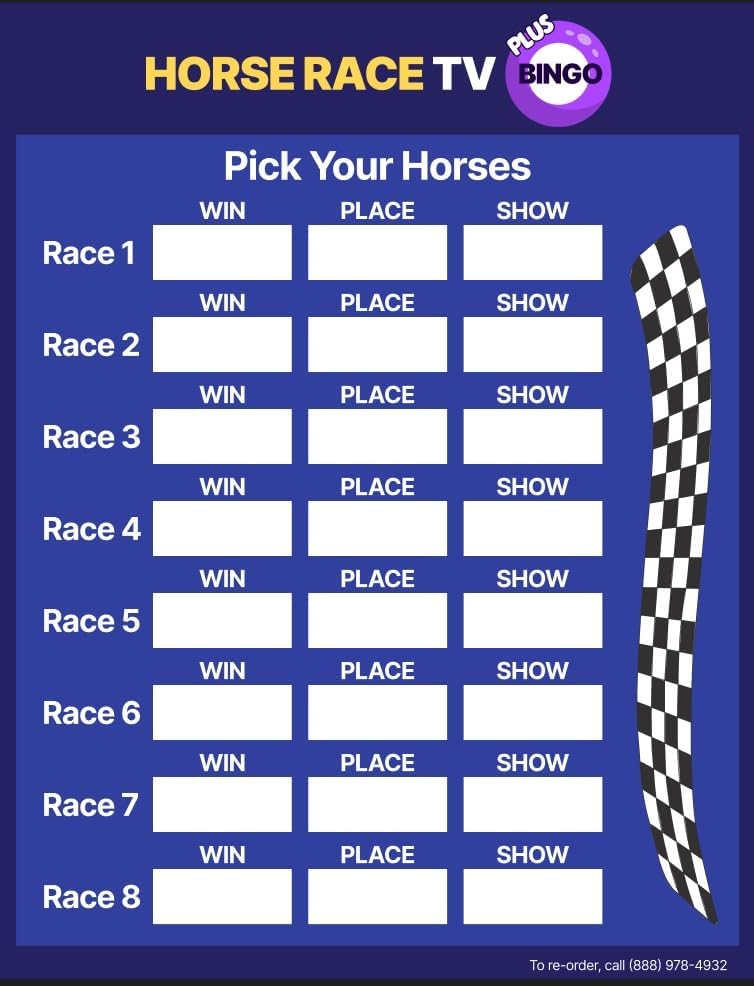
รูปที่ 5: อดีตample racing form for tracking horse selections and winnings.
3.3. วิดีโอสาธิตผลิตภัณฑ์
Watch this video for a short demonstration of both the TV Bingo and Horse Race TV games.
Video 1: A short demonstration of the TV Bingo and Horse Race Game features.
4. การบำรุงรักษา
To ensure the longevity and optimal performance of your game arcade, follow these general maintenance guidelines:
- การทำความสะอาด: Use a soft, dry cloth to clean the exterior of the device and remote control. Avoid using abrasive cleaners or solvents.
- พื้นที่จัดเก็บ: เก็บอุปกรณ์ไว้ในที่แห้งและเย็น หลีกเลี่ยงแสงแดดโดยตรงและอุณหภูมิที่สูงหรือต่ำเกินไปเมื่อไม่ได้ใช้งาน
- การดูแลสายเคเบิล: Handle the HDMI and USB cables carefully to prevent damage. Avoid sharp bends or excessive pulling.
5 การแก้ไขปัญหา
If you encounter issues with your TV Bingo and Horseracing Game, refer to the following common troubleshooting steps:
- ไม่มีภาพแสดงบนทีวี:
- Ensure the HDMI cable is securely connected to both the game arcade and the TV.
- ตรวจสอบว่าทีวีของคุณตั้งค่าเป็นแหล่งอินพุต HDMI ที่ถูกต้อง
- Check if the device is receiving power (indicated by any LED lights on the unit).
- ไม่มีเสียง:
- Confirm your TV's volume is not muted or set too low.
- Check the audio settings within the game menu.
- รีโมทคอนโทรลไม่ตอบสนอง:
- Ensure there are no obstructions between the remote and the game arcade.
- เปลี่ยนแบตเตอรี่ในรีโมทคอนโทรลหากจำเป็น
- เกมค้างหรือล่ม:
- Restart the game arcade by disconnecting and reconnecting the power.
- หากปัญหายังคงอยู่ โปรดติดต่อฝ่ายสนับสนุนลูกค้า
6. ข้อมูลจำเพาะ
| คุณสมบัติ | รายละเอียด |
|---|---|
| ยี่ห้อ | ทั่วไป |
| หมายเลขรุ่น | ทีวีบี |
| ผู้ผลิต | Briteworx |
| ขนาดรายการ | 4 x 4 x 1 นิ้ว |
| น้ำหนักสินค้า | 0.5 ปอนด์ |
| ประเภทวัสดุ | พลาสติก |
| แหล่งพลังงาน | ยูเอสบี |
| ส่วนประกอบที่รวมอยู่ | รีโมทคอนโทรล |
| จำนวนผู้เล่น | สูงถึง 50 |
| โหมดการทำงาน | คู่มือ |
| จำเป็นต้องประกอบ | เลขที่ |
7. การรับประกันและการสนับสนุน
The TV Bingo and Horseracing Game includes a 1st year warranty and support from Briteworx. After the initial year, additional years of warranty and game updates can be purchased annually. These extended plans may include software and product updates, phone support, and device replacement if needed. The annual extended warranty is not required for the product to continue functioning, as the game arcade is designed for long-term use.