
1. บทนำ
Thank you for choosing the Milex Mist Breeze Fan MMF002. This product combines the functionality of a fan with a humidifier to provide a refreshing and comfortable environment. Please read this manual carefully before operating the appliance to ensure safe and efficient use. Keep this manual for future reference.
2. คำแนะนำด้านความปลอดภัยที่สำคัญ
เมื่อใช้เครื่องใช้ไฟฟ้า ควรปฏิบัติตามข้อควรระวังด้านความปลอดภัยขั้นพื้นฐานเสมอ เพื่อลดความเสี่ยงจากไฟไหม้ ไฟฟ้าช็อต และการบาดเจ็บต่อบุคคล ซึ่งได้แก่:
- อ่านคำแนะนำทั้งหมดก่อนใช้เครื่องใช้ไฟฟ้านี้
- ให้แน่ใจว่าปริมาตรtagค่า e ที่ระบุบนฉลากตรงกับระดับเสียงของแหล่งจ่ายไฟหลักของคุณtage.
- ห้ามจุ่มอุปกรณ์ ปลั๊ก หรือสายไฟลงในน้ำหรือของเหลวอื่นๆ
- จำเป็นต้องมีการดูแลอย่างใกล้ชิดเมื่อมีเด็กหรือใช้งานเครื่องใช้ไฟฟ้าใดๆ ใกล้เด็ก
- ถอดปลั๊กออกจากเต้าเสียบเมื่อไม่ใช้งาน ก่อนประกอบหรือถอดชิ้นส่วน และก่อนทำความสะอาด
- ห้ามใช้งานเครื่องใช้ไฟฟ้าที่มีสายไฟหรือปลั๊กชำรุด หรือหลังจากที่เครื่องใช้ไฟฟ้าทำงานผิดปกติหรือได้รับความเสียหายในลักษณะใดๆ
- ห้ามใช้กลางแจ้ง อุปกรณ์นี้ใช้สำหรับภายในอาคารเท่านั้น
- อย่าให้สายไฟห้อยออกจากขอบโต๊ะหรือเคาน์เตอร์ หรือสัมผัสพื้นผิวที่ร้อน
- ห้ามวางบนหรือใกล้เตาแก๊สหรือเตาไฟฟ้าที่ร้อน หรือในเตาอบที่อุ่น
- Always operate the appliance on a stable, flat surface.
- Do not insert fingers or any objects into the fan guard or mist outlet during operation.
- Ensure the water tank is securely in place before operating the mist function.
- Only use clean tap water in the water tank. Do not add essential oils or other chemicals directly into the water tank as this may damage the unit.
3. เนื้อหาบรรจุภัณฑ์
Carefully unpack your Milex Mist Breeze Fan and check that all items are present and in good condition. If any items are missing or damaged, please contact your retailer.
- 1 x Milex Mist Breeze Fan Unit (MMF002)
- 1 x รีโมทคอนโทรล
- 1 x คู่มือผู้ใช้ (เอกสารนี้)
4. สินค้าหมดview
Familiarize yourself with the components of your Milex Mist Breeze Fan.

รูปที่ 4.1: ด้านหน้า view of the Milex Mist Breeze Fan. This image shows the fan head, control panel, main body, water tank, and base with rollers.

รูปที่ 4.2: ด้านข้าง view of the Milex Mist Breeze Fan. This image highlights the overall profile and the position of the water tank at the base.
แผงควบคุม
รูปที่ 4.3: รายละเอียด view of the control panel. This panel features buttons for power, speed, mode, oscillation, timer, and mist functions.
รีโมทคอนโทรล
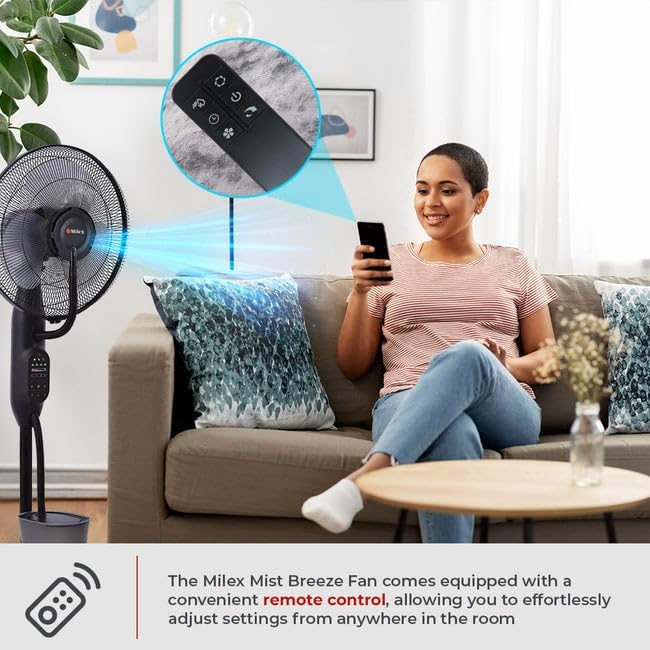
รูปที่ 4.4: The remote control for the Milex Mist Breeze Fan. It allows for convenient adjustment of all fan settings from a distance.
5. การตั้งค่า
Follow these steps to set up your Milex Mist Breeze Fan:
- แกะ: นำวัสดุบรรจุภัณฑ์ออกทั้งหมด และตรวจสอบให้แน่ใจว่ามีอุปกรณ์ครบทุกชิ้น
- การวางตำแหน่ง: Place the fan on a firm, level surface. The five rollers on the base allow for easy movement. Ensure there is adequate space around the fan for optimal air circulation and mist dispersion.
- เติมถังน้ำ:
- Carefully remove the water tank from the base.
- คลายเกลียวฝาที่ด้านล่างของถัง
- Fill the tank with clean, cool tap water. Do not exceed the maximum fill line. The water capacity is 2.8 Litres.
- หมุนฝาปิดกลับให้แน่นสนิท
- วางถังน้ำที่เติมแล้วกลับเข้าที่ฐาน โดยตรวจสอบให้แน่ใจว่าติดตั้งไว้ถูกต้อง
- เชื่อมต่อพลังงาน: Plug the power cord into a standard 220-240V, 50/60 Hz electrical outlet.
6. การดำเนินการ
Your Milex Mist Breeze Fan can be operated using the control panel on the unit or the included remote control.
6.1 เปิด/ปิดเครื่อง
- กดปุ่ม พลัง button once to turn the fan on.
- กดปุ่ม พลัง button again to turn the fan off.
6.2 การตั้งค่าความเร็ว
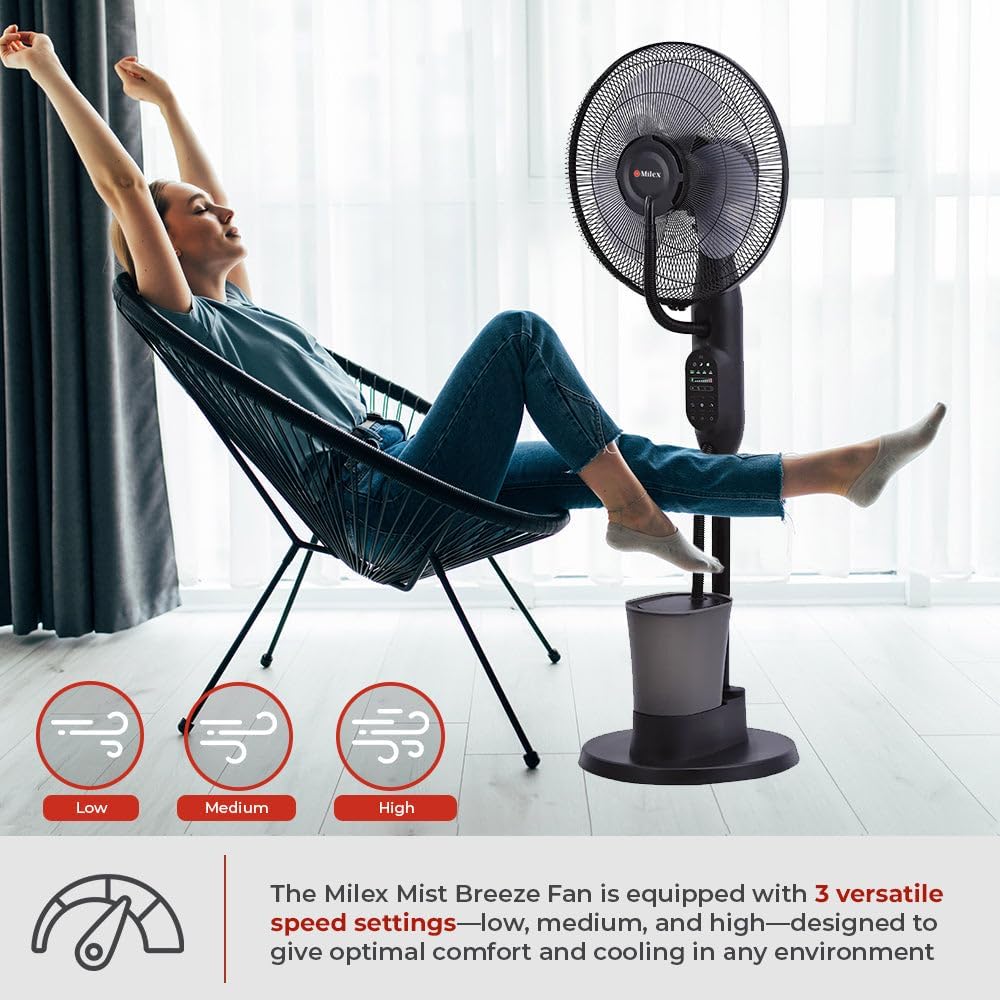
The fan has three speed settings: Low, Medium, and High.

รูปที่ 6.1: Visual representation of the three speed settings: Low, Medium, and High.
- กดปุ่ม ความเร็ว button repeatedly to cycle through the speeds: Low → Medium → High → Low.
6.3 โหมดลม
Choose from three distinct breeze modes: Natural, Normal, and Sleep.
- กดปุ่ม โหมด button repeatedly to select your desired mode.
- โหมดปกติ: ให้การไหลเวียนของอากาศคงที่ตามความเร็วที่เลือก
- โหมดธรรมชาติ: Simulates natural wind by varying the fan speed intermittently.
- โหมดสลีป: Operates at a lower, quieter speed, ideal for nighttime use.
6.4 การสั่น
The fan features a 70-degree oscillation function to distribute air and mist evenly.
- กดปุ่ม โอเอสซี button once to activate oscillation. The fan head will move from side to side.
- กดปุ่ม โอเอสซี button again to stop oscillation at the current position.
6.5 ฟังก์ชั่นจับเวลา
ตั้งค่าพัดลมให้ปิดอัตโนมัติเมื่อครบระยะเวลาที่กำหนด
- กดปุ่ม ตัวจับเวลา button repeatedly to set the desired operating time, from 30 minutes up to 7 hours and 30 minutes, in 30-minute increments.
- The display will show the selected time. The fan will automatically turn off once the timer expires.
6.6 Mist Function (Adjustable Humidifier)
Activate the mist function to add humidity to the air.
รูปที่ 6.2: The Milex Mist Breeze Fan producing a fine mist for humidification.
- Ensure the water tank is filled before activating the mist function.
- กดปุ่ม หมอก button once to turn on the mist function.
- กดปุ่ม หมอก button again to turn off the mist function.
- The mist output is approximately 180ml/h.
7. การบำรุงรักษาและการทำความสะอาด
Regular cleaning and maintenance will ensure the longevity and optimal performance of your Milex Mist Breeze Fan.
7.1 การทำความสะอาดทั่วไป
- ควรถอดปลั๊กพัดลมออกจากเต้ารับไฟฟ้าทุกครั้งก่อนทำความสะอาด
- ใช้แบบนุ่มๆamp ผ้าเช็ดทำความสะอาดพื้นผิวภายนอกของพัดลม ห้ามใช้น้ำยาทำความสะอาดที่มีฤทธิ์กัดกร่อนหรือตัวทำละลาย
- For the fan blades, carefully remove the front grill (refer to assembly instructions if needed) and wipe the blades with a soft cloth. Ensure the blades are completely dry before reassembling.
7.2 Water Tank and Mist Nozzle Cleaning
- Empty any remaining water from the tank after each use, especially if the fan will not be used for an extended period.
- Rinse the water tank with clean water. For thorough cleaning, use a soft brush to remove any mineral deposits or residue.
- Wipe the mist nozzle gently with a soft cloth to prevent mineral buildup, which can affect mist output.
- ตรวจสอบให้แน่ใจว่าชิ้นส่วนทั้งหมดแห้งสนิทก่อนประกอบและจัดเก็บ
8 การแก้ไขปัญหา
If you encounter any issues with your Milex Mist Breeze Fan, please refer to the following troubleshooting guide:
| ปัญหา | สาเหตุที่เป็นไปได้ | สารละลาย |
|---|---|---|
| พัดลมไม่เปิด | ไม่มีแหล่งจ่ายไฟ | ตรวจสอบว่าสายไฟเสียบเข้ากับเต้ารับที่ใช้งานได้แน่นหนาหรือไม่ |
| ไม่มีการสร้างหมอกเกิดขึ้น | Water tank is empty or incorrectly placed. | Fill the water tank with water and ensure it is correctly seated on the base. |
| ปริมาณหมอกที่พ่นออกมาค่อนข้างน้อย | Mineral buildup on the mist nozzle. | Clean the mist nozzle as described in the Maintenance section. |
| รีโมทคอนโทรลไม่ทำงาน | แบตเตอรี่หมดหรือใส่ไม่ถูกต้อง | เปลี่ยนแบตเตอรี่ในรีโมทคอนโทรล ตรวจสอบให้แน่ใจว่าใส่แบตเตอรี่ถูกขั้ว |
| พัดลมมีเสียงดัง | Fan blades or grill are dirty or loose. | Clean the fan blades and ensure the front grill is securely attached. |
หากปัญหายังคงมีอยู่หลังจากพยายามแก้ไขปัญหาเหล่านี้แล้ว โปรดติดต่อฝ่ายสนับสนุนลูกค้า
9. ข้อมูลจำเพาะ
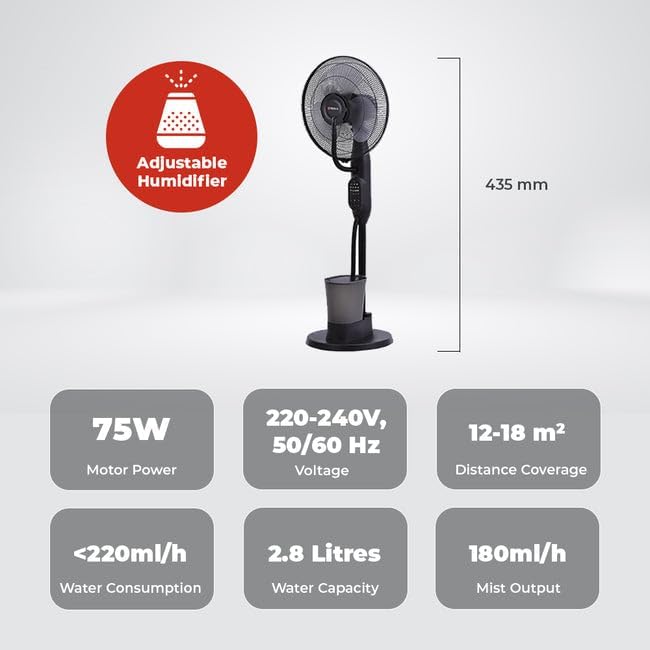
Technical specifications for the Milex Mist Breeze Fan MMF002:
- แบบอย่าง: เอ็มเอ็มเอฟ002
- เล่มที่tage: 220-240V, 50/60 เฮิร์ตซ์
- พลัง: 75วัตต์
- ปริมาณหมอก: 180มล./ชม.
- ความจุน้ำ: 2.8 ลิตร
- ปริมาณการใช้น้ำ: <220มล./ชม
- ระยะการครอบคลุม: 12-18 ตรม.
- การสั่น: 70 องศา
- การตั้งค่าความเร็ว: ต่ำ, กลาง, สูง
- Breeze Modes: Natural, Normal, Sleep
- ตัวจับเวลา: 30 นาทีถึง 7 ชั่วโมง 30 นาที
- ขนาด (D x W x H): 60D x 30W x 46H centimetres (approximate)
- สี: สีดำ
รูปที่ 9.1: ด้านข้าง view illustrating the approximate dimensions of the Milex Mist Breeze Fan.
10. การรับประกันและการสนับสนุน
For warranty information or technical support, please refer to the warranty card included with your purchase or contact your retailer. Keep your proof of purchase for any warranty claims.