
1. บทนำ
This manual provides detailed instructions for the Soudorv Smart Watch T70B. Please read it carefully to ensure proper use and to fully utilize all features of your device. The Soudorv Smart Watch T70B is designed to enhance your daily life with features such as Bluetooth 5.3 for calls, a full touch screen, heart rate and blood oxygen monitoring, step counting, sleep analysis, and various sports modes.
เนื้อหาแพ็คเกจ:
- Soudorv Smart Watch T70B
- สายชาร์จแม่เหล็ก
- คู่มือการใช้งาน (เอกสารนี้)

Image 1.1: Soudorv Smart Watch T70B product packaging. The box displays the smartwatch and its branding.
2. การตั้งค่า
2.1 การชาร์จอุปกรณ์
Before initial use, fully charge your Soudorv Smart Watch T70B. Connect the magnetic charging cable to the charging points on the back of the watch and plug the USB end into a 5V/1A power source. A full charge typically takes approximately 2 hours.

Image 2.1: The smartwatch displaying an 80% charge level, indicating its long battery life and magnetic charging capability.
2.2 การติดตั้งและการจับคู่แอป
- ดาวน์โหลดแอป: ค้นหา "GloryFit" in the App Store (iOS 9.0 and higher) or Google Play Store (Android 5.0 and higher) and install it on your smartphone.
- เปิดใช้งานบลูทูธ: ตรวจสอบให้แน่ใจว่าได้เปิดใช้งาน Bluetooth บนสมาร์ทโฟนของคุณแล้ว
- เปิดแอป GloryFit: Launch the "GloryFit" app and follow the on-screen instructions to create an account or log in.
- เพิ่มอุปกรณ์: In the app, navigate to the device section and select "Add Device" or a similar option. The app will search for available devices.
- เลือกนาฬิกาของคุณ: Choose "Soudorv T70B" from the list of found devices to initiate the pairing process.
- ยืนยันการจับคู่: A pairing request may appear on your watch. Confirm the pairing on both your watch and smartphone.
เมื่อจับคู่แล้ว นาฬิกาจะซิงค์ข้อมูลกับแอป และคุณสามารถปรับแต่งการตั้งค่าได้ view รายงานสุขภาพและกิจกรรมโดยละเอียด
3. คู่มือการใช้งาน
3.1 การนำทางพื้นฐาน
The Soudorv Smart Watch T70B features a 1.91-inch TFT HD full touch screen (320x380 resolution) for intuitive navigation.
- ปัดขึ้น/ลง: เลื่อนดูเมนูและการแจ้งเตือน
- ปัดไปทางซ้าย/ขวา: เข้าถึงฟังก์ชันด่วนหรือหน้าจอแสดงข้อมูลต่างๆ ได้อย่างรวดเร็ว
- แตะ: เลือกสินค้าหรือยืนยันการดำเนินการ
- กดปุ่มด้านข้าง: Return to the main watch face or power on/off the device.

Image 3.1: Close-up of the Soudorv Smart Watch T70B's 1.91-inch HD display, highlighting its vivid and brilliant visual quality.
3.2 การโทรออกและรับสาย
With its Bluetooth 5.3 chip, the watch allows you to manage calls directly from your wrist.
- การรับสายโทรศัพท์: When an incoming call is received, tap the green phone icon on the watch screen to answer.
- โทรออก: Access the "Dialpad" or "Frequent Contacts" feature on your watch to initiate a call. Ensure your watch is connected to your smartphone via Bluetooth.
- ซิงค์รายชื่อผู้ติดต่อ: Use the "GloryFit" app to sync your mobile contacts to the watch for quick dialing.

Image 3.2: The smartwatch displaying a call dialpad and various smart notification icons from social media and messaging apps.
3.3 Health Activity Tracking
นาฬิกาเรือนนี้จะตรวจสอบตัวชี้วัดสุขภาพต่างๆ อย่างต่อเนื่อง:
- อัตราการเต้นของหัวใจ: การตรวจวัดอัตราการเต้นของหัวใจแบบเรียลไทม์
- ออกซิเจนในเลือด (SpO2): วัดระดับออกซิเจนในเลือด
- การติดตามการนอนหลับ: Tracks deep sleep, light sleep, and provides sleep quality analysis.
- การติดตามรอบเดือน: Predicts menstrual periods and ovulation for female users.
All collected health data is synchronized with the "GloryFit" app, providing a comprehensive overview of your health status. Note: Smartwatch data is for reference only and cannot be used for medical purposes. Consult a professional doctor for medical advice.
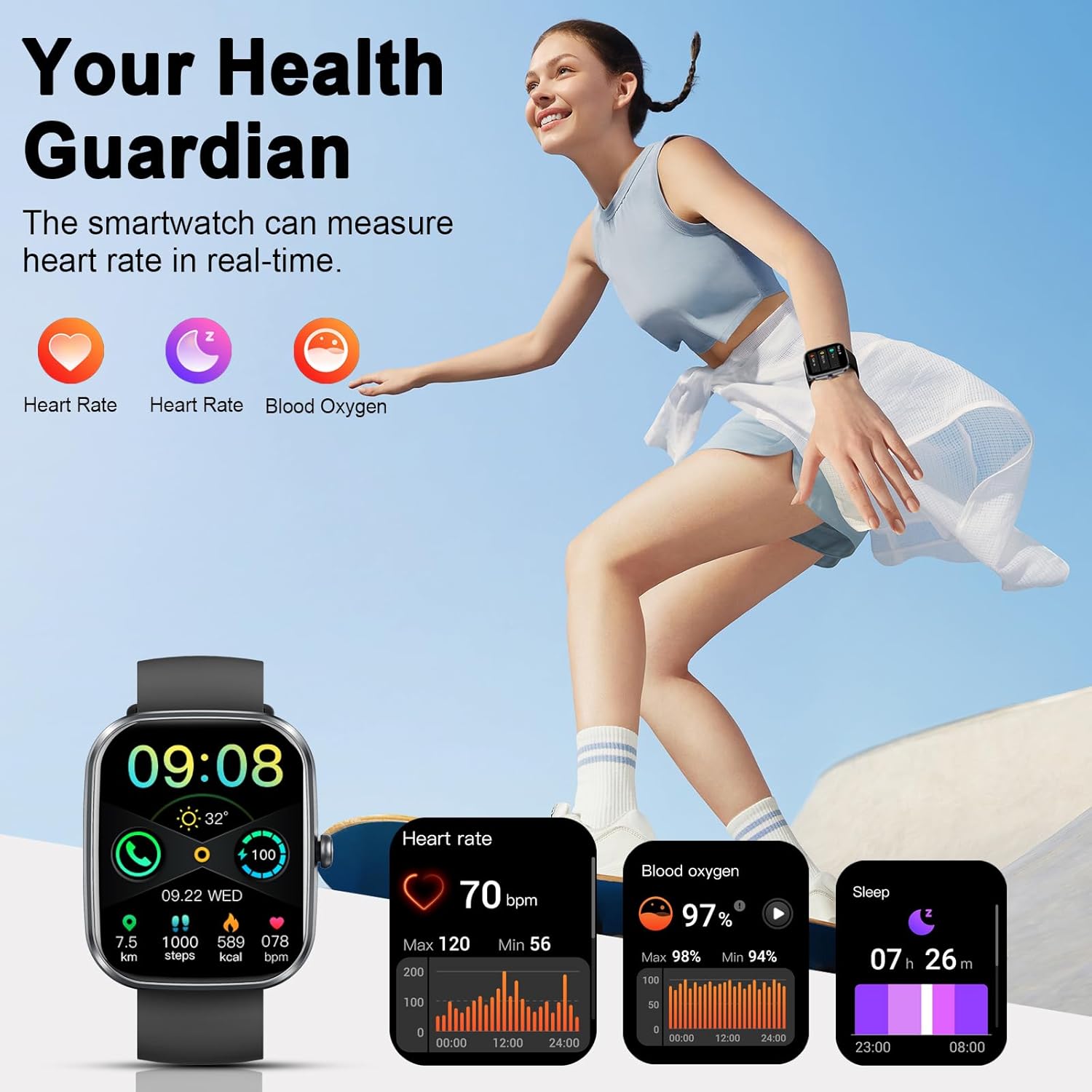
Image 3.3: The smartwatch displaying heart rate, blood oxygen, and sleep tracking data, emphasizing its role as a health guardian.
3.4 Sports Modes and Activity Monitoring
The watch supports over 110 sports modes, tracking your performance during various physical activities.
- Data Recorded: During workouts, the watch records data such as heart rate, steps, calories burned, distance, and active hours.
- วิธีเข้าถึงโหมดกีฬา: Navigate through the watch's menu to select your desired sport mode.

Image 3.4: An illustration showing a person running, with the smartwatch displaying various sports activity metrics like distance, steps, calories, and heart rate.
3.5 การแจ้งเตือนอัจฉริยะ
Receive notifications directly on your watch for incoming calls, emails, texts, and messages from various social media platforms (e.g., Facebook, WhatsApp, Twitter, Instagแรม).
- Ensure the "GloryFit" app has the necessary permissions to access notifications on your smartphone.
- Configure which app notifications you wish to receive through the "GloryFit" app settings.
3.6 ฟังก์ชั่นอื่น ๆ
The Soudorv Smart Watch T70B includes several utility features:
- พยากรณ์อากาศ: View สภาพอากาศปัจจุบัน
- เครื่องคิดเลข: ดำเนินการคำนวณขั้นพื้นฐาน
- การควบคุมเพลง: ควบคุมการเล่นเพลงบนสมาร์ทโฟนของคุณ
- การควบคุมกล้อง: ทริกเกอร์กล้องสมาร์ทโฟนของคุณจากระยะไกล
- นาฬิกาปลุก: ตั้งค่าสัญญาณเตือน
- เตือนการนั่งเฉยๆ: รับการแจ้งเตือนเพื่อเริ่มดำเนินการหลังจากไม่มีการใช้งานเป็นระยะเวลานาน
- นาฬิกาจับเวลา: สำหรับการจับเวลาในการทำกิจกรรม
- ค้นหาโทรศัพท์ของคุณ: ค้นหาสมาร์ทโฟนที่เชื่อมต่ออยู่กับคุณ
- DIY Dials: Customize your watch face with personal photos or choose from over 100 online watch faces.
- การปรับความสว่าง: Manually adjust display brightness (4 levels).

ภาพที่ 3.5: ภาพตัดปะแสดง...asing various practical functions of the smartwatch, including voice assistant, calculator, camera control, music control, and multiple customizable watch faces.
4. การบำรุงรักษา
4.1 การกันซึม
The Soudorv Smart Watch T70B has an IP68 waterproof rating, meaning it is resistant to dust and can withstand submersion in water up to a certain depth for a limited time. It is suitable for daily use, such as washing hands or wearing in rainy weather.
Important: Do NOT use the watch in showers, saunas, or while swimming. Exposure to hot water, steam, or high-pressure water jets may compromise the waterproof seals.
4.2 การทำความสะอาด
To maintain the watch's appearance and functionality:
- เช็ดหน้าจอและสายรัดเป็นประจำด้วยผ้าแห้งนุ่ม
- หากจำเป็น ให้ใช้ง. เล็กน้อยamp ผ้าสำหรับขจัดคราบฝังแน่นแล้วเช็ดให้แห้งสนิท
- หลีกเลี่ยงการใช้สารเคมีรุนแรง น้ำยาทำความสะอาดที่มีฤทธิ์กัดกร่อน หรือตัวทำละลาย เนื่องจากสารเหล่านี้อาจทำให้ผิวเคลือบและส่วนประกอบของนาฬิกาเสียหายได้
4.3 การดูแลแบตเตอรี่
- หลีกเลี่ยงการปล่อยแบตเตอรี่จนหมดบ่อยครั้ง
- Charge the watch using only the provided magnetic charging cable and a compatible 5V/1A power adapter.
- Do not expose the watch to extreme temperatures (very hot or very cold) as this can affect battery life and performance.
5 การแก้ไขปัญหา
If you encounter issues with your Soudorv Smart Watch T70B, refer to the following common solutions:
- นาฬิกาไม่เปิด: ตรวจสอบให้แน่ใจว่านาฬิกาชาร์จเต็มแล้ว เชื่อมต่อกับแท่นชาร์จแม่เหล็ก และรอสักครู่ก่อนที่จะลองเปิดเครื่องอีกครั้ง
- ไม่สามารถจับคู่กับโทรศัพท์ได้:
- ตรวจสอบให้แน่ใจว่าได้เปิดใช้งานบลูทูธบนโทรศัพท์และนาฬิกาของคุณแล้ว
- ตรวจสอบให้แน่ใจว่านาฬิกาอยู่ในระยะของโทรศัพท์ของคุณ
- รีสตาร์ททั้งโทรศัพท์และนาฬิกาของคุณ
- Try unpairing and re-pairing the device through the "GloryFit" app.
- ไม่ได้รับการแจ้งเตือน:
- Check if the "GloryFit" app is running in the background on your phone.
- Verify that notification permissions are granted to the "GloryFit" app in your phone's settings.
- Ensure notifications are enabled for specific apps within the "GloryFit" app.
- ข้อมูลสุขภาพที่ไม่ถูกต้อง:
- ตรวจสอบให้แน่ใจว่าสวมนาฬิกาให้พอดีกับข้อมือ ไม่หลวมหรือแน่นเกินไป
- ทำความสะอาดเซ็นเซอร์ที่ด้านหลังของนาฬิกา
- Remember: Smartwatch data is for reference only and not for medical diagnosis.
- อายุการใช้งานแบตเตอรี่สั้น:
- ลดความสว่างหน้าจอ
- Disable unnecessary features or continuous monitoring if not required.
- ตรวจสอบให้แน่ใจว่านาฬิกาชาร์จเต็มทุกครั้ง
If problems persist, contact Soudorv customer support for further assistance.
6. ข้อมูลจำเพาะ
| ยี่ห้อ | Soudorv |
| แบบอย่าง | ที70บี |
| ขนาดจอแสดงผล | 1.91 นิ้ว |
| ประเภทจอภาพ | จอแอลซีดี |
| ปณิธาน | 320 x 380 |
| ระบบปฏิบัติการ | แอสโตรโดรมิโนโอเอส |
| การเชื่อมต่อ | บลูทูธ 5.3 |
| อุปกรณ์ที่รองรับ | สมาร์ทโฟน (Android 5.0 ขึ้นไป, iOS 9.0 ขึ้นไป) |
| ความจุของแบตเตอรี่ | 300 มิลลิวินาทีamp ชั่วโมง (ลิเธียมโพลิเมอร์) |
| เวลาในการชาร์จ | ประมาณ 2 ชั่วโมง |
| ระดับการกันน้ำ | IP68 |
| น้ำหนักสินค้า | 40 กรัม |
| คุณสมบัติพิเศษ | Bluetooth calling, full touch screen, heart rate, blood oxygen, step counting, sleep tracking, alarm clock, sedentary reminder, remote photography, music control, female menstrual period prediction, wrist flick to brighten screen, weather, 110+ sports modes, magnetic charging, APP notifications. |

Image 6.1: The back of the product packaging showing detailed specifications and warnings for the Soudorv Smart Watch T70B.
7. ข้อมูลและคำเตือนด้านความปลอดภัยที่สำคัญ
- Do not disassemble, strike, or throw the device into fire.
- Do not place the device in high temperature or deep water environments.
- Ensure the device is connected to a power source of 5V/1A while charging.
- Smartwatch data is for reference only and cannot be used for medical purposes. If you require medical assistance, please consult a professional doctor.

ภาพที่ 7.1: ด้านข้าง view of the product packaging displaying various compliance certifications such as CE, FCC, and RoHS.
8. การรับประกันและการสนับสนุน
For warranty information or technical support, please refer to the contact details provided with your purchase documentation or visit the official Soudorv webไซต์ โปรดเก็บใบเสร็จรับเงินไว้เป็นหลักฐานการซื้อ
For app-related queries or data synchronization issues, refer to the "GloryFit" app's help section.