
1. บทนำ
This manual provides detailed instructions for the proper use, setup, operation, and maintenance of your EBTOOLS Bluetooth Headset. Please read this manual thoroughly before using the product to ensure optimal performance and longevity.
2. สินค้าหมดview
2.1 คุณสมบัติหลัก
- ไมโครโฟนแบบหมุนได้: Easily adjust the microphone to the optimal angle for clear voice capture.
- เทคโนโลยีบลูทูธ 5.0: Ensures faster, more efficient, and stable wireless connectivity with compatible devices.
- การออกแบบที่สะดวกสบาย: Single-ear design with padded ear cushion and flexible headband for extended wear without discomfort.
- อายุการใช้งานแบตเตอรี่ยาวนาน: Up to 17 hours of talk time and 200 hours of standby time on a 2-hour charge.
- เข้ากันได้สากล: Works with laptops, cell phones, PCs, tablets, and other Bluetooth-enabled devices. Ideal for office, home, remote work, call centers, VoIP, and Skype.
2.2 เนื้อหาบรรจุภัณฑ์
ตรวจสอบว่ามีรายการทั้งหมดอยู่ในแพ็คเกจของคุณ:
- EBTOOLS Bluetooth Headset
- ฐานชาร์จ
- สายชาร์จไมโคร USB
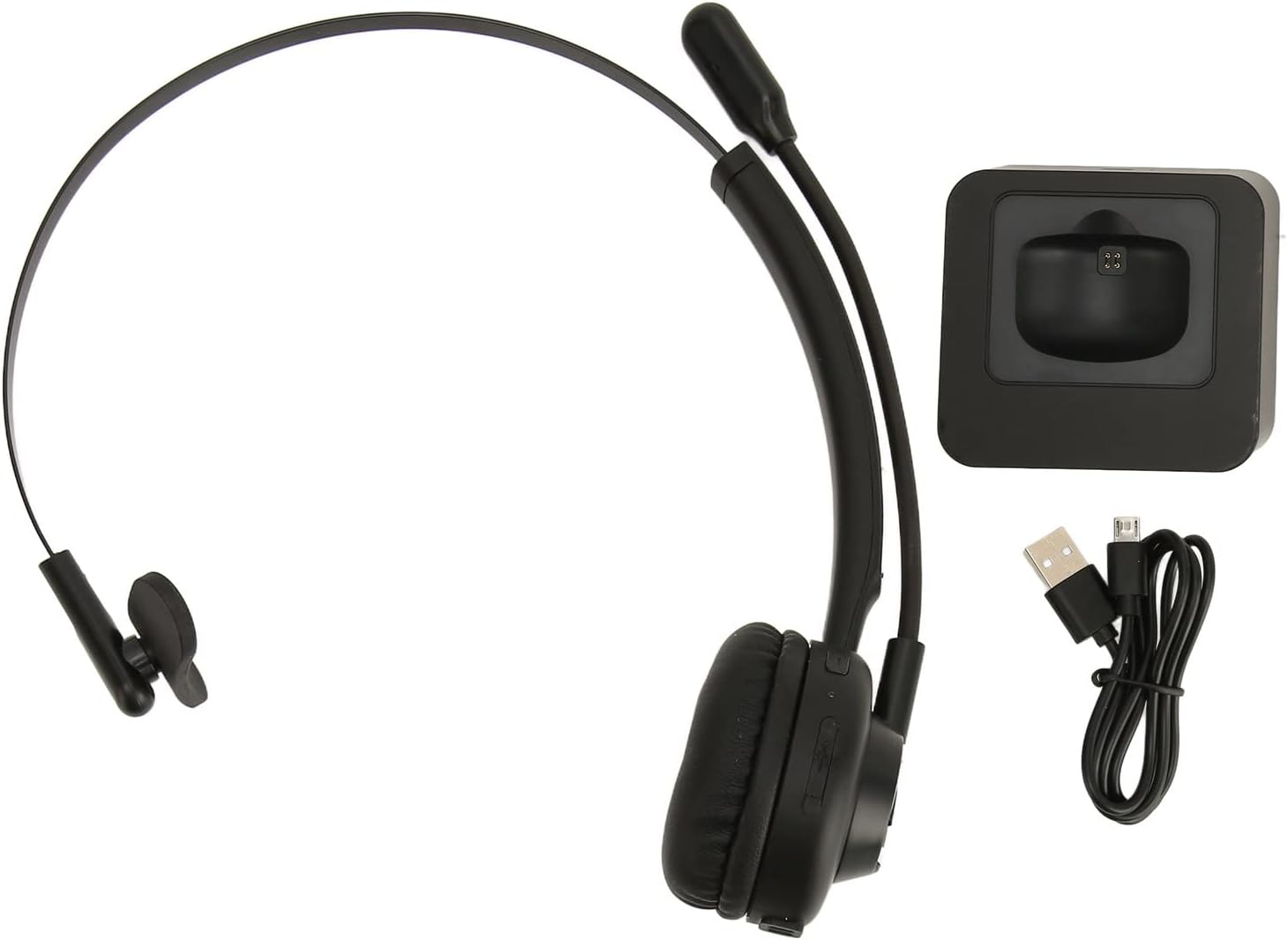
Image: The EBTOOLS Bluetooth Headset, its dedicated charging base, and a Micro USB charging cable, illustrating the complete package contents.
2.3 Headset Controls and Indicators

Image: A detailed diagram highlighting the Micro USB port, LED indicator, Volume Down button, Multifunctional button, and Volume Up button on the EBTOOLS Bluetooth Headset.
- พอร์ตไมโครยูเอสบี: สำหรับชาร์จหูฟังโดยตรง
- ไฟแสดงสถานะ LED: แสดงสถานะพลังงาน การชาร์จ และการจับคู่
- ปุ่มปรับระดับเสียง: ลดระดับเสียง
- ปุ่มอเนกประสงค์: Controls power, pairing, call answer/end, and music playback.
- ระดับเสียง + ปุ่ม: เพิ่มระดับเสียง
3. การตั้งค่า
3.1 การชาร์จชุดหูฟัง
Before first use, fully charge the headset. You can charge it using the included charging base or directly via the Micro USB port.
- Connect the Micro USB cable to the charging base and a power source (e.g., computer USB port, USB wall adapter).
- Place the headset onto the charging base, ensuring the charging contacts align. The LED indicator on the headset will show charging status.
- Alternatively, connect the Micro USB cable directly to the headset's Micro USB port and a power source.
- A full charge typically takes approximately 2 hours. The LED indicator will change color or turn off once fully charged.

ภาพ: ภาพระยะใกล้ view of the headset's earcup, showing the charging contacts designed to connect with the charging base.
3.2 การจับคู่กับอุปกรณ์บลูทูธ
To connect your headset to a device:
- ตรวจสอบให้แน่ใจว่าชุดหูฟังปิดอยู่
- กดปุ่มค้างไว้ ปุ่มมัลติฟังก์ชั่น for approximately 5-7 seconds until the LED indicator flashes red and blue alternately, indicating pairing mode.
- บนอุปกรณ์ของคุณ (โทรศัพท์ คอมพิวเตอร์ แท็บเล็ต) เปิดใช้งานบลูทูธ แล้วค้นหาอุปกรณ์ใหม่
- Select "EBTOOLS Headset" (or similar name) from the list of available devices.
- เมื่อเชื่อมต่อแล้ว ไฟ LED บนชุดหูฟังจะกะพริบเป็นสีน้ำเงินช้าๆ หรือติดเป็นสีน้ำเงินค้าง
- หากได้รับแจ้งให้ป้อนรหัสผ่าน ให้ป้อน "0000"
3.3 การสวมชุดหูฟัง
The headset is designed for comfort and flexibility.
- Adjust the flexible headband to fit comfortably over your head.
- The single ear design allows you to remain aware of your surroundings.
- Rotate the microphone boom to position it close to your mouth for optimal voice clarity. The microphone can be rotated 180 degrees to be worn on either the left or right ear.

Image: A person wearing the EBTOOLS Bluetooth Headset, demonstrating the comfortable fit and the adjustable, rotatable microphone positioned for clear communication.
4. คู่มือการใช้งาน
4.1 เปิด/ปิดเครื่อง
- เปิดเครื่อง: กดปุ่มค้างไว้ ปุ่มมัลติฟังก์ชั่น for approximately 3 seconds until the LED indicator flashes blue.
- หมดแรง: กดปุ่มค้างไว้ ปุ่มมัลติฟังก์ชั่น for approximately 3-5 seconds until the LED indicator flashes red and then turns off.
4.2 การปรับระดับเสียง
- กดปุ่ม ปุ่ม Volume + to increase the listening volume.
- กดปุ่ม ระดับเสียง - ปุ่ม เพื่อลดระดับเสียงการฟัง
4.3 การจัดการการโทร
- รับสาย: กดสั้น ๆ ปุ่มมัลติฟังก์ชั่น เมื่อมีสายเรียกเข้าดังขึ้น
- วางสาย: กดสั้น ๆ ปุ่มมัลติฟังก์ชั่น ในระหว่างการโทร
- ปฏิเสธสาย: กดปุ่มค้างไว้ ปุ่มมัลติฟังก์ชั่น for approximately 2 seconds when an incoming call rings.
- โทรซ้ำหมายเลขล่าสุด: กดสองครั้ง ปุ่มมัลติฟังก์ชั่น เมื่อไม่ได้อยู่ระหว่างการสนทนาทางโทรศัพท์
4.4 Music Playback (if supported by device)
- เล่น/หยุดชั่วคราว: กดสั้น ๆ ปุ่มมัลติฟังก์ชั่น.
- เพลงถัดไป: กดปุ่มค้างไว้ ปุ่ม Volume +.
- แทร็กก่อนหน้า: กดปุ่มค้างไว้ ระดับเสียง - ปุ่ม.
4.5 การใช้งานไมโครโฟน
The rotatable microphone ensures your voice is captured clearly.
- Adjust the microphone boom to be approximately 1-2 inches from your mouth.
- The microphone can be rotated 180 degrees to allow wearing the headset on either the left or right ear.

ภาพ: ภาพระยะใกล้ view of the EBTOOLS headset's flexible microphone boom, highlighting its design for optimal voice pickup.
5. การบำรุงรักษา
5.1 การทำความสะอาด
- เช็ดหูฟังด้วยผ้าแห้งนุ่มๆ หรือผ้าชุบน้ำหมาดๆamp ผ้า.
- ห้ามใช้สารเคมีรุนแรง น้ำยาทำความสะอาด หรือสารซักฟอกชนิดเข้มข้น
- หลีกเลี่ยงไม่ให้ความชื้นเข้าไปในช่องเปิดต่างๆ
5.2 การดูแลแบตเตอรี่
- ชาร์จหูฟังเป็นประจำ แม้จะไม่ได้ใช้งานบ่อยก็ตาม เพื่อรักษาสุขภาพแบตเตอรี่
- หลีกเลี่ยงการปล่อยแบตเตอรี่จนหมดบ่อยครั้ง
- เก็บหูฟังไว้ในที่แห้งและเย็น ห่างจากอุณหภูมิที่สูงหรือต่ำเกินไป
6 การแก้ไขปัญหา
หากคุณพบปัญหาเกี่ยวกับชุดหูฟัง โปรดดูวิธีแก้ไขทั่วไปต่อไปนี้:
| ปัญหา | วิธีแก้ปัญหาที่เป็นไปได้ |
|---|---|
| หูฟังไม่สามารถเปิดเครื่องได้ | Ensure the headset is charged. Connect it to the charging base or directly via USB. |
| ไม่สามารถจับคู่กับอุปกรณ์ได้ | Ensure the headset is in pairing mode (LED flashing red/blue). Turn off and on your device's Bluetooth. Delete previous pairings on your device and try again. Ensure the headset is within range (typically 10 meters). |
| ไม่มีเสียงหรือเสียงเบา | Increase volume on both the headset and your connected device. Ensure the headset is selected as the audio output device on your computer or phone. Re-pair the headset. |
| ไมโครโฟนไม่ทำงาน | Ensure the microphone is positioned correctly. Check microphone settings on your connected device to ensure the headset is selected as the input device. |
| การเชื่อมต่อไม่ต่อเนื่อง | Move closer to your connected device. Avoid obstacles between the headset and device. Reduce interference from other wireless devices. |
7. ข้อมูลจำเพาะ
| คุณสมบัติ | รายละเอียด |
|---|---|
| ชื่อยี่ห้อ | EBTOOLS |
| หมายเลขรุ่น | EBTOOLSrsgvuyg5fc |
| เทคโนโลยีการเชื่อมต่อ | บลูทูธ 5.0 |
| น้ำหนักสินค้า | 11.6 ออนซ์ |
| ขนาดแพ็คเกจ | 7.09 x 6.69 x 2.36 นิ้ว |
| เวลาสนทนา | นานถึง 17 ชั่วโมง |
| เวลาสแตนด์บาย | นานถึง 200 ชั่วโมง |
| เวลาในการชาร์จ | ประมาณ 2 ชั่วโมง |
8. การรับประกันและการสนับสนุน
For warranty information or technical support, please refer to the documentation included with your purchase or contact EBTOOLS customer service through the retailer where the product was purchased. Keep your proof of purchase for warranty claims.