
1. สินค้าหมดview
The CAPOXO Wired 1080p Full HD Video Recording Camera is designed for discreet surveillance and recording. This device captures high-definition video with audio, features motion detection, and includes a night lamp for low-light conditions. It operates without Wi-Fi, storing recordings directly onto a memory card for easy access.
This manual provides detailed instructions for setting up, operating, and maintaining your CAPOXO camera to ensure optimal performance.
2. เนื้อหาบรรจุภัณฑ์
ตรวจสอบว่ามีรายการทั้งหมดอยู่ในแพ็คเกจของคุณ:
- CAPOXO Wired 1080p Full HD Video Recording Camera
- สาย USB
- คู่มือการใช้งาน
บันทึก: A Micro SD card (16GB, 32GB, or 64GB Class 10 recommended) and a 5V/1A charger are not included and must be purchased separately.
3. คุณสมบัติของผลิตภัณฑ์
- บันทึกวิดีโอ Full HD 1080p: Captures clear, high-definition video footage.
- การบันทึกเสียง: บันทึกเสียงพร้อมกับวิดีโอ
- การตรวจจับการเคลื่อนไหว: Automatically triggers video recording when motion is detected.
- กลางคืน Lamp ความสามารถ: Equipped with white LED lights for recording in low-light or dark conditions.
- การบันทึกต่อเนื่อง: Records directly to a Micro SD card (not included).
- ตั้งค่าได้ง่าย: Wired operation, no complex Wi-Fi configuration required.
- การออกแบบพกพา: Compact and easy to carry or clip.
- เลนส์หมุนได้: 90° rotatable lens for wider viewมุมการเอียง

Image: The CAPOXO camera featuring its 90-degree rotatable lens, allowing for flexible recording angles.

ภาพ: ระยะใกล้ view of the CAPOXO camera's rotatable lens mechanism, highlighting its design for wider field of view.
4. คู่มือการติดตั้ง
4.1 การชาร์จกล้อง
- Before first use, charge the camera for at least 1 hour.
- Connect the camera to a 5V/1A charger (not included) using the provided USB cable.
- ไฟแสดงสถานะการชาร์จจะสว่างขึ้นในระหว่างการชาร์จ และดับลงเมื่อชาร์จเต็ม
- A full charge provides up to 3 hours of continuous operation. The camera can also be used while charging for extended recording.
4.2 การใส่การ์ด Micro SD
- ตรวจสอบให้แน่ใจว่ากล้องปิดอยู่
- หาช่องเสียบการ์ด Micro SD ที่ด้านข้างของกล้อง
- Gently insert a Class 10 Micro SD card (16GB, 32GB, or 64GB) into the slot until it clicks into place.
- ในการถอด ให้ค่อยๆ ดันการ์ดเข้าไปอีกครั้งจนกว่าการ์ดจะเด้งออกมา

Image: Diagram showing the CAPOXO camera's various components, including the Micro SD card slot, ON/OFF switch, and recording buttons.
5. คู่มือการใช้งาน
5.1 การเปิด/ปิดเครื่อง
- ในการเปิดเครื่อง ให้เลื่อน... เปิด/ปิด switch to the "ON" position.
- หากต้องการปิดเครื่อง ให้เลื่อน... เปิด/ปิด สลับไปที่ตำแหน่ง "ปิด"

Image: A hand demonstrating how to operate the CAPOXO camera, highlighting the easy-to-use ON/OFF switch for one-button recording.
5.2 การบันทึกวิดีโอ
- Ensure the camera is powered on and a Micro SD card is inserted.
- Slide the "SAVE -> VIDEO" switch to the "VIDEO" position to start recording.
- The indicator light will flash to confirm recording is in progress.
- To stop recording, slide the "SAVE -> VIDEO" switch back to the "SAVE" position. The video file จะถูกบันทึกลงในการ์ด Micro SD
5.3 การบันทึกการตรวจจับการเคลื่อนไหว
The camera automatically records 1080p HD videos when motion is detected. This feature is active when the camera is powered on and in recording mode.
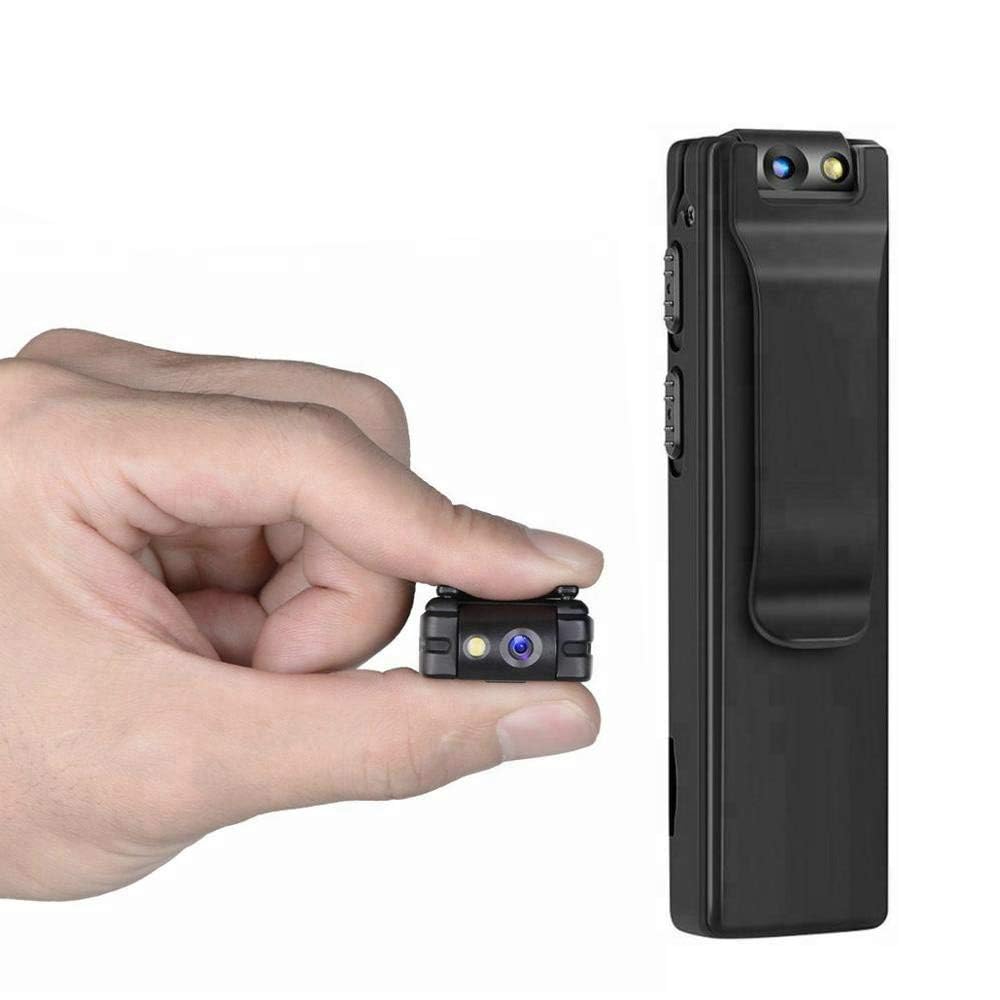
Image: Illustration of the CAPOXO camera's motion detection feature, showing it capturing activity in a room.
5.4 Night Lamp โหมด
The camera is equipped with white LED lights to enhance visibility and recording quality in low-light or dark environments.
- To activate the night lamp, slide the "ON -> LAMP" switch to the "LAMP" position.
- To deactivate, slide the switch back to the "ON" position.
5.5 การถ่ายภาพ
- ตรวจสอบให้แน่ใจว่ากล้องเปิดอยู่
- Press the "PHOTO" button once to take a still image. The indicator light may flash briefly.
- Photos are saved to the Micro SD card.
5.6 Viewing บันทึก
- ปิดกล้อง
- Remove the Micro SD card from the camera.
- Insert the Micro SD card into a computer's card reader or a compatible device.
- เข้าถึง files บนการ์ด Micro SD ถึง view วิดีโอและภาพถ่ายที่คุณบันทึกไว้

Image: The CAPOXO camera shown in different usage environments, including an office, car, laboratory, and home, demonstrating its versatility.

Image: The CAPOXO camera depicted in diverse settings such as business meetings, family gatherings, children playing, and outdoor adventures, illustrating its broad application.
6. การบำรุงรักษา
- การทำความสะอาด: Use a soft, dry cloth to clean the camera body. Do not use liquid cleaners or solvents.
- การดูแลเลนส์: Gently wipe the lens with a microfiber cloth designed for optics. Avoid touching the lens with bare fingers.
- พื้นที่จัดเก็บ: เก็บกล้องไว้ในที่แห้งและเย็น หลีกเลี่ยงแสงแดดโดยตรงและอุณหภูมิที่สูงหรือต่ำเกินไป
- อายุการใช้งานแบตเตอรี่: เพื่อยืดอายุการใช้งานแบตเตอรี่ ควรหลีกเลี่ยงการปล่อยประจุแบตเตอรี่จนหมดบ่อยๆ ควรชาร์จแบตเตอรี่เป็นประจำ แม้จะไม่ได้ใช้งานเป็นเวลานานก็ตาม
- การจัดการการ์ด SD: Regularly back up important recordings and format the Micro SD card periodically to maintain optimal performance and prevent data corruption.
7 การแก้ไขปัญหา
กล้องไม่เปิด
- Ensure the battery is charged. Connect the camera to a charger for at least 1 hour.
- ตรวจสอบให้แน่ใจว่าสวิตช์เปิด/ปิดอยู่ในตำแหน่ง "เปิด"
ไม่สามารถบันทึกวิดีโอได้
- Check if a Micro SD card is properly inserted.
- Ensure the Micro SD card has sufficient free space.
- Verify the Micro SD card is Class 10 and within the supported capacity (16GB, 32GB, 64GB).
- Format the Micro SD card if it's a new card or if you encounter issues.
คุณภาพวิดีโอไม่ดี
- Ensure the camera lens is clean and free from smudges or dust.
- Check lighting conditions. Use the night lamp ในสภาพแวดล้อมที่มีแสงน้อย
การตรวจจับความเคลื่อนไหวไม่ทำงาน
- Ensure the camera is powered on and in recording mode.
- ตรวจสอบให้แน่ใจว่าไม่มีสิ่งกีดขวางใดๆ บังกล้อง view.
Camera Unresponsive (Reset)
- If the camera becomes unresponsive, locate the "RESET" button (often a small pinhole).
- Use a thin object (like a paperclip) to gently press and hold the reset button for a few seconds.
- The camera should restart.
8. ข้อมูลจำเพาะ
| ยี่ห้อ | คาพ็อกโซ |
| หมายเลขรุ่น | Capoxo-A-Cctv-Camera |
| ความละเอียดในการจับภาพวิดีโอ | 1080p เต็ม HD |
| เทคโนโลยีการเชื่อมต่อ | Wired (USB for charging/data transfer) |
| ประเภทหน่วยความจำแฟลช | Micro SD (supports 16GB, 32GB, 64GB Class 10) |
| รูปแบบการจับภาพวิดีโอ | เอวีไอ |
| รูปแบบเสียงที่รองรับ | เอเอซี |
| คุณสมบัติพิเศษ | Motion Detection, Night Lamp, HD Resolution, 90° Rotatable Lens |
| อายุการใช้งานแบตเตอรี่ | สูงสุด 3 ชั่วโมง (หลังจากชาร์จเต็ม) |
| อินพุตการชาร์จ | 5V/1A (charger not included) |
| ขนาด (กxยxส) | 9 x 2.5 x 1 เซนติเมตร |
| น้ำหนักสินค้า | 250 กรัม |
| ส่วนประกอบที่รวมอยู่ | Camera, USB Cable, Manual |
9. การรับประกันและการสนับสนุน
For warranty information or technical support, please refer to the contact details provided with your purchase documentation or visit the official CAPOXO webเว็บไซต์.
โปรดเก็บหลักฐานการซื้อไว้เพื่อใช้ในกรณีเรียกร้องการรับประกัน