1. บทนำ
ขอบคุณสำหรับการซื้อasing the Generic HY300 Portable Ultra HD Projector. This device is designed to provide a versatile and powerful projection solution for various needs, including business presentations, home entertainment, and multimedia content display. Its compact design and broad compatibility make it an ideal choice for use in different environments.
This manual provides essential information on the setup, operation, and maintenance of your projector. Please read it thoroughly before using the product to ensure proper function and to maximize your viewการสร้างประสบการณ์

Figure 1.1: The compact design of the HY300 projector, highlighting its portability.
2. ข้อมูลด้านความปลอดภัย
To ensure safe operation and prolong the life of your projector, please observe the following safety guidelines:
- การระบายอากาศ : อย่าปิดกั้นช่องระบายอากาศ ตรวจสอบให้แน่ใจว่ามีการระบายอากาศรอบ ๆ โปรเจ็กเตอร์อย่างเพียงพอเพื่อป้องกันความร้อนสูงเกินไป
- ฝุ่นและสิ่งสกปรก: Place the projector in a location free of dust or dirt. Dust can contaminate the internal lenses and affect image quality.
- แหล่งจ่ายไฟ: Use only the provided power cable and ensure the voltage matches the projector's requirements (110V/220V compatible).
- การสัมผัสของเหลว: Keep the projector away from water or other liquids. Do not operate with wet hands.
- การปกป้องดวงตา: อย่ามองตรงเข้าไปในเลนส์โปรเจ็กเตอร์เมื่อลamp เปิดอยู่ เนื่องจากแสงที่สว่างเกินไปอาจทำให้ตาเมื่อยล้าหรือเกิดความเสียหายได้
- การจัดการ: โปรดใช้งานโปรเจคเตอร์อย่างระมัดระวัง หลีกเลี่ยงการทำตกหรือการกระแทกอย่างแรง
3. เนื้อหาบรรจุภัณฑ์
ตรวจสอบว่ามีรายการทั้งหมดอยู่ในแพ็คเกจ:
- Generic HY300 Projector
- สายไฟ
- รีโมทคอนโทรล
- คู่มือการใช้งาน (เอกสารนี้)
4. สินค้าหมดview
Familiarize yourself with the various ports and features of your HY300 projector:
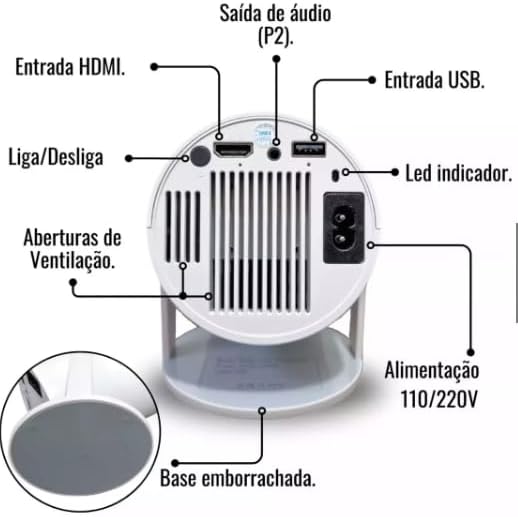
Figure 4.1: Rear panel and connections of the HY300 Projector.
- อินพุต HDMI: Connect to devices such as laptops, game consoles, or TV boxes.
- ช่องต่อ USB: เชื่อมต่อไดรฟ์ USB สำหรับการเล่นสื่อ
- Audio Output (P2): เชื่อมต่อลำโพงภายนอกหรือหูฟัง
- Power Input (110V/220V): ต่อสายไฟเข้ากับเต้ารับไฟฟ้า
- ปุ่มเปิด/ปิด: เปิดหรือปิดโปรเจ็กเตอร์
- ไฟแสดงสถานะ LED: Displays the power status of the projector.
- ช่องระบายอากาศ: จำเป็นสำหรับการระบายความร้อน ห้ามกีดขวาง
- Rubberized Base: Provides stability and prevents slipping.
5. การตั้งค่า
5.1 การจัดวาง
Position the projector on a stable, flat surface. The HY300 features a 180-degree flexible projection angle, allowing you to adjust the body to project onto a wall or even the ceiling.
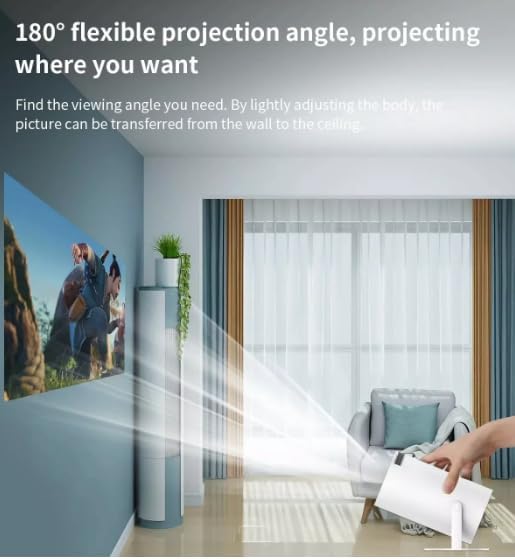
Figure 5.1: Adjusting the projection angle for flexible viewการไอเอ็นจี
5.2 การเชื่อมต่อสายไฟ
- ต่อสายไฟเข้ากับช่องเสียบไฟของโปรเจ็กเตอร์
- Plug the other end of the power cable into a 110V or 220V electrical outlet. The projector is bivolt compatible.
5.3 การเปิดเครื่องครั้งแรก
Press the Power Button on the projector or the remote control to turn on the device. The indicator LED will illuminate.
6. คู่มือการใช้งาน
6.1 การนำทางพื้นฐาน
The HY300 projector runs on an Android system, allowing for intuitive navigation using the remote control. Use the directional buttons to move through menus and the OK button to select.

Figure 6.1: The projector's smart interface with various applications.
6.2 การปรับการฉายภาพ
- จุดสนใจ: ปรับวงแหวนปรับโฟกัสบนเลนส์โปรเจ็กเตอร์จนกว่าภาพจะคมชัด
- การแก้ไขคีย์สโตน: The projector features automatic image correction to adjust for distorted images when the projector is not perfectly perpendicular to the screen.
- ซูม: The projector has a 1.35x zoom capability, allowing for minor adjustments to the image size without moving the projector.
7. การเชื่อมต่อ
The HY300 projector offers multiple connectivity options:
- ช่องต่อ HDMI: Connect to external devices such as TV boxes, laptops, game consoles (PlayStation), or other HDMI-enabled media players.
- ยูเอสบี: เสียบแฟลชไดรฟ์ USB เพื่อเล่นสื่อ fileโดยตรงจากไดรฟ์
- บลูทูธ: Connect to external Bluetooth speakers for enhanced audio output. The projector also has a built-in speaker.
- Audio Output (P2): เชื่อมต่อหูฟังแบบมีสายหรือลำโพงภายนอก
8. การมิเรอร์หน้าจอ
The projector supports convenient screen mirroring, allowing you to display content from your smartphone or tablet wirelessly via Wi-Fi.
- ตรวจสอบให้แน่ใจว่าโปรเจ็กเตอร์และอุปกรณ์พกพาของคุณเชื่อมต่อกับเครือข่าย Wi-Fi เดียวกัน
- On the projector's interface, select the screen mirroring application (e.g., 'Miracast' or 'AirPlay' equivalent).
- On your smartphone or tablet, enable screen mirroring/casting (e.g., 'Smart View' on Android, 'Screen Mirroring' on iOS).
- เลือกโปรเจ็กเตอร์จากรายการอุปกรณ์ที่มีอยู่
- Your device's screen will now be mirrored on the projector.
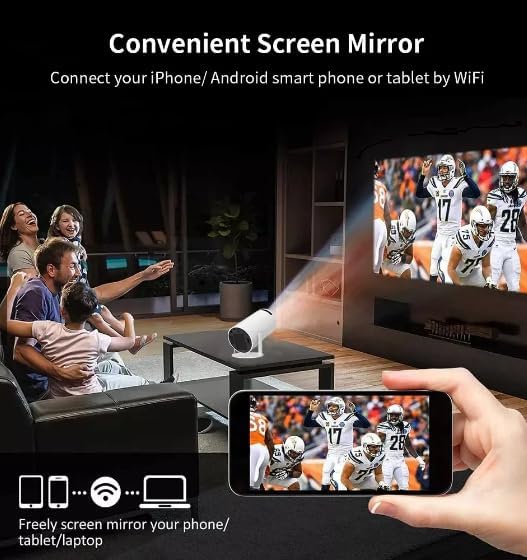
Figure 8.1: Screen mirroring from a smartphone to the projector.
9. การบำรุงรักษา
Proper maintenance ensures optimal performance and longevity of your projector:
- การทำความสะอาดเลนส์: เช็ดเลนส์โปรเจ็กเตอร์เบาๆ ด้วยผ้าเนื้อนุ่ม ปราศจากขน ที่ออกแบบมาสำหรับพื้นผิวเลนส์โดยเฉพาะ ห้ามใช้สารทำความสะอาดที่มีฤทธิ์กัดกร่อน
- การป้องกันฝุ่น: As mentioned in the safety section, always place the projector in a clean, dust-free environment to prevent internal lens contamination.
- การระบายอากาศ : Regularly check that the ventilation openings are clear of dust and debris. Use a soft brush or compressed air to clean them if necessary.
- พื้นที่จัดเก็บ: เมื่อไม่ได้ใช้งานเป็นเวลานาน ควรเก็บโปรเจคเตอร์ไว้ในที่แห้งและเย็น โดยควรเก็บไว้ในบรรจุภัณฑ์เดิมหรือกล่องป้องกัน
10 การแก้ไขปัญหา
หากคุณพบปัญหาเกี่ยวกับโปรเจ็กเตอร์ของคุณ โปรดดูปัญหาทั่วไปและวิธีแก้ไขต่อไปนี้:
- ไม่มีรูป:
- ตรวจสอบให้แน่ใจว่าได้เสียบสายไฟแน่นสนิทและเปิดโปรเจ็กเตอร์แล้ว
- Check the input source (HDMI, USB) and ensure it is correctly selected.
- Verify that the connected device (laptop, TV box) is powered on and outputting a signal.
- ปรับวงแหวนปรับโฟกัส
- ไม่มีเสียง:
- ตรวจสอบการตั้งค่าระดับเสียงทั้งบนโปรเจ็กเตอร์และอุปกรณ์แหล่งสัญญาณที่เชื่อมต่ออยู่
- หากใช้ลำโพงภายนอก โปรดตรวจสอบให้แน่ใจว่าเชื่อมต่อและเปิดเครื่องอย่างถูกต้อง
- If using Bluetooth speakers, ensure they are paired correctly.
- ภาพเบลอ:
- ปรับวงแหวนปรับโฟกัสบนเลนส์โปรเจ็กเตอร์
- ตรวจสอบให้แน่ใจว่าพื้นผิวการฉายนั้นเรียบและเรียบ
- Check for dust on the lens.
- คำเตือนความร้อนสูงเกินไป:
- ตรวจสอบให้แน่ใจว่าช่องระบายอากาศไม่ถูกปิดกั้น
- ใช้งานโปรเจ็กเตอร์ในบริเวณที่มีอากาศถ่ายเทได้ดี
11. ข้อมูลจำเพาะ
Detailed technical specifications for the Generic HY300 Projector:
| คุณสมบัติ | ข้อมูลจำเพาะ |
|---|---|
| ยี่ห้อ | ทั่วไป |
| แบบอย่าง | HY300 |
| ความละเอียดออฟติคัล | 1280 x 720 (อัลตร้าเอชดี) |
| ความสว่าง | 8000 Lumens (200 ANSI Lumens) |
| อัตราส่วนคอนทราสต์ | 3001:1 - 4000:1 |
| เทคโนโลยีการฉายภาพ | นำ |
| แหล่งกำเนิดแสงชีวิต | 50,000 ชั่วโมง |
| ขนาดการฉายภาพ | 40-150 นิ้ว |
| ระยะฉายภาพ | 1.2เมตรถึง4เมตร |
| ขนาดหน้าจอ | 4:3 / 16:9 |
| ซูม | 1.35 เท่า |
| ระบบปฏิบัติการ | แอนดรอยด์ |
| ฮาร์ดแวร์อินเตอร์เฟซ | Bluetooth, HDMI, USB |
| เทคโนโลยีการเชื่อมต่อ | สาย HDMI, Wi-Fi, บลูทูธ |
| อุปกรณ์ที่รองรับ | Speakers, Laptops, Game Consoles, Smartphones, Tablets, Televisions |
| คุณสมบัติพิเศษ | Portable, Automatic Image Correction, Built-in Speaker, Screen Mirroring |
| เล่มที่tage | 110 Volts / 220 Volts (Bivolt) |
| ใส่ DC | 19V 3A & OTG |
| น้ำหนัก | 900กรัม |
| อัตราการรีเฟรช | 60 เฮิรตซ์ |
| ประเภทการติดตั้ง | Freestanding, Tabletop Mount |
12. การรับประกันและการสนับสนุน
The Generic HY300 Projector comes with a manufacturer's warranty of 30 วัน นับจากวันที่ซื้อ โปรดเก็บหลักฐานการซื้อของคุณไว้สำหรับการเรียกร้องการรับประกันใด ๆ
For technical support or warranty inquiries, please contact your retailer or the manufacturer's customer service. Refer to the product packaging or purchase documentation for specific contact information.


