
1. บทนำ
The Betopper LPC010N-4 is a professional 54x4W RGBW (Red, Green, Blue, White) LED Par Light designed for various stage, event, and photography lighting applications. Featuring a high Color Rendering Index (CRI) of over 90, this light ensures accurate and vibrant color reproduction. It delivers up to 5500 lumens of brightness and offers multiple control modes for versatile lighting effects.
2. ข้อมูลด้านความปลอดภัย
- ควรต่ออุปกรณ์เข้ากับวงจรที่มีสายดินเสมอ
- ตรวจสอบให้แน่ใจว่าปริมาณพลังงานtage ตรงกับปริมาตรที่กำหนดtage ของโคม
- Do not open the housing; there are no user-serviceable parts inside. Refer servicing to qualified personnel.
- หลีกเลี่ยงการสัมผัสกับแหล่งกำเนิดแสงโดยตรง
- Keep the fixture away from rain or moisture.
- ตรวจสอบให้แน่ใจว่ามีการระบายอากาศเพียงพอรอบๆ อุปกรณ์เพื่อป้องกันความร้อนมากเกินไป
- Mount the fixture securely using appropriate clampและสายนิรภัย
3. เนื้อหาบรรจุภัณฑ์
Each Betopper LPC010N-4 package includes:
- Betopper LPC010N-4 LED Par Light unit(s)
- สายไฟ
- คู่มือการใช้งาน
4. สินค้าหมดview
4.1 คุณสมบัติหลัก
- High CRI (>90): Provides exceptional color accuracy for natural and vibrant object and skin tone reproduction, ideal for photography and video.
- ความสว่างที่เหนือกว่า: Equipped with 54*4W LED bulbs, delivering up to 5500 lumens for large venues.
- RGBW Full Color: 4-in-1 LED sources (Red, Green, Blue, White) offer brighter and purer colors than traditional RGB lights.
- โหมดควบคุมที่ยืดหยุ่น: Supports DMX, automatic, and sound-activated modes, along with multiple pre-set colors.
- ช่วงการใช้งานที่กว้าง: Suitable for parties, discos, bars, clubs, weddings, churches, live performances, studios, and more.
4.2 ส่วนประกอบทางกายภาพ


The fixture features a robust aluminum housing, a cooling fan for heat dissipation, and a digital display with four control buttons (MENU, UP, DOWN, ENTER) for easy navigation. It includes DMX In/Out ports for external control and Power In/Out for daisy-chaining multiple units.
5. การตั้งค่า
5.1 การติดตั้ง
The LPC010N-4 can be mounted in various ways:
- แบบติดพื้น: Use the adjustable bracket to position the light on a flat surface.
- T-Bar/Truss Mount: Secure the fixture to a T-bar or lighting truss using appropriate clamps (not included) and a safety cable. Ensure the mounting surface can support the weight of the fixture.

5.2 การเชื่อมต่อสายไฟ
Connect the provided power cable to the 'POWER IN' port on the rear of the fixture and then to a suitable AC100-240V power outlet. Multiple units can be daisy-chained using the 'POWER OUT' port to connect to the 'POWER IN' of the next fixture.
5.3 การเชื่อมต่อ DMX (ไม่บังคับ)
For DMX control, connect a DMX cable from your DMX controller's output to the 'DMX IN' port of the first fixture. To daisy-chain multiple DMX fixtures, connect the 'DMX OUT' of the first fixture to the 'DMX IN' of the next, and so on.
6. โหมดการทำงาน
6.1 การนำทางแผงควบคุม
The rear control panel features a digital display and four buttons:
- เมนู: วนไปเรื่อยๆ ตามตัวเลือกในเมนูหลัก
- ขึ้น: เพิ่มค่าหรือเลื่อนขึ้นไปยังตัวเลือกในเมนู
- ลง: ลดค่าหรือเลื่อนลงไปยังตัวเลือกในเมนู
- เข้า: ยืนยันการเลือกหรือเข้าสู่เมนูย่อย

6.2 โหมดควบคุม DMX
The fixture supports DMX512 protocol with 4 or 8 channel modes. Refer to the DMX channel chart in the appendix (not provided in this manual) for specific channel functions. Set the DMX address using the control panel.
6.3 โหมดอัตโนมัติ
The automatic mode features pre-programmed light shows and color sequences. Use the MENU button to select 'Auto' mode and then UP/DOWN to choose different auto programs.
6.4 Sound-Activated Mode
In sound-activated mode, the light reacts to ambient sound or music. Use the MENU button to select 'Sound' mode. The fixture's built-in microphone will detect audio and trigger dynamic lighting effects.
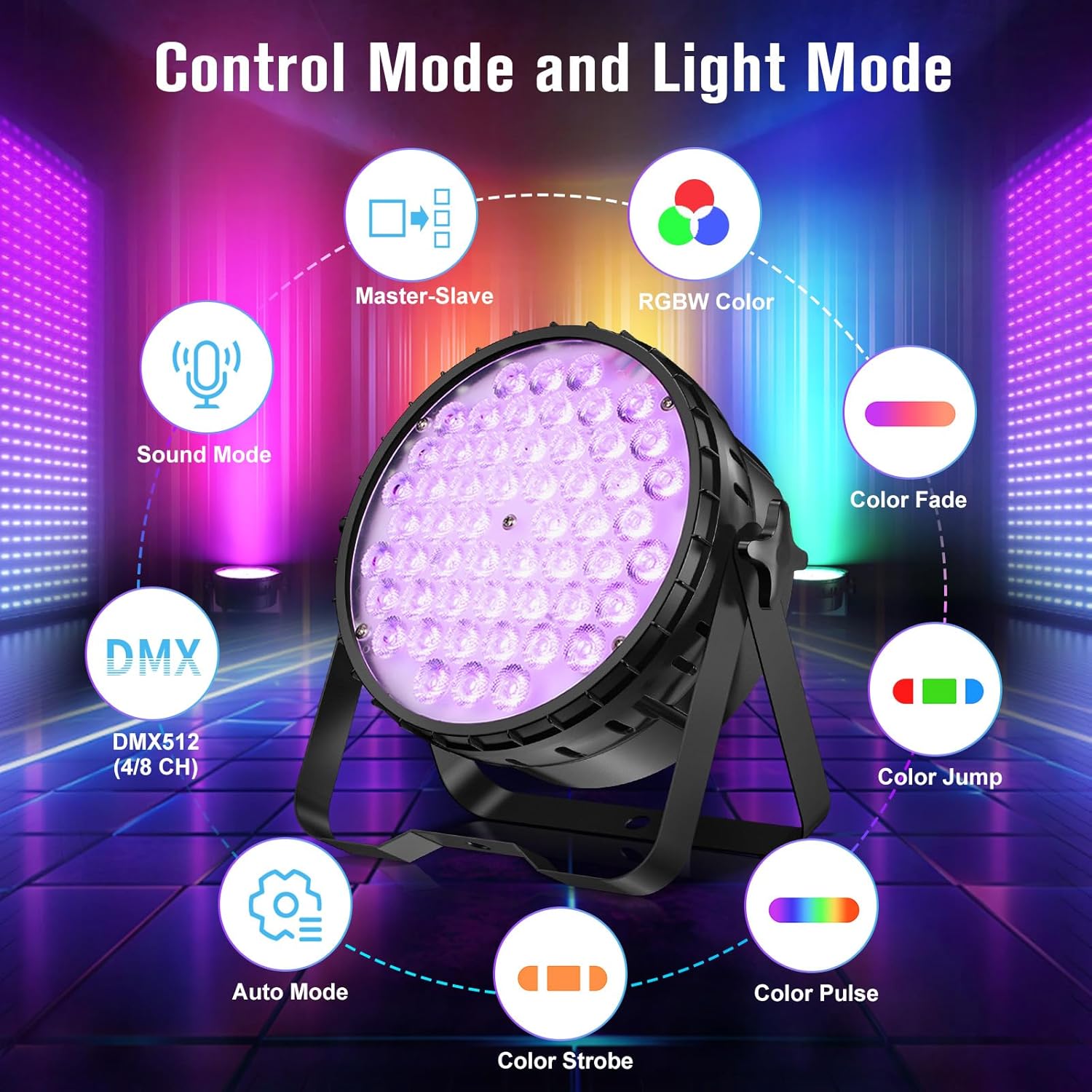
6.5 โหมดมาสเตอร์-สเลฟ
Connect multiple fixtures via DMX cables. Set one fixture as the 'Master' (e.g., in Auto or Sound mode) and the others as 'Slave' units. The slave units will then synchronize their effects with the master unit.
7. เอฟเฟกต์แสง
The LPC010N-4 offers a variety of dynamic lighting effects:
- แฟลช: Rapid flashing of light.
- Gradual Fading Change: Smooth transitions between colors.
- กระโดด: Instantaneous changes between colors.
- Pulse Change: Rhythmic changes in light intensity or color.


7.1 CRI Comparison
The high CRI (>90) of the LPC010N-4 ensures that colors appear more natural and true to life compared to lights with lower CRI values.

7.2 Brightness Comparison
The 54x4W configuration provides significantly higher brightness compared to lights with fewer or lower wattagอี LED

7.3 การสาธิตผ่านวิดีโอ
8. การบำรุงรักษา
- การทำความสะอาด: Regularly clean the lens and housing with a soft, lint-free cloth. Do not use abrasive cleaners.
- การบำรุงรักษาพัดลม: Ensure the cooling fan is free from dust and debris to maintain optimal performance and prevent overheating.
- พื้นที่จัดเก็บ: เมื่อไม่ใช้งาน ควรเก็บอุปกรณ์ไว้ในที่แห้งและปราศจากฝุ่น
- การตรวจสอบ: Periodically check all cables, connections, and mounting hardware for any signs of wear or damage.
9 การแก้ไขปัญหา
| ปัญหา | สาเหตุที่เป็นไปได้ | สารละลาย |
|---|---|---|
| ไม่มีไฟฟ้า | Power cable disconnected; no power from outlet; fuse blown. | Check power cable connection; test outlet; replace fuse if necessary. |
| ไม่มีแสงออก | Fixture in blackout mode; incorrect mode selected; internal fault. | Check control panel settings; cycle through modes; contact support if fault persists. |
| การควบคุม DMX ไม่ทำงาน | ที่อยู่ DMX ไม่ถูกต้อง; สาย DMX ชำรุด; ตัวควบคุม DMX มีปัญหา; โหมด DMX ไม่ถูกต้อง | Verify DMX address; check DMX cable integrity; test with another controller; ensure fixture is in DMX mode. |
| แสงริบหรี่ | Unstable power supply; DMX signal interference; loose connection. | Ensure stable power; check DMX termination; secure all connections. |
10. ข้อมูลจำเพาะ
| คุณสมบัติ | รายละเอียด |
|---|---|
| หมายเลขรุ่น | LPC010N |
| ประเภทแหล่งกำเนิดแสง | ไดโอดเปล่งแสง (LED) |
| จำนวนแหล่งกำเนิดแสง | 54 |
| วัดtage (per LED) | 4W |
| รวมวัดtage | 216 วัตต์ |
| เอาท์พุตแสงสูงสุด | 5500 ลูเมน |
| ดัชนีความถูกต้องของสี (CRI) | 95 (CRI>90) |
| อุณหภูมิสี | 4500 เคลวิน |
| คุณสมบัติหลอดไฟ | CRI>90, RGBW full color, DMX, automatic, sound-activated |
| วัสดุ | อลูมิเนียม |
| ประเภทการเสร็จสิ้น | ปัด |
| ประเภทการติดตั้ง | ชั้นเมา |
| แหล่งพลังงาน | สายไฟ |
| ขนาดสินค้า | ยาว 9.84 นิ้ว x กว้าง 4.5 นิ้ว x สูง 9.84 นิ้ว |
| น้ำหนักสินค้า | 16.06 ปอนด์ |
| รวมแบตเตอรี่ | เลขที่ |
11. การรับประกันและการสนับสนุน
For warranty information, technical support, or service inquiries, please contact Betopper customer service. Keep your purchase receipt as proof of purchase.
Visit the official Betopper store for more information: BetopperDirect Store