
Lepro E1-60
คู่มือการใช้งานไฟส่องสว่างภายนอกอาคารแบบถาวร Lepro E1 AI
รุ่น : E1-60
1. บทนำ
Thank you for choosing Lepro E1 AI Permanent Outdoor Lights. This manual provides essential information for the safe and efficient installation, operation, and maintenance of your new lighting system. These smart RGB+IC lights offer advanced features including individual bulb control, tunable white light, AI-generated lighting effects, and smart home integration with Alexa and Google Assistant.

Image: Lepro E1 AI Permanent Outdoor Lights product packaging and an example of the lights installed on a house.
2. ข้อมูลด้านความปลอดภัย
โปรดอ่านคำแนะนำด้านความปลอดภัยทั้งหมดอย่างละเอียดก่อนการติดตั้งและการใช้งาน การไม่ปฏิบัติตามคำแนะนำเหล่านี้อาจส่งผลให้เกิดไฟฟ้าช็อต ไฟไหม้ หรืออันตรายอื่นๆ
- Ensure the power adapter is plugged into an outlet with an enclosed electrical box for outdoor use, as the adapter plug itself is not waterproof.
- The light kits, in-line controller, wires, and connections are waterproof (IP65 rated).
- ห้ามดัดแปลงหรือซ่อมแซมผลิตภัณฑ์ด้วยตนเอง โปรดส่งต่อผลิตภัณฑ์ให้กับช่างผู้ชำนาญการเท่านั้น
- ควรเก็บผลิตภัณฑ์ให้ห่างจากเปลวไฟหรือแหล่งความร้อนสูง
- Ensure all connections are secure and properly aligned to prevent poor contact.

Image: Components of the lighting system, highlighting their IP65 waterproof rating for outdoor use.
3. เนื้อหาบรรจุภัณฑ์
ตรวจสอบว่ารายการทั้งหมดที่ระบุไว้ด้านล่างนี้รวมอยู่ในแพ็คเกจของคุณ:
- 4 × 7.6M/25FT LED permanent light strings (15 LED nodes per string, 60 LED nodes in total)
- 1 × 3M/10FT extension cable
- 1 × 1.5M/5FT extension cable
- 1 × in-line controller
- 1 × power adapter (Input: 100-240V AC, Output: 29V DC)
- 70 × 3M double-sided tape (each LED node has 3M tape on the back; an extra 10 pieces of 3M tape are included in the package)
- 60 × screws and 60 × plastic expansion anchors

ภาพ: ภาพแสดงส่วนประกอบทั้งหมดที่รวมอยู่ในบรรจุภัณฑ์ของผลิตภัณฑ์
4. การตั้งค่า
Follow these steps to set up your Lepro E1 AI Permanent Outdoor Lights.
4.1. Preparation Before Assembly
- Download the Lepro app from the App Store or Google Play.
- Register a new account within the app.
- Turn on your phone's Bluetooth and connect to your 2.4 GHz Wi-Fi network. (Note: 5 GHz Wi-Fi is not supported).
4.2. Assembling and Testing the Lights
Align connectors correctly, push firmly, and tighten to avoid poor contact. Each length (50ft/100ft/150ft kits) comes with a unique power supply and controller, so they cannot be mixed.
The extension cord can be added between the controller and the light string, or between two strings of lights.

Image: Step-by-step visual guide for assembling and installing the lights.
- Assemble all strands and test the Wi-Fi/Bluetooth connection before installation.
- Plug the power adapter into an outdoor outlet with an enclosed electrical box. A flashing white light indicates the connected length is being detected.
- If adding additional strings, detect the length by re-plugging the power or through the app settings. A flashing blue light indicates the app is pairing.
4.3. Adding Lights to the Lepro App
Once connected, add the E1 lights to your Lepro APP. The app will auto-search for available devices.
Video: Detailed instructions on how to download the Lepro app, register an account, and navigate the app for setup and control.
4.4. การติดตั้งทางกายภาพ
- Adjust the lights' distance from the wall (2-4 inches recommended) for the best scalloped pattern.
- Use a cardboard template to ensure all light nodes are evenly spaced from the wall.
- Clean the ceiling surface with alcohol before applying adhesive.
- Use the double-sided tape for initial placement.
- Secure with screws and plastic expansion anchors for a permanent installation.
5. คู่มือการใช้งาน
Your Lepro E1 lights offer a variety of control options and lighting effects.
5.1. การควบคุมผ่านแอปพลิเคชันview
The Lepro app is your primary interface for controlling the lights. It offers extensive features for customization and smart control.

ภาพ: เหนือview of the Lepro app interface for smart control.
5.2. AI Generated Lighting (LightGPM 2.0)
Lepro LightGPM is an AI model that generates lighting effects based on your prompts. Simply type or speak your activity or mood into the app, and it will suggest ideal lighting effects.

Image: How the AI voice control works to generate lighting effects.
Video: Demonstrates various AI-generated lighting effects and how they can be applied to a house.
5.3. Tunable White Light (2200K-6500K)
The lights feature dedicated white LEDs, allowing you to choose any shade of white light, from warm white (2200K) for accent lighting to daylight white (6500K) for security. Each white LED is individually addressable.

Image: Comparison of warm white and daylight white light settings on a house.
5.4. RGB+IC (Independent Control) LEDs
You can set each bulb to a specific color individually, creating a myriad of dynamic lighting effects. The app allows for detailed customization of colors and patterns.
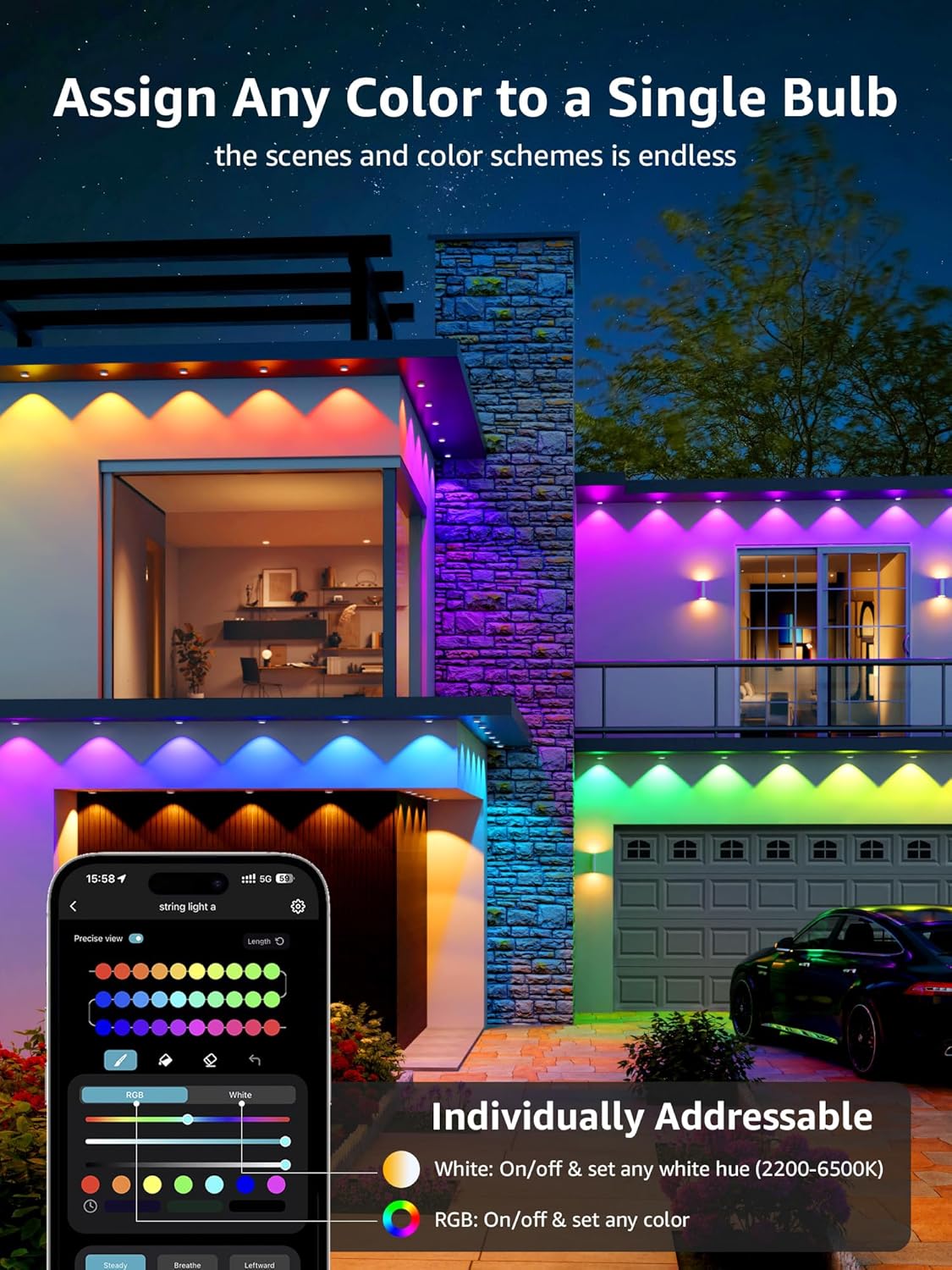
Image: App interface demonstrating individual color assignment to each light puck.
5.5. การบูรณาการบ้านอัจฉริยะ
The lights can be controlled with voice commands through Alexa or Google Assistant. Ensure the light is connected to Wi-Fi through the Lepro app for this functionality.

Image: Steps to integrate your Lepro lights with Alexa or Google Home.
6. การบำรุงรักษา
Proper maintenance ensures the longevity and optimal performance of your lights.
- การทำความสะอาด: Gently wipe the light pucks and cables with a soft, damp ผ้า. หลีกเลี่ยงการใช้สารเคมีที่รุนแรงหรือน้ำยาทำความสะอาดที่มีฤทธิ์กัดกร่อน
- การกันน้ำ: While the lights and in-line controller are IP65 waterproof, the power adapter plug is not. Always ensure it is protected within an enclosed electrical box when used outdoors.
- การตรวจสอบ: Periodically inspect cables and connections for any signs of wear, damage, or loose connections. Address any issues promptly.
7 การแก้ไขปัญหา
If you encounter issues with your Lepro E1 lights, refer to the following common solutions:
7.1. Lights Not Responding / Disconnection
- ตรวจสอบพลังงาน: ตรวจสอบให้แน่ใจว่าอะแดปเตอร์ไฟฟ้าเสียบเข้ากับเต้ารับที่ใช้งานได้แน่นดี
- การเชื่อมต่อ Wi-Fi/บลูทูธ: Verify your phone's Bluetooth is on and connected to a 2.4 GHz Wi-Fi network. Ensure the lights are within range of your Wi-Fi router.
- สถานะแอป: Check the Lepro app to see if the device is online. If not, try refreshing the app or re-pairing the device.
- การเชื่อมต่อสายเคเบิล: Ensure all light string connections are firm and properly aligned.
7.2. การรีเซ็ตอุปกรณ์
If the lights are unresponsive or you need to re-pair them, you can perform a factory reset:
- Press and hold the button on the in-line controller for 5 seconds.
- A flashing blue light indicates a successful reset. The device is now ready for re-pairing.
8. ข้อมูลจำเพาะ
| คุณสมบัติ | ข้อมูลจำเพาะ |
|---|---|
| ยี่ห้อ | โรคเรื้อน |
| แบบอย่าง | E1-60 |
| ขนาด | 100 FT |
| ประเภทแหล่งกำเนิดแสง | นำ |
| จำนวนแหล่งกำเนิดแสง | 60 |
| สีอ่อน | Tunable White (2200K-6500K), Multicolor (RGB+IC) |
| ความสว่าง | 2400 ลูเมน |
| วัดtage | 36 วัตต์ |
| เล่มที่tage | 29 โวลต์ (กระแสตรง) |
| วิธีการควบคุม | ควบคุมผ่านแอปพลิเคชัน, ควบคุมด้วยเสียง (Alexa, Google Assistant) |
| โปรโตคอลการเชื่อมต่อ | บลูทูธ, Wi-Fi (2.4 GHz) |
| การใช้งานภายใน/ภายนอกอาคาร | กลางแจ้ง |
| ระดับความต้านทานต่อน้ำ | Waterproof (IP65 for lights/controller) |
| ชีวิตเฉลี่ย | 15000 ชั่วโมง |
| วัสดุ | โพลีคาร์บอเนต |
| น้ำหนักสินค้า | 4.41 ปอนด์ |
9. การรับประกันและการสนับสนุน
For warranty information and technical support, please visit the official Lepro webหรือติดต่อฝ่ายบริการลูกค้า เก็บใบเสร็จรับเงินไว้เพื่อใช้ในการเคลมประกัน
Ask a question about this manual
Ask about setup, troubleshooting, compatibility, parts, safety, or missing instructions. Manuals+ will review the question and use this page’s manual context to help answer it.