
Fabater HW400S
คู่มือการใช้งานเครื่องวัดความหนาของสารเคลือบดิจิทัล Fabator HW400S
Model: HW400S
1. บทนำ
This manual provides detailed instructions for the proper use and maintenance of your Fabater HW400S Digital Coating Thickness Gauge. This device is designed for accurate measurement of coating thickness on various metal substrates, including paint on steel, enamel, chrome, aluminum, and anodized coatings on copper. Please read this manual thoroughly before operating the device to ensure optimal performance and longevity.
2. เนื้อหาบรรจุภัณฑ์
เมื่อเปิดบรรจุภัณฑ์ โปรดตรวจสอบว่าประกอบด้วยสิ่งของต่อไปนี้ทั้งหมด:
- 1 x Fabater HW400S Digital Coating Thickness Gauge
- 7 x Calibration Plates (various thicknesses)
- 1 x คู่มือผู้ใช้
3. คุณสมบัติของผลิตภัณฑ์
The Fabater HW400S Digital Coating Thickness Gauge offers several key features for precise and convenient measurements:
- การวัดแบบมัลติฟังก์ชั่น: Capable of measuring thickness on both ferrous (F) and non-ferrous (NF) metal substrates. Automatically detects substrate properties.
- การบันทึกข้อมูล: Records average, maximum, minimum, and difference values. Supports storage of up to 50 data points for statistical analysis.
- หน่วยการวัดหลายหน่วย: Switchable between micrometers (um), millimeters (mm), and mils for versatile applications.
- ความแม่นยำสูง: Provides precise measurements for various coatings.
- การออกแบบที่กะทัดรัดและน้ำหนักเบา: Easy to carry and operate in various environments.
- ปิดเครื่องอัตโนมัติ: Conserves battery power by automatically turning off after 3 minutes of inactivity.
- ตัวบ่งชี้ระดับแบตเตอรี่: แสดงสถานะแบตเตอรี่ปัจจุบัน
- จอแสดงผล HD: จอแสดงผลดิจิทัลที่ชัดเจนและอ่านง่าย
- หัววัดความแม่นยำสูง: Ensures accurate contact and measurement.
- การออกแบบร่องกันลื่น: Enhances grip and handling stability.
4. สินค้าหมดview
Familiarize yourself with the components and controls of your HW400S Digital Coating Thickness Gauge.

ภาพที่ 4.1: ด้านหน้า view of the HW400S gauge with key components labeled. This includes the display, probe, and various control buttons.

ภาพที่ 4.2: รายละเอียด view highlighting the HD display, high precision probe, and anti-slip groove design for improved handling.
ส่วนประกอบหลัก:
- หน้าจอแสดงผล: Shows measurement readings, unit, mode, battery level, and statistical data (MAX, MIN, AVG, DIF).
- โพรบ: The sensor at the top of the device used to contact the surface for measurement.
- Power On/Off Button (⏻): กดเพื่อเปิดหรือปิดอุปกรณ์
- F/NF Button: Switches between automatic (AUTO), magnetic induction (F) for ferrous metals, and eddy current (NFE) for non-ferrous metals.
- Mils/um/mm Button: Toggles between measurement units (mils, micrometers, millimeters).
- ZERO/CAL Button: Used for zero calibration and accessing calibration functions.
- Backlight Switch / Automatic Shutdown Switch: Controls the display backlight and can be used to adjust automatic shutdown settings.
5. การตั้งค่า
5.1 การติดตั้งแบตเตอรี่
The Fabater HW400S requires two 1.5V AAA batteries (not included) for operation.
- ค้นหาฝาครอบช่องใส่แบตเตอรี่ที่ด้านหลังของอุปกรณ์
- เลื่อนฝาครอบออกเพื่อเปิดช่องเก็บของ
- ใส่แบตเตอรี่ AAA สองก้อน โดยตรวจสอบให้แน่ใจว่าขั้ว (+/-) ถูกต้องตามที่ระบุภายในช่องใส่
- ปิดฝาช่องใส่แบตเตอรี่ โดยเลื่อนให้แน่นจนได้ยินเสียงคลิกเข้าที่
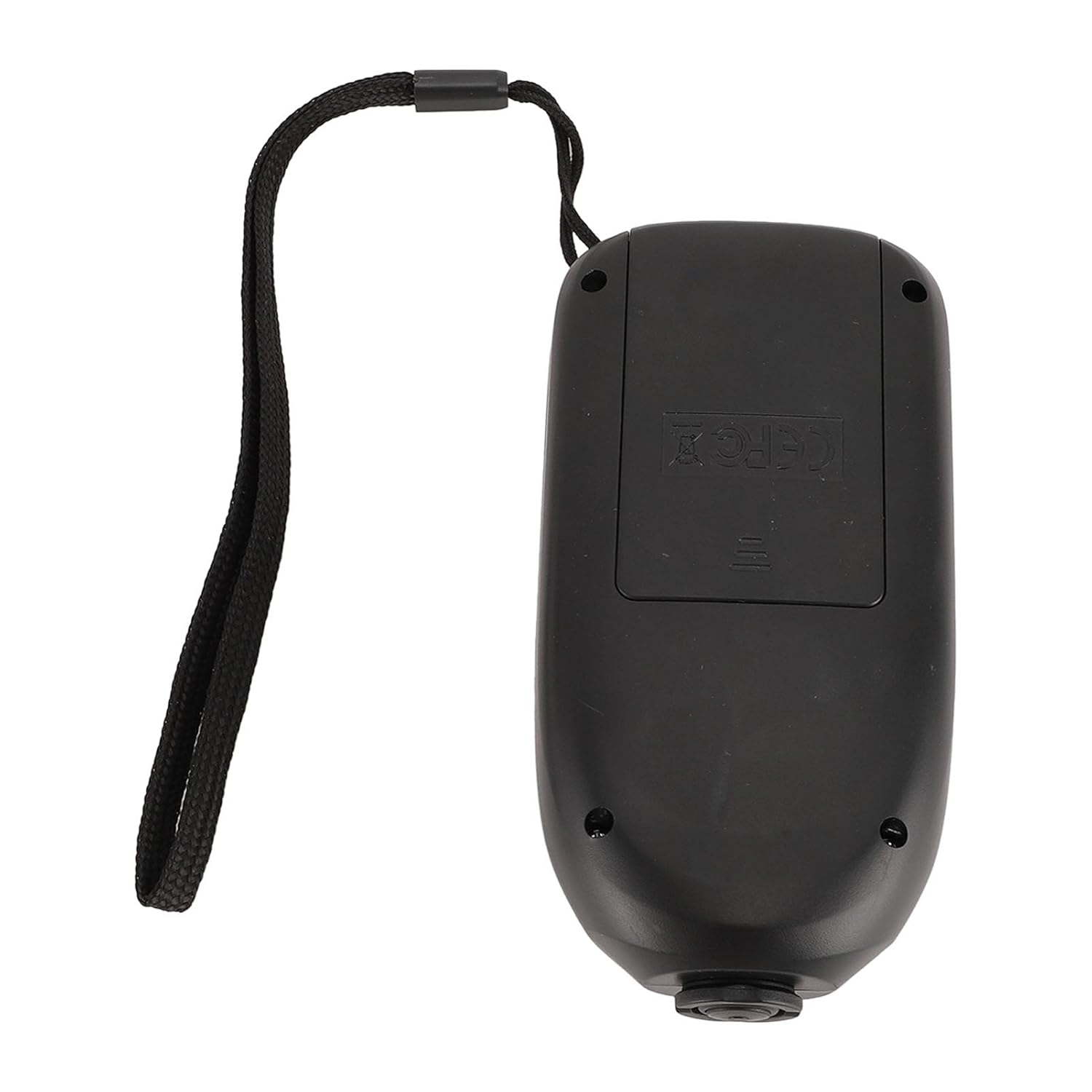
ภาพที่ 5.1: View of the open battery compartment on the back of the device, showing where to insert two AAA batteries.
5.2 เปิด/ปิดเครื่อง
- หากต้องการเปิดเครื่อง ให้กดปุ่ม Power On/Off (⏻) กดปุ่ม หน้าจอจะสว่างขึ้น
- หากต้องการปิดอุปกรณ์ ให้กดปุ่ม Power On/Off (⏻) กดปุ่มค้างไว้สองสามวินาที จนกระทั่งจอแสดงผลดับลง
- The device will automatically shut off after 3 minutes of inactivity to conserve battery life.
6. การดำเนินการ
6.1 การวัดพื้นฐาน
- ตรวจสอบให้แน่ใจว่าอุปกรณ์เปิดอยู่
- วางหัววัดลงบนพื้นผิวที่ต้องการวัดอย่างมั่นคงและตั้งฉาก
- The measurement reading will appear on the display. The device takes approximately 2 readings per second.
- ยกหัววัดออกจากพื้นผิวเพื่อทำการวัดให้เสร็จสมบูรณ์
6.2 Measurement Modes (F/NF)
The HW400S can measure on both ferrous (F) and non-ferrous (NF) substrates. Press the F/NF ปุ่มเพื่อหมุนเวียนไปตามโหมดต่างๆ:
- อัตโนมัติ: Automatically detects the substrate type (ferrous or non-ferrous). This is the recommended default mode.
- F (Ferrous): For coatings on magnetic metals like steel and iron.
- NFE (Non-Ferrous): For coatings on non-magnetic metals like aluminum, copper, and brass.
6.3 การสลับหน่วย
To change the measurement unit, press the Mils/um/mm button. The display will cycle through:
- um (micrometers)
- mm (millimeters)
- มิลส์
6.4 การสอบเทียบ
Regular calibration ensures the accuracy of your measurements. The HW400S supports zero calibration and multi-point calibration using the provided calibration plates.

ภาพที่ 6.1: Illustrates the process of self-calibration for accurate measurements, typically performed on a known zero-thickness surface or a calibration plate.

ภาพที่ 6.2: Shows the HW400S alongside the included calibration plates (0.05mm, 0.10mm, 0.25mm, 0.50mm, 1.00mm, 2.00mm) and a standard aluminum block, used for zero and multi-point calibration.
การสอบเทียบเป็นศูนย์:
To perform a zero calibration, place the probe directly onto a bare, uncoated metal substrate (e.g., the standard aluminum block or a known bare ferrous surface) and follow the instructions displayed on the screen or refer to the detailed steps in the included printed manual.
การสอบเทียบหลายจุด:
For enhanced accuracy, especially when measuring specific coating thicknesses, use the provided calibration plates. Place the probe on each plate and adjust the reading according to the plate's known thickness. Consult the detailed instructions in the included printed manual for the exact procedure.
6.5 สถิติข้อมูล
The device automatically calculates and displays statistical data for your measurements. The display shows:
- สูงสุด: Maximum measured thickness.
- นาที: Minimum measured thickness.
- เฉลี่ย: Average thickness of recorded measurements.
- ความแตกต่าง: Difference between maximum and minimum measurements.
The device can store up to 50 data points for these statistics.
7. การบำรุงรักษา
- การทำความสะอาด: เช็ดอุปกรณ์ด้วยผ้านุ่มและแห้ง ห้ามใช้น้ำยาทำความสะอาดที่มีฤทธิ์กัดกร่อนหรือตัวทำละลาย
- พื้นที่จัดเก็บ: Store the gauge in a dry, cool place, away from direct sunlight and extreme temperatures. If storing for extended periods, remove the batteries to prevent leakage.
- การดูแลโพรบ: Keep the probe tip clean and free from debris to ensure accurate readings. Avoid scratching or damaging the probe surface.
8 การแก้ไขปัญหา
| ปัญหา | สาเหตุที่เป็นไปได้ | สารละลาย |
|---|---|---|
| อุปกรณ์ไม่เปิดเครื่อง | แบตเตอรี่หมดหรือติดตั้งไม่ถูกต้อง | ตรวจสอบขั้วแบตเตอรี่ เปลี่ยนแบตเตอรี่ AAA ใหม่ |
| การอ่านที่ไม่ถูกต้อง | Device needs calibration; probe tip is dirty or damaged; incorrect measurement mode selected. | Perform zero and multi-point calibration. Clean the probe tip. Ensure correct F/NF mode is selected for the substrate. |
| จอภาพมืดหรือกระพริบ | พลังงานแบตเตอรี่ต่ำ | เปลี่ยนแบตเตอรี่ |
| อุปกรณ์ปิดตัวเองโดยไม่คาดคิด | ระบบปิดเครื่องอัตโนมัติทำงาน เนื่องจากแบตเตอรี่เหลือน้อย | This is normal behavior after 3 minutes of inactivity. If it happens during use, replace batteries. |
9. ข้อมูลจำเพาะ
Technical specifications for the Fabater HW400S Digital Coating Thickness Gauge:
- แบบอย่าง: HW400S
- วัสดุ: เอบีเอส
- แหล่งจ่ายไฟ: แบตเตอรี่ AAA 2 x 1.5V (ไม่รวม)
- ปณิธาน: 1ไมโครเมตร
- ช่วงการวัด: 0-2000ไมโครเมตร
- ความแม่นยำในการวัด: ±(3%+1ไมโครเมตร)
- Minimum Convex Radius: ประมาณ 5 มม. / 0.2 นิ้ว
- Minimum Concave Radius: ประมาณ 25 มม. / 0.98 นิ้ว
- Minimum Measuring Area Diameter: ประมาณ 20 มม. / 0.79 นิ้ว
- Minimum Substrate Thickness: ประมาณ 0.2 มม. / 0.01 นิ้ว
- Maximum Measurement Speed: 2 Readings Per Second
- ขนาด : 12cm (4.7in) x 6cm (2.4in) x 2.8cm (1.1in) (approximate)
- น้ำหนัก: 4.76 ounces (approximate, without batteries)
- เหมาะสำหรับ: FE (Ferrous) and NFE (Non-Ferrous) substrates

ภาพที่ 9.1: Shows the approximate dimensions of the HW400S device, indicating its compact size.
10. การรับประกันและการสนับสนุน
Specific warranty details are not provided within this manual. For warranty information, technical support, or customer service inquiries, please refer to the product packaging or contact the manufacturer directly through their official channels.
คุณยังสามารถเยี่ยมชม Fabater Store on Amazon สำหรับข้อมูลผลิตภัณฑ์เพิ่มเติมและทรัพยากรสนับสนุน
Ask a question about this manual
Ask about setup, troubleshooting, compatibility, parts, safety, or missing instructions. Manuals+ will review the question and use this page’s manual context to help answer it.