
BAKON 601S
BAKON 601S 90W Soldering Station Kit Instruction Manual
แบบอย่าง: 601วินาที | ยี่ห้อ: BAKON
1. บทนำ
Thank you for choosing the BAKON 601S 90W Soldering Station Kit. This electronic rework station is designed for precision soldering tasks, offering rapid heating, stable temperature control, and user-friendly features. It is suitable for a wide range of applications, from DIY electronics to professional circuit board repairs.
This manual provides essential information for the safe and effective operation, maintenance, and troubleshooting of your soldering station. Please read it thoroughly before initial use and retain it for future reference.

Figure 1.1: BAKON 601S Soldering Station Kit and Accessories.
2. ข้อมูลด้านความปลอดภัย
ปฏิบัติตามข้อควรระวังด้านความปลอดภัยต่อไปนี้เสมอเพื่อป้องกันการบาดเจ็บหรือความเสียหายต่ออุปกรณ์:
- ความปลอดภัยทางไฟฟ้า: This product is rated for US 110V. Ensure your power supply matches this requirement. Do not operate with wet hands or in damp สภาพแวดล้อม
- อันตรายจากความร้อน: The soldering iron tip and heating element reach very high temperatures (up to 896°F / 480°C). Always use the provided safety holder and allow the iron to cool completely before handling or storing.
- ควัน: Soldering produces fumes. Always work in a well-ventilated area or use a fume extractor to avoid inhaling harmful vapors.
- การปกป้องดวงตา: ควรสวมแว่นตานิรภัยหรือแว่นกันลมทุกครั้งเพื่อป้องกันดวงตาจากเศษตะกั่วหรือเศษวัสดุที่กระเด็นออกมา
- อันตรายจากไฟไหม้: Keep flammable materials away from the soldering area. Do not leave the soldering iron unattended when powered on.
- เด็กและสัตว์เลี้ยง: เก็บสถานีบัดกรีและอุปกรณ์เสริมทั้งหมดให้พ้นมือเด็กและสัตว์เลี้ยง
- การใช้งานที่เหมาะสม: Use the tool only for its intended purpose. Do not modify the equipment.
3. เนื้อหาบรรจุภัณฑ์
ตรวจสอบว่ารายการทั้งหมดที่ระบุไว้ด้านล่างนี้รวมอยู่ในแพ็คเกจของคุณ:
- BAKON 601S Soldering Station Unit
- Soldering Iron with Ceramic Heater Core
- Soldering Iron Safety Holder
- ฟองน้ำทำความสะอาด
- 5 x Interchangeable Soldering Iron Tips
- แหนบ ESD
- Tip Cleaner (Brass Wire Ball)
- ลวดบัดกรี
- ปั๊มดูดตะกั่ว
4. ส่วนประกอบมากกว่าview
Familiarize yourself with the main components of your BAKON 601S Soldering Station:

Figure 4.1: Main components of the BAKON 601S Soldering Station.
- Large Real-time Digital Display: Shows current temperature, set temperature, and other indicators.
- ปุ่มขึ้น/ลง: ปรับการตั้งค่าอุณหภูมิ
- Function Key (*): Used for menu navigation and settings.
- CH1/CH2/CH3 Keys: One-key access to preset temperature channels.
- Tin Wire Rack: Convenient storage for solder wire.
- Soldering Iron Tip Placement Slot: Holds extra soldering tips.
- Cleaning Brass Ball Kit: For cleaning the soldering iron tip.
- ฟองน้ำทำความสะอาด: For wiping the soldering iron tip.
- Heat-resistant Anti-slip Handle: ออกแบบตามหลักสรีรศาสตร์เพื่อการจับที่สบาย
- Heat-resistant Bakelite Threaded Sleeve: Secures the soldering tip.
- Stainless Steel Tip Enclosure: Protects the heating element.
- Lead-free Soldering Iron Tip: Standard tip for general soldering.

Figure 4.2: Soldering Iron Components. Features include 900M Series Soldering Iron Tips, Screw Nut, 4 Vents for Heat Dissipation, Ceramic Heating Core, High Temperature Resistant Black Nuts, and Silicone Grip Area.

Figure 4.3: Included Desoldering Pump and ESD Tweezers.

Figure 4.4: Assortment of 5 Soldering Iron Tips (900-I, 900-B, 900-K, 900-3C, 900-2.4D).
5. คำแนะนำในการตั้งค่า
ทำตามขั้นตอนต่อไปนี้เพื่อตั้งค่าสถานีบัดกรีของคุณสำหรับการใช้งานครั้งแรก:
- แกะ: นำส่วนประกอบทั้งหมดออกจากบรรจุภัณฑ์อย่างระมัดระวัง ตรวจสอบความเสียหายที่อาจเกิดขึ้น
- ตำแหน่งสถานี: Place the soldering station on a stable, heat-resistant, and non-flammable surface. Ensure adequate ventilation around the unit.
- Prepare the Soldering Iron Holder: Ensure the soldering iron holder is securely placed on the station.
- เตรียมฟองน้ำทำความสะอาด: Dampen the cleaning sponge with water (do not soak) and place it in the designated tray on the station. The brass wire ball can be used dry.
- เชื่อมต่อหัวแร้ง: Plug the soldering iron cable into the corresponding port on the soldering station unit.
- เชื่อมต่อพลังงาน: Plug the power cord into the soldering station and then into a standard 110V AC power outlet.
6. การดำเนินการ
6.1 เปิด/ปิดเครื่อง
To power on the station, press the power switch located on the unit. The digital display will illuminate, showing the current temperature and set temperature. To power off, press the power switch again.
6.2 การปรับอุณหภูมิ
The soldering iron has an adjustable temperature range from 356°F to 896°F (180°C to 480°C).
- ใช้ ขึ้น (▲) และ ลง (▼) keys to increase or decrease the set temperature.
- The display will show the set temperature and the real-time temperature of the iron tip.

Figure 6.1: PID Temperature Stabilization ensures rapid heating and stable temperature.
การแปลง 6.3 °C/°F
วิธีการสลับหน่วยอุณหภูมิระหว่างองศาเซลเซียส (°C) และองศาฟาเรนไฮต์ (°F):
- กดปุ่ม Function Key (*) เพื่อเข้าสู่โหมดการตั้งค่า
- ใช้ ขึ้น (▲) or ลง (▼) keys to navigate to the °C/°F conversion setting (usually indicated by a specific display icon or number, refer to the display image).
- กดปุ่ม Function Key (*) อีกครั้งเพื่อยืนยันและบันทึกการตั้งค่า
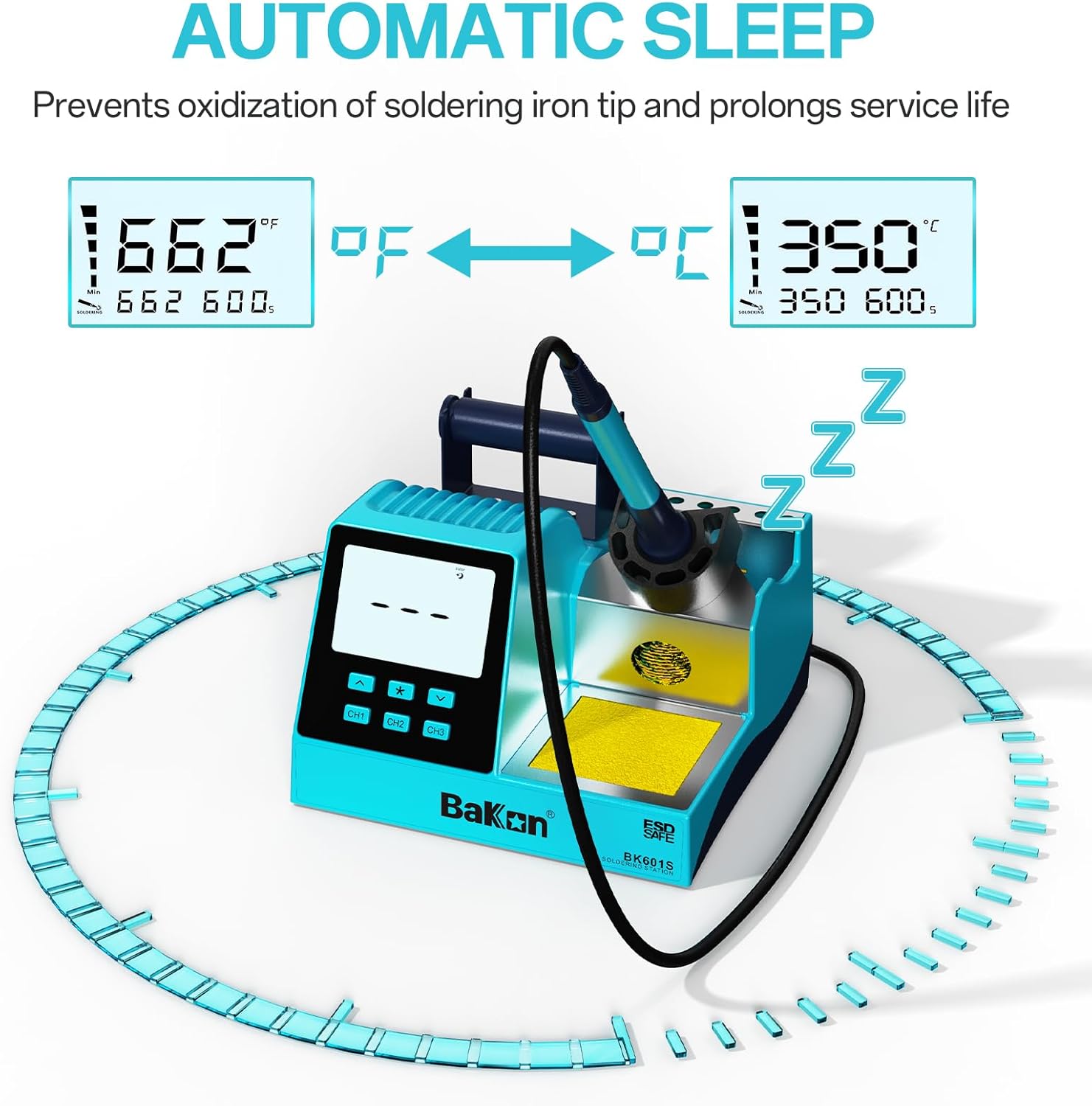
Figure 6.2: Display showing °F to °C conversion.
6.4 3 Preset Modes (CH1, CH2, CH3)
The station allows you to save three frequently used temperature settings for quick access:
- การตั้งค่าล่วงหน้า: Adjust the temperature to your desired value using the Up/Down keys. Then, press and hold the desired preset button (CH1, CH2, หรือ CH3) for more than 1 second until the display indicates the setting is saved.
- การเรียกคืนค่าที่ตั้งไว้ล่วงหน้า: เพียงแค่กดปุ่ม CH1, CH2, หรือ CH3 button to instantly switch to the saved temperature for that channel.
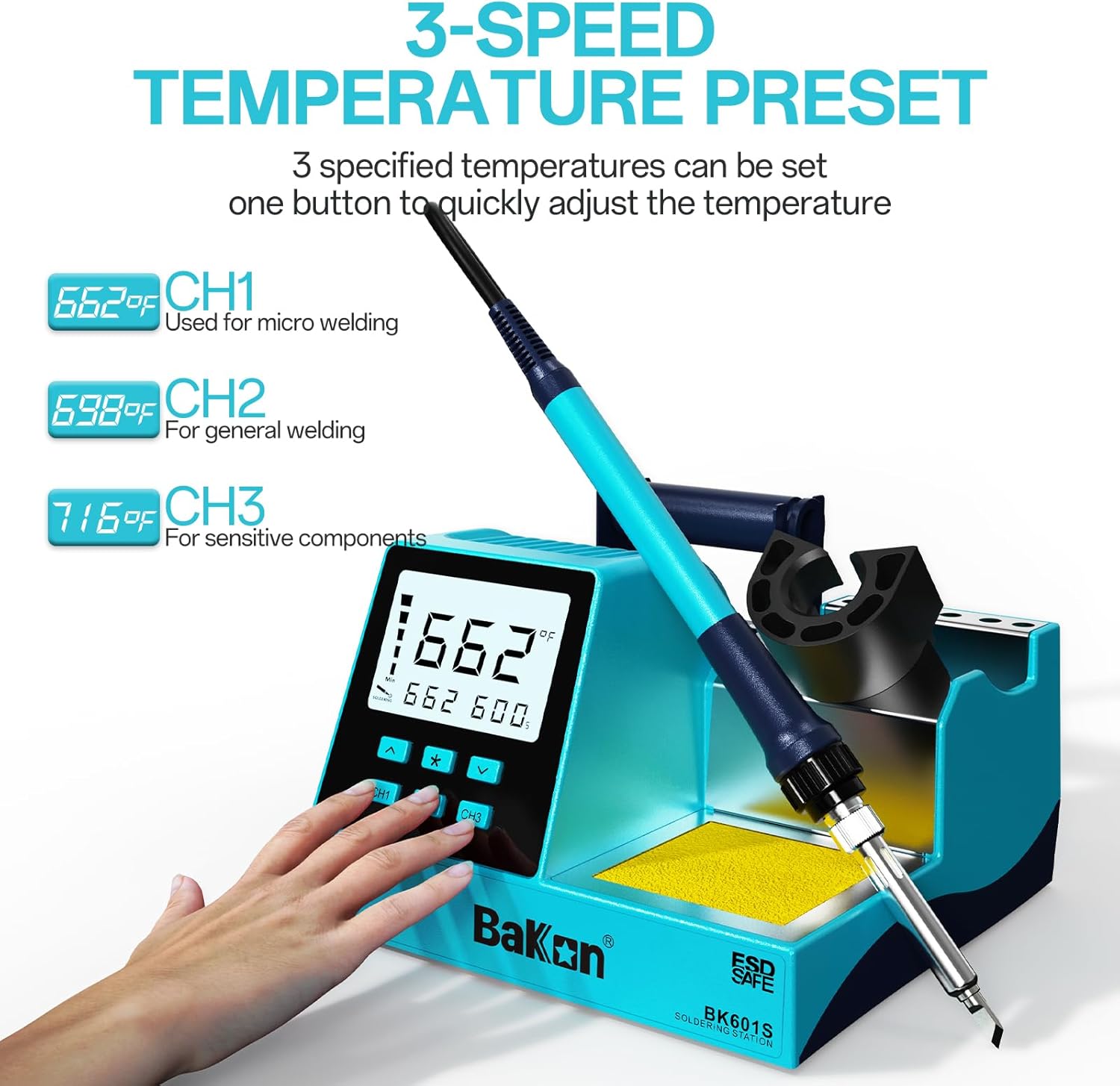
Figure 6.3: Three preset temperature channels for quick adjustment.

Figure 6.4: One-Key Quick Setting for CH1, CH2, CH3.
6.5 Automatic Standby and Sleep Modes
The station features intelligent standby and sleep modes to prolong the lifespan of the soldering iron tip and save energy:
- โหมดสแตนด์บาย: If the soldering iron is placed in its holder and not used for a set period (e.g., 60-600 seconds, configurable), the station will automatically reduce the tip temperature to a lower, safer level to prevent oxidation.
- Sleep Mode / Auto Wake: After a longer period of inactivity in standby mode, the station will enter a deeper sleep mode, further reducing power consumption. Picking up the soldering iron from its holder will automatically wake the station and quickly bring the tip back to the set operating temperature.

Figure 6.5: Sleep Mode and Auto Wake functionality.
6.6 Using the Desoldering Pump
The included desoldering pump is used to remove excess solder from components or circuit boards:
- เติมปั๊ม: Push the plunger down until it clicks into place.
- ละลายตะกั่วบัดกรี: Heat the solder joint you wish to desolder with the soldering iron until the solder melts.
- ใช้ปั๊ม: รีบนำหัวฉีดของปั๊มดูดตะกั่วไปวางเหนือตะกั่วหลอมเหลวแล้วกดปุ่มปล่อย ปั๊มจะสร้างสุญญากาศและดูดตะกั่วหลอมเหลวขึ้นมา
- Clear Pump: Push the plunger down again to expel the collected solder.
6.7 การเปลี่ยนหัวบัดกรี
Always ensure the soldering iron is cool before changing tips to avoid burns.
- คลายความร้อน: Turn off the soldering station and allow the iron tip to cool completely.
- คลายเกลียว: Carefully unscrew the threaded sleeve at the base of the soldering tip.
- ถอดหัวทิป: Gently pull out the old soldering tip.
- แทรกเคล็ดลับใหม่: Insert the desired new tip, ensuring it is fully seated.
- ปลอดภัย: Screw the threaded sleeve back on firmly.
7. การบำรุงรักษา
การบำรุงรักษาอย่างสม่ำเสมอจะช่วยให้เครื่องบัดกรีทำงานได้อย่างมีประสิทธิภาพสูงสุดและยืดอายุการใช้งานของเครื่องได้
7.1 Cleaning the Soldering Iron Tip
- ระหว่างการใช้งาน: เช็ดปลายร้อนบนกระดาษทรายเป็นระยะamp cleaning sponge or gently rub it against the brass wire ball to remove excess solder and oxidation.
- หลังการใช้งาน: Before turning off the station, apply a small amount of fresh solder to the tip (tinning). This protects the tip from oxidation as it cools.
7.2 Cleaning the Station
- Ensure the station is powered off and unplugged before cleaning.
- เช็ดทำความสะอาดภายนอกสถานีด้วยผ้าเนื้อนุ่มและแห้งamp ผ้า ห้ามใช้สารทำความสะอาดที่มีฤทธิ์กัดกร่อนหรือตัวทำละลาย
- Regularly clean the cleaning sponge tray and brass wire ball holder.
8 การแก้ไขปัญหา
If you encounter issues with your BAKON 601S Soldering Station, refer to the following common problems and solutions:
| ปัญหา | สาเหตุที่เป็นไปได้ | สารละลาย |
|---|---|---|
| หัวแร้งไม่ร้อน | Power switch off; power cord unplugged; faulty heating element or connection. | Ensure power switch is ON and cord is plugged in. Check connection of soldering iron to station. If problem persists, contact support. |
| หน้าจอแสดงอุณหภูมิแสดงผลผิดปกติหรือไม่แม่นยำ | Loose tip; faulty sensor; environmental factors. | Ensure tip is securely installed. Avoid drafts. If issue continues, contact support. |
| ตะกั่วบัดกรีไม่ละลายง่าย | Temperature set too low; oxidized tip. | Increase set temperature. Clean and re-tin the soldering tip. |
| ปั๊มดูดตะกั่วมีแรงดูดต่ำ | Nozzle clogged; plunger seal worn. | Clean the nozzle. Disassemble and clean the pump if necessary. |
9. ข้อมูลจำเพาะ
Technical specifications for the BAKON 601S Soldering Station Kit:
| คุณสมบัติ | ข้อมูลจำเพาะ |
|---|---|
| หมายเลขรุ่น | 601วินาที |
| วัดtage | 90 วัตต์ |
| เล่มที่tage | 110 โวลต์ (AC) |
| ช่วงอุณหภูมิ | 356°F ถึง 896°F (180°C ถึง 480°C) |
| ความคงตัวของอุณหภูมิ | ±400 degrees_celsius (PID controlled) |
| ประเภทจอภาพ | ดิจิตอล |
| คุณสมบัติพิเศษ | 3 Memory Channels, Sleep Mode, °C/°F Conversion, Lightweight |
| น้ำหนักสินค้า | 2.57 ปอนด์ |
| ขนาดแพ็คเกจ | 9.37 x 8.15 x 5.55 นิ้ว |
| ผู้ผลิต | BAKON |
10. การรับประกันและการสนับสนุน
Your BAKON 601S Soldering Station Kit comes with a สินค้ารับประกัน 1 ปี ตั้งแต่วันที่ซื้อสินค้า
For technical assistance, troubleshooting, or warranty claims, please contact BAKON's technical support team. They are available to provide 24-hour support to assist you with any questions or issues you may encounter.
Please refer to the product packaging or the official BAKON website for the most current contact information for customer service.