
PELONIS PSHC30DW6ABB
PELONIS 30-inch Smart Electric Space Heater Instruction Manual
Model: PSHC30DW6ABB
คำแนะนำด้านความปลอดภัยที่สำคัญ
Please read all instructions carefully before using this appliance and retain for future reference. Failure to follow these instructions may result in fire, electric shock, or injury.
- เสียบปลั๊กเครื่องทำความร้อนเข้ากับเต้ารับ/เต้ารับที่ผนังโดยตรงเสมอ ห้ามใช้กับสายไฟต่อหรือก๊อกน้ำแบบเปลี่ยนตำแหน่งได้ (เต้ารับ/รางปลั๊ก)
- เครื่องทำความร้อนนี้จะร้อนขณะใช้งาน เพื่อป้องกันการไหม้ ห้ามให้ผิวหนังสัมผัสพื้นผิวที่ร้อนโดยตรง ควรใช้ที่จับเมื่อเคลื่อนย้ายเครื่องทำความร้อนนี้
- วางวัสดุที่ติดไฟได้ เช่น เฟอร์นิเจอร์ หมอน เครื่องนอน กระดาษ เสื้อผ้า และผ้าม่านให้ห่างจากด้านหน้าเครื่องทำความร้อนอย่างน้อย 3 ฟุต (0.9 ม.) และวางให้ห่างจากด้านข้างและด้านหลัง
- จำเป็นต้องใช้ความระมัดระวังเป็นพิเศษเมื่อเด็กหรือผู้ป่วยใช้เครื่องทำความร้อน รวมถึงทุกครั้งที่ปล่อยให้เครื่องทำความร้อนทำงานและไม่มีใครดูแล
- ควรถอดปลั๊กเครื่องทำความร้อนทุกครั้งเมื่อไม่ได้ใช้งาน
- ห้ามใช้งานเครื่องทำความร้อนใดๆ กับสายไฟหรือปลั๊กที่ชำรุด หรือหลังจากที่เครื่องทำความร้อนทำงานผิดปกติ ตกหล่นหรือเสียหายในลักษณะใดๆ
- ห้ามใช้กลางแจ้ง เครื่องทำความร้อนนี้ออกแบบมาสำหรับใช้ภายในอาคารเท่านั้น
- หากต้องการตัดการเชื่อมต่อเครื่องทำความร้อน ให้เปิดตัวควบคุมไปที่ปิด จากนั้นถอดปลั๊กออกจากเต้ารับ
- ห้ามใส่หรือให้สิ่งแปลกปลอมเข้าไปในช่องระบายอากาศหรือช่องระบายอากาศ เนื่องจากอาจทำให้เกิดไฟฟ้าช็อต ไฟไหม้ หรือทำให้เครื่องทำความร้อนเสียหายได้
- เพื่อป้องกันไฟไหม้ที่อาจเกิดขึ้น ห้ามปิดกั้นช่องรับหรือระบายอากาศในลักษณะใดๆ ห้ามใช้บนพื้นผิวที่อ่อนนุ่ม เช่น เตียง เพราะช่องเปิดอาจถูกปิดกั้น
- This heater includes tip-over and overheat protection features for enhanced safety. If the heater tips over or overheats, it will automatically shut off.
- Constructed with UL94 V-0 flame-retardant materials to ensure unbreakable safety.
สินค้าเกินview
The PELONIS 30-inch Smart Electric Space Heater is designed to provide efficient and widespread warmth for large rooms. Featuring PTC ceramic heating technology, it delivers rapid and directional heat, capable of warming up to 300 sq ft quickly.

ด้านหน้า view of the PELONIS 30-inch Smart Electric Space Heater, showcasing its sleek tower design and digital display.
คุณสมบัติหลัก:
- Powerful and Wide Warmth: 2X heating efficiency with an enlarged 308mm PTC element for rapid warm-up in 3 seconds. 75° oscillation covers up to 300 sq ft.
- Smart Schedules on Your Phone: Control and schedule operation via the SmartHome App. Supports voice control with Alexa and Google Assistant.
- Expanded Heating Capabilities: Five heating modes (H1/H2/H3/ECO/Fan only) to suit various needs, including an ECO mode for energy saving.
- การควบคุมอุณหภูมิที่แม่นยำ: Set room temperature between 41-95°F with 1°F precision using a dedicated thermal sensor.
- ความปลอดภัยที่ครอบคลุม: ETL-listed with tip-over and overheat protection, enhanced safety plug, and UL94 V-0 flame-retardant materials.
- การทำงานที่เงียบเป็นพิเศษ: Operates at around 35dB, ideal for bedrooms and quiet workspaces.
การตั้งค่า
การแกะกล่อง:
Carefully remove the heater from its packaging. Ensure all components, including the user manual and remote control, are present and undamaged. Retain the packaging for future storage.
การจัดวาง:
Place the heater on a firm, level surface. Ensure there is at least 3 feet (0.9 m) of clear space around the heater to allow for proper airflow and to prevent fire hazards. Do not place the heater on soft surfaces like carpets or rugs that may block the air intake.

The PELONIS space heater positioned on a wooden floor in a living room, illustrating ideal placement away from furniture.
คำแนะนำการใช้งาน
แผงควบคุมและรีโมทคอนโทรล:
The heater can be operated using the touch controls on the top panel or the included remote control. The digital display shows the current temperature and selected mode.

รายละเอียด view of the heater's top control panel with digital display and touch buttons for various functions.
การเปิด/ปิดเครื่อง:
Press the power button on the control panel or remote to turn the heater on or off. The heater will start in the last used mode or a default setting.
ปรับอุณหภูมิ:
Use the '+' and '-' buttons on the control panel or remote to set your desired temperature. The temperature can be adjusted between 41°F and 95°F in 1°F increments.

An illustration highlighting the precise temperature control range of 41°F to 95°F with 1°F increments.
Selecting Heating Modes:
Cycle through the available heating modes using the Mode button: H1 (Low), H2 (Medium), H3 (High), ECO, and Fan Only. ECO mode automatically adjusts power consumption to maintain the set temperature, optimizing energy efficiency.
Visual representation of the five available heating modes: ECO, three heating levels (H1, H2, H3), and Fan only mode.
ฟังก์ชันการสั่น:
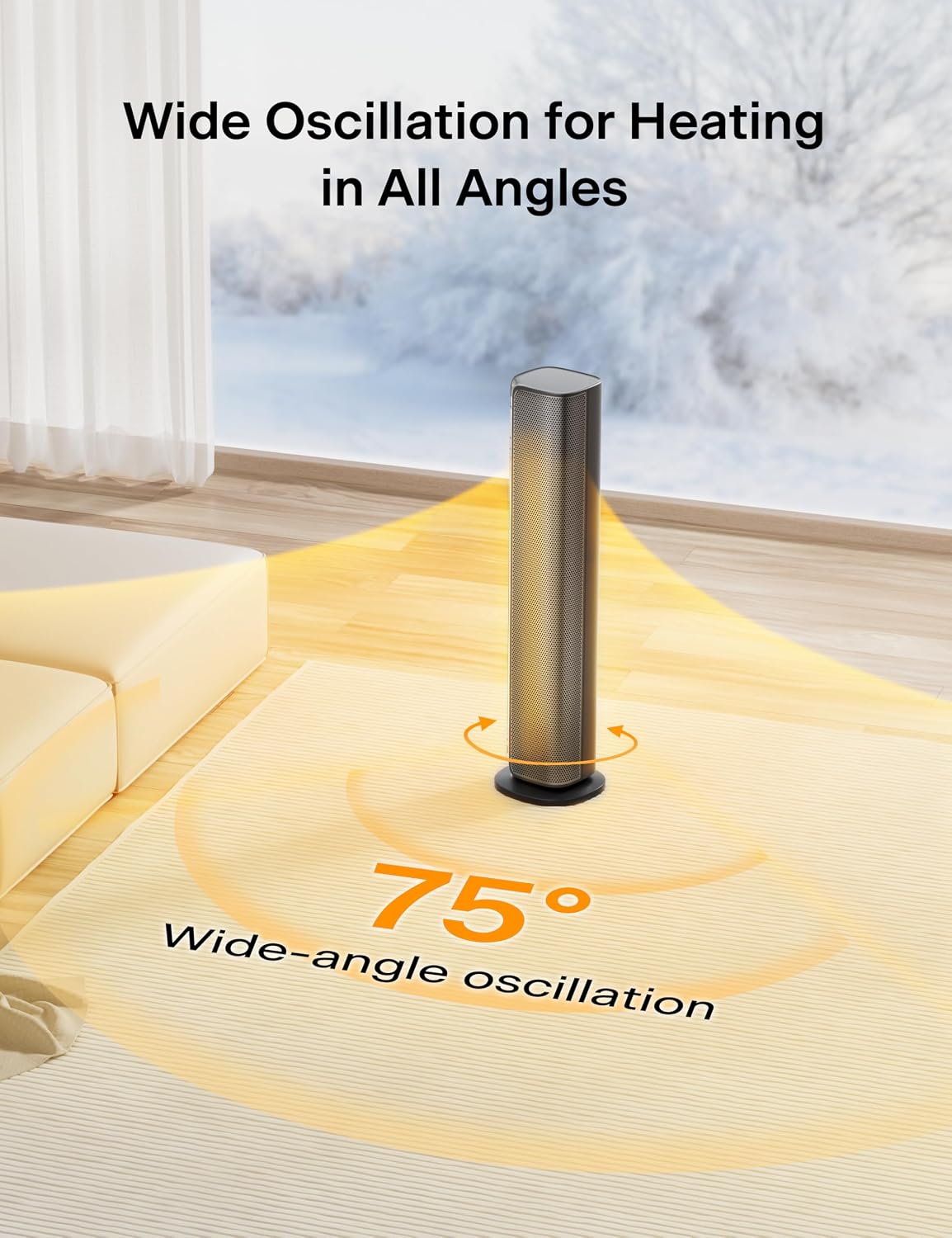
Activate the oscillation function to distribute heat across a wider area. The heater provides a 75° wide-angle oscillation for comprehensive room coverage.

ค่าใช้จ่ายทางอ้อม view illustrating the 75-degree wide-angle oscillation feature of the PELONIS space heater.
ฟังก์ชั่นจับเวลา:
Set the 24-hour timer to automatically turn the heater on or off at specified times, allowing for convenient and energy-efficient operation.

An image depicting the 24-hour timer function, allowing users to schedule operation.
การควบคุมอัจฉริยะ (แอปพลิเคชันและเสียง):
Download the SmartHome App to control your PELONIS heater remotely, set schedules, and monitor energy consumption. The heater is also compatible with Amazon Alexa and Google Assistant for convenient voice control.

An image showing the PELONIS heater being controlled via a smartphone app and voice commands through an Alexa device.
This video demonstrates the steps to connect your PELONIS Smart Space Heater with Amazon Alexa for voice control.
This video provides a guide on connecting your PELONIS Smart Space Heater to the SmartHome App for remote control and scheduling.
การซ่อมบำรุง
การทำความสะอาด:
- ถอดปลั๊กเครื่องทำความร้อนก่อนทำความสะอาดทุกครั้ง
- ใช้แบบนุ่มๆamp ผ้าสำหรับเช็ดพื้นผิวภายนอกของเครื่องทำความร้อน
- ห้ามใช้แอลกอฮอล์ น้ำมันเบนซิน ผงขัด ขัดเฟอร์นิเจอร์ หรือแปรงหยาบในการทำความสะอาดเครื่องทำความร้อน ซึ่งอาจทำให้พื้นผิวของเครื่องทำความร้อนเสียหายหรือเสื่อมสภาพได้
- ห้ามจุ่มเครื่องทำน้ำอุ่นลงในน้ำ
พื้นที่จัดเก็บ:
- หากจะเก็บเครื่องทำความร้อนไว้เป็นเวลานาน ควรทำความสะอาดอย่างทั่วถึง
- เก็บเครื่องทำความร้อนไว้ในที่แห้งและเย็น
- แนะนำให้เก็บเครื่องทำความร้อนไว้ในบรรจุภัณฑ์เดิมเพื่อป้องกันฝุ่นละอองและความเสียหาย
การแก้ไขปัญหา
If your PELONIS Space Heater is not operating correctly, please refer to the following common issues and solutions:
| ปัญหา | สาเหตุที่เป็นไปได้ / วิธีแก้ไข |
|---|---|
| เครื่องทำความร้อนไม่เปิด |
|
| ไม่มีความร้อนออก |
|
| ปัญหาการเชื่อมต่อ Wi-Fi |
|
| เครื่องทำความร้อนดับลงโดยไม่คาดคิด |
|
ข้อมูลจำเพาะ
| ข้อมูลจำเพาะ | รายละเอียด |
|---|---|
| ยี่ห้อ | เปโลนิส |
| หมายเลขรุ่น | PSHC30DW6ABB |
| ขนาดสินค้า | ลึก 7.5 นิ้ว x กว้าง 7.5 นิ้ว x สูง 30 นิ้ว (ลึก 19.05 ซม. x กว้าง 19.05 ซม. x สูง 76.2 ซม.) |
| น้ำหนักสินค้า | 7.78 ปอนด์ (3.53 กก.) |
| เล่มที่tage | 120 โวลต์ (AC) |
| ครอบคลุมความร้อน | สูงถึง 300 ฟุต² (27.87 ตร.ม.) |
| คุณสมบัติพิเศษ | Programmable Thermostat, Adjustable Temperature, Fast Heating, Oscillating, APP & Voice Control |
| ส่วนประกอบที่รวมอยู่ | PELONIS 30in Tower Heater, Remote Control, User Manual |
| ยูพีซี | 810049711870 |
การรับประกันและการสนับสนุน
PELONIS products are manufactured to the highest quality standards. For information regarding warranty coverage or technical support, please refer to the warranty card included with your product or visit the official PELONIS website. Please have your model number (PSHC30DW6ABB) and proof of purchase ready when contacting support.
Ask a question about this manual
Ask about setup, troubleshooting, compatibility, parts, safety, or missing instructions. Manuals+ will review the question and use this page’s manual context to help answer it.