1. บทนำ
This manual provides essential instructions for the safe operation, setup, and maintenance of your Generic Speed Pioneer Multi-Functional Stunt Cross-Country Robot, Model GHYD45. Please read this manual thoroughly before using the product to ensure proper function and to prevent damage.
The Speed Pioneer is a remote-controlled vehicle designed for performing various stunts and maneuvers, including 360-degree spins and double flips. It features a rugged design suitable for both indoor and outdoor use.
2. ข้อมูลด้านความปลอดภัย
WARNING: Not suitable for children under 3 years due to small parts. Adult supervision is recommended for all users.
- ผลิตภัณฑ์นี้ใช้สำหรับภายนอกเท่านั้น
- Keep hands, hair, and loose clothing away from moving parts when the vehicle is in operation.
- Do not operate the vehicle near water or in wet conditions to prevent electrical damage.
- Avoid operating the vehicle in crowded areas or near obstacles that could cause collisions or injury.
- ตรวจสอบให้แน่ใจว่าใส่แบตเตอรี่โดยให้ขั้วถูกต้อง ห้ามใช้แบตเตอรี่เก่าและใหม่ปะปนกัน หรือใช้แบตเตอรี่ต่างชนิดกัน
- ควรชาร์จแบตเตอรี่แบบชาร์จได้ภายใต้การดูแลของผู้ใหญ่เท่านั้น
- Do not attempt to modify or disassemble the product. This may cause damage and void the warranty.
3. เนื้อหาบรรจุภัณฑ์
ตรวจสอบว่ามีสินค้าทั้งหมดที่ระบุไว้ด้านล่างอยู่ในแพ็คเกจของคุณ:
- Speed Pioneer Stunt Cross-Country Robot (1 unit)
- Standard Remote Control (1 unit)
- Gesture Control Remote (1 unit)
- Rechargeable Lithium-Ion Battery (for robot) (1 unit)
- สายชาร์จ USB (1 ชิ้น)
- User Manual (this document) (1 unit)
Note: Batteries for the remote controls are not included and must be purchased separately.
4. สินค้าหมดview
Familiarize yourself with the main components and features of your Speed Pioneer Stunt Robot.

Figure 4.1: The Speed Pioneer Stunt Robot shown with the gesture control remote. The robot features a central body with four multi-directional wheels, designed for various terrains and stunt maneuvers.

Figure 4.2: Diagram illustrating key features of the RC Stunt Car, including 360-degree rotation, traverse movement, powerful wheels, parallel shift capability, durable construction, dual remote control options (standard and gesture), integrated music, and cool lighting effects.

รูปที่ 4.3: มิติ view of the Speed Pioneer Stunt Robot in both blue and red color variants. The robot measures approximately 295mm in length, 205mm in width, and 130mm in height.
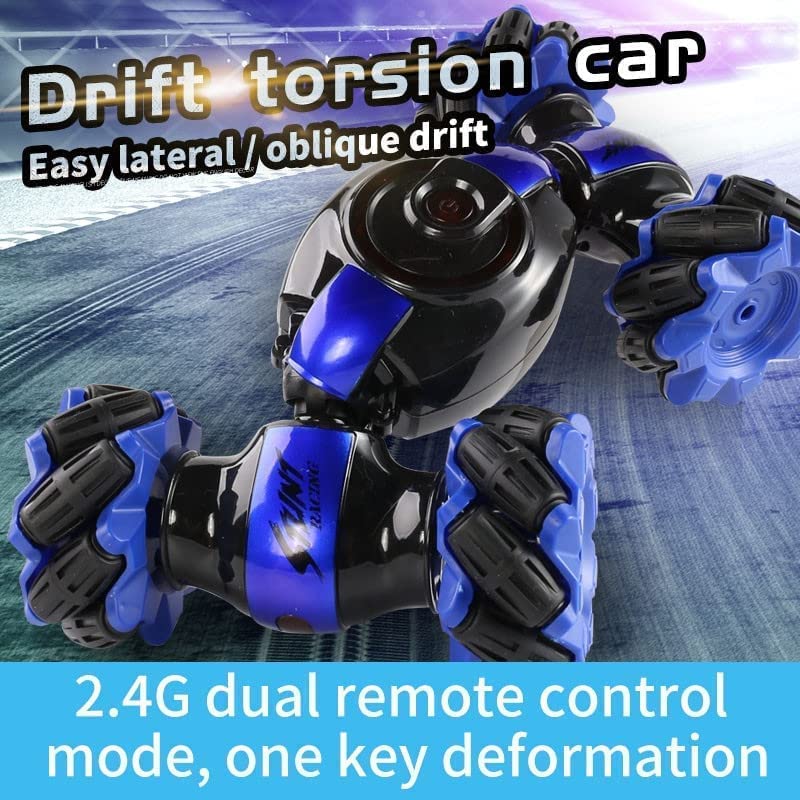
Figure 4.4: The robot demonstrating its drift torsion capability, allowing for easy lateral and oblique drifts. It highlights the 2.4G dual remote control mode and one-key deformation feature.
5. การตั้งค่า
5.1. Charging the Robot Battery
- Locate the charging port on the Speed Pioneer Stunt Robot.
- Connect the included USB charging cable to the robot's charging port.
- เสียบปลายอีกด้านของสาย USB เข้ากับแหล่งจ่ายไฟ USB ที่ใช้งานร่วมกันได้ (เช่น พอร์ต USB ของคอมพิวเตอร์ อะแดปเตอร์ติดผนัง USB)
- The charging indicator light on the robot will illuminate during charging and turn off or change color when fully charged. Refer to the robot's specific indicator behavior for details.
- Charging typically takes 2-3 hours. Do not overcharge the battery.
5.2. Installing Batteries in Remote Controls
Both the standard remote control and the gesture control remote require batteries (not included).
- Open the battery compartment on the back of each remote control.
- Insert the required batteries (typically AA or AAA, check the remote for specific type) ensuring correct polarity (+/-).
- ปิดช่องใส่แบตเตอรี่ให้แน่น
5.3. การจับคู่รีโมทคอนโทรล
Follow these steps to pair the remote controls with the robot:
- Ensure the robot's battery is charged and the remote controls have fresh batteries.
- Turn on the robot using its power switch.
- Turn on the desired remote control (standard or gesture).
- The remote control and robot should automatically pair. An indicator light on the remote may stop flashing or turn solid to confirm pairing.
- If pairing fails, turn off both the robot and the remote, then repeat the steps.
6. คู่มือการใช้งาน
Once paired, you can begin operating your Speed Pioneer Stunt Robot.
6.1. Standard Remote Control Functions
- ไปข้างหน้าไปข้างหลัง: Use the left joystick (or corresponding button) to move the robot forward or backward.
- เลี้ยวซ้าย/ขวา: Use the right joystick (or corresponding button) to steer the robot left or right.
- การหมุน 360 องศา: Specific button or combination of joystick movements for initiating a full rotation.
- Stunt/Deformation Button: Press to activate stunt modes or change the robot's configuration (e.g., for double flip).
- Music/Light Button: Toggles integrated music and LED lights.
6.2. Gesture Control Remote Functions
The gesture control remote allows for intuitive control through hand movements.
- ไปข้างหน้าไปข้างหลัง: เอียงมือไปข้างหน้าหรือข้างหลัง
- เลี้ยวซ้าย/ขวา: เอียงมือไปทางซ้ายหรือขวา
- Lateral Movement (Traverse/Parallel Shift): Specific hand gestures may enable sideways movement. Refer to the remote's specific instructions for detailed gestures.
- การเปิดใช้งานการแสดงผาดโผน: Certain hand movements or button presses on the gesture remote can trigger stunts like 360-degree spins or double flips.
Practice with the gesture remote in an open area to become familiar with its controls.
6.3. การแสดงท่าทางผาดโผน
- การหมุน 360 องศา: The robot can perform full spins in place.
- Double Flip Design: The unique design allows the robot to flip over and continue operating on either side.
- Drift Torsion: Execute lateral and oblique drifts for dynamic movement.
7. การบำรุงรักษา
- การทำความสะอาด: Use a soft, dry cloth to wipe down the robot and remote controls. Do not use water or cleaning solvents.
- พื้นที่จัดเก็บ: Store the robot and accessories in a cool, dry place away from direct sunlight when not in use.
- การดูแลแบตเตอรี่
- Remove batteries from remote controls if the product will not be used for an extended period.
- Do not leave the robot's rechargeable battery fully discharged for long periods. Charge it periodically.
- การตรวจสอบ: Regularly check for any loose parts, damaged wires, or other signs of wear and tear. Discontinue use if damage is found.
8 การแก้ไขปัญหา
| ปัญหา | สาเหตุที่เป็นไปได้ | สารละลาย |
|---|---|---|
| หุ่นยนต์ไม่เปิด | Battery is discharged or not connected. | Charge the robot's battery. Ensure the battery is properly connected. |
| รีโมทคอนโทรลไม่ตอบสนอง | Remote control batteries are low or incorrectly installed. Not paired. | Replace remote control batteries. Check polarity. Re-pair the remote with the robot (see Section 5.3). |
| Robot moves erratically or slowly. | Low robot battery. Interference. Damaged wheels. | Recharge the robot's battery. Move to an area with less interference. Inspect wheels for damage. |
| Stunts are not performing correctly. | Insufficient power. Incorrect control input. | Ensure battery is fully charged. Review operating instructions for correct stunt commands. |
9. ข้อมูลจำเพาะ
- แบบอย่าง: GHYD45
- ยี่ห้อ: ทั่วไป
- วัสดุ: พลาสติก
- สี: Blue (as per product images)
- ขนาดผลิตภัณฑ์ (ยาวxกว้างxสูง): 30 x 10 x 12 ซม. (ประมาณ 295 x 205 x 130 มม.)
- น้ำหนักสินค้า: 700 กรัม
- Battery Type (Robot): ลิเธียมไออน (ชาร์จไฟได้)
- อายุที่แนะนำ: อายุ 6 ปีขึ้นไป
- ความถี่ควบคุม: 2.4 กิกะเฮิรตซ์
10. การรับประกันและการสนับสนุน
This product is manufactured by Urban toys & Gifts. For any questions, technical support, or warranty inquiries, please contact your retailer or the manufacturer directly.
โปรดเก็บหลักฐานการซื้อไว้เพื่อใช้ในกรณีเรียกร้องการรับประกัน