
1. สินค้าหมดview
The GEYA GPS8-01-U-40A is an AC220V Din Rail mounted overvoltagอีและอันเดอร์โวลtage protective device designed for household equipment. It provides essential protection against voltage fluctuations, ensuring the safety and longevity of connected appliances. This device features real-time voltage monitoring, self-reset capabilities after a fault, and clear LED indicators for fault status.

ภาพที่ 1.1: ด้านหน้า view of the GEYA GPS8-01 Overvoltagอีอันเดอร์โวลtage Protective Device.
2. ข้อมูลด้านความปลอดภัย
Please read this manual carefully before installation and operation. Incorrect installation or use may result in electric shock, fire, or damage to the device and connected equipment. Always adhere to local electrical codes and standards.
- การติดตั้งควรทำโดยบุคลากรที่มีคุณสมบัติเหมาะสมเท่านั้น
- Ensure the main power supply is disconnected before any wiring or maintenance.
- ห้ามใช้งานอุปกรณ์หากอุปกรณ์ชำรุดหรือทำงานผิดปกติ
- Verify correct wiring connections to prevent short circuits or improper operation.
- ควรเก็บอุปกรณ์ให้ห่างจากความชื้น ฝุ่นละออง และสภาพแวดล้อมที่มีฤทธิ์กัดกร่อน
3. คุณสมบัติของผลิตภัณฑ์
- เล่มที่tage (True RMS) monitoring and protection.
- ปรับระดับโอเวอร์โวลได้tagอีและอันเดอร์โวลtagค่าอี
- Double bus wiring design for enhanced capability.
- Automatic reset after fault conditions.
- จอแสดงผลดิจิตอลสำหรับ voltage values and LED indicators for fault status.
- Compact 1-MODULE design for DIN rail mounting.
4. การตั้งค่าและการติดตั้ง
4.1 แผนผังการเดินสายไฟ
The GPS8-01 device supports both upper and down wiring configurations. Ensure the neutral (N) and incoming line (IN) connections are correctly made as per the diagram below.

Image 4.1: Comparison of upper and down wiring for GPS8-01 and GPS8-02 models. For GPS8-01, connect N to N and IN to 1 for upper incoming line, and N to N and IN to 1 for down incoming line.
4.2 ขั้นตอนการติดตั้ง
- Mount the device onto a standard DIN rail.
- Connect the incoming neutral (N) and live (IN) wires to the corresponding terminals on the device.
- Connect the load wires (neutral and live) from the device's output terminals to the equipment requiring protection.
- Ensure all connections are secure and tightened appropriately.
- เมื่อเดินสายเสร็จแล้ว ให้จ่ายไฟกลับเข้าสู่วงจร
Video 4.2: Demonstration of connecting the GEYA protective device to a load and power supply. The video illustrates accessing the load, connecting to the power supply, and turning on electricity to show the device's operation.
5. คู่มือการใช้งาน
5.1 Panel Diagram and Indicators
The device features a digital display and LED indicators to show operating status and fault conditions.
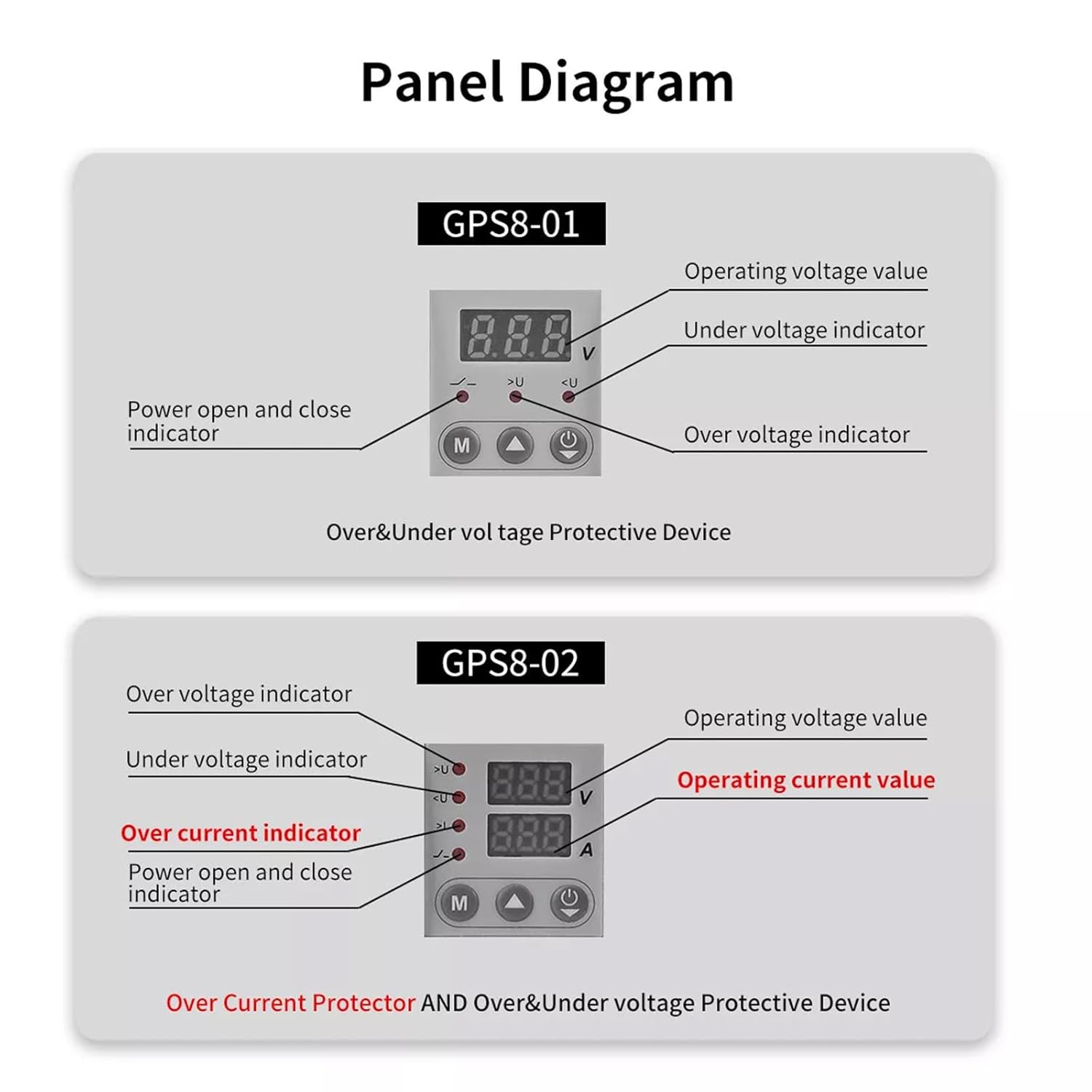
Image 5.1: Panel layout for GPS8-01 and GPS8-02. GPS8-01 displays operating voltage ภายใต้ voltage indicator, over voltage indicator, and power open/close indicator. GPS8-02 adds over current indicator and operating current value.
- ปฏิบัติการฉบับที่tage มูลค่า: แสดงฉบับปัจจุบันtage.
- มากกว่าVoltage Indicator (>U): Lights up when overvoltagตรวจพบเงื่อนไข e
- ภายใต้ฉบับtage Indicator (
- Power Open and Close Indicator: ระบุสถานะพลังงานของอุปกรณ์
5.2 การตั้งค่าพารามิเตอร์
To adjust the protection parameters, press and hold the 'M' button for 3 seconds to enter the parameter setting interface. Use the up and down arrow buttons to navigate and adjust values. Short presses of the arrow buttons can quickly add and drop parameters. If no key is operated for 60 seconds, the device will automatically exit the setting mode.

Image 5.2: Parameter setting flow for GPS8-01 and GPS8-02. For GPS8-01, settings include Overvoltage (230V-300V), Undervoltage (145V-210V), and Reset Time (2s-900s).
GPS8-01 Adjustable Parameters:
- โอเวอร์โวลtage การตั้งค่า: Range 230V-300V (Factory default: 275V).
- อันเดอร์โวลtage การตั้งค่า: Range 145V-210V (Factory default: 175V).
- Reset Time Setting: Range 2s-900s (Time before the device automatically resets after a fault).
6. ขนาด
The compact design of the GPS8-01 allows for easy integration into electrical panels.
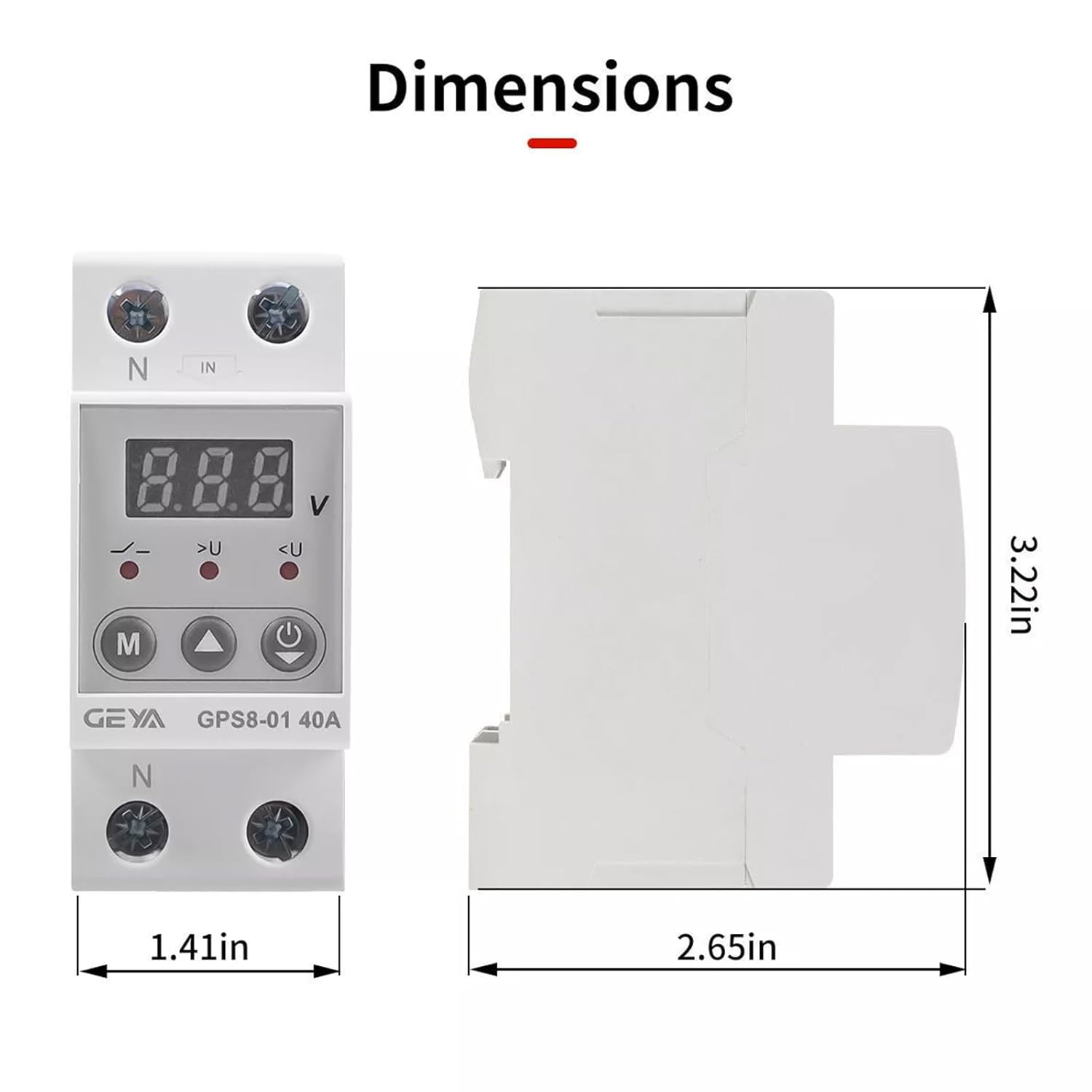
Image 6.1: Dimensions of the GEYA GPS8-01 device. Width: 1.41in (36mm), Height: 3.22in (82mm), Depth: 2.65in (68mm).
7. ข้อมูลจำเพาะทางเทคนิค
Detailed technical parameters for the GEYA GPS8-01 protective device.
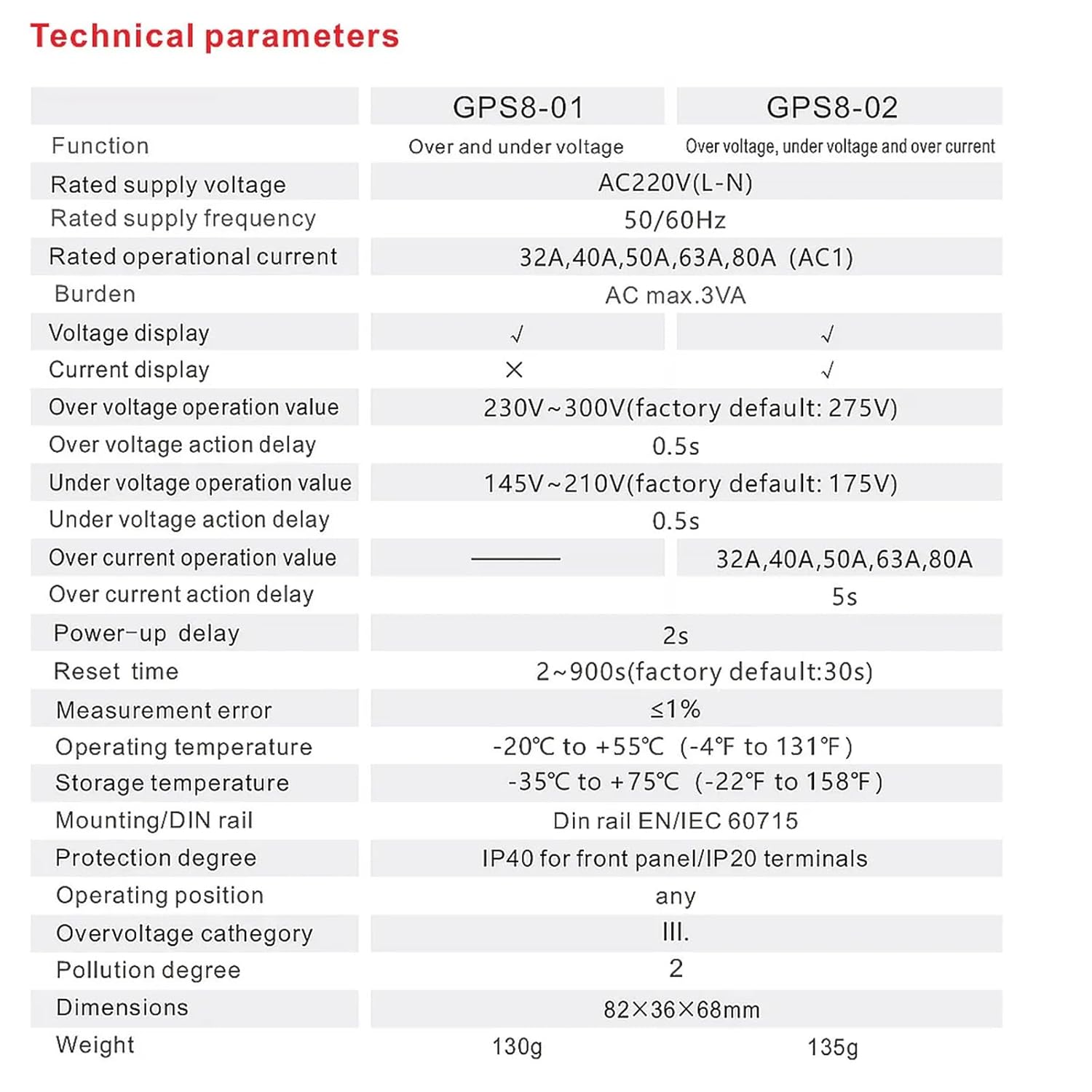
Image 7.1: Technical specifications table comparing GPS8-01 and GPS8-02 models.
| พารามิเตอร์ | GPS8-01 (Over and Under Voltage) |
|---|---|
| จัดอันดับอุปทานvoltage | AC220V (L-N) |
| จัดอันดับความถี่การจ่ายไฟ | 50/60เฮิรตซ์ |
| จัดอันดับการดำเนินงานปัจจุบัน | 32A, 40A, 50A, 63A, 80A (AC1) |
| ภาระ | กำลังไฟ AC สูงสุด 3VA |
| เล่มที่tagอี ดิสเพลย์ | ✓ |
| การแสดงผลปัจจุบัน | ✗ |
| มากกว่า voltage operation value | 230V~300V (factory default: 275V) |
| มากกว่า voltage action delay | 0.5วินาที |
| ภายใต้ฉบับtage operation value | 145V~210V (factory default: 175V) |
| ภายใต้ฉบับtage action delay | 0.5วินาที |
| Over current operation value | - |
| Over current action delay | - |
| Power-up delay | 2s |
| รีเซ็ตเวลา | 2~900s (factory default: 30s) |
| ข้อผิดพลาดในการวัด | ≤1% |
| อุณหภูมิในการทำงาน | -20°C ถึง +55°C (-4°F ถึง 131°F) |
| อุณหภูมิในการเก็บรักษา | -35°C ถึง +75°C (-22°F ถึง 158°F) |
| การติดตั้ง/ราง DIN | ราง DIN EN/IEC 60715 |
| ระดับการป้องกัน | IP40 สำหรับแผงด้านหน้า/เทอร์มินอล IP20 |
| ตำแหน่งการทำงาน | ใดๆ |
| โอเวอร์โวลtage หมวดหมู่ | สาม. |
| ระดับมลพิษ | 2 |
| ขนาด | 82×36×68มม. |
| น้ำหนัก | 130กรัม |
8 การแก้ไขปัญหา
If the device is not functioning as expected, consider the following:
- ไม่มีจอแสดงผล/พลังงาน: Check the main power supply and ensure all wiring connections are secure.
- การสะดุดล้มบ่อยครั้ง: Verify that the set overvoltage/อันเดอร์โวลtage thresholds are appropriate for your electrical system. Excessive voltage fluctuations in your area might require consultation with an electrician.
- Device Not Resetting: Check the 'Reset Time Setting' parameter. If the fault condition persists, the device will not reset until the condition is cleared.
- Vol .ไม่ถูกต้องtagอี การอ่าน: Ensure proper wiring and that the device is correctly rated for your supply voltage.
For issues not resolved by these steps, contact qualified technical support.
9. การบำรุงรักษา
The GEYA GPS8-01 device requires minimal maintenance. Regular checks can help ensure optimal performance:
- ตรวจสอบอุปกรณ์เป็นระยะเพื่อดูว่ามีร่องรอยความเสียหายหรือการเชื่อมต่อหลวมหรือไม่
- รักษาอุปกรณ์ให้สะอาด ปราศจากฝุ่นและสิ่งสกปรก ใช้ผ้าแห้งนุ่มๆ ในการทำความสะอาด
- ห้ามใช้น้ำยาทำความสะอาดที่มีฤทธิ์กัดกร่อนหรือตัวทำละลาย
10. การรับประกันและการสนับสนุน
GEYA products are manufactured to high-quality standards. For warranty information and technical support, please refer to the official GEYA webหรือติดต่อตัวแทนจำหน่ายในพื้นที่ของคุณ เก็บใบเสร็จรับเงินไว้เป็นหลักฐานการซื้อ