
การแนะนำ
This manual provides detailed instructions for the operation and maintenance of the WOYO PL007 CAN LIN PWM Tester. This device is designed for automotive diagnostic applications, enabling the analysis of CAN Bus, LIN Bus, and PWM signals. Understanding the functions and proper usage of this tool will ensure accurate diagnostics and extend its lifespan.
สินค้าเกินview
คุณสมบัติหลัก
The WOYO PL007 is a portable diagnostic tool with the following key features:
- Automatic recognition of CAN-H and CAN-L lines.
- Supports a wide range of CAN Bus baud rates: 50, 83, 100, 125, 150, 200, 250, 300, 400, 500, 666, 800, 1000kbps.
- Reads LIN Bus baud rates: 2400, 4800, 9600, 14400, 19200bps.
- Detects PWM signals up to 20V.
- อนุญาติ viewing of standard frame ID data.

Figure 1: WOYO PL007 Tester with key features highlighted, including CAN, LIN, and PWM testing capabilities.
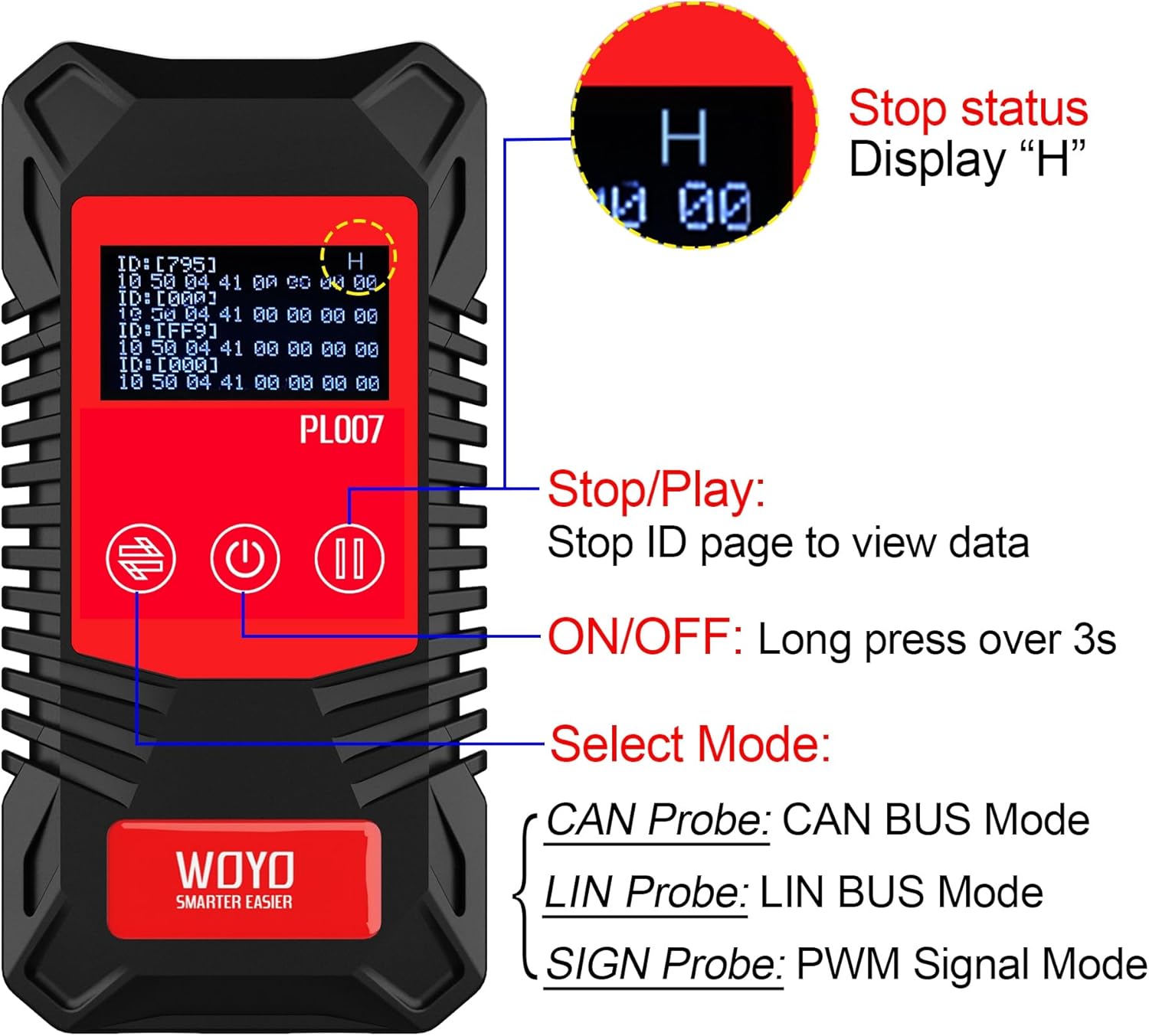
รูปที่ 2 : ด้านหน้า view of the WOYO PL007, illustrating the Stop/Play, ON/OFF, and Mode Select buttons. The display shows data frames.
การตั้งค่า
แหล่งจ่ายไฟ
The WOYO PL007 tester requires a 9V battery for operation. The battery is not included in the package.
- ค้นหาช่องใส่แบตเตอรี่ที่ด้านหลังของอุปกรณ์
- เปิดฝาช่องใส่แบตเตอรี่
- Insert a 9V battery, ensuring correct polarity.
- ปิดฝาช่องใส่แบตเตอรี่ให้แน่น

รูปที่ 3: ด้านหลัง view of the WOYO PL007, illustrating the 9V battery compartment. A 9V battery is required for operation.
การเชื่อมต่อโพรบ
The device uses standard 4.0mm banana plugs for connecting probes.

รูปที่ 4: ด้านบน view of the WOYO PL007, indicating the input ports for 4mm banana plugs.
คำแนะนำการใช้งาน
การดำเนินงานทั่วไป
- เปิด/ปิดเครื่อง: Long press the power button (labeled with a circle and vertical line) for over 3 seconds to turn the device on or off.
- การเลือกโหมด: Use the mode select button (labeled with two arrows) to cycle through CAN, LIN, and PWM modes.
- หยุด/เล่น: In data display modes, press the Stop/Play button (labeled with two vertical lines) to pause the data stream and view specific ID pages. A 'H' will be displayed when paused.
โหมด CAN Bus
In CAN Bus mode, the device automatically recognizes the direction of CAN-H and CAN-L lines and detects the baud rate.
- Connect the CAN probes to the respective CAN-H and CAN-L lines of the vehicle's CAN bus. The device will automatically identify which probe is connected to CAN-H and CAN-L.
- The display will show the detected baud rate (e.g., 500kbps) and the identified CAN-H and CAN-L connections.
- If communication is normal, the baud rate will be displayed. If the connection is broken or no data is present, no baud rate will be shown.
- ถึง view specific standard frame ID data, press the Stop/Play button to pause the display.

Figure 5: The WOYO PL007 in CAN Mode, demonstrating connection to a vehicle's CAN bus. The display shows the detected baud rate and CAN-L/CAN-H identification.
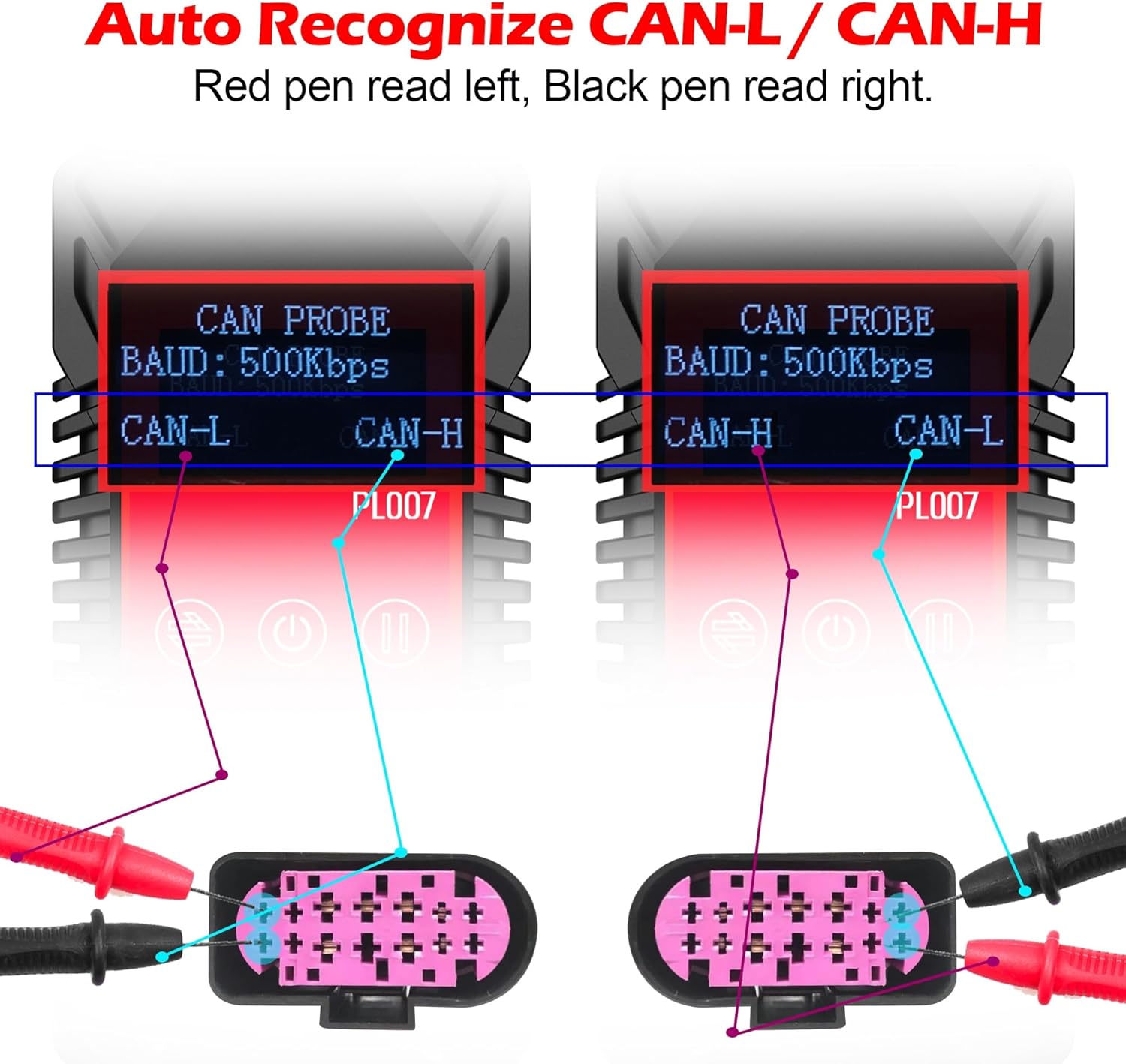
Figure 6: Illustration of the WOYO PL007's automatic CAN-L/CAN-H recognition feature, showing how the device adapts to probe connections.
Video 1: Demonstrates the WOYO PL007 CAN Bus testing functionality, including automatic recognition of CAN-H and CAN-L.
LIN Bus Mode
For LIN Bus testing, ensure correct probe connection to LIN and Ground (GND).
- Connect the red probe to the LIN line and the black probe to the GND line.
- The device will display the detected LIN Bus baud rate.
- Similar to CAN mode, if communication is normal, the baud rate will be shown. If no data is present, the baud rate will not be displayed.
- Use the Stop/Play button to pause the data stream and examine specific ID data.

Figure 7: The WOYO PL007 in LIN Mode, demonstrating correct probe connection to LIN and GND lines. The display shows the detected LIN baud rate.
PWM Signal Mode
The PWM Signal mode is used to detect Pulse Width Modulation signals.
- Connect the red probe to the signal line and the black probe to the GND line.
- The device will display the detected PWM signal, including its voltage.
- The maximum detectable voltage for PWM signals is 20V.

Figure 8: The WOYO PL007 in PWM Signal Mode, showing probe connection to a signal line and GND. The display indicates the detected PWM signal and voltage.
Video 2: A comprehensive guide on how to use the WOYO PL007 CAN LIN PWM Tester for various diagnostic tasks.
การซ่อมบำรุง
To ensure the longevity and accurate performance of your WOYO PL007 tester, follow these maintenance guidelines:
- การทำความสะอาด: เช็ดอุปกรณ์ด้วยผ้านุ่มและแห้ง ห้ามใช้น้ำยาทำความสะอาดที่มีฤทธิ์กัดกร่อนหรือตัวทำละลาย
- พื้นที่จัดเก็บ: เก็บอุปกรณ์ไว้ในที่แห้งและเย็น หลีกเลี่ยงแสงแดดโดยตรงและอุณหภูมิที่สูงหรือต่ำเกินไป
- แบตเตอรี่: Remove the 9V battery if the device will not be used for an extended period to prevent battery leakage.
- โพรบ: Inspect probes and cables regularly for any signs of wear or damage. Replace damaged components immediately.
การแก้ไขปัญหา
If you encounter issues with your WOYO PL007 tester, refer to the following common troubleshooting steps:
- อุปกรณ์ไม่เปิดเครื่อง:
- Ensure the 9V battery is correctly installed and has sufficient charge.
- Verify that the power button is pressed and held for over 3 seconds.
- No baud rate displayed in CAN/LIN mode:
- Check all probe connections to ensure they are secure and correctly connected to the respective communication lines and ground.
- Verify that the vehicle's communication bus is active and transmitting data.
- Ensure the correct mode (CAN or LIN) is selected on the device.
- Incorrect PWM signal reading:
- Confirm that the red probe is connected to the signal line and the black probe to ground.
- Ensure the signal voltage ไม่เกิน 20V.
- Display shows 'H' and data is static:
- This indicates the data stream is paused. Press the Stop/Play button to resume real-time data display.
ข้อมูลจำเพาะ
| คุณสมบัติ | รายละเอียด |
|---|---|
| ยี่ห้อ | โวโย |
| แบบอย่าง | PL007 (also referred to as PL017) |
| แหล่งพลังงาน | แบตเตอรี่ 9V (ไม่รวม) |
| CAN Bus Baud Rate Range | 50, 83, 100, 125, 150, 200, 250, 300, 400, 500, 666, 800, 1000kbps |
| LIN Bus Baud Rate Range | 2400, 4800, 9600, 14400, 19200 บิตต่อวินาที |
| PWM Signal Detection | < 20 โวลต์ |
| น้ำหนักสินค้า | 0.16 กิโลกรัม |
| ขนาดรายการ (ยาว x กว้าง x สูง) | 4.33 x 1.97 x 1.18 นิ้ว (11.00 x 5.00 x 3.00 ซม.) |
| อุปกรณ์ที่รองรับ | Vehicles and devices with CAN, LIN, or PWM communication capabilities |
| ส่วนประกอบที่รวมอยู่ | ผู้ทดสอบหลัก |
Note: The model number PL017 is an equivalent to PL007, with identical functionality.
การรับประกันและการสนับสนุน
ข้อมูลการรับประกัน
The WOYO PL007 CAN LIN PWM Tester comes with a รับประกัน 1 เดือน นับจากวันที่ซื้อ การรับประกันนี้ครอบคลุมข้อบกพร่องจากการผลิตและการทำงานผิดปกติภายใต้การใช้งานปกติ โปรดเก็บหลักฐานการซื้อไว้เพื่อขอรับสิทธิ์การรับประกัน
การสนับสนุนลูกค้า
For technical assistance, troubleshooting, or warranty inquiries, please contact WOYO customer support. Refer to the official WOYO webเว็บไซต์หรือเอกสารการซื้อของคุณสำหรับรายละเอียดการติดต่อ
Manufacturer: WOYO SMART