
การแนะนำ
The Zoom ZDM-1 Podcast Mic Pack is a comprehensive solution designed for high-quality audio recording and streaming. This pack includes the ZDM-1 dynamic microphone, ZHP-1 over-ear headphones, a TPS-4 tabletop tripod stand, a custom windscreen, and an XLR cable. This manual provides detailed instructions for setting up, operating, and maintaining your ZDM-1 Podcast Mic Pack to ensure optimal performance.

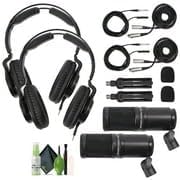
Image: The complete Zoom ZDM-1 Podcast Mic Pack, showcasing the microphone, headphones, and tripod.
มีอะไรอยู่ในกล่อง
ตรวจสอบว่ามีรายการทั้งหมดต่อไปนี้รวมอยู่ในแพ็คเกจของคุณ:
- ไมโครโฟนไดนามิก ZDM-1
- ZHP-1 Over-Ear Headphones
- TPS-4 Tabletop Tripod Stand
- Custom Windscreen
- 2-Meter XLR Cable
- Cleaning Kit (if included in your specific bundle)

Image: All components of the ZDM-1 Podcast Mic Pack, including the microphone, headphones, tripod, windscreen, and XLR cable.
คู่มือการติดตั้ง
- Assemble the TPS-4 Tripod Stand:
Unfold the legs of the TPS-4 tabletop tripod stand. Ensure it is stable on a flat surface. The stand features a universal 5/8"-27 thread for microphone attachment.
- Attach the ZDM-1 Microphone:
Carefully screw the ZDM-1 dynamic microphone onto the 5/8"-27 thread of the TPS-4 tripod stand. Ensure it is securely fastened but do not overtighten. The microphone includes an integrated pivot mount for angle adjustment.

Image: The ZDM-1 microphone securely attached to the TPS-4 tabletop tripod stand.
- ติดตั้งกระจกหน้ารถ:
Gently slide the custom windscreen over the head of the ZDM-1 microphone. This helps reduce plosive sounds (P, B, T, K) and breath noise during recording.

Image: The ZDM-1 microphone with its custom windscreen in place.
- เชื่อมต่อสาย XLR:
Connect one end of the provided 2-meter XLR cable to the XLR output port at the base of the ZDM-1 microphone. Connect the other end of the XLR cable to an audio interface, mixer, or portable recorder that provides an XLR input.
- Connect the ZHP-1 Headphones:
Plug the 3.5mm (1/8-inch) stereo mini-jack of the ZHP-1 headphones into the headphone output of your audio interface, mixer, or recording device. If your device has a 6.35mm (1/4-inch) jack, use an appropriate adapter (not included).

Image: The ZHP-1 over-ear headphones, ready for connection.
คำแนะนำการใช้งาน
Using the ZDM-1 Microphone
- ตำแหน่งการวางไมโครโฟน: Position the ZDM-1 microphone approximately 6-12 inches (15-30 cm) from your mouth for optimal vocal capture. The supercardioid polar pattern is designed to pick up sound primarily from the front, minimizing off-axis noise. Experiment with distance to find the best sound for your voice and environment.
- การตั้งค่าเกน: Adjust the input gain on your audio interface or mixer. Start with the gain low and gradually increase it while speaking into the microphone at your normal volume. Aim for a strong signal level without clipping (distortion). Most digital audio workstations (DAWs) or interfaces have meters to help you monitor this.
- Using the Windscreen: Keep the custom windscreen on the microphone to effectively reduce plosives and breath sounds, especially when speaking close to the microphone.
Using the ZHP-1 Headphones
- การตรวจสอบเสียง: The ZHP-1 headphones provide accurate and neutral sound reproduction for monitoring your recordings. Adjust the headphone volume on your audio interface or mixer to a comfortable listening level.
- ความสบายและความพอดี: The ZHP-1 features a self-adjusting headband and rotatable earcups for a comfortable fit during extended sessions. The closed-back design helps isolate sound, preventing leakage into your microphone.
การซ่อมบำรุง
- การทำความสะอาดไมโครโฟน: Use a soft, dry cloth to wipe down the body of the ZDM-1 microphone. For the grille, a soft brush can be used to remove dust. Do not use liquid cleaners directly on the microphone.
- การทำความสะอาดหูฟัง: Wipe the earcups and headband of the ZHP-1 headphones with a soft, slightly damp cloth. Avoid getting moisture into the speaker drivers. The leatherette earpads are replaceable if they become worn.
- การดูแลกระจกหน้ารถ: The foam windscreen can be gently hand-washed with mild soap and water, then allowed to air dry completely before reattaching to the microphone.
- พื้นที่จัดเก็บ: When not in use, store the ZDM-1 Podcast Mic Pack components in a clean, dry place, away from extreme temperatures and humidity. Disconnecting cables and storing them neatly can prolong their lifespan.
ภาพ: อดีตample of a cleaning kit that can be used for maintenance.
การแก้ไขปัญหา
| ปัญหา | สาเหตุที่เป็นไปได้ | สารละลาย |
|---|---|---|
| ไม่มีเสียงออกจากไมโครโฟน |
|
|
| Poor sound quality (e.g., muffled, distorted) |
|
|
| ไม่มีเสียงออกจากหูฟัง |
|
|
ข้อมูลจำเพาะ
ไมโครโฟนไดนามิก ZDM-1
- พิมพ์: พลวัต
- รูปแบบขั้ว: ซุปเปอร์คาร์ดิออยด์
- การตอบสนองความถี่: 50 เฮิรตซ์ - 18 กิโลเฮิรตซ์
- SPL สูงสุด: 135 เดซิเบล
- การเชื่อมต่อ: เอ็กซ์แอลอาร์
- คุณสมบัติพิเศษ: Large-diaphragm, internal shockmount, humbucking circuit
ZHP-1 Over-Ear Headphones
- พิมพ์: ด้านหลังปิดสนิท ไดนามิก
- ไดรเวอร์: นีโอไดเมียม
- การตอบสนองความถี่: 10 เฮิรตซ์ - 20 กิโลเฮิรตซ์
- การเชื่อมต่อ: 3.5mm (1/8-inch) stereo mini-jack (detachable cable)
- คุณสมบัติพิเศษ: Self-adjusting headband, rotatable earcups, replaceable earpads
TPS-4 Tabletop Tripod Stand
- การก่อสร้าง: โลหะ
- ด้าย: 5/8"-27 (universal)
- ปรับความสูง: 3.85 ถึง 5 นิ้ว
การรับประกันและการสนับสนุน
For specific warranty information regarding your Zoom ZDM-1 Podcast Mic Pack, please refer to the warranty card included with your product or visit the official Zoom webเว็บไซต์.
หากต้องการความช่วยเหลือด้านเทคนิค การลงทะเบียนผลิตภัณฑ์ หรือแหล่งข้อมูลเพิ่มเติม โปรดเยี่ยมชม [ที่อยู่เว็บไซต์] Zoom North America Store on Amazon or the official Zoom Corporation webเว็บไซต์.