
1. บทนำ
Thank you for choosing the ECLIPSE AVN-LBS01 Car Navigation System. This manual provides essential information for the proper installation, operation, and maintenance of your device. Please read this manual thoroughly before using the product to ensure safe and optimal performance. Keep this manual in a safe place for future reference.
2. ข้อมูลด้านความปลอดภัย
Always observe the following safety precautions to prevent injury, damage to the device, or damage to your vehicle.
- ความปลอดภัยในการขับขี่: ห้ามใช้งานระบบนำทางหรือ view the screen while driving. Always pull over to a safe location before making adjustments or inputting destinations.
- การติดตั้ง: Installation should be performed by a qualified professional to avoid electrical shorts, damage to vehicle wiring, or improper mounting. Ensure all connections are secure.
- แหล่งจ่ายไฟ: This unit is designed for a 12V DC negative ground electrical system. Do not connect it to any other voltage หรือขั้ว
- การระบายอากาศ : ตรวจสอบให้แน่ใจว่ามีการระบายอากาศรอบ ๆ เครื่องอย่างเพียงพอ อย่าปิดกั้นช่องระบายอากาศ
- การทำความสะอาด: ใช้ผ้าแห้งนุ่มๆ เช็ดทำความสะอาด ห้ามใช้สารทำความสะอาดที่มีฤทธิ์กัดกร่อนหรือตัวทำละลาย
3. เนื้อหาบรรจุภัณฑ์
ตรวจสอบว่ามีรายการทั้งหมดอยู่ในบรรจุภัณฑ์ก่อนดำเนินการติดตั้ง
- ECLIPSE AVN-LBS01 Main Unit
- เสาอากาศ GPS
- ไมโครโฟน
- ชุดสายไฟหลัก
- Various Connection Cables (e.g., RCA, USB, Steering Wheel Control)
- สกรูยึดและอุปกรณ์เสริม

ภาพที่ 3.1: Various wiring harnesses and connectors included with the ECLIPSE AVN-LBS01 car navigation system. This image shows a comprehensive set of cables for power, audio, video, and data connections, essential for integrating the unit into a vehicle's electrical system.

ภาพที่ 3.2: GPS antenna and microphone for the ECLIPSE AVN-LBS01 car navigation system. The GPS antenna is crucial for accurate location tracking, while the microphone enables hands-free communication and voice commands.
4. การตั้งค่าและการติดตั้ง
Proper installation is crucial for the performance and safety of your car navigation system. It is highly recommended that installation be performed by a professional.
4.1. Main Unit Overview

ภาพที่ 4.1: ด้านหน้า view of the ECLIPSE AVN-LBS01 car navigation system. This image displays the 7V screen, control buttons (TILT, MENU, Current Location), and the overall aesthetic of the unit when installed in a dashboard.

ภาพที่ 4.2: สูงสุด view of the ECLIPSE AVN-LBS01 car navigation system showing the product label. The label indicates the model number AVN-LBS01(R), manufacturing origin (Made in China), power requirement (12V), and serial number (FDI202203118595). It also includes information regarding Bluetooth trademark ownership.
4.2. การเชื่อมต่อแผงด้านหลัง
The rear panel of the AVN-LBS01 unit provides various ports for connecting power, antennas, and external devices.

ภาพที่ 4.3: หลัง view of the ECLIPSE AVN-LBS01 car navigation system showing connection ports. Key ports include MIC (microphone input), GPS (GPS antenna input), TV (TV antenna input), and various multi-pin connectors for power, speakers, and other vehicle interfaces.
4.3. การเชื่อมต่อสายไฟ
Connect the main wiring harness and other cables as follows:
- กำลังไฟและสายดิน: Connect the yellow wire (constant 12V), red wire (accessory 12V), and black wire (ground) to the corresponding vehicle wiring.
- เอาต์พุตลำโพง: เชื่อมต่อสายลำโพงเข้ากับลำโพงของรถของคุณโดยตรวจสอบให้แน่ใจว่าขั้วถูกต้อง
- เสาอากาศ GPS: Connect the GPS antenna to the dedicated GPS port on the rear of the unit. Position the antenna in a location with a clear view ของท้องฟ้า
- ไมโครโฟน: Connect the microphone to the MIC input port. Route the microphone cable to a suitable location for clear voice pickup.
- สัญญาณรถยนต์: Connect the SPEED (vehicle pulse), REVERSE, and PARKING wires to the corresponding vehicle signals. The parking brake connection is a safety feature that may restrict certain functions while the vehicle is in motion.
- การเชื่อมต่ออื่นๆ: Connect any additional cables for steering wheel controls, external amplifiers, or video inputs/outputs as required.
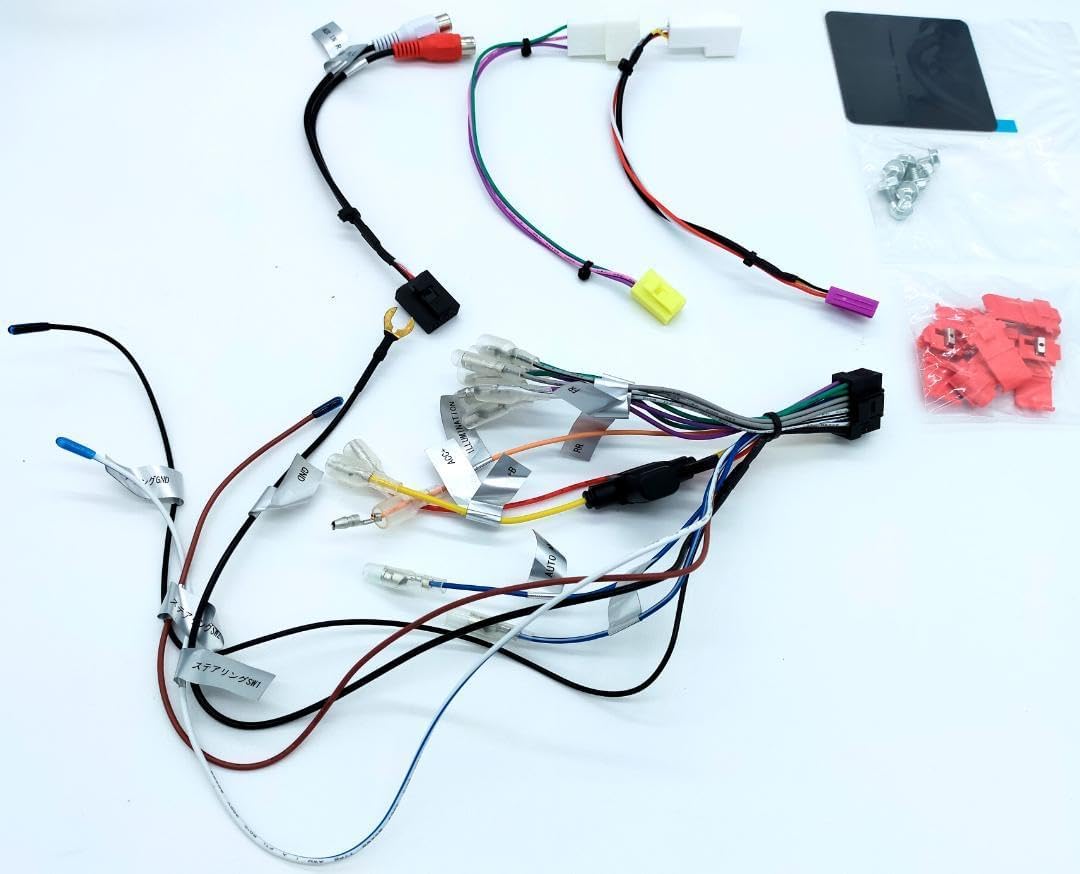
ภาพที่ 4.4: รายละเอียด view of the main wiring harness for the ECLIPSE AVN-LBS01 car navigation system. This image highlights various labeled wires such as SPEED (vehicle pulse), REVERSE, and PARKING, which are critical for proper navigation and safety feature operation.
4.4. การติดตั้งตัวเครื่อง
Secure the main unit into the vehicle's dashboard opening using the provided mounting brackets and screws. Ensure the unit is firmly seated and does not obstruct any vehicle controls or airbags.

ภาพที่ 4.5: ด้านข้าง view of the ECLIPSE AVN-LBS01 car navigation system showing mounting points. This perspective illustrates the screw holes and chassis design for secure installation within a vehicle's dashboard.

ภาพที่ 4.6: ฝั่งตรงข้าม view of the ECLIPSE AVN-LBS01 car navigation system showing mounting points. Similar to Image 4.5, this view provides additional detail on the chassis structure and mounting options.
5. คู่มือการใช้งาน
This section covers the basic operation of your ECLIPSE AVN-LBS01 car navigation system.
5.1. เปิด/ปิดเครื่อง
To power on the unit, turn your vehicle's ignition to the ACC or ON position. The unit will typically power on automatically. To power off, turn the ignition to the OFF position.
5.2. Display Controls
The unit features a 7V type touchscreen display. Use the physical buttons for quick access to common functions.
- TILT Button: Press this button to adjust the screen angle for optimal viewing and to reduce glare.
- ปุ่มเมนู: Press to access the main menu, where you can select various functions such as navigation, audio, video, and settings.
- ปุ่ม +/-: Typically used for volume control or zooming in/out on the map.
- Current Location Button: Press to quickly display your current position on the map.

ภาพที่ 5.1: ด้านหน้าบนเอียง view of the ECLIPSE AVN-LBS01 car navigation system showing the tilt mechanism. This image demonstrates how the screen can be adjusted for better visibility, highlighting the 'TILT' button on the front panel.
5.3. Navigation Functions
The AVN-LBS01 comes with 2022 Autumn Edition map data. Access navigation features through the main menu.
- การป้อนปลายทาง: Use the touchscreen keyboard to enter addresses, points of interest (POIs), or coordinates.
- คำแนะนำเส้นทาง: ทำตามคำแนะนำบนหน้าจอและเสียงแจ้งเตือนเพื่อการนำทางแบบทีละขั้นตอน
- แผนที่ View: สลับระหว่างแผนที่ 2 มิติและ 3 มิติ views, zoom levels, and display options.
- ข้อมูลการจราจร: If supported, the system may display real-time traffic updates to help avoid congestion.
5.4. การเล่นเสียง/วิดีโอ
The unit supports various audio and video playback options. Refer to the on-screen menu for available sources (e.g., radio, USB, Bluetooth audio, external AV input).
6. การบำรุงรักษา
Regular maintenance ensures the longevity and optimal performance of your navigation system.
- การทำความสะอาดหน้าจอ: เช็ดหน้าจอเบาๆ ด้วยผ้านุ่มที่ไม่เป็นขุย สำหรับรอยเปื้อนฝังแน่น ให้เช็ดเบาๆampชุบผ้าด้วยน้ำหรือน้ำยาทำความสะอาดหน้าจอ ห้ามฉีดน้ำยาทำความสะอาดลงบนหน้าจอโดยตรง
- การทำความสะอาดยูนิต: Use a dry, soft cloth to wipe the exterior of the unit. Avoid using harsh chemicals or abrasive materials.
- การอัปเดตซอฟต์แวร์: ตรวจสอบผู้ผลิตเป็นระยะ website or contact support for available map data and software updates.
7 การแก้ไขปัญหา
If you encounter issues with your AVN-LBS01, refer to the following common problems and solutions.
| ปัญหา | สาเหตุที่เป็นไปได้ | สารละลาย |
|---|---|---|
| ไม่มีไฟฟ้า | การเชื่อมต่อไฟฟ้าหลวม ฟิวส์ขาด กุญแจรถปิด | Check power wiring, inspect vehicle fuses, ensure ignition is on. |
| ไม่มีสัญญาณ GPS | GPS antenna not connected, antenna obstructed, driving in an area with poor satellite reception. | ตรวจสอบให้แน่ใจว่าเสาอากาศ GPS เชื่อมต่ออย่างแน่นหนาและมีสัญญาณที่ชัดเจน view ของท้องฟ้า เคลื่อนตัวไปยังพื้นที่เปิดโล่ง |
| หน้าจอสัมผัสไม่ตอบสนอง | System freeze, dirty screen, calibration issue. | Restart the unit (turn vehicle ignition off and on). Clean the screen. If issue persists, consult a professional. |
| ไม่มีเสียง | ระดับเสียงต่ำเกินไป ปิดเสียงแล้ว ปัญหาสายลำโพง | Increase volume, check mute settings, verify speaker connections. |
If the problem persists after trying these solutions, please contact customer support or a qualified service technician.
8. ข้อมูลจำเพาะ
| คุณสมบัติ | รายละเอียด |
|---|---|
| หมายเลขรุ่น | AVN-LBS01 |
| ประเภทจอภาพ | 7V Type Touchscreen |
| ข้อมูลแผนที่ | 2022 Autumn Edition |
| แหล่งจ่ายไฟ | 12V DC (กราวด์เชิงลบ) |
| แหล่งกำเนิดการผลิต | ผลิตในประเทศจีน |
| ASIN | B0DCW68M8N |
| หมายเลขสินค้า | m49798662797 |
| หมายเลขซีเรียล | เอฟดีไอ202203118595 |
| บลูทูธ | เครื่องหมายคำและโลโก้ Bluetooth® เป็นเครื่องหมายการค้าจดทะเบียนซึ่งเป็นกรรมสิทธิ์ของ Bluetooth SIG, Inc. |
9. การรับประกันและการสนับสนุน
For warranty information, please refer to the warranty card included with your product or contact your retailer. For technical support, product inquiries, or service, please contact the authorized ECLIPSE service center or your point of purchase. Keep your purchase receipt and serial number handy when contacting support.