
1. บทนำ
ขอบคุณสำหรับการซื้อasing the RCA SP550BT Portable Speaker. This manual provides important information regarding the setup, operation, and maintenance of your new speaker. Please read it thoroughly before use and keep it for future reference.
The RCA SP550BT is a versatile portable speaker featuring 50W output, Bluetooth connectivity, USB playback, FM radio, AUX input, True Wireless Stereo (TWS) function, LED lights, and a microphone input for an enhanced audio experience.
2. เนื้อหาบรรจุภัณฑ์
กรุณาตรวจสอบแพ็คเกจสำหรับรายการต่อไปนี้:
- RCA SP550BT Portable Speaker
- รีโมทคอนโทรล
- สายไฟ
- คู่มือการใช้งาน (เอกสารนี้)
3. สินค้าหมดview
Familiarize yourself with the main components and features of your RCA SP550BT speaker.

รูปที่ 3.1: ด้านหน้า view of the RCA SP550BT portable speaker. This image displays the speaker in an upright position, highlighting the top control panel and the three prominent speaker cones with red illumination.

รูปที่ 3.2: ด้านข้าง view of the RCA SP550BT portable speaker. This perspective shows the depth of the speaker and the integrated handle for portability.

รูปที่ 3.3: แนวนอน view of the RCA SP550BT portable speaker. This image illustrates the speaker's design when placed on its side, emphasizing the speaker grille and LED lighting.
3.1 การควบคุมระยะไกล
รีโมตคอนโทรลที่ให้มาช่วยให้สามารถควบคุมลำโพงจากระยะไกลได้อย่างสะดวก
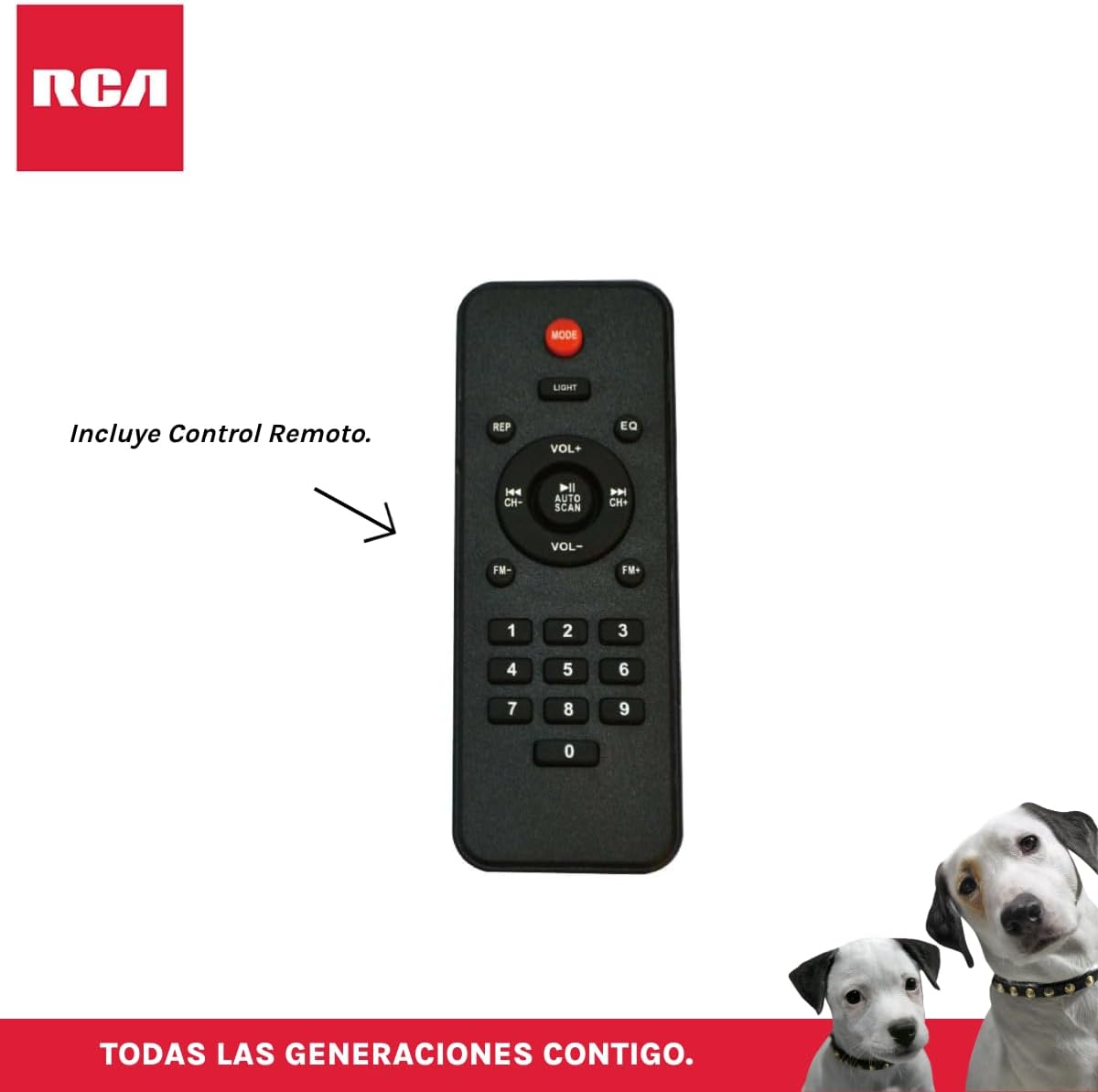
รูปที่ 3.4: RCA SP550BT Remote Control. This image displays the full layout of the remote control, including buttons for power, mode selection, volume adjustment, track navigation, equalizer settings, and a numeric keypad.
4. การตั้งค่า
4.1 การเชื่อมต่อสายไฟ
- ตรวจสอบให้แน่ใจว่าได้วางลำโพงบนพื้นผิวที่มั่นคงและเรียบ
- Connect the power cable to the speaker's power input port.
- Plug the other end of the power cable into a standard electrical outlet (AC 100-240V, 50/60Hz).
- Press the power button on the speaker or remote control to turn it on.
5. คู่มือการใช้งาน
5.1 เปิด/ปิดเครื่อง
- หากต้องการเปิดลำโพง ให้กดปุ่ม พลัง button on the control panel or the remote control.
- หากต้องการปิดลำโพง ให้กดปุ่ม พลัง ปุ่มอีกครั้ง
การเลือกโหมด 5.2
กดปุ่ม โหมด button on the control panel or remote control to switch between Bluetooth, USB, FM, and AUX input modes.
5.3 การจับคู่บลูทูธ
- เปิดลำโพงและเลือกโหมดบลูทูธโดยใช้ โหมด button. The display will show "BLUE" and a pairing indicator will flash.
- เปิดใช้งานบลูทูธบนอุปกรณ์เคลื่อนที่ของคุณ (สมาร์ทโฟน แท็บเล็ต ฯลฯ)
- ค้นหา "RCA SP550BT" in your device's Bluetooth list and select it to pair.
- เมื่อจับคู่สำเร็จแล้ว ลำโพงจะส่งเสียงยืนยัน และไฟแสดงสถานะบลูทูธจะหยุดกะพริบ
- ตอนนี้คุณสามารถเล่นเสียงจากอุปกรณ์ของคุณผ่านลำโพงได้
5.4 การเล่น USB
- Insert a USB flash drive (FAT32 format, max 32GB) containing MP3 audio fileลงในพอร์ต USB
- ลำโพงจะสลับไปที่โหมด USB โดยอัตโนมัติและเริ่มเล่นแทร็กแรก หากไม่เป็นเช่นนั้น ให้กดปุ่ม โหมด ปุ่มเพื่อเลือกโหมด USB
- ใช้ เล่น/หยุดชั่วคราว, ก่อนหน้า, และ ต่อไป buttons on the control panel or remote to control playback.
5.5 วิทยุ FM
- Turn on the speaker and select FM mode using the โหมด ปุ่ม.
- กดปุ่มค้างไว้ เล่น/หยุดชั่วคราว ปุ่ม (หรือ สแกนอัตโนมัติ on remote) to automatically scan and save available FM stations.
- ใช้ ก่อนหน้า และ ต่อไป ปุ่มสำหรับนำทางไปยังสถานีที่บันทึกไว้
อินพุต AUX 5.6 ช่อง
- เชื่อมต่ออุปกรณ์เสียงภายนอก (เช่น เครื่องเล่น MP3, แล็ปท็อป) เข้ากับพอร์ต AUX ของลำโพงโดยใช้สายสัญญาณเสียงขนาด 3.5 มม. (ไม่ได้รวมอยู่ในชุด)
- เลือกโหมด AUX โดยใช้ โหมด ปุ่ม.
- ควบคุมการเล่นและระดับเสียงจากอุปกรณ์ที่เชื่อมต่อของคุณ
5.7 ฟังก์ชั่น TWS (True Wireless Stereo)
The TWS function allows you to connect two RCA SP550BT speakers wirelessly for a stereo sound experience.
- Ensure both SP550BT speakers are powered on and in Bluetooth mode, but not yet paired with any device.
- บนลำโพงตัวหนึ่ง ให้กดปุ่มค้างไว้ ทไวซ์ button (if available, or a dedicated TWS pairing button) until you hear a confirmation tone. The speakers will attempt to pair with each other.
- Once successfully paired, one speaker will act as the master (left channel) and the other as the slave (right channel).
- Now, pair your mobile device with the master speaker via Bluetooth as described in section 5.3.
ไฟ LED 5.8 ดวง
กดปุ่ม แสงสว่าง button on the control panel or remote control to cycle through different LED light modes or to turn them off.
5.9 การใช้งานไมโครโฟน
Connect a wired microphone (not included) to the microphone input port on the speaker. Adjust the microphone volume using the dedicated knob (if available) or the main volume control.
6. การบำรุงรักษา
- การทำความสะอาด: ใช้ผ้าแห้งนุ่มเช็ดทำความสะอาดภายนอกลำโพง ห้ามใช้สารทำความสะอาดที่มีฤทธิ์กัดกร่อนหรือตัวทำละลาย
- พื้นที่จัดเก็บ: เมื่อไม่ได้ใช้งานเป็นเวลานาน ควรเก็บลำโพงไว้ในที่แห้งและเย็น หลีกเลี่ยงแสงแดดโดยตรงและอุณหภูมิที่สูงหรือต่ำเกินไป
- การสัมผัสน้ำ: ลำโพงนี้ไม่กันน้ำ โปรดหลีกเลี่ยงการสัมผัสกับน้ำหรือความชื้นมากเกินไป
7 การแก้ไขปัญหา
หากคุณพบปัญหาเกี่ยวกับลำโพงของคุณ โปรดดูปัญหาทั่วไปและวิธีแก้ไขต่อไปนี้:
| ปัญหา | สาเหตุที่เป็นไปได้ | สารละลาย |
|---|---|---|
| ไม่มีไฟฟ้า | Power cable not connected; Power outlet not working; Speaker off. | Check power cable connection; Try a different outlet; Press the POWER button. |
| ไม่มีเสียง | ระดับเสียงต่ำเกินไป; เลือกโหมดไม่ถูกต้อง; อุปกรณ์ไม่ได้เชื่อมต่ออย่างถูกต้อง | Increase volume; Select correct input mode (Bluetooth, USB, AUX); Reconnect device. |
| การจับคู่บลูทูธล้มเหลว | Speaker not in pairing mode; Device Bluetooth off; Speaker already paired. | Ensure speaker is in Bluetooth pairing mode; Turn on device Bluetooth; Disconnect from other devices. |
| การเล่น USB ไม่ทำงาน | USB drive format incompatible; Corrupt files; USB drive not inserted correctly. | ตรวจสอบให้แน่ใจว่า USB อยู่ในรูปแบบ FAT32; ตรวจสอบอีกครั้ง file integrity; Reinsert USB drive. |
| การรับสัญญาณวิทยุ FM ไม่ดี | สัญญาณอ่อน; สัญญาณรบกวน. | Relocate speaker; Extend antenna (if applicable). |
8. ข้อมูลจำเพาะ
| คุณสมบัติ | ข้อมูลจำเพาะ |
|---|---|
| แบบอย่าง | SP550BT |
| ยี่ห้อ | อาร์ซีเอ |
| กำลังขับของลำโพง | 50 วัตต์ (สูงสุด) |
| เทคโนโลยีการเชื่อมต่อ | บลูทูธ, USB, AUX |
| เทคโนโลยีไร้สาย | บลูทูธ |
| โหมดเอาต์พุตเสียง | สเตอริโอ |
| ประเภทลำโพง | พกพาได้ กลางแจ้ง |
| ประเภทการติดตั้ง | ที่วางบนโต๊ะ |
| วิธีการควบคุม | รีโมทคอนโทรล |
| ขนาดลำโพง | 6.5 นิ้ว |
| เส้นผ่านศูนย์กลางวูฟเฟอร์ | 6.5 นิ้ว |
| ความจุของแบตเตอรี่ | 4400 มิลลิวินาทีamp ชั่วโมง |
| แหล่งพลังงาน | สายไฟฟ้า |
| อุปกรณ์ที่รองรับ | แล็ปท็อป, เครื่องเล่น MP3, สมาร์ทโฟน, แท็บเล็ต |
| GTIN / UPC | 044476152061 |
9. การรับประกันและการสนับสนุน
This product comes with a limited warranty. Please refer to the warranty card included in your package for specific terms and conditions. For technical support or service inquiries, please contact RCA customer service through their official webเว็บไซต์หรือข้อมูลการติดต่อที่ให้มาพร้อมกับการซื้อของคุณ
Note: Warranty terms may vary by region. Keep your proof of purchase for warranty claims.