
1. สินค้าหมดview
The boogostore PS-160 is a high-capacity 50000mAh portable power bank designed for versatile charging on the go. It features multiple charging methods including a built-in AC wall plug, USB cable input, and an auxiliary solar panel. With 5 output ports, including 3 built-in cables (Micro-USB, Type-C, Lightning) and dedicated USB-A and Type-C ports, it supports fast charging for a wide range of devices. Additional functionalities include dual LED flashlights and an integrated pull-out phone holder, making it an ideal companion for travel and outdoor activities.
2. เนื้อหาบรรจุภัณฑ์
- 1x boogostore PS-160 Portable Solar Power Bank
- 1x USB-A to Micro-USB Charging Cable (for power bank)
- 1x คาราบิเนอร์
- 1x สายคล้องคอ
- 1x คู่มือผู้ใช้
3. คุณสมบัติของผลิตภัณฑ์

An annotated image highlighting the power bank's various components including built-in cables (Micro, Type-C, Lightning), USB output, Type-C input/output, AC plug, solar panel, mobile phone holder, flashlight, and power button.
- สายเคเบิลในตัว: Equipped with Micro-USB, Type-C, and Lightning output cables for direct charging of most mobile devices without needing extra cables.
- ปลั๊กติดผนัง AC ในตัว: A foldable AC plug allows for convenient direct wall charging of the power bank itself.
- แผงโซล่าเซลล์: An auxiliary solar panel provides emergency charging or helps maintain the power bank's charge when outdoors.
- พอร์ตเอาต์พุตหลายพอร์ต: In addition to the built-in cables, the power bank includes a dedicated USB-A output port and a Type-C output/input port, allowing up to five devices to be charged simultaneously.
- พอร์ตอินพุตหลายพอร์ต: The power bank can be recharged via its built-in AC wall plug, a built-in USB-A cable, the Type-C port, or the solar panel.
- Dual LED Flashlights: Two bright LED lights provide illumination for emergencies or low-light conditions.
- Pull-out Phone Holder: An integrated bracket allows you to prop up your smartphone for hands-free viewการไอเอ็นจี
- ไฟ LED แสดงสถานะ: Four LED lights indicate the remaining battery capacity of the power bank.
4 การชาร์จ Power Bank

An illustration demonstrating how to charge the power bank using a USB cable, directly plugging into a wall outlet, and via its solar panel.
- AC Wall Plug Charging: Extend the built-in AC wall plug and insert it directly into a standard wall outlet. The power bank will be fully charged in approximately 6 hours.
- การชาร์จสาย USB: Connect the provided USB-A to Micro-USB cable (or a Type-C cable) to the corresponding input port on the power bank and to a USB power adapter. The power bank can be fully charged in approximately 5 hours using a 5V/2.6A adapter.
- การชาร์จพลังงานแสงอาทิตย์: Place the power bank with its solar panel facing direct sunlight. The LED indicator will flash to show that solar charging is active. Note that solar charging is an auxiliary function and is significantly slower than wall or USB charging. It is best used for emergencies or to maintain charge levels when other power sources are unavailable.
For the first use, it is recommended to fully charge the power bank via the AC wall plug or USB cable to ensure optimal performance.
5. Using the Power Bank to Charge Devices
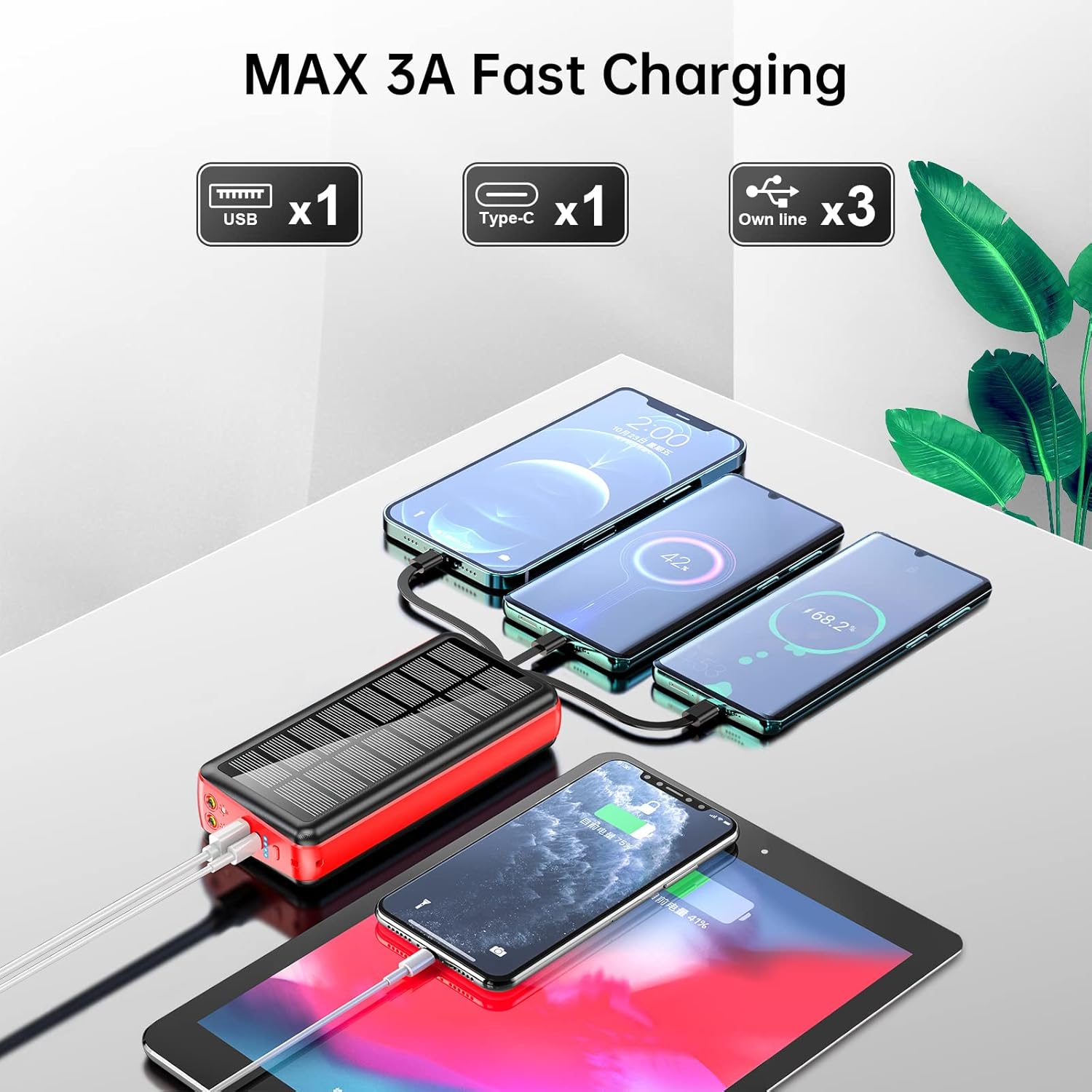
The power bank is shown charging three smartphones and a tablet using its various output options, demonstrating its multi-device charging capability.
- การใช้สายเคเบิลในตัว: Select the appropriate built-in cable (Micro-USB, Type-C, or Lightning) and connect it directly to your device.
- Using USB-A or Type-C Ports: Connect your device's charging cable to the USB-A output port or the Type-C output/input port on the power bank.
The power bank will automatically detect your device and begin charging. Disconnect your device once charging is complete or when you wish to stop.
6. Using the LED Flashlights

The power bank's dual LED flashlights are shown in use, providing illumination in a dark outdoor setting next to a campกำลังกางเต็นท์
To activate the dual LED flashlights, long press the power button for more than 3 seconds. To turn them off, long press the power button again for more than 3 seconds.
7. Using the Phone Holder

A smartphone is shown resting in the pull-out phone holder of the power bank, illustrating its hands-free viewฟังก์ชั่น
Locate the pull-out bracket on the side of the power bank. Gently pull it outwards to deploy the phone holder. Place your smartphone into the holder for hands-free viewการไอเอ็นจี
8. ข้อมูลจำเพาะ
| คุณสมบัติ | รายละเอียด |
|---|---|
| แบบอย่าง | พีเอส-160 |
| ความจุของแบตเตอรี่ | 50000mAh / 185 วัตต์ชั่วโมง |
| Built-in Line Output | 5V/2A |
| เอาท์พุต USB | 4.5V/5A, 5V/4.5A, 9V/2A, 12V/1.5A (สูงสุด 30W) |
| เอาต์พุต/อินพุต Type-C | 5V/3A, 9V/2A, 12V/1.5A (PD 18W) |
| Built-in Line Input | 5V/2A |
| อินพุตปลั๊ก AC | 5V/2A |
| ขนาด | 6.42 x 2.91 x 1.18 นิ้ว (163 x 74 x 30 มม.) |
| น้ำหนักสินค้า | 1.17 ปอนด์ |
| แบตเตอรี่ | แบตเตอรี่ลิเธียมโพลิเมอร์ 2 ก้อน (รวมอยู่ด้วย) |
| คุณสมบัติพิเศษ | Built-in Cable, Built-in Wall Plug, Fast Charging, Flashlight, Phone Holder, Solar Charging |
9. ข้อมูลด้านความปลอดภัย

A graphic illustrating the multiple safety protections integrated into the power bank, including overcurrent, short-circuit, over-discharge, and temperature protection.
- Do not place the product in fire or expose it to temperatures exceeding 50°C (122°F).
- หลีกเลี่ยงการทำพาวเวอร์แบงค์ตกหรือโดนแรงกระแทกรุนแรง
- Do not attempt to disassemble, modify, or repair the unit yourself.
- Keep the power bank away from corrosive and flammable liquids.
- Do not leave the power bank in a completely enclosed car under direct sunlight for extended periods.
- Optimal operating temperature is 10-35°C (50-95°F). Avoid using outside this range.
- Dispose of waste electronic products responsibly and in accordance with local regulations.
- The power bank includes built-in safety features such as OverCurrent Protection, Short-Circuit Protection, Over Voltage Protection, and Over Heat Protection to ensure safe charging.
10 การแก้ไขปัญหา
- อุปกรณ์ไม่ชาร์จ:
- ตรวจสอบให้แน่ใจว่าพาวเวอร์แบงค์มีประจุไฟเพียงพอ ตรวจสอบไฟ LED แสดงสถานะ
- ตรวจสอบว่าสายชาร์จเชื่อมต่อกับพาวเวอร์แบงค์และอุปกรณ์ของคุณอย่างแน่นหนาแล้ว
- Try using a different built-in cable or output port on the power bank.
- Confirm that your device is compatible with the power bank's output specifications.
- พาวเวอร์แบงค์ไม่ชาร์จ:
- Ensure the AC wall plug or USB charging cable is securely connected to a working power source.
- Try a different wall outlet or USB power adapter.
- For solar charging, ensure the solar panel is exposed to direct sunlight and not obstructed. Remember solar charging is slower and primarily for auxiliary use.
- ไฟฉายใช้งานไม่ได้:
- โปรดตรวจสอบให้แน่ใจว่าได้เปิดใช้งานพาวเวอร์แบงค์แล้ว
- Long press the power button for more than 3 seconds to activate or deactivate the flashlight.
11. การรับประกันและการสนับสนุน
The product comes with a free return policy within 3 months of purchase. If you encounter any problems or have questions regarding your boogostore PS-160 Portable Solar Power Bank, please contact our customer service. We are committed to resolving any issues within 12 hours.
12. วิดีโอสาธิตผลิตภัณฑ์
This video provides a visual guide to the boogostore PS-160 Portable Solar Power Bank, showcasing its built-in cables, wall plug, solar panel, flashlight, and phone holder, along with how to charge devices and recharge the power bank.