
1. บทนำ
This manual provides essential information for the safe and efficient operation of your boogostore Portable Charger, Model PS-160. This device is a high-capacity power bank designed for charging various electronic devices on the go. It features multiple charging options, including built-in cables, a wall plug, and solar charging capabilities, along with additional functionalities like dual LED flashlights and a phone holder.
2. สินค้าหมดview
The boogostore PS-160 Portable Charger is equipped with a 50000mAh battery, offering substantial power for multiple charges of your devices. Its compact design integrates various charging interfaces and utility features.
ส่วนประกอบหลัก:
- สายเคเบิลในตัว: Micro USB, Type-C, and Lightning output cables for direct device connection.
- ปลั๊กไฟ AC: Retractable plug for direct wall charging of the power bank.
- แผงโซล่าเซลล์: Integrated panel for auxiliary solar charging.
- พอร์ตเอาต์พุต USB: Standard USB-A port for additional device charging.
- พอร์ตอินพุต/เอาต์พุต Type-C: Versatile port for both charging the power bank and charging devices.
- Dual LED Flashlights: เพื่อการส่องสว่างในสภาวะแสงน้อย
- ที่วางโทรศัพท์: A pull-out bracket to support your mobile phone.
- ไฟแสดงสถานะแบตเตอรี่: LED lights to show remaining power.
- ปุ่มเปิด/ปิด: Controls power and flashlight functions.

รูปที่ 1: เกินview of the boogostore PS-160 Portable Charger's features, including built-in cables, ports, solar panel, and wall plug.
Video 1: An unboxing and demonstration of the boogostore PS-160 Portable Charger, showcasing its features and how to use them.
3. การตั้งค่า
Before initial use, it is recommended to fully charge the power bank using a wall adapter and cable for optimal performance. This ensures the internal battery is calibrated and ready for use.
การชาร์จแบตสำรอง:
Your power bank can be charged using three methods:
- ปลั๊กไฟ AC: Extend the built-in AC plug and insert it directly into a wall outlet.
- การชาร์จสาย USB: Connect a USB cable to the power bank's Type-C input port and a USB power adapter.
- การชาร์จพลังงานแสงอาทิตย์: Place the power bank in direct sunlight. The solar panel acts as an auxiliary emergency charging method. The battery indicator will flash when solar charging is active.

Figure 2: Illustration of the three charging methods for the power bank: via USB cable, direct wall plug, and solar energy.
4. คู่มือการใช้งาน
การชาร์จอุปกรณ์มือถือ:
The power bank offers multiple output options to charge your devices:
- สายเคเบิลในตัว: Select the appropriate built-in cable (Micro USB, Type-C, or Lightning) and connect it directly to your device.
- พอร์ตเอาต์พุต USB: Use your device's own USB charging cable and plug it into the USB-A output port on the power bank.
- พอร์ตเอาต์พุต Type-C: Use a Type-C to Type-C cable (not included) to connect your device to the power bank's Type-C port.
The power bank supports fast charging with up to 22.5W output, allowing quick recharges for compatible devices.
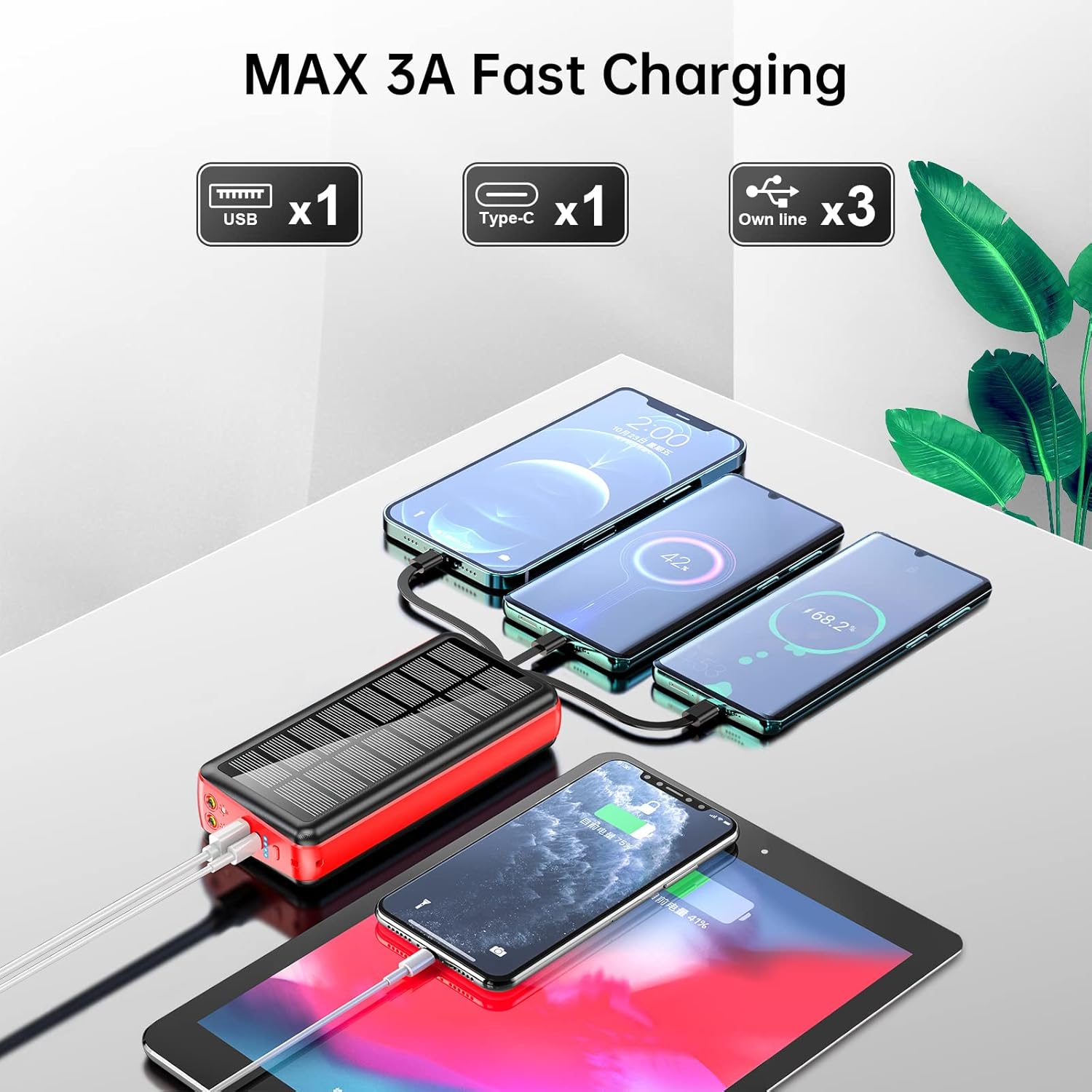
Figure 3: The power bank charging multiple devices simultaneously, demonstrating its versatile output capabilities.
Using the LED Flashlights:
To activate the dual LED flashlights, long press the power button for 3 seconds. To turn them off, long press the power button again for 3 seconds.

Figure 4: The power bank's dual LED flashlights providing illumination, useful for outdoor activities.
การใช้ที่วางโทรศัพท์:
The power bank includes a pull-out bracket that functions as a phone holder. Simply extend the bracket to prop up your smartphone, allowing for hands-free viewขณะชาร์จ

Figure 5: A smartphone utilizing the integrated pull-out phone holder on the power bank for convenient viewการไอเอ็นจี
5. ข้อมูลด้านความปลอดภัย
To ensure safe operation and prolong the life of your power bank, please observe the following:
- Do not place the product in fire; there is a risk of explosion.
- Do not drop the charger, knock it hard, disassemble it, or attempt to repair it.
- Avoid charging or using the device in a completely enclosed car or in direct sunlight for extended periods to prevent overheating.
- Do not expose to corrosive and inflammable liquids.
- Optimal use temperature is 15-25°C. Avoid extreme high or low temperatures.
- Dispose of waste electronic products in accordance with local regulations.
- The power bank provides short circuit protection, over current protection, over voltage, and over heat protection to ensure safe charging.

Figure 6: Safety features of the power bank, including protection against overcurrent, short-circuit, over-discharge, and extreme temperatures.
6. ข้อมูลจำเพาะ
| คุณสมบัติ | ข้อมูลจำเพาะ |
|---|---|
| แบบอย่าง | พีเอส-160 |
| ความจุของแบตเตอรี่ | 50000mAh (185 วัตต์ชั่วโมง) |
| ขนาดสินค้า | 6.42 x 2.91 x 1.18 นิ้ว |
| น้ำหนักสินค้า | 1.17 ปอนด์ |
| Built-in Line Output | 5V/2A |
| เอาท์พุต USB | 4.5V/5A, 5V/4.5A, 9V/2A, 12V/1.5A (สูงสุด 22.5W) |
| เอาท์พุต Type-C | 5V/3A, 9V/2.22A, 12V/1.67A (PD 20W) |
| อินพุตประเภท C | 5V/3A, 9V/2A, 12V/1.5A (PD 18W) |
| อินพุตปลั๊ก AC | 5V/2A |
| คุณสมบัติพิเศษ | Built-in Cable, Built-in Wall Plug, Fast Charging, Flashlight, Phone Holder, Solar Charging |
| ผู้ผลิต | Shenzhen Ente Intelligent Co., Ltd. |
7 การแก้ไขปัญหา
- อุปกรณ์ไม่ชาร์จ: Ensure the power bank is sufficiently charged. Check that cables are securely connected to both the power bank and your device. Press the power button to activate output if necessary.
- การชาร์จช้า: Verify that your device supports fast charging and that the correct port/cable is being used. Ensure the power bank itself is fully charged.
- Flashlight not turning on/off: Ensure you are long-pressing the power button for 3 seconds, not just a short press.
- Solar charging indicator not flashing: Ensure the solar panel is exposed to direct sunlight. Note that solar charging is an auxiliary feature and may be slower than other methods.
8. การรับประกันและการสนับสนุน
The boogostore Portable Charger comes with a commitment to quality and customer satisfaction. If you encounter any issues or have questions regarding your product, please contact customer support. The manufacturer provides power short circuit protection, over current protection, over voltage, and over heat protection to ensure safe charging.
For any problems, please contact us, and we will endeavor to resolve it within 12 hours.