
1. สินค้าหมดview
The Akko Calico Cat Theme Wireless Gaming Mouse is designed for comfortable and versatile use across various devices. It features a unique cat-shaped design and offers tri-mode connectivity for flexible operation.

Image: The Akko Calico Cat Theme Wireless Gaming Mouse, showcasinด้วยดีไซน์ที่เป็นเอกลักษณ์
- Calico Cat Theme: Features an adorable cat-shaped design for a unique aesthetic.
- การเชื่อมต่อสามโหมด: Supports 2.4GHz wireless, Bluetooth 3.0, and Bluetooth 5.0 for versatile connection options.
- การออกแบบตามหลักสรีรศาสตร์: Shaped for a comfortable fit in the palm, enhancing user experience.
- ความเข้ากันได้กว้าง: Compatible with Mac and Windows systems, including PCs, laptops, MacBooks, and iPads.
- การทำงานเงียบ: Equipped with soundless clicks for a quiet working environment.
2. คำแนะนำในการตั้งค่า
2.1 การติดตั้งแบตเตอรี่
The mouse requires one AA battery (included). To install the battery:
- ค้นหาช่องใส่แบตเตอรี่ที่ด้านล่างของเมาส์
- เปิดฝาช่องใส่แบตเตอรี่
- ใส่แบตเตอรี่ AA หนึ่งก้อน โดยตรวจสอบให้แน่ใจว่าขั้วถูกต้อง (+/-)
- ปิดฝาช่องใส่แบตเตอรี่ให้แน่น

Image: Underside of the mouse showing the battery compartment and the 2.4G USB receiver slot.
2.2 การเชื่อมต่อเมาส์
The mouse supports three connection modes: 2.4GHz wireless (via USB receiver), Bluetooth 3.0, and Bluetooth 5.0.

Image: Diagram illustrating the three connectivity modes: 2.4G, Bluetooth 3.0, and Bluetooth 5.0.
2.2.1 การเชื่อมต่อไร้สาย 2.4GHz (ตัวรับสัญญาณ USB)
- Locate the 2.4G USB receiver stored within the battery compartment of the mouse.
- ถอดตัวรับสัญญาณ USB
- เสียบตัวรับสัญญาณ USB เข้ากับพอร์ต USB ที่ว่างอยู่บนคอมพิวเตอร์หรืออุปกรณ์ของคุณ
- เปิดสวิตช์เปิด/ปิดที่อยู่ด้านล่างของเมาส์
- เมาส์ควรเชื่อมต่อโดยอัตโนมัติ
2.2.2 Bluetooth Connection (BT3.0/BT5.0)
- Ensure the mouse has a battery installed and is powered on.
- On the underside of the mouse, locate the switch to select between 2.4G and BT modes. Switch it to the BT position.
- บนคอมพิวเตอร์หรืออุปกรณ์ของคุณ เปิดใช้งานบลูทูธและค้นหาอุปกรณ์ใหม่
- The mouse should appear as "Akko Mouse" or similar in the list of available Bluetooth devices.
- เลือกเมาส์ที่ต้องการจับคู่ ทำตามคำแนะนำบนหน้าจอเพื่อทำการจับคู่ให้เสร็จสมบูรณ์
3. คู่มือการใช้งาน
3.1 ฟังก์ชั่นพื้นฐาน
- คลิกซ้าย: การคัดเลือกเบื้องต้นและการโต้ตอบ
- คลิกขวา: เข้าถึงเมนูบริบท
- ล้อเลื่อน: Scrolls content vertically. Pressing the scroll wheel typically acts as a middle click.
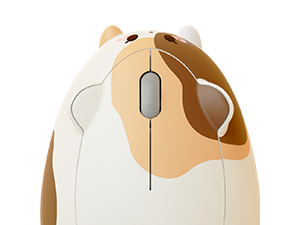
ภาพ: ด้านบน view of the Akko Calico Cat mouse, highlighting the main buttons and scroll wheel.
3.2 การปรับ DPI
The mouse features adjustable DPI (Dots Per Inch) settings, allowing you to change cursor sensitivity. The available DPI settings are 800, 1600 (default), and 3200.
To adjust the DPI, press the dedicated DPI button, usually located on the underside or top of the mouse. Each press cycles through the available DPI settings.

Image: Visual representation of adjustable DPI settings (800, 1600, 3200) for the Akko mouse.
4. หลักสรีรศาสตร์และการออกแบบ
The Akko Cat Theme Wireless Gaming Mouse is designed with user comfort in mind. Its ergonomic shape provides a natural fit for the palm, reducing strain during extended use. The mouse also features an anti-slip bottom for stable movement and an agile scroll wheel for smooth navigation.

Image: Illustration of the mouse's ergonomic design, suitable for palm, fingertip, and claw grip styles.

Image: The mouse's surface, emphasizing its skin-friendly material for comfortable touch.
4.1 ความสามารถในการพกพา
With dimensions of approximately 115mm (length) x 76mm (width) x 41mm (height), the mouse is designed to be portable and easy to carry.

ภาพ: ด้านบนและด้านข้าง views of the mouse with its compact dimensions indicated.
5. การบำรุงรักษา
- การทำความสะอาด: ใช้ผ้านุ่มและแห้งเช็ดทำความสะอาดเมาส์ สำหรับคราบฝังแน่น ให้เช็ดเบาๆamp สามารถใช้ผ้าได้เพื่อให้แน่ใจว่าไม่มีความชื้นเข้าไปในส่วนประกอบภายใน
- การเปลี่ยนแบตเตอรี่: ควรเปลี่ยนแบตเตอรี่ AA เมื่อประสิทธิภาพการทำงานของเมาส์ลดลงหรือหยุดทำงาน
- พื้นที่จัดเก็บ: เมื่อไม่ได้ใช้งานเป็นเวลานาน ควรปิดเมาส์เพื่อประหยัดแบตเตอรี่ เก็บไว้ในที่แห้งและเย็น
6 การแก้ไขปัญหา
- เมาส์ไม่ตอบสนอง:
- - ตรวจสอบให้แน่ใจว่าได้ติดตั้งแบตเตอรี่อย่างถูกต้องและมีประจุไฟเพียงพอ เปลี่ยนแบตเตอรี่หากจำเป็น
- - Check the power switch on the underside of the mouse is in the "ON" position.
- - สำหรับการเชื่อมต่อ 2.4GHz โปรดตรวจสอบให้แน่ใจว่าตัวรับสัญญาณ USB เสียบเข้ากับพอร์ต USB ที่ใช้งานได้อย่างแน่นหนา
- - For Bluetooth connection, verify that Bluetooth is enabled on your device and the mouse is correctly paired. Try re-pairing if connection issues persist.
- - Note: The mouse does not have a visible laser light on the bottom, which is normal operation.
- การเชื่อมต่อไม่ต่อเนื่องหรือล่าช้า:
- - Move the mouse closer to the USB receiver or Bluetooth-enabled device to reduce interference.
- - Ensure there are no large metallic objects between the mouse and the receiver/device that could block the signal.
- - Check for other wireless devices operating on the same frequency that might cause interference.
- การเคลื่อนที่ของเคอร์เซอร์ผิดปกติหรือไม่แม่นยำ:
- - Clean the optical sensor on the underside of the mouse with a soft, dry cloth.
- - Use the mouse on a clean, uniform surface or a mouse pad.
- - Adjust the DPI setting to a more suitable level for your task.
7. ข้อมูลจำเพาะ
| คุณสมบัติ | รายละเอียด |
|---|---|
| ยี่ห้อ | อักโกะ |
| ชื่อรุ่น | Akko Wireless Gaming Mouse |
| หมายเลขรุ่น | 6925758630146 |
| สี | Calico Cat |
| เทคโนโลยีการเชื่อมต่อ | 2.4G, Bluetooth 3.0, Bluetooth 5.0 (Tri-Mode) |
| เทคโนโลยีตรวจจับการเคลื่อนไหว | ออฟติคอล |
| คุณสมบัติพิเศษ | คลิกไร้เสียง |
| จำนวนปุ่ม | 1 (referring to main click functionality, typically 3 buttons including scroll click) |
| การวางแนวมือ | ขวา |
| อุปกรณ์ที่รองรับ | Personal Computer (PC, Laptops, MacBooks, iPad) |
| ระบบปฏิบัติการ | Windows 8.2, Mac |
| แหล่งพลังงาน | ใช้พลังงานจากแบตเตอรี่ (ต้องใช้แบตเตอรี่ AA 1 ก้อน รวมอยู่ด้วย) |
| น้ำหนักสินค้า | 0.16 กก. |
| วัสดุ | พลาสติก |
| ขนาด (โดยประมาณ) | 115มม. (ยาว) x 76มม. (กว้าง) x 41มม. (สูง) |
8. การรับประกันและการสนับสนุน
This product is covered by a standard manufacturer's warranty. For specific warranty details, please refer to the packaging or contact Akko customer support directly. Keep your purchase receipt as proof of purchase.
For technical support or inquiries, please visit the official Akko webเว็บไซต์หรือติดต่อฝ่ายบริการลูกค้าของพวกเขา
Akko Official Webเว็บไซต์: www.akkogear.com