
การแนะนำ
The CARPURIDE W502 is a 5-inch IPS touchscreen display designed to enhance your motorcycle riding experience by integrating wireless CarPlay and Android Auto. This device provides convenient access to navigation, communication, and entertainment directly on your handlebars, promoting a safer and more connected journey. This manual provides detailed instructions for installation, operation, maintenance, and troubleshooting.
สินค้าเกินview
The W502 display offers a range of features designed for motorcycle use:
- การบูรณาการสมาร์ทโฟนอย่างราบรื่น: Connect your mobile phone wirelessly via Bluetooth for CarPlay or Android Auto functionality, eliminating the need to handle your phone while riding.
- การเชื่อมต่อบลูทูธแบบ Dual: Allows simultaneous connection of your phone and a Bluetooth helmet or headset to the Carpuride device, or direct connection of your smartphone to your helmet/headset in CarPlay/Android Auto mode.
- Modern 5-inch IPS Display: A high-definition 5-inch IPS touchscreen with 65K vibrant colors and 1000 nits maximum brightness ensures clear visibility, even in direct sunlight, aided by an included sun visor.
- IP67 Waterproof & Anti-theft Design: The IP67 rating ensures normal operation in rainy conditions. A removable anti-theft design provides enhanced security and convenience.
- Portable Mounting: Comes with a complete mounting kit and tools for easy and secure attachment to any motorcycle handlebar.
มีอะไรอยู่ในกล่อง
โปรดตรวจสอบว่าบรรจุภัณฑ์มีส่วนประกอบทั้งหมด:
- 1 x CARPURIDE W502 5-inch Motorcycle CarPlay Screen
- สายไฟ 1 เส้น
- 1 x USB Boost Charging Cable
- 1 x U-shaped Mount
- 1 x ส่วนต่อขยาย
- 1 x คู่มือผู้ใช้
บันทึก:
- This product is not fully compatible with Samsung Note and S Series phones.
- Before use, ensure your phone supports wireless CarPlay or wireless Android Auto.

Image: Package contents and dimensions of the CARPURIDE W502.
การตั้งค่า
คำแนะนำในการติดตั้ง
- Attach the U-shaped mount to your motorcycle handlebar using a Phillips screwdriver.
- Fix the extension rod to the mount, ensuring it is securely fastened.
- Insert the W502 display onto the mount. Adjust its position and angle as desired, then tighten the adjustment ring to secure the device. The mount allows for 360-degree rotation.
- Verify that the display is firmly attached and does not obstruct your view หรือการควบคุม
การเชื่อมต่อไฟฟ้า
The CARPURIDE W502 offers two methods for power connection:
- การเชื่อมต่อแบตเตอรี่โดยตรง: Connect the provided power cable directly to your motorcycle's 12V 1A battery. The red wire connects to the positive terminal, and the black wire connects to the negative (ground) terminal. The device includes built-in reverse polarity protection to prevent damage from incorrect wiring.
- USB Port Connection: Plug the 5V-12V USB charging cable directly into your motorcycle's USB port. Ensure the USB port provides sufficient power (5V, 2.5A or more) for stable operation.

Image: Installation and wiring diagram for the CARPURIDE W502.
คำแนะนำการใช้งาน
Smartphone Connection (Wireless CarPlay / Android Auto)
To connect your smartphone to the W502 for wireless CarPlay or Android Auto:
- ตรวจสอบให้แน่ใจว่าได้เปิดใช้งาน Bluetooth และ Wi-Fi ของสมาร์ทโฟนของคุณแล้ว
- On the W502 display, navigate to the CarPlay or Android Auto connection menu.
- ค้นหา the W502 device on your smartphone's Bluetooth settings and pair with it.
- Once paired via Bluetooth, the device will prompt you to connect via Wi-Fi for the CarPlay or Android Auto functionality. Confirm the connection.
CarPlay Requirements:
- iPhone running iOS 6 or higher.
- CarPlay system and iPhone's voice system (Siri) must be activated.
Android Auto Requirements:
- Phone supporting Wi-Fi 5GHz.
- Phone running Android 11 or higher.
- Android Auto application must be installed and updated to the latest version.

Image: Wireless CarPlay and Android Auto interfaces on the W502 display.

Image: Compatibility requirements for CarPlay and Android Auto, and a list of incompatible phone models.
การเชื่อมต่อชุดหูฟังบลูทูธ
You can connect your Bluetooth helmet or headset to the W502 using two methods:
Method 1: Dual Bluetooth via W502
- Connect your smartphone to the W502 for CarPlay or Android Auto.
- On the W502, go to 'Audio Output' and select 'Iplay/auto'.
- Connect your Bluetooth helmet or headset to the W502's Bluetooth. This allows audio from your phone (via W502) to be routed to your headset.
Method 2: Direct Smartphone to Headset (BT Trans Mode)
- On the W502, navigate to the 'Audio Output' interface and select 'BT Trans'.
- Turn on your motorcycle helmet or headset and put it into pairing mode.
- On the W502, click 'Carpuride Moto BT search' to find and pair with your helmet or headset.
- Once connected, the W502 will display 'Connected'.
- สำคัญ: When using BT Trans mode, ensure your smartphone is NOT connected to any other Bluetooth headphones. If it is, disconnect and delete any previous Bluetooth pairing records for headphones from your phone's Bluetooth list.
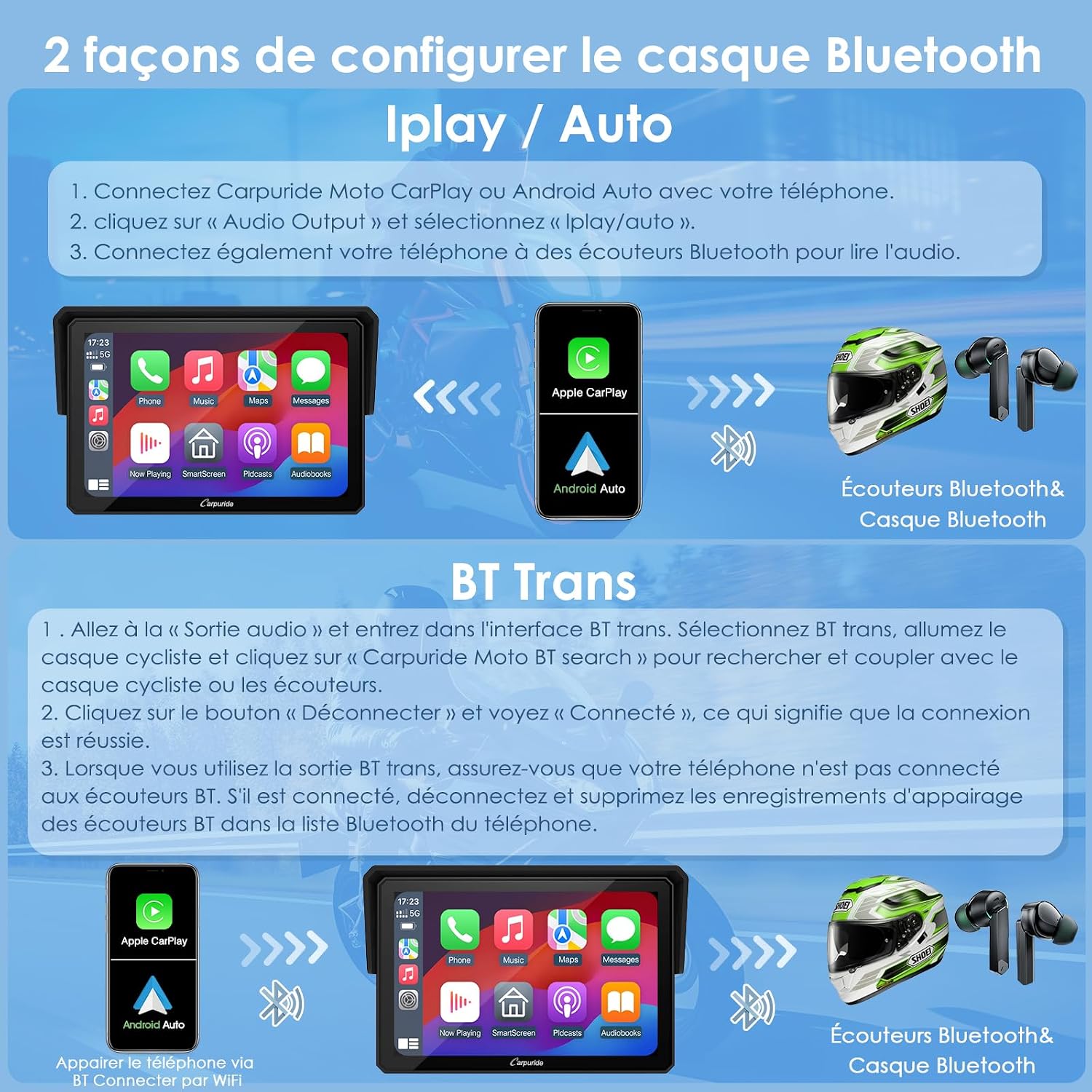
Image: Bluetooth connection methods for helmet/headset.
Voice Control (Siri / Google Voice)
The W502 supports voice commands for hands-free operation. Once your smartphone is connected via CarPlay or Android Auto, you can use voice assistants like Siri or Google Voice for tasks such as:
- Navigation (e.g., "Hey Siri, show me the map.")
- Music playback (e.g., "Hey Google, play music.")
- Making calls (e.g., "Hey Siri, call Helen.")
- การส่งข้อความ
Ensure your phone's voice assistant is activated and properly configured for optimal use.

Image: Hands-free phone functions including voice control, navigation, music, and calls.
การซ่อมบำรุง
ทนทานต่อสภาพอากาศ
The CARPURIDE W502 features an IP67 waterproof design, allowing it to function normally even when riding in the rain. However, avoid submerging the device in water for extended periods.
อุณหภูมิในการทำงาน
The device is designed to operate reliably in a wide temperature range, from -20°C to 80°C.
การทำความสะอาด
ในการทำความสะอาดหน้าจอและตัวเครื่อง ให้ใช้ผ้าเนื้อนุ่มและแห้งamp cloth. Avoid using abrasive cleaners, solvents, or harsh chemicals, as these can damage the display or casing.

Image: Weather resistance and operating temperature range of the W502.
การแก้ไขปัญหา
ปัญหาการเชื่อมต่อ
- If the device fails to connect to your phone, ensure both Bluetooth and Wi-Fi are enabled on your phone.
- Verify that your phone model is compatible with wireless CarPlay or Android Auto (refer to the 'Smartphone Connection' section).
- For Bluetooth headset issues, review the 'Bluetooth Headset Connection' section, especially regarding BT Trans mode and ensuring no other Bluetooth headphones are connected to your phone.
- Try restarting both the W502 and your smartphone.
การอัพเดตซอฟต์แวร์
- The 64GB TF card accessory is for local music and video playback only and does not support software upgrades.
- For software updates, use a lower capacity microSD card (e.g., 32GB, 16GB, 8GB, 4GB).
- Connect the device using a USB Boost cable, ensuring your motorcycle's USB port provides at least 5V, 2.5A for stable power during the update process.
Screen Visibility
- If the screen is difficult to see in bright sunlight, ensure the included sun visor is properly positioned.
- The screen has a maximum brightness of 1000 nits, designed for optimal visibility in various lighting conditions.
ข้อมูลจำเพาะ
| คุณสมบัติ | ข้อมูลจำเพาะ |
|---|---|
| ยี่ห้อ | คาร์พูไรด์ |
| ชื่อรุ่น | W502 |
| ประเภทบริการยานพาหนะ | รถจักรยานยนต์ |
| ขนาดหน้าจอ | 5 นิ้ว |
| คุณสมบัติพิเศษ | บลูทูธ, หน้าจอสัมผัส |
| เทคโนโลยีการเชื่อมต่อ | บลูทูธ |
| ประเภทแผนที่ | ถนน |
| โหมดเอาต์พุตเสียง | สเตอริโอ |
| ประเภทการติดตั้ง | ที่ยึดแฮนด์บาร์ |
| ความละเอียดหน้าจอ | 1280 x 720 |
| ระบบปฏิบัติการ | แอนดรอยด์, ไอโอเอส |
| ความจุของหน่วยความจำ | 64 GB (for local media) |
| ประเภทหน้าจอสัมผัส | ความจุ |
| ประเภทจอภาพ | จอ LCD ไอพีเอส |
| วิธีการป้อนข้อมูล | หน้าจอสัมผัส |
| อุปกรณ์ที่รองรับ | สมาร์ทโฟน |
| วิธีการควบคุม | แอปพลิเคชัน |
| รวมแบตเตอรี่ | เลขที่ |
| รองรับระบบนำทางผ่านดาวเทียม | จีพีเอส |
| ประเภทหน่วยความจำแฟลชที่เข้ากันได้ | ไมโครเอสดี |
| ประเภทกีฬา | รถจักรยานยนต์ |
| ขนาดรายการ (ยาว x กว้าง x สูง) | 13.4 x 2.8 x 8.9 ซม. |
การรับประกันและการสนับสนุน
ข้อมูลการรับประกัน
The CARPURIDE W502 comes with a รับประกัน 1 ปี นับจากวันที่ซื้อ การรับประกันนี้ครอบคลุมถึงข้อบกพร่องจากการผลิตและการทำงานผิดปกติภายใต้การใช้งานปกติ
การสนับสนุนด้านเทคนิค
เรานำเสนอ 12 months of dedicated technical support for the GPS navigation system and other functionalities of your W502 device. Your satisfaction is our priority, and we guarantee a 100% satisfactory solution within 24 hours for any questions or concerns you may have.
Custom Boot Logo Service
CARPURIDE offers a unique service to customize the boot logo of your device. You can send us images you wish to use as your personalized boot logo.