
การแนะนำ
This manual provides instructions for the safe and effective use of your Ashfly Portable Handheld Kids Microscope. Please read this manual thoroughly before operating the device and retain it for future reference.
The Ashfly Portable Handheld Kids Microscope is designed to introduce young scientists to the microscopic world. Featuring a 2-inch LCD screen and 200x magnification, it allows for real-time observation of small objects.
เนื้อหาแพ็คเกจ
ตรวจสอบว่ามีสินค้าทั้งหมดที่ระบุไว้ด้านล่างอยู่ในแพ็คเกจของคุณ:
- Ashfly Portable Handheld Kids Microscope
- สายชาร์จ USB
- Lanyard/Wrist Strap
- คู่มือการใช้งาน (เอกสารนี้)

Image: Contents of the Ashfly Portable Handheld Kids Microscope package, including the microscope, USB cable, and wrist strap.
การตั้งค่า
1. การชาร์จอุปกรณ์
- Locate the USB charging port on the microscope.
- Connect the provided USB charging cable to the microscope and a compatible USB power source (e.g., computer, wall adapter).
- ไฟแสดงสถานะการชาร์จจะสว่างขึ้น ใช้เวลาประมาณ 2-3 ชั่วโมงในการชาร์จจนเต็ม
- เมื่อชาร์จเต็มแล้ว ให้ถอดสายชาร์จออก
2. Attaching the Lanyard/Wrist Strap
Thread the lanyard or wrist strap through the designated loop on the microscope to prevent accidental drops during use.
คำแนะนำการใช้งาน
1. เปิด/ปิดเครื่อง
- To power on, press and hold the power button (usually marked with a power symbol) for a few seconds until the screen illuminates.
- หากต้องการปิดเครื่อง ให้กดปุ่มเปิด/ปิดค้างไว้จนกว่าหน้าจอจะดับลง
2. Observing Objects
- Place the object you wish to observe on a flat surface.
- Position the microscope's lens directly over the object.
- Adjust the focus wheel (if present) or move the microscope closer/further from the object until a clear image appears on the 2-inch LCD screen.
- Use the zoom adjustment button (4x zoom) to further magnify the image up to 200x.

Image: A child holding the Ashfly microscope, observing a small object on a surface, demonstrating its handheld operation.
3. การถ่ายภาพและวิดีโอ
The microscope supports photo and video functions. It comes with built-in memory for storing observations.
- To take a photo: Press the designated photo capture button (refer to device markings).
- To record a video: Press the designated video record button to start recording, and press it again to stop.

Image: The Ashfly microscope's screen displaying a magnified image of an insect, illustrating its digital imaging capability.
4. Dual-Lens Design
This microscope features a dual-lens design. One side is the digital microscope for recording observations, and the other side is a physical magnifier for quick viewไอเอ็นจีของวัตถุ
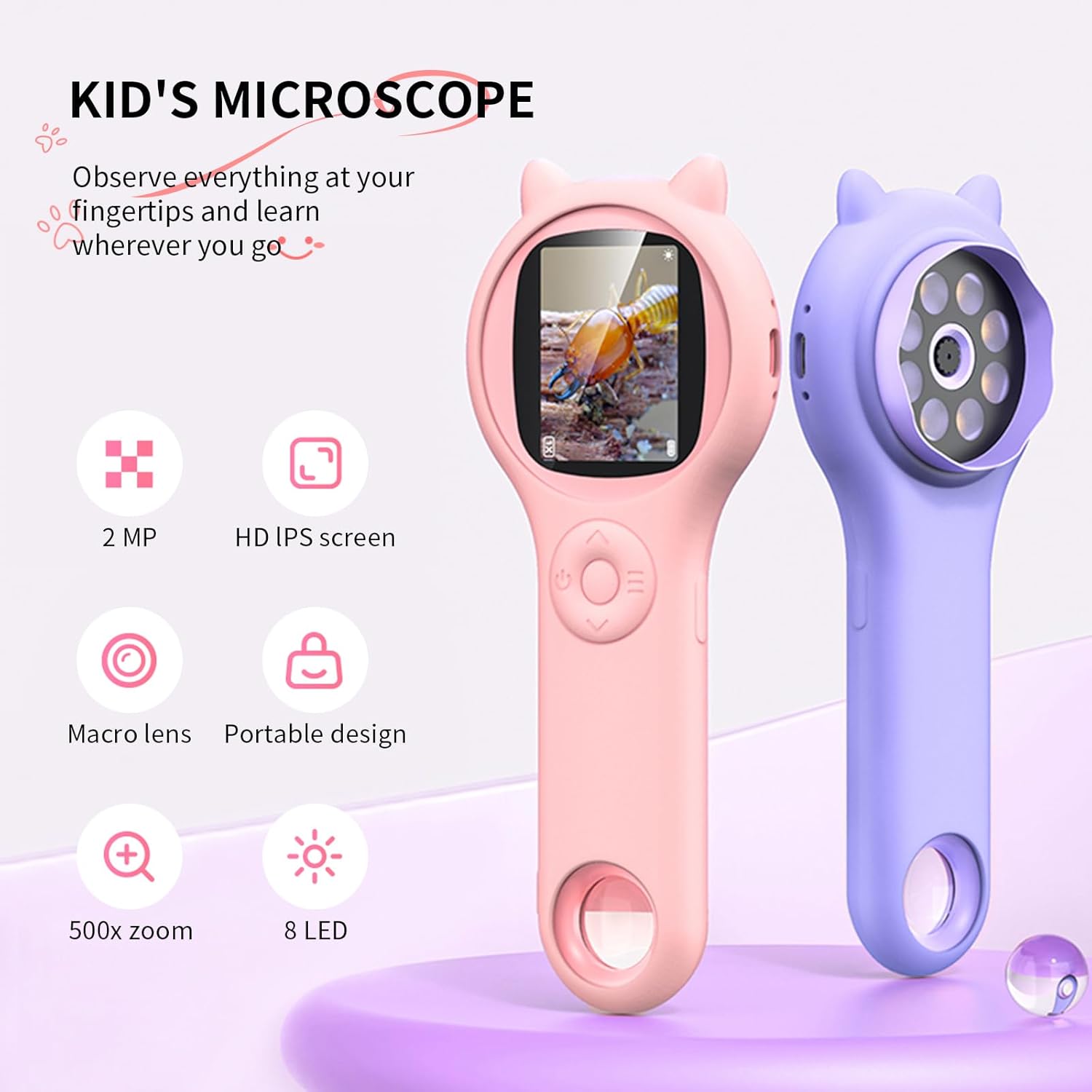
Image: Two Ashfly Kids Microscopes, one pink and one purple, illustrating the compact design and the different lenses/screens on each side.
การซ่อมบำรุง
- การทำความสะอาด: Use a soft, dry cloth to clean the exterior of the microscope. For the lens and screen, use a specialized lens cleaning cloth. Do not use abrasive cleaners or solvents.
- พื้นที่จัดเก็บ: เก็บกล้องจุลทรรศน์ไว้ในที่แห้งและเย็น หลีกเลี่ยงแสงแดดโดยตรงและอุณหภูมิที่สูงหรือต่ำเกินไป
- การดูแลแบตเตอรี่ เพื่อยืดอายุการใช้งานแบตเตอรี่ ควรหลีกเลี่ยงการคายประจุแบตเตอรี่จนหมดบ่อยๆ ควรชาร์จอุปกรณ์เป็นประจำ แม้ว่าจะไม่ได้ใช้งานเป็นเวลานานก็ตาม
การแก้ไขปัญหา
| ปัญหา | สาเหตุที่เป็นไปได้ | สารละลาย |
|---|---|---|
| อุปกรณ์ไม่เปิดเครื่อง | แบตเตอรี่หมดประจุ | ชาร์จอุปกรณ์โดยใช้สาย USB ที่ให้มา |
| Image on screen is blurry. | Incorrect focus or distance from object. | Adjust the microscope's distance from the object or use the focus wheel (if applicable) until the image is clear. |
| ไม่สามารถถ่ายภาพ/วิดีโอได้ | หน่วยความจำภายในเต็มแล้ว | Transfer existing photos/videos to a computer to free up space. |
ข้อมูลจำเพาะ
| คุณสมบัติ | รายละเอียด |
|---|---|
| แบบอย่าง | ASIN B0DBVB3RGT |
| ยี่ห้อ | ขี้เถ้า |
| การขยายภาพ | Up to 200x (with 4x zoom adjustment) |
| หน้าจอ | 2-inch LCD, 1080P HD digital imaging |
| แหล่งกำเนิดแสง | นำ |
| วัสดุ | พลาสติก |
| สี | สีม่วง |
| แหล่งพลังงาน | ใช้พลังงานจากแบตเตอรี่ |
| เลนส์วัตถุ | ไม่มีสี |
ข้อมูลการรับประกัน
Ashfly products are designed for quality and durability. For specific warranty details, please refer to the warranty card included with your product or visit the official Ashfly webไซต์ โปรดเก็บใบเสร็จรับเงินไว้เป็นหลักฐานการซื้อสำหรับการเรียกร้องการรับประกัน
การสนับสนุนลูกค้า
If you encounter any issues or have questions regarding your Ashfly Portable Handheld Kids Microscope, please contact our customer support team:
- การสนับสนุนทางออนไลน์: เยี่ยมชม Ashfly Store on Amazon สำหรับคำถามที่พบบ่อยและตัวเลือกการติดต่อ
- อีเมล: ดูที่บรรจุภัณฑ์ผลิตภัณฑ์หรืออย่างเป็นทางการ webเว็บไซต์สำหรับติดต่อฝ่ายสนับสนุนทางอีเมลโดยตรง