
การแนะนำ
This manual provides comprehensive instructions for the UNINELL HOME UV3 Cordless Cane Vacuum Cleaner Accessory Kit. This kit is designed to enhance and maintain the performance of your UNINELL HOME UV3 cordless vacuum cleaner by providing essential replacement parts: a high-capacity replacement battery, a compatible power adapter, and 8 HEPA filters. Please read this manual thoroughly before installation and use to ensure proper function and longevity of your vacuum accessories.
ข้อมูลด้านความปลอดภัย
- Always disconnect the vacuum cleaner from power before installing or replacing any components.
- Use only the provided power adapter or a UNINELL HOME approved replacement for charging the battery.
- Do not expose the battery or power adapter to water, extreme temperatures, or direct sunlight.
- Keep HEPA filters dry and clean. Do not wash filters with water unless explicitly stated in the vacuum's main manual.
- Dispose of old batteries and filters according to local regulations.
เนื้อหาแพ็คเกจ
Verify that all items are present in your accessory kit:
- 1 x Replacement Battery for UNINELL HOME UV3
- อะแดปเตอร์ไฟฟ้า 1 ตัว
- ตัวกรอง HEPA 8 ชิ้น
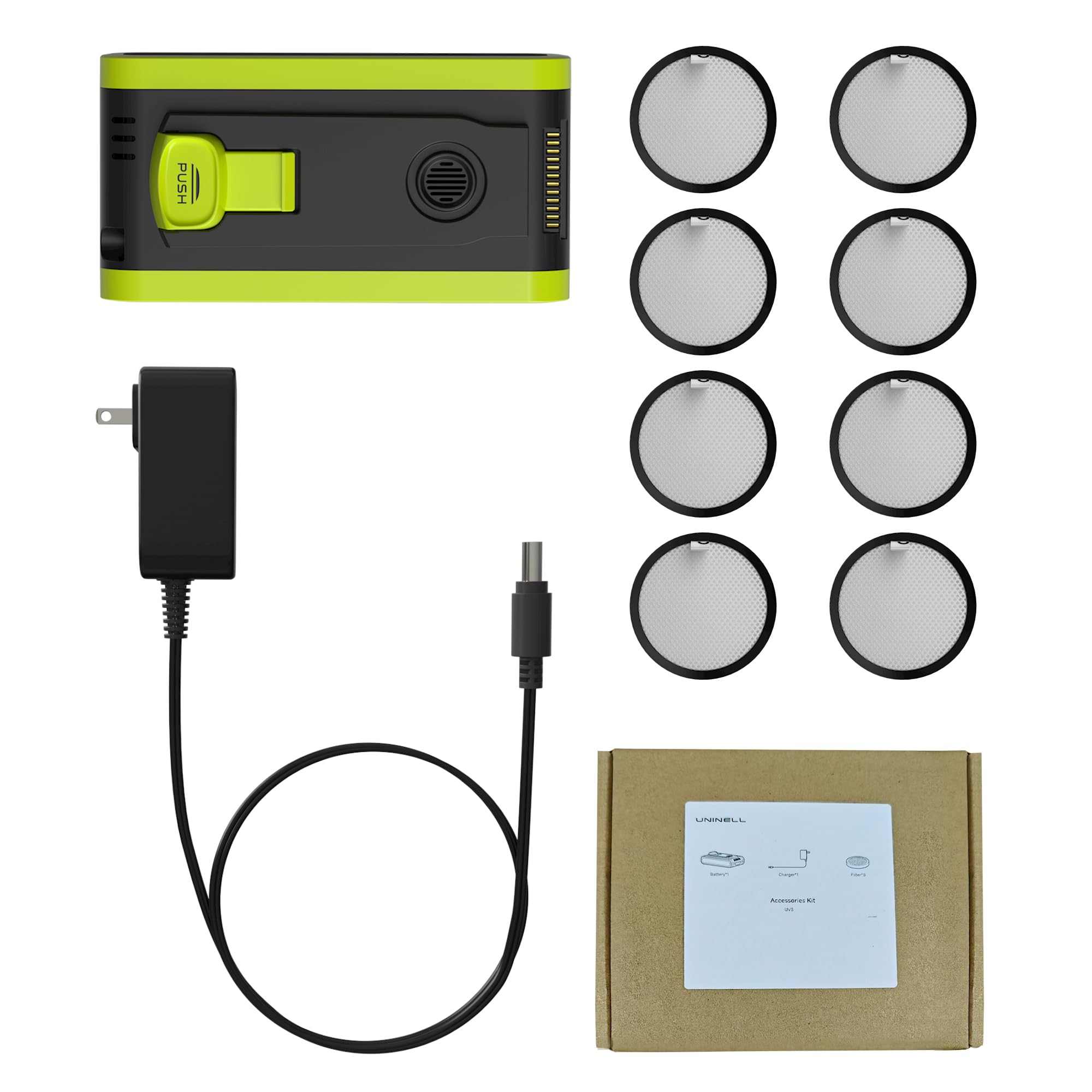
Image: The UNINELL HOME UV3 Accessory Kit, showing the replacement battery, power adapter, and eight HEPA filters neatly arranged.
การตั้งค่า
1. การติดตั้งแบตเตอรี่
- Ensure your UNINELL HOME UV3 vacuum cleaner is powered off and disconnected from any charging source.
- Locate the battery compartment on your vacuum cleaner. Refer to your vacuum's main instruction manual for specific battery removal instructions.
- ถอดแบตเตอรี่เก่าออกอย่างระมัดระวัง
- Insert the new replacement battery into the compartment, ensuring it clicks securely into place.
2. การชาร์จแบตเตอรี่
- เชื่อมต่ออะแดปเตอร์ไฟฟ้าเข้ากับเต้ารับไฟฟ้ามาตรฐาน
- Plug the charging cable from the power adapter into the charging port on your UNINELL HOME UV3 vacuum cleaner.
- Allow the battery to charge fully before first use. The charging indicator on your vacuum will typically change color or turn off when charging is complete.
3. การติดตั้งแผ่นกรอง HEPA
- Ensure the vacuum cleaner is off and the dustbin is empty.
- Locate the filter housing, usually within or near the dustbin.
- ถอดแผ่นกรอง HEPA เก่าออก
- Insert a new HEPA filter into the housing, ensuring it fits snugly to prevent air leakage.
- Close the dustbin and filter housing securely.
การดำเนินงาน
Using the Charged Battery
Once the replacement battery is fully charged and installed, your UNINELL HOME UV3 vacuum cleaner is ready for use. Operate the vacuum as you normally would, following the instructions in your vacuum's main user manual. The new battery should provide optimal runtime.
Maintaining Filter Performance
Regularly check the HEPA filter for dirt and debris. A clean filter is crucial for maintaining strong suction power and ensuring effective air filtration. Replace the filter as needed, typically every 3-6 months depending on usage, or when you notice a decrease in suction.
การซ่อมบำรุง
การดูแลแบตเตอรี่
- เพื่ออายุการใช้งานแบตเตอรี่ที่เหมาะสม ควรหลีกเลี่ยงการใช้แบตเตอรี่จนหมดก่อนที่จะชาร์จใหม่
- เก็บแบตเตอรี่ไว้ในที่แห้งและเย็นเมื่อไม่ได้ใช้งานเป็นเวลานาน
- If the vacuum will not be used for a long time, charge the battery to about 50% before storage.
การเปลี่ยนไส้กรอง HEPA
The accessory kit includes 8 HEPA filters. It is recommended to replace the HEPA filter every 3 to 6 months, or more frequently if the vacuum is used heavily or in dusty environments. Refer to the 'Setup' section for installation instructions.
การดูแลอะแดปเตอร์ไฟฟ้า
- Inspect the power adapter and cable regularly for any signs of damage. Do not use if damaged.
- Store the adapter in a safe place, away from pets and children, to prevent damage.
การแก้ไขปัญหา
แบตเตอรี่ไม่ได้ชาร์จ
- ตรวจสอบการเชื่อมต่อพลังงาน: Ensure the power adapter is securely plugged into both the wall outlet and the vacuum's charging port.
- ตรวจสอบเอาท์เล็ท: ทดสอบปลั๊กไฟกับอุปกรณ์อื่นเพื่อตรวจสอบว่าใช้งานได้ปกติ
- ตรวจสอบอะแดปเตอร์: Check the power adapter and cable for any visible damage. If damaged, discontinue use and contact support.
- ที่นั่งแบตเตอรี่: ตรวจสอบให้แน่ใจว่าได้ติดตั้งแบตเตอรี่อย่างถูกต้องและเสียบเข้าไปในช่องใส่แบตเตอรี่จนสุดแล้ว
Vacuum Not Powering On (with new battery)
- ชาร์จแบตเตอรี่: Ensure the new battery has been fully charged before attempting to power on the vacuum.
- การติดตั้งแบตเตอรี่: Double-check that the battery is correctly and securely installed.
- Vacuum Main Switch: Confirm the main power switch on the vacuum is in the 'ON' position.
Reduced Suction (after filter change)
- ที่นั่งแบบกรอง: Ensure the new HEPA filter is correctly installed and sealed within its housing. An improperly seated filter can cause air leaks and reduced suction.
- Dustbin Check: Verify the dustbin is empty and properly attached to the vacuum.
- ตัวกรองอื่นๆ: Check if any other filters in the vacuum (e.g., pre-motor filter) also need cleaning or replacement.
ข้อมูลจำเพาะ
| ส่วนประกอบ | ข้อมูลจำเพาะ |
|---|---|
| รุ่นสินค้า | UNINELL HOME UV3 Accessory Kit |
| ประเภทตัวกรอง | แผ่นกรอง HEPA |
| แหล่งพลังงาน | Battery Powered (for vacuum operation) |
| Unit Count (Filters) | 8.0 จำนวน |
| ยี่ห้อ | UNINELL HOME |
การรับประกันและการสนับสนุน
ข้อมูลการรับประกัน
Your UNINELL HOME UV3 Cordless Cane Vacuum Cleaner Accessory Kit is covered by a การรับประกันเพิ่มเติม 24 เดือน from the date of purchase. This warranty covers manufacturing defects and ensures product reliability. Additionally, we offer a การคืนสินค้าภายใน 30 วันโดยไม่มีปัญหา policy for your peace of mind.
การสนับสนุนลูกค้า
For any questions, technical assistance, or warranty claims, please contact our customer support team. We provide การสนับสนุนด้านเทคนิคตลอด 24 ชั่วโมง and are committed to ความพึงพอใจของลูกค้า 100%.
You can find more information and contact details on the official UNINELL HOME store page: UNINELL HOME Store