
DOOGEE DOOGEE Blade 10 Ultra
คู่มือการใช้งานสมาร์ทโฟน DOOGEE Blade 10 Ultra
Model: DOOGEE Blade 10 Ultra
1. บทนำ
This manual provides comprehensive instructions for the safe and efficient use of your DOOGEE Blade 10 Ultra smartphone. Please read this manual carefully before using the device to ensure optimal performance and longevity.

ภาพ: ด้านหน้าและด้านหลัง view of the DOOGEE Blade 10 Ultra smartphone, highlighting its rugged design and key features like NFC and Android 14.
2. การตั้งค่า
2.1 การแกะกล่องและการตรวจสอบเบื้องต้น
Carefully unbox your DOOGEE Blade 10 Ultra and verify that all components are present and in good condition. The package should contain:
- 1 x DOOGEE Blade 10 Ultra Smartphone
- สาย USB Type-C 1 เส้น
- 1 x เครื่องชาร์จ
- 1 x Tempered Glass Protector (pre-applied)
- 1 x คู่มือผู้ใช้
2.2 การติดตั้งซิมการ์ดและการ์ด microSD
To install your SIM card(s) and/or microSD card:
- ค้นหาถาดซิมที่ด้านข้างของอุปกรณ์
- เสียบเครื่องมือถอดซิมเข้าไปในรูเล็กๆ ข้างถาดเพื่อเปิดออก
- Place your Nano-SIM card(s) and/or microSD card into the designated slots. Ensure the gold contacts are facing down. The device supports up to 2TB external storage via microSD.
- ค่อยๆ ดันถาดกลับเข้าไปในช่องจนกระทั่งล็อคเข้าที่

Image: Illustration of the internal storage components, showing 8GB+12GB RAM and 256GB ROM, with support for up to 2TB microSD card.
2.3 First Power On and Basic Setup
Press and hold the power button until the DOOGEE logo appears. Follow the on-screen prompts to complete the initial setup, including language selection, Wi-Fi connection, Google account setup, and security settings.
2.4 การชาร์จอุปกรณ์
Connect the USB Type-C cable to the phone's charging port and the other end to the provided charger. Plug the charger into a power outlet. The battery indicator will show charging status. For optimal battery life, fully charge the device before first use.
3. การใช้งานสมาร์ทโฟนของคุณ
3.1 เกินview of Android 14
Your DOOGEE Blade 10 Ultra runs on the latest Android 14 operating system, offering enhanced privacy features, improved security, and a more personalized user experience. Explore new customization options and streamlined notifications.

Image: The Android 14 system logo, emphasizing its smart, secure, and convenient features.
3.2 การแสดงผลและการนำทาง
The device features a 6.56-inch HD+ IPS waterdrop display with a 90Hz refresh rate for smooth visuals. Navigate the interface using touch gestures: swipe, tap, pinch-to-zoom, and long-press.
3.3 การใช้งานกล้อง
Capture high-quality photos and videos with the 50MP AI main camera and 8MP front camera. The Morpho Imaging Algorithm enhances your photography with various modes including HDR, Watermark, Video, Picture, Beauty, Pro Mode, Portrait, Gif, Panorama, and Filter.

Image: Visual representation of the 50MP main camera and 8MP front camera, detailing the various imaging modes available through the Morpho Imaging Algorithm.
3.4 การเชื่อมต่อ
Your smartphone supports a wide range of connectivity options:
- ไวไฟ : Connect to 2.4G and 5G networks (802.11ac/a/b/g/n).
- บลูทูธ: BT5.0 for connecting to wireless accessories.
- NFC: เพื่อการชำระเงินแบบไร้สัมผัสและแบ่งปันข้อมูลอย่างรวดเร็ว
- ออโตจีที: On-The-Go support for connecting USB devices.
- การนำทาง: Integrated GPS, Glonass, Galileo, and Beidou for accurate positioning.
- เครือข่ายเซลลูล่าร์: Supports 2G GSM (B2/3/5/8), 3G WCDMA (B1/2/4/5/8), and 4G FDD (B1/2/3/4/5/7/8/18/19/20/25/26/28A/28B/66) bands.
3.5 การจัดการแบตเตอรี่
The DOOGEE Blade 10 Ultra is equipped with a large 5150mAh battery, providing extended usage times. To maximize battery life:
- Optimize screen brightness.
- ปิดแอพพลิเคชันพื้นหลังที่ไม่ได้ใช้งาน
- ปิดใช้งาน Wi-Fi, Bluetooth หรือ GPS เมื่อไม่ได้ใช้งาน
- Expected battery life: up to 470 hours standby, 111.9 hours music, 25.5 hours talk, 16.7 hours video, 7.6 hours web เรียกดู
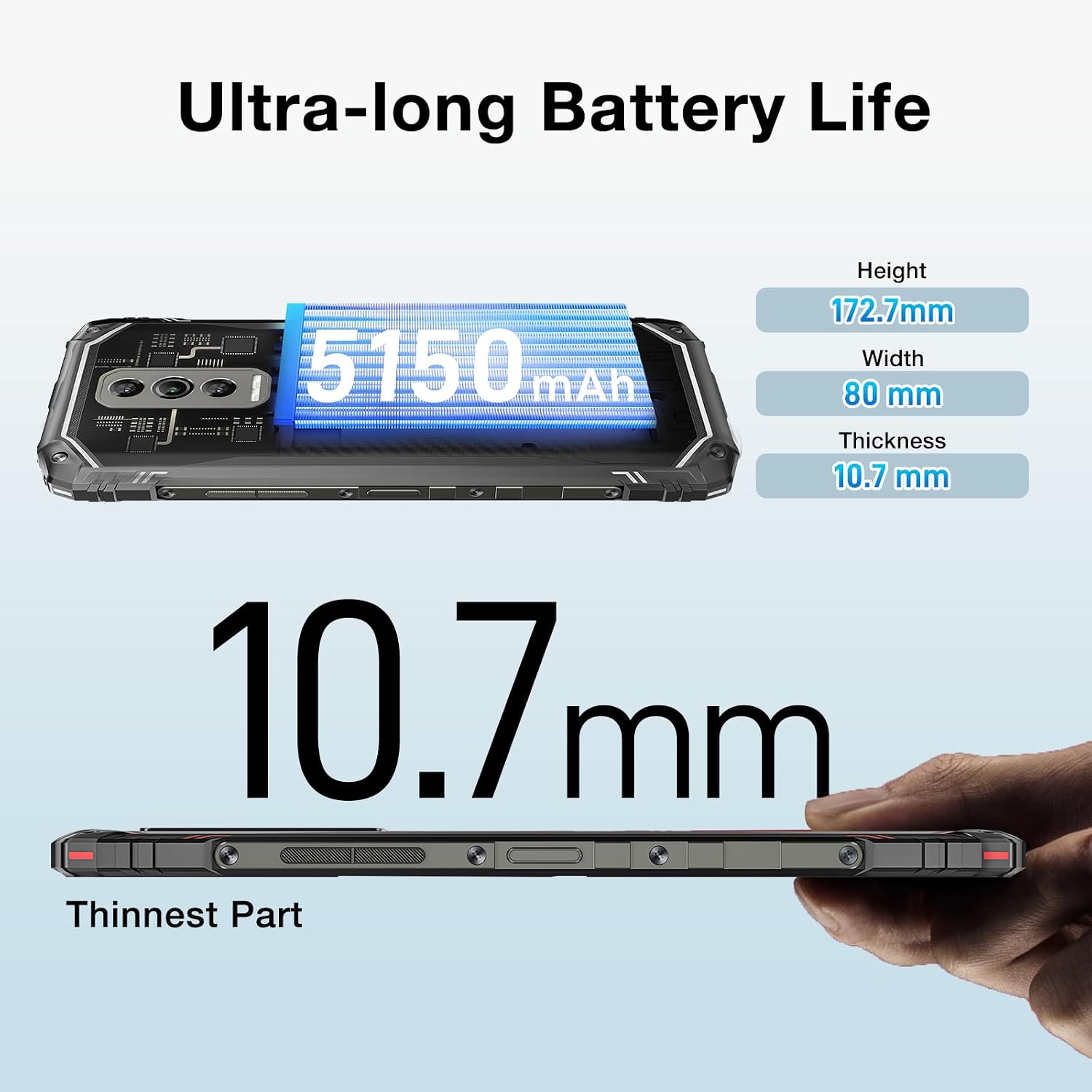
Image: The DOOGEE Blade 10 Ultra highlighting its 5150mAh battery capacity and physical dimensions (Height: 172.7mm, Width: 80mm, Thickness: 10.7mm).
3.6 การจัดการการจัดเก็บข้อมูล
The device comes with 256GB of internal storage (ROM) and up to 20GB of RAM (8GB physical + 12GB virtual). You can expand storage by up to 2TB using a microSD card. Regularly clear cache and unnecessary fileเพื่อรักษาประสิทธิภาพการทำงานให้อยู่ในระดับที่เหมาะสม
3.7 ขาตั้ง Widevine L1
The DOOGEE Blade 10 Ultra supports Widevine L1, enabling high-definition streaming from popular platforms. Enjoy your favorite movies and shows in crisp, clear quality.
4. การบำรุงรักษา
4.1 การทำความสะอาดอุปกรณ์ของคุณ
ใช้ผ้านุ่มที่ไม่เป็นขุยทำความสะอาดหน้าจอและตัวเครื่องโทรศัพท์ หลีกเลี่ยงการใช้สารเคมีรุนแรงหรือวัสดุขัดถูที่อาจทำให้อุปกรณ์เสียหาย สำหรับรอยเปื้อนฝังแน่น ให้เช็ดเบาๆampชุบผ้าด้วยน้ำหรือน้ำยาทำความสะอาดหน้าจอ
4.2 การอัปเดตซอฟต์แวร์
ตรวจสอบและติดตั้งการอัปเดตซอฟต์แวร์เป็นประจำเพื่อให้แน่ใจว่าอุปกรณ์ของคุณมีฟีเจอร์ แพตช์ความปลอดภัย และการปรับปรุงประสิทธิภาพล่าสุด ไปที่ การตั้งค่า > ระบบ > อัปเดตระบบ เพื่อตรวจสอบการอัปเดต
4.3 การเพิ่มประสิทธิภาพการจัดเก็บข้อมูล
To keep your phone running smoothly, periodically review and delete unnecessary apps, photos, videos, and files. Utilize cloud storage or transfer large files to a computer to free up internal space.
5 การแก้ไขปัญหา
If you encounter issues with your DOOGEE Blade 10 Ultra, refer to the following common solutions:
| ปัญหา | สารละลาย |
|---|---|
| อุปกรณ์ไม่ได้เปิด | Ensure the battery is charged. Connect to the charger for at least 10 minutes, then try powering on. If unresponsive, perform a forced restart by holding the power button for 10-15 seconds. |
| ปัญหาการชาร์จ | Check the USB cable and charger for damage. Try a different power outlet. Ensure the charging port is clean and free of debris. |
| การเชื่อมต่อเครือข่ายไม่ดี | Check if airplane mode is off. Restart the device. Verify SIM card is properly inserted. Contact your network provider if the issue persists. |
| แอปพลิเคชันขัดข้องหรือค้าง | Clear the app's cache and data (Settings > Apps > [App Name] > Storage). Update the app to the latest version. If the problem continues, uninstall and reinstall the app. |
| อุปกรณ์ทำงานช้า | ปิดแอปพลิเคชันที่ทำงานอยู่เบื้องหลังที่ไม่ได้ใช้งาน ล้างแคชและไฟล์ชั่วคราว files. Ensure sufficient storage space is available. Restart the device. |
5.1 รีเซ็ตเป็นค่าโรงงาน
หากขั้นตอนการแก้ไขปัญหาอื่นๆ ไม่ได้ผล คุณอาจต้องทำการรีเซ็ตเป็นค่าเริ่มต้นจากโรงงาน คำเตือน: การดำเนินการนี้จะลบข้อมูลทั้งหมดในโทรศัพท์ของคุณ โปรดสำรองข้อมูลสำคัญก่อนดำเนินการต่อ ไปที่ การตั้งค่า > ระบบ > ตัวเลือกการรีเซ็ต > ลบข้อมูลทั้งหมด (รีเซ็ตเป็นค่าโรงงาน) และทำตามคำแนะนำบนหน้าจอ
6. ข้อมูลจำเพาะ
Detailed technical specifications for the DOOGEE Blade 10 Ultra:
| คุณสมบัติ | ข้อมูลจำเพาะ |
|---|---|
| แบบอย่าง | DOOGEE Blade 10 Ultra |
| ระบบปฏิบัติการ | แอนดรอยด์ 14 |
| แสดง | 6.56-inch HD+ IPS Waterdrop, 90Hz Refresh Rate |
| โปรเซสเซอร์ | Spreadtrum T606 Octa-core 1.6GHz (12nm) |
| แรม | หน่วยความจำสูงสุด 20GB (8GB จริง + 12GB เสมือน) |
| หน่วยความจำภายใน (ROM) | 256GB |
| พื้นที่เก็บข้อมูลแบบขยายได้ | รองรับความจุสูงสุด 2TB ผ่านการ์ด microSD |
| กล้องหลัก | 50MP เอไอ |
| กล้องหน้า | 8MP |
| ความจุของแบตเตอรี่ | 5150mAh |
| แบนด์เครือข่าย | 2G GSM: B2/3/5/8; 3G WCDMA: B1/2/4/5/8; 4G FDD: B1/2/3/4/5/7/8/18/19/20/25/26/28A/28B/66 |
| ไวไฟ | 2.4G/5G (802.11ac/a/b/g/n) |
| บลูทูธ | BT5.0 |
| เอ็นเอฟซี | รองรับ |
| ออโตจีที | รองรับ |
| การนำทาง | จีพีเอส | กโลนาส | กาลิเลโอ | เป่ยโต่ว |
| ขนาด (สูง x กว้าง x สูง) | 172.7มม. x 80มม. x 10.7มม. |
| สี | สีดำ |

Image: Diagram illustrating the powerful Octa-core 1.6GHz processor, highlighting its boosted performance and reduced consumption.
7. การรับประกันและการสนับสนุน
For warranty information, please refer to the warranty card included in your product packaging or visit the official DOOGEE website. For technical support or further assistance, please contact DOOGEE customer service through their official channels.
Ask a question about this manual
Ask about setup, troubleshooting, compatibility, parts, safety, or missing instructions. Manuals+ will review the question and use this page’s manual context to help answer it.