
1. บทนำ
This manual provides detailed instructions for the VIKYLIN 8MP Fixed Dome PoE IP Camera Outdoor, Model VK-YC2583I-28. This camera features 4K Ultra HD resolution, full-color night vision, human/vehicle detection, a built-in microphone, and Power over Ethernet (PoE) for simplified installation. Please read this manual thoroughly before installation and operation to ensure proper use and optimal performance.
2. เนื้อหาบรรจุภัณฑ์
ตรวจสอบว่าสินค้าทั้งหมดที่ระบุไว้ด้านล่างนี้รวมอยู่ในแพ็คเกจของคุณแล้ว หากมีสินค้าใดสูญหายหรือเสียหาย โปรดติดต่อฝ่ายสนับสนุนลูกค้า
- 1x 4K PoE IP Dome Camera
- 1x Base Sticker
- 1x คู่มือการใช้งาน
- 1x Screw Bag (containing screws for mounting)
- 1x Waterproof Kit

Image: Package contents of the VIKYLIN 8MP Fixed Dome PoE IP Camera.
3. คุณสมบัติของผลิตภัณฑ์
- ความละเอียด 4K Ultra HD: Provides clear image quality with 8MP (3840 × 2160) resolution at 20 frames per second, featuring a 1/2.8” 8 Megapixel Scan CMOS sensor and a 2.8mm fixed lens for a 112° ultra-wide viewมุมอิง
- การมองเห็นตอนกลางคืนแบบสีเต็มรูปแบบ: Equipped with F1.6 aperture and soft supplemental lighting, this camera provides detailed full-color video even in extremely dark scenes.
- ไฟคู่อัจฉริยะ: The camera intelligently switches between IR (infrared) and warm light illumination based on detection, ensuring optimal night vision while deterring intruders with a warm light flash.
- การตรวจจับมนุษย์/ยานพาหนะ: Advanced detection functions reduce false alarms by accurately identifying human and vehicle movement. Detection areas and sensitivity can be adjusted.
- ไมโครโฟนในตัว: Capture clear audio from the camera's vicinity, allowing for one-way audio monitoring and recording.
- จ่ายไฟผ่านอีเทอร์เน็ต (PoE): Simplifies installation by providing both power and data connection through a single Cat 5 or Cat 6 Ethernet cable.
- การออกแบบที่ทนทาน: IP67 weatherproof and IK10 vandal-proof rating ensures reliable outdoor performance in various conditions.
- การบีบอัดที่มีประสิทธิภาพ: Utilizes H.265+/H.264 encoding technology to save bandwidth and storage space without compromising video quality.
Feature Demonstrations
Video: Demonstration of the camera's UltraHD 4K picture display quality.

Image: Smart Dual Illuminators in action, providing full-color night vision when a target is detected.

Image: Human and Vehicle Detection capabilities, highlighting reduced false alarms.
Video: Full Color Camera Night Vision demonstration, showcasing clear imaging in low-light conditions.

Image: Built-in microphone feature allowing for one-way audio communication.
4. การตั้งค่าและการติดตั้ง
The VIKYLIN 8MP Fixed Dome PoE IP Camera is designed for easy installation using Power over Ethernet (PoE). A single Ethernet cable provides both power and data connectivity.
4.1 การติดตั้งทางกายภาพ
- เลือกสถานที่: Select a suitable indoor or outdoor location for mounting. The camera is IP67 rated for weather resistance and IK10 for vandal resistance.
- การติดตั้ง: Use the provided base sticker as a template to mark drill holes. Secure the camera using the included screws.
- การเชื่อมต่อสายเคเบิล: Connect a Cat 5 or Cat 6 Ethernet cable from the camera to a PoE injector, PoE switch, or PoE NVR. Ensure the waterproof kit is properly installed for outdoor use.

Image: Camera's IP67 weatherproof and IK10 vandal-proof design.
4.2 การกำหนดค่าเริ่มต้น
After physical installation, configure the camera using the web อินเทอร์เฟซหรือแอปพลิเคชันบนมือถือ
- เชื่อมต่อกับเครือข่าย: Ensure the camera is connected to your network via PoE.
- ค้นพบกล้องถ่ายรูป: Use a PC software like VMS or SADP Tool to search for the camera device on your network.
- เข้าถึง Web อินเทอร์เฟซ: เปิด web browser and enter the camera's IP address. Log in using the default credentials (usually admin/admin or admin/12345).
- Enable P2P: Navigate to Configuration > Network > P2P and enable the P2P function. Scan the QR code to add the device to your mobile app.
Video: Detailed guide on configuring the 4K Full Color PoE IP Dome Camera, including human/vehicle detection settings and night vision options.
5. คู่มือการใช้งาน
Operate your VIKYLIN IP camera using the 'Remoteeyes' mobile app or compatible PC software.
5.1 Mobile App (Remoteeyes)
- ดาวน์โหลดแอพ: Download the 'Remoteeyes' app from the Apple App Store or Google Play Store.
- เพิ่มอุปกรณ์: Use the P2P function (QR code scan) to add your camera to the app.
- สด View: Access live video feeds from your camera anytime, anywhere.
- การเล่นซ้ำ: Review บันทึกเสียงฟูtage with smart playback features.
- เสียงทางเดียว: Utilize the built-in microphone for one-way audio communication.
- การแจ้งเตือน: Receive real-time video/snapshot alerts on your mobile phone when human or vehicle detection is triggered.
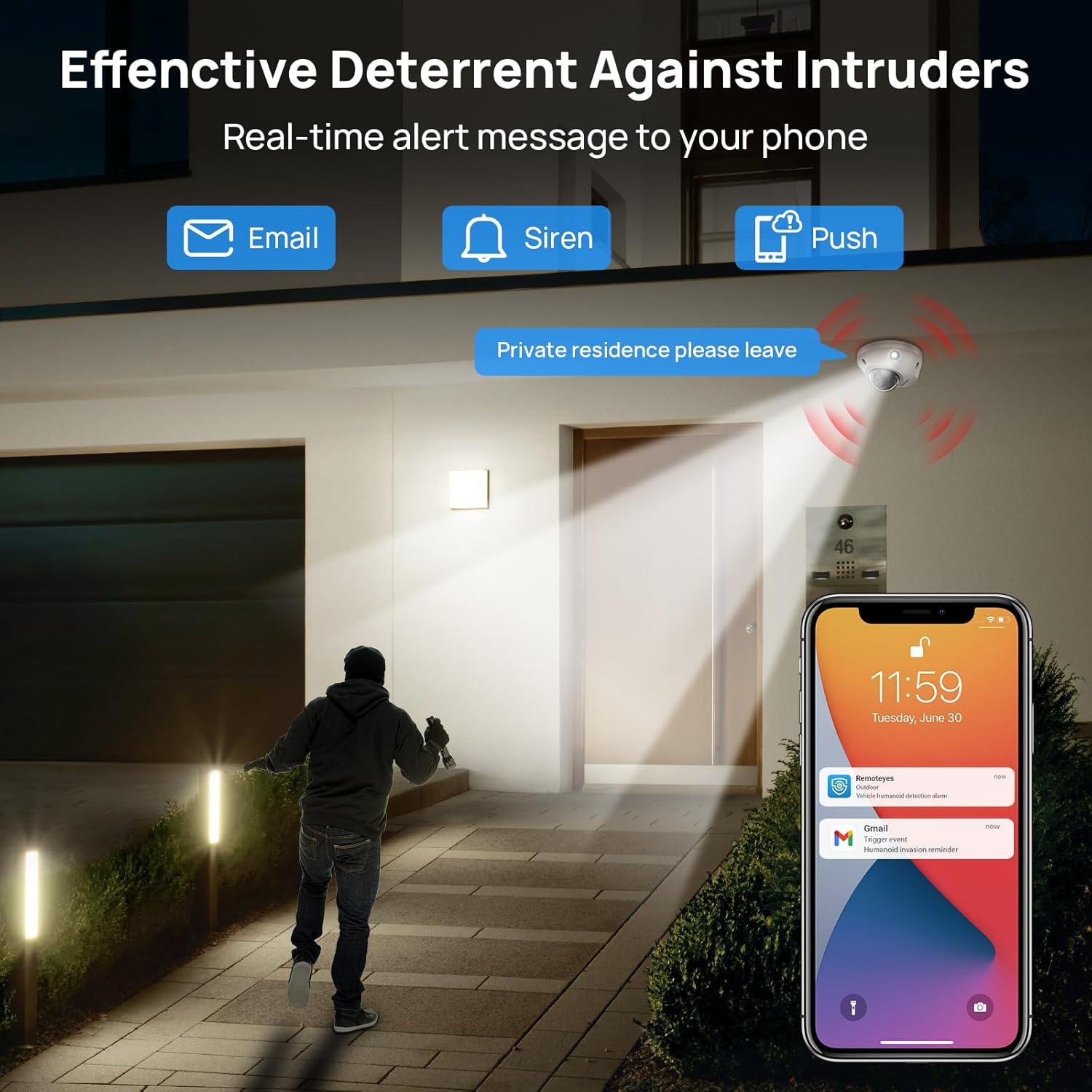
Image: Real-time alerts and deterrent features in action.
5.2 PC Software and Third-Party Compatibility
The camera is compatible with free PC software (VMS) and third-party monitoring software such as Blue Iris, iSpy, and VLC. It supports the Open Network Video Interface protocol (ONVIF) and RTSP for integration with various systems.
Local PC/NVR/NAS video storage is supported, with options for 24/7 recording or motion-triggered video to NVR or FTP.
6. การบำรุงรักษา
To ensure optimal performance and longevity of your VIKYLIN IP Camera, consider the following maintenance tips:
- การทำความสะอาดปกติ: ทำความสะอาดเลนส์และตัวเรือนกล้องเป็นระยะด้วยผ้านุ่มๆamp ผ้าสำหรับเช็ดฝุ่นและเศษสิ่งสกปรก หลีกเลี่ยงน้ำยาทำความสะอาดที่มีฤทธิ์กัดกร่อน
- อัพเดตเฟิร์มแวร์: ตรวจสอบของผู้ผลิต webตรวจสอบเว็บไซต์หรือแอปพลิเคชันเพื่อดูการอัปเดตเฟิร์มแวร์ที่มีอยู่ เพื่อให้มั่นใจว่ากล้องของคุณมีคุณสมบัติและการปรับปรุงด้านความปลอดภัยล่าสุด
- การตรวจสอบสายเคเบิล: Regularly inspect the Ethernet cable and connections for any signs of wear or damage, especially for outdoor installations.
- การจัดการพื้นที่เก็บข้อมูล: If using local storage (Micro SD card, NVR, NAS), ensure sufficient storage space is available and manage recordings as needed.
7 การแก้ไขปัญหา
If you encounter issues with your VIKYLIN 8MP Fixed Dome PoE IP Camera, refer to the following common troubleshooting steps:
- ไม่มีพลังงาน/การเชื่อมต่อ:
- Verify the Ethernet cable is securely connected to both the camera and the PoE source (NVR, switch, or injector).
- ตรวจสอบให้แน่ใจว่าแหล่งจ่ายไฟ PoE เปิดใช้งานอยู่และทำงานได้อย่างถูกต้อง
- ตรวจสอบสายเคเบิลว่าได้รับความเสียหายหรือไม่
- ไม่สามารถเข้าถึงกล้องได้:
- Confirm the camera's IP address using the SADP Tool or VMS software.
- Ensure your computer or mobile device is on the same network as the camera.
- Check firewall settings on your computer or router that might be blocking access.
- Reset the camera to factory defaults if you have forgotten the password (a reset button is available on the camera).
- คุณภาพของภาพต่ำ:
- ทำความสะอาดเลนส์กล้อง
- Check network bandwidth; insufficient bandwidth can affect streaming quality.
- Adjust image settings (brightness, contrast, WDR) in the camera's web อินเทอร์เฟซหรือแอป
- สัญญาณเตือนที่ผิดพลาด:
- Adjust the sensitivity of human/vehicle detection.
- Define specific detection zones to exclude areas with irrelevant motion (e.g., trees swaying).
For further assistance, please contact VIKYLIN customer support.
8. ข้อมูลจำเพาะ
| คุณสมบัติ | รายละเอียด |
|---|---|
| ชื่อรุ่น | 4K Dual-light Built-in Microphone PoE IP Dome Camera (VK-YC2583I-28-N) |
| หมายเลขรุ่นสินค้า | VK-YC2583I-28 |
| ความละเอียดของภาพนิ่งที่มีประสิทธิภาพ | 8 ล้านพิกเซล (3840 x 2160) |
| อัตราเฟรม | 20 เฟรมต่อวินาที |
| เลนส์ | 2.8mm fixed lens, F1.6 Super Aperture |
| Viewอิงแองเกิล | เลนส์มุมกว้างพิเศษ 112° |
| ช่วงการมองเห็นตอนกลางคืน | 98 Feet (Full Color / IR View) |
| เทคโนโลยีแสงน้อย | Night Color / IR, Smart Dual Light |
| เสียง | Built-in Mic (One-way Audio) |
| การตรวจจับ | การตรวจจับมนุษย์/ยานพาหนะ |
| เทคโนโลยีการเชื่อมต่อ | อีเธอร์เน็ต (PoE) |
| แหล่งพลังงาน | ไฟฟ้าแบบมีสาย (PoE) |
| พื้นที่จัดเก็บ | Local PC/NVR/NAS Video Storage, supports up to 256GB Micro SD card (not included) |
| ความเข้ากันได้ | PoE NVR, ONVIF, Blue Iris, iSpy, VLC, Remoteeyes App (iOS/Android), VMS PC software |
| การให้คะแนนการคุ้มครองระหว่างประเทศ | IP67 (กันน้ำ) |
| การป้องกันแรงกระแทก | IK10 (Vandal-proof) |
| อุณหภูมิในการทำงาน | -30°C ถึง 60°C (-22°F ถึง 140°F) |
| ความชื้น | < 90% |
| วัสดุ | โลหะ |
| ขนาดสินค้า | 5.51 x 5.51 x 3.94 นิ้ว |
| น้ำหนักสินค้า | 1.17 ปอนด์ |

Image: Technical specifications overview ของกล้อง
9. การรับประกันและการสนับสนุน
VIKYLIN provides comprehensive support for its products.
- การรับประกัน: ผลิตภัณฑ์นี้มีการรับประกัน 2 ปี
- การสนับสนุนด้านเทคนิค: มีบริการสนับสนุนทางเทคนิคตลอดอายุการใช้งาน
- ข้อมูลติดต่อ: For any questions or issues, please contact our support team via email at cairo@vikylin.com.
- แผนการคุ้มครอง: Extended protection plans are available for purchase separately (e.g., 2-Year Protection Plan, 3-Year Protection Plan, Complete Protect).