
1. บทนำ
This manual provides detailed instructions for the installation, setup, operation, and maintenance of your SALCAR T5W Smart Wi-Fi Heating Thermostat. This device is designed to offer precise temperature control, energy efficiency, and smart home integration for your heating system. Please read this manual thoroughly before installation and use to ensure proper functionality and safety.

Image 1.1: SALCAR T5W Smart Wi-Fi Thermostat with its accompanying smartphone application interface.
2. เนื้อหาบรรจุภัณฑ์
ตรวจสอบว่ารายการทั้งหมดที่ระบุไว้ด้านล่างนี้รวมอยู่ในแพ็คเกจของคุณ:
- 1 x SALCAR T5W Smart Wi-Fi Thermostat
- 1 x คู่มือผู้ใช้
- สกรูยึด 2 ตัว
- แบตเตอรี่อัลคาไลน์ AA 1.5V จำนวน 2 ก้อน

Image 2.1: Contents of the SALCAR T5W Thermostat package.
3. คุณสมบัติของผลิตภัณฑ์
The SALCAR T5W Thermostat offers a range of features designed for comfort and energy efficiency:
- การเชื่อมต่อ Wi-Fi: Remote control and monitoring via the Tuya Smart Life app.
- การควบคุมด้วยเสียง: เข้ากันได้กับ Amazon Alexa และ Google Assistant เพื่อการใช้งานแบบแฮนด์ฟรี
- กำหนดการที่ตั้งโปรแกรมได้: Customize heating schedules with 5+2, 6+1, or 7-day options, allowing up to 6 heating events per day.
- การล็อคเด็ก: ป้องกันการเปลี่ยนแปลงการตั้งค่าโดยไม่ได้รับอนุญาต
- ระบบป้องกันน้ำแข็งเกาะ: Automatically activates heating to prevent pipes from freezing.
- หน่วยความจำปิดเครื่อง: Retains settings in case of power interruption.
- เซ็นเซอร์ความชื้นในตัว: แสดงค่าความชื้นในห้องปัจจุบัน
- จอแสดงผล LCD: Clear digital display for temperature, time, and mode.
- เปิดหน้าต่างการตรวจจับ: (Feature may vary by firmware) Automatically adjusts heating when an open window is detected.

ภาพที่ 3.1: จบแล้วview of the SALCAR T5W Smart Thermostat's key features.
4. การติดตั้ง
4.1. การเดินสาย
สำคัญ: Electrical installation should be performed by a qualified professional to ensure safety and compliance with local regulations. Always turn off the main power supply before beginning any wiring work.
The SALCAR T5W thermostat supports two main wiring configurations:
- For Valve Actuator (NC Electrothermal Actuator): Connect the Neutral (N) and Live (L) wires from your power supply to the corresponding terminals on the thermostat. Connect the actuator to the N and NO (Normally Open) terminals.
- For Water/Gas Boiler (Dry Contact Control): Connect the N and L wires from your power supply to the thermostat. Connect the boiler's control wires to the N and COM (Common) terminals.

Image 4.1: Wiring diagrams for connecting the thermostat to a valve actuator or a boiler.
4.2. การติดตั้งแบตเตอรี่
The thermostat is powered by two AA 1.5V alkaline batteries.
- Gently pull the front cover of the thermostat upwards and outwards to detach it from the backplate.
- Insert the two AA 1.5V alkaline batteries into the battery compartment, ensuring correct polarity (+/-).
- Align the front cover with the backplate and push it back into place until it clicks securely.

Image 4.2: Step-by-step guide for battery installation.
5. การตั้งค่าเริ่มต้นและการเชื่อมต่อ Wi-Fi
To utilize the smart features of your SALCAR T5W thermostat, connect it to your home Wi-Fi network via the Tuya Smart Life app.
- ดาวน์โหลดแอป: ค้นหา ค้นหา "Tuya Smart" หรือ "Smart Life" ในแอปสโตร์ของสมาร์ทโฟนของคุณ (iOS หรือ Android) แล้วติดตั้ง
- ลงทะเบียน/เข้าสู่ระบบ: เปิดแอปพลิเคชันและสร้างบัญชีใหม่ หรือเข้าสู่ระบบด้วยบัญชีที่มีอยู่แล้ว
- Activate Wi-Fi Pairing Mode: Ensure the thermostat is powered OFF. Press and hold the 'OFF' button on the thermostat for approximately 3 seconds until the Wi-Fi icon on the display starts blinking rapidly. This indicates it is in pairing mode.
- เพิ่มอุปกรณ์ในแอป: In the Tuya Smart Life app, tap the '+' icon (usually in the top right corner) to add a new device. Select 'Add Device' and then choose 'Small Home Appliances' > 'Thermostat (Wi-Fi)'.
- เชื่อมต่อกับ Wi-Fi 2.4GHz: Confirm your smartphone is connected to a 2.4GHz Wi-Fi network. Enter your Wi-Fi password in the app and proceed. The app will search for and connect to the thermostat.
- เสร็จสิ้น: Once connected, the Wi-Fi icon on the thermostat display will become solid. You can then rename your device in the app and begin controlling it remotely.

Image 5.1: Visual guide for Wi-Fi connection using the Tuya Smart Life app.
6. การใช้งานเทอร์โมสตัท
6.1. หน้าจอแสดงผลและปุ่มควบคุมเทอร์โมสตัท
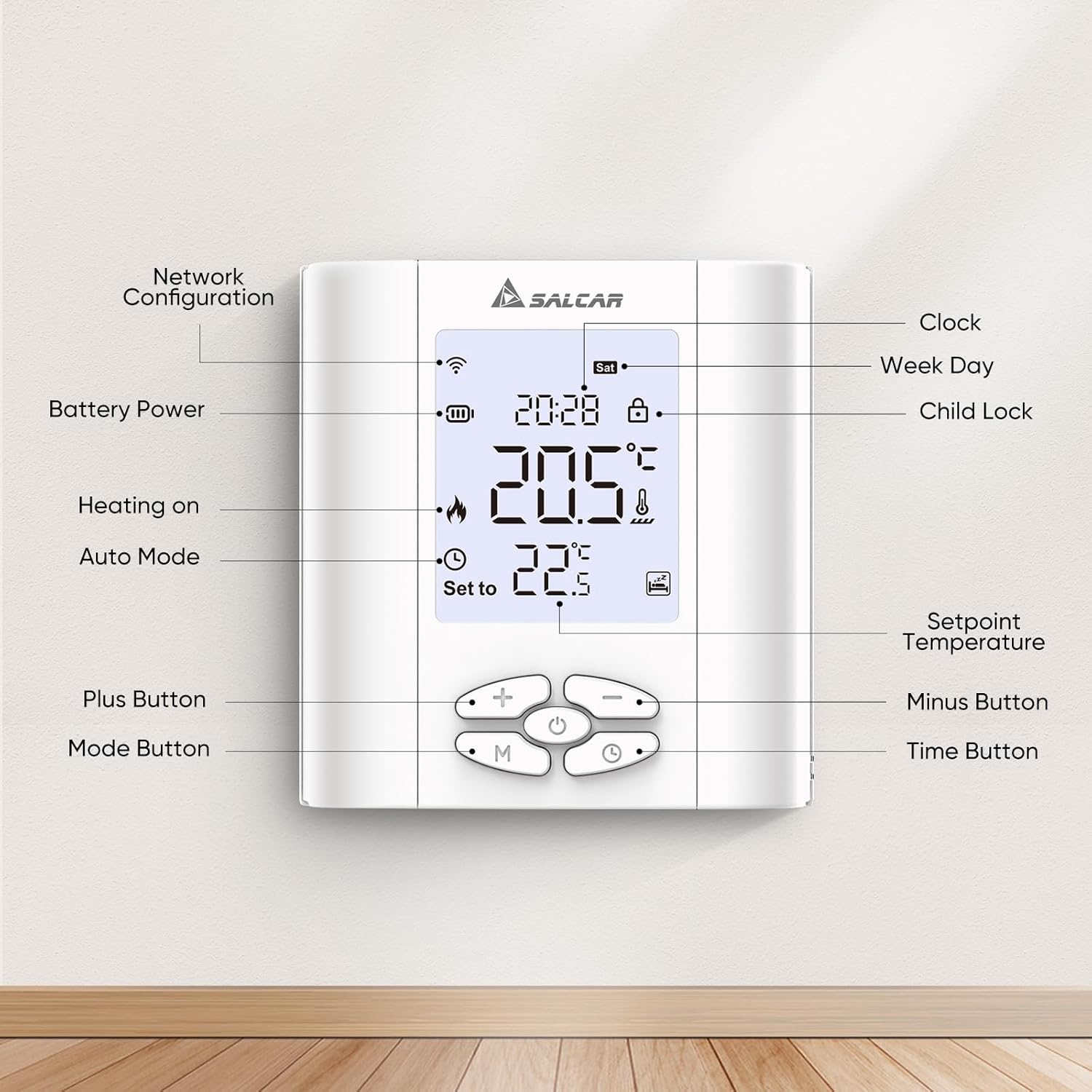
Image 6.1: Labeled components of the SALCAR T5W Thermostat display and control buttons.
| องค์ประกอบ | คำอธิบาย |
|---|---|
| Network Configuration Icon | ระบุสถานะการเชื่อมต่อ Wi-Fi |
| ไอคอนพลังงานแบตเตอรี่ | แสดงระดับแบตเตอรี่ปัจจุบัน |
| Heating On Icon | ระบุเมื่อระบบทำความร้อนทำงานอยู่ |
| ไอคอนโหมดอัตโนมัติ | Indicates the thermostat is operating in automatic programmed mode. |
| ปุ่มบวก (+) | Increases temperature setpoint or adjusts settings. |
| ปุ่มโหมด (M) | Switches between manual and automatic modes, or enters programming. |
| การแสดงนาฬิกา | แสดงเวลาปัจจุบัน |
| Week Day Display | Shows current day of the week. |
| ไอคอนล็อคเด็ก | แสดงว่าเปิดใช้งานระบบล็อกสำหรับเด็กอยู่หรือไม่ |
| อุณหภูมิที่ตั้งไว้ | The desired temperature setting. |
| ปุ่มลบ (-) | Decreases temperature setpoint or adjusts settings. |
| ปุ่มเวลา | Used for setting time and programming schedules. |
6.2. โหมดการทำงาน
- โหมดแมนนวล: เทอร์โมสตัทจะรักษาอุณหภูมิคงที่ตามที่ผู้ใช้กำหนดไว้จนกว่าจะเปลี่ยนด้วยตนเอง
- Automatic (Programmed) Mode: The thermostat follows a pre-set heating schedule based on time and day.
6.3. Programming Heating Schedules
The thermostat supports 5+2 (weekday/weekend), 6+1 (Mon-Sat/Sun), and 7-day (individual day) programming. You can set up to 6 heating events per day.
- Press the 'M' (Mode) button to enter programming mode.
- Use the '+' and '-' buttons to select the desired programming type (5+2, 6+1, or 7 days).
- Press the 'Time' button to confirm and move to setting the first event's time and temperature.
- Use '+' and '-' to adjust the time, then 'Time' to confirm.
- Use '+' and '-' to adjust the temperature for that event, then 'Time' to confirm.
- Repeat for all 6 events for the selected day(s).
- Exit programming mode by pressing 'M' or waiting for the thermostat to automatically exit.

ภาพที่ 6.2: อดีตample of setting programmable heating schedules via the app.
6.4. ล็อคเด็ก
To activate or deactivate the child lock, press and hold the '+' and '-' buttons simultaneously for a few seconds until the child lock icon appears or disappears on the display.
6.5. Anti-frost Protection
The anti-frost function helps prevent your heating system from freezing by automatically activating heating if the room temperature drops below a set threshold (e.g., 5°C). This feature is active by default and can usually be configured in advanced settings via the app.

Image 6.3: Illustration of the anti-frost protection feature.
7. การบูรณาการการควบคุมด้วยเสียง
The SALCAR T5W thermostat is compatible with Amazon Alexa and Google Assistant, allowing you to control your heating with voice commands.
- เชื่อมโยงบัญชี: In the Alexa or Google Home app, enable the "Tuya Smart" or "Smart Life" skill/service. Follow the on-screen instructions to link your Tuya Smart Life account.
- ค้นพบอุปกรณ์: เมื่อเชื่อมต่อเสร็จแล้ว ให้บอกผู้ช่วยเสียงของคุณว่า "ค้นหาอุปกรณ์" หรือเริ่มการค้นหาอุปกรณ์ด้วยตนเองในแอป
- คำสั่งเสียง: You can now use commands such as:
- "Alexa ตั้งค่า [ชื่อเทอร์โมสตัท] เป็น 22 องศา"
- "Hey Google, what is the temperature in [Room Name]?"
- "Alexa เปิด [ชื่อเทอร์โมสตัท]"

Image 7.1: Demonstrating voice control with Amazon Alexa and Google Assistant.
8. การบำรุงรักษา
8.1. การเปลี่ยนแบตเตอรี่
When the battery icon on the display indicates low power, replace the two AA 1.5V alkaline batteries. Follow the steps outlined in Section 4.2 for battery installation. It is recommended to replace both batteries at the same time.
9 การแก้ไขปัญหา
If you encounter issues with your SALCAR T5W thermostat, refer to the following common problems and solutions:
| ปัญหา | สาเหตุที่เป็นไปได้ | สารละลาย |
|---|---|---|
| เทอร์โมสตัทไม่เปิดเครื่อง | แบตเตอรี่เสียหรือติดตั้งไม่ถูกต้อง | เปลี่ยนแบตเตอรี่โดยตรวจสอบให้แน่ใจว่าใส่ขั้วถูกต้อง |
| Wi-Fi icon not blinking during pairing | ไม่ได้อยู่ในโหมดจับคู่ | Ensure thermostat is OFF, then press and hold the 'OFF' button for 3 seconds. |
| ไม่สามารถเชื่อมต่อ Wi-Fi ได้ | รหัสผ่าน Wi-Fi ไม่ถูกต้อง, ใช้เครือข่าย 5GHz หรืออยู่ห่างจากเราเตอร์มากเกินไป | Verify password, ensure 2.4GHz network, move thermostat closer to router. |
| เครื่องทำความร้อนไม่เปิด/ปิด | Incorrect wiring, thermostat in wrong mode, or setpoint not met. | Check wiring (consult professional), switch to manual mode, adjust setpoint, or check program. |
| การอ่านอุณหภูมิไม่แม่นยำ | Thermostat placed near heat source/draft, or needs calibration. | Relocate thermostat, check app for calibration options. |
10. ข้อมูลจำเพาะ
| คุณลักษณะ | รายละเอียด |
|---|---|
| ยี่ห้อ | SALCAR |
| แบบอย่าง | T5W |
| ขนาด | 8.6 x 2.08 x 9 ซม. |
| น้ำหนัก | 200 กรัม |
| วัสดุ | พลาสติก |
| เล่มที่tage | 15 Volt (for internal operation, external power supply for heating control) |
| คุณสมบัติพิเศษ | เซ็นเซอร์วัดความชื้น |
| ประเภทตัวควบคุม | แอป Tuya Smart Life |
| การใช้ผลิตภัณฑ์เฉพาะ | การควบคุมหม้อไอน้ำ |
11. การรับประกันและการสนับสนุน
For warranty information, technical support, or service inquiries, please contact SALCAR customer support. Refer to the product packaging or the official SALCAR webเว็บไซต์สำหรับรายละเอียดการติดต่อล่าสุด
ข้อมูลติดต่อผู้ผลิต:
- บริษัท: Salcar GmbH
- ที่อยู่: An der Hebemärchte 6, 04316 Leipzig, Germany
- อีเมล: info@salcar.de
- โทรศัพท์: 0341 25257850

Image 11.1: Manufacturer contact details as found on the product packaging.