
1. บทนำ
The DARAN NEO300 is a compact and versatile portable power station designed to provide reliable power for various applications, including home use, camping, emergencies, and travel. Featuring a durable LiFePO4 battery and multiple output ports, it offers a dependable energy source for your electronic devices and small appliances. This manual provides essential information for the safe and efficient operation, maintenance, and troubleshooting of your NEO300 power station.

The DARAN NEO300 is designed for easy portability, making it convenient to carry wherever power is needed.
2. คำแนะนำด้านความปลอดภัย
Please read and understand all safety instructions before operating the DARAN NEO300. Failure to follow these instructions may result in electric shock, fire, or serious injury.
- อย่าถอดประกอบซ่อมแซมหรือดัดแปลงเครื่อง
- Do not expose the unit to fire, direct sunlight, or extreme temperatures.
- ควรเก็บอุปกรณ์ให้ห่างจากน้ำ ความชื้น และสารกัดกร่อน
- ควรจัดให้มีการระบายอากาศที่เหมาะสมขณะใช้งานและชาร์จเพื่อป้องกันความร้อนสูงเกินไป
- ใช้เฉพาะสายชาร์จและอะแดปเตอร์ของแท้หรือที่ได้รับการรับรองเท่านั้น
- เก็บให้พ้นจากมือเด็กและสัตว์เลี้ยง
- If the unit emits smoke, strange odors, or unusual noises, discontinue use immediately and contact customer support.
3. สินค้าหมดview
The DARAN NEO300 features a robust design with multiple input and output ports to accommodate various devices. Familiarize yourself with the components and display indicators for optimal use.
3.1 ส่วนประกอบ

The DARAN NEO300 portable power station with its main display and various output ports.
The NEO300 offers a versatile array of ports for simultaneous device charging.
3.2. ตัวบ่งชี้การแสดงผล
The integrated display provides real-time information about the power station's status.

ชัดเจนกว่าview of the DARAN NEO300's display, providing essential information at a glance.
- ตัวบ่งชี้ระดับแบตเตอรี่: แสดงระดับการชาร์จปัจจุบัน
- Input/Output Indicator: Displays power flow into or out of the unit.
- AC/DC/USB/LED Indicators: Show which output ports are active.
- ตัวบ่งชี้การไฮเบอร์เนต: Indicates if hibernation mode is active.
- ตัวบ่งชี้การชาร์จพลังงานแสงอาทิตย์: Lights up when solar input is detected.
- ตัวบ่งชี้สัญญาณเตือน: แจ้งเตือนปัญหาที่อาจเกิดขึ้น (เช่น การโอเวอร์โหลด อุณหภูมิสูงเกินไป)
4. การตั้งค่า
4.1. การชาร์จครั้งแรก
Before first use, it is recommended to fully charge the DARAN NEO300. This ensures optimal battery performance and longevity.
- เชื่อมต่อสายชาร์จ AC ที่ให้มากับพอร์ตอินพุตบนเครื่องจ่ายไฟ
- เสียบปลายอีกด้านหนึ่งของสายชาร์จ AC เข้ากับเต้ารับติดผนังมาตรฐาน
- หน้าจอจะแสดงสถานะการชาร์จ เครื่องจะชาร์จเต็มเมื่อตัวแสดงสถานะแบตเตอรี่แสดง 100%
Initial charging typically takes approximately 4 hours via AC wall outlet.
5. คู่มือการใช้งาน
5.1. การเปิด/ปิด
- To turn on the unit, press and hold the main power button until the display illuminates.
- หากต้องการปิดเครื่อง ให้กดปุ่มเปิด/ปิดเครื่องหลักค้างไว้จนกว่าจอแสดงผลจะดับลง
5.2. การใช้พอร์ตเอาต์พุต
The NEO300 offers various output options:
- เต้าเสียบไฟ AC: Press the AC button to activate the AC output. Plug in your AC-powered devices (e.g., laptops, small appliances).
- DC Outlet (12V) & Car Socket: Press the DC button to activate the DC output. Connect 12V devices.
- USB Ports (USB-A & Type-C PD60W): These ports are typically active when the unit is on. Simply plug in your USB-powered devices.
5.3. การชาร์จสถานีไฟฟ้า
The NEO300 can be recharged in multiple ways:

The DARAN NEO300 offers flexible recharging options for convenience.
- เต้ารับไฟฟ้ากระแสสลับ: Use the included AC adapter and cable. Full charge in approximately 4 hours.
- แผงโซล่าเซลล์: Connect a compatible solar panel (up to 100W input) to the DC input port. The built-in MPPT controller ensures efficient charging. Charging time is typically 3-4 hours depending on sunlight intensity.
- การชาร์จรถยนต์: Use a car charger (cigarette lighter adapter) to charge from your vehicle's 12V outlet. Full charge in approximately 4 hours.
5.4. โหมดไฟ LED
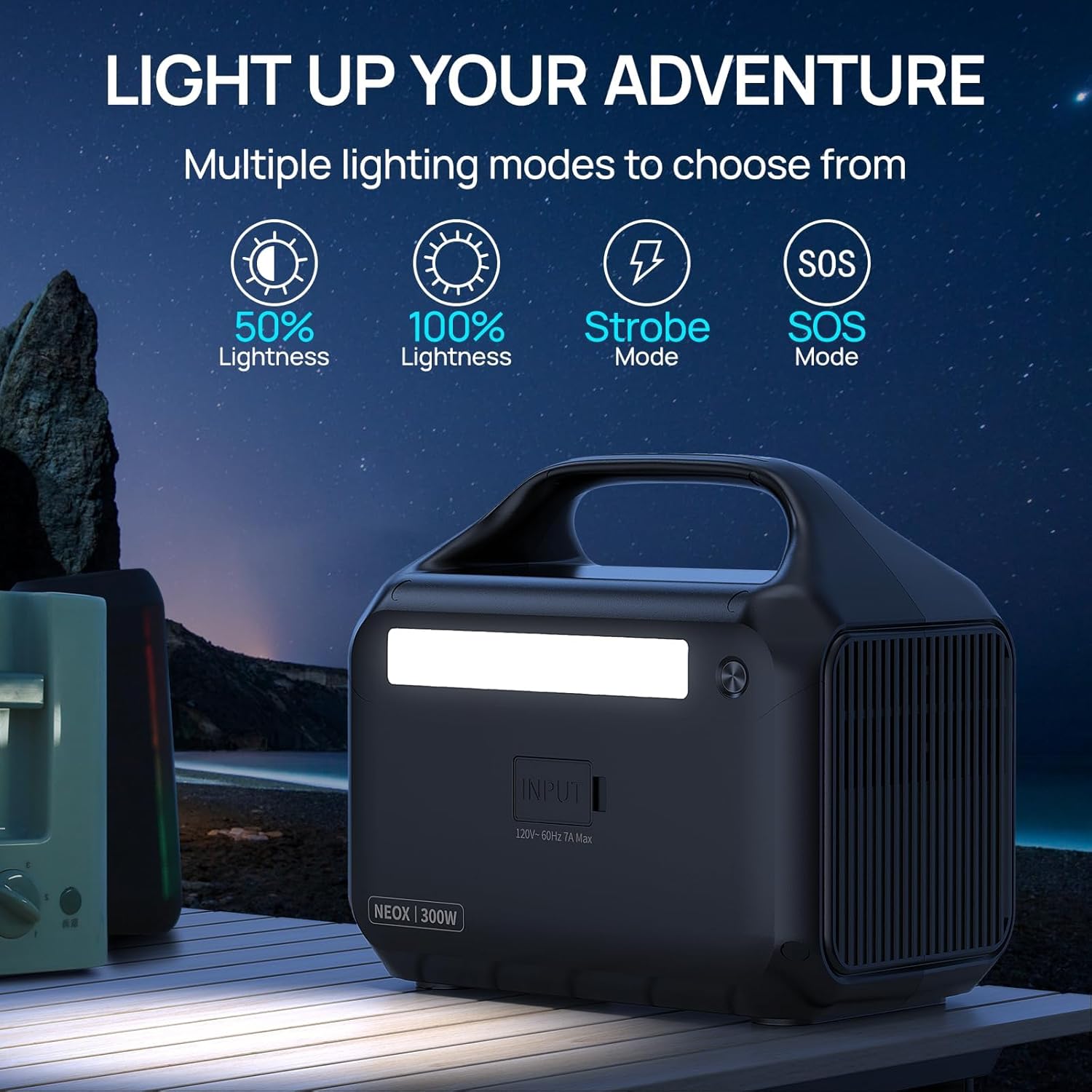
The NEO300 includes an integrated LED light with multiple modes:

The NEO300's LED light offers versatile illumination for various situations.
- Press the LED button to cycle through 50% brightness, 100% brightness, Strobe mode, and SOS mode.
- กดอีกครั้งเพื่อปิดไฟ LED
5.5. โหมดไฮเบอร์เนต
The NEO300 features a default hibernation mode to conserve power. To disable it for continuous operation:
- Press and hold the AC button.
- While holding the AC button, press the LED button.
- This action will toggle the hibernation mode off, allowing for uninterrupted use. Repeat the process to re-enable hibernation mode.
5.6. การจ่ายไฟให้อุปกรณ์
The NEO300 can power a variety of devices. The actual runtime will vary based on the device's power consumption.

Examples of devices and their estimated usage times with the DARAN NEO300.

The NEO300 can power multiple devices simultaneously, from drones to laptops.

The NEO300 is suitable for various home and outdoor applications, providing power for essential devices.
This video demonstrates the DARAN NEO300 portable generator charging devices effectively.
6. การบำรุงรักษา
6.1. การดูแลแบตเตอรี่
The NEO300 uses a LiFePO4 battery, known for its long lifespan and safety. To maximize battery life:

The LiFePO4 battery in the NEO300 is designed for extended durability and a long operational life.
- Charge the unit fully at least once every 3-6 months, even if not in use.
- หลีกเลี่ยงการชาร์จแบตเตอรี่จนหมดก่อนชาร์จ
- เก็บอุปกรณ์ไว้ในที่แห้งและเย็น หลีกเลี่ยงแสงแดดโดยตรงและอุณหภูมิที่สูงหรือต่ำเกินไป
6.2. การทำความสะอาดและการเก็บรักษา
- เช็ดภายนอกด้วยผ้านุ่มและแห้ง ห้ามใช้น้ำยาทำความสะอาดที่มีฤทธิ์กัดกร่อนหรือตัวทำละลาย
- ตรวจสอบให้แน่ใจว่าพอร์ตทั้งหมดไม่มีฝุ่นและเศษขยะ
- When storing for extended periods, ensure the battery is charged to about 50-80%.
7 การแก้ไขปัญหา
If you encounter issues with your DARAN NEO300, refer to the following common problems and solutions:
| ปัญหา | สาเหตุที่เป็นไปได้ | สารละลาย |
|---|---|---|
| เครื่องไม่เปิด | Battery is completely drained; Power button not held long enough. | ชาร์จเครื่อง กดปุ่มเปิด/ปิดค้างไว้ 3-5 วินาที |
| เอาต์พุต AC ไม่ทำงาน | AC output not activated; Device power consumption exceeds 300W; Overload protection triggered. | Press the AC button; Check device wattage; Disconnect device, restart unit. |
| เครื่องไม่ชาร์จ | Charging cable/adapter faulty; Input port blocked; Extreme temperature. | Try a different cable/adapter; Clear debris from port; Move unit to a suitable temperature range (0-40°C). |
| ไฟ LED ไม่ทำงาน | LED function not activated. | กดปุ่ม LED เพื่อเปลี่ยนโหมดต่างๆ |
If the problem persists after attempting these solutions, please contact DARAN customer service for further assistance.
8. ข้อมูลจำเพาะ
| คุณสมบัติ | รายละเอียด |
|---|---|
| ชื่อรุ่น | NEOZL (NEO300) |
| ประเภทแบตเตอรี่ | ลิเธียมไอออนฟอสเฟต |
| ความจุ | 268.8 วัตต์ชั่วโมง |
| เอาท์พุตไฟฟ้ากระแสสลับ | 300W (600W Surge), 110V, 60Hz Pure Sine Wave |
| เอาท์พุท DC | ซ็อกเก็ตรถ 12V |
| เอาต์พุต USB-A | 2 Ports (3.0/5V-3A, MAX.18W) |
| เอาท์พุต Type-C | PD60W |
| ป้อนพลังงานแสงอาทิตย์ | Up to 100W (MPPT Controller) |
| เวลาในการชาร์จ (AC) | ประมาณ 4 ชั่วโมง |
| ขนาด (กว้าง x ยาว x สูง) | 10.04" x 8.19" x 6.61" |
| น้ำหนัก | 7.45 ปอนด์ |
| คุณสมบัติพิเศษ | Balance Management, Digital Display, Intelligent Temperature Control, Overload Protection, Short Circuit Protection |
9. การรับประกันและการสนับสนุนลูกค้า
The DARAN NEO300 Portable Power Station comes with a รับประกัน 3 ปี และ 5-year quality customer service. This ensures worry-free use and support for your product.
For any questions, technical assistance, or warranty claims, please contact DARAN customer support through the following channels:
- โปรดดูข้อมูลติดต่อที่ระบุไว้บนบรรจุภัณฑ์ของผลิตภัณฑ์
- Visit the official DARAN store on Amazon: DARAN Store
Please have your model number (NEO300 or NEOZL) and purchase details ready when contacting support.