
G003250A
USB 3.0 Mobile Hard Disk PCB Board G003250A
คู่มือการใช้งาน
1. บทนำ
This manual provides essential information for the installation, operation, and maintenance of the Generic USB 3.0 Mobile Hard Disk PCB Board G003250A. This PCB board is designed as a replacement or repair component for specific Toshiba MQ01UBD series mobile hard drives, including models MQ01UBD100, MQ01UBD075, MQ01UBD050, and compatible 500GB, 750GB, 1TB, and 2TB variants. It facilitates the conversion of the internal hard drive interface to a standard USB 3.0 connection, enabling external use.
2. การตั้งค่าและการติดตั้ง
Proper installation of the PCB board is crucial for its functionality and the safety of your data. This process typically involves replacing an existing PCB on a compatible hard drive.
2.1. รายการตรวจสอบก่อนการติดตั้ง
- Ensure the G003250A PCB board is compatible with your specific hard drive model (e.g., MQ01UBD series).
- Gather necessary tools: small Phillips head screwdriver, anti-static wrist strap or mat.
- ทำงานในสภาพแวดล้อมที่สะอาดและปราศจากไฟฟ้าสถิต
2.2. ขั้นตอนการติดตั้ง
- ถอดชิ้นส่วน: Carefully open the enclosure of your existing mobile hard drive. Locate and identify the original PCB board.
- ข้อควรระวังเกี่ยวกับไฟฟ้าสถิต: Before handling the new PCB, ensure you are grounded using an anti-static wrist strap or by touching a grounded metal object.
- ถอด PCB เก่าออก: Gently unscrew and detach the old PCB board from the hard drive. Note the orientation and connection points.
- ติดตั้ง PCB ใหม่: Align the G003250A PCB board with the hard drive's connectors. Ensure all pins are correctly seated. Secure the new PCB with the screws removed earlier. Do not overtighten.
- การประกอบกลับ: Carefully close the hard drive enclosure, ensuring all components are properly seated and secured.
- การเชื่อมต่อเริ่มต้น: Connect the USB 3.0 cable from the newly assembled external drive to a USB 3.0 port on your computer.

This image displays the top side of the G003250A PCB board, highlighting the main controller chip, USB 3.0 port, and various surface-mounted components. This is the side that interfaces with the hard drive's internal components and provides the external USB connection.
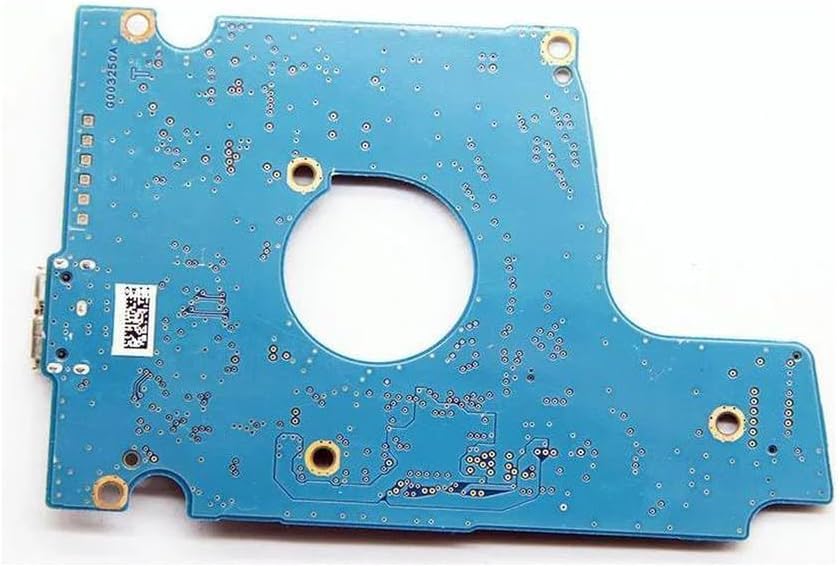
This image shows the underside of the G003250A PCB board, revealing the solder points and circuit traces. This side typically connects to the hard drive's motor and read/write head assembly.
3. คู่มือการใช้งาน
Once the G003250A PCB board is correctly installed and the hard drive is reassembled, it functions as a standard USB 3.0 external hard drive.
3.1. การเชื่อมต่อกับคอมพิวเตอร์
- Plug the USB 3.0 cable into the port on the PCB board.
- Connect the other end of the USB 3.0 cable to an available USB 3.0 port on your computer for optimal performance. The device is backward compatible with USB 2.0 ports, but data transfer speeds will be limited.
- The operating system should automatically detect and install the necessary drivers. The drive will appear as an external storage device.
3.2. การโอนข้อมูล
โอนได้แล้ว files to and from the external hard drive as you would with any other storage device. Drag and drop files, or use copy/paste functions.
3.3. การเคลื่อนย้ายอย่างปลอดภัย
Always safely eject the hard drive before disconnecting it from your computer to prevent data corruption. On Windows, use the "Safely Remove Hardware and Eject Media" icon in the system tray. On macOS, drag the drive icon to the Trash or use the Eject option in Finder.
4. การบำรุงรักษา
To ensure the longevity and reliable performance of your PCB board and the associated hard drive, follow these maintenance guidelines:
- รักษาความสะอาด: Regularly clean the exterior of the hard drive enclosure with a soft, dry cloth. Avoid using liquid cleaners directly on the PCB or connectors.
- หลีกเลี่ยงไฟฟ้าสถิต: Always handle the PCB board with anti-static precautions to prevent damage from electrostatic discharge.
- สภาพแวดล้อม : Store and operate the drive in a cool, dry environment, away from direct sunlight, extreme temperatures, and high humidity.
- การป้องกันทางกายภาพ: Protect the external drive from drops, impacts, and excessive vibration, as these can damage the internal hard drive components.
- เฟิร์มแวร์: While PCB boards typically do not require user-updatable firmware, ensure your operating system's USB drivers are up to date.
5 การแก้ไขปัญหา
If you encounter issues with your USB 3.0 Mobile Hard Disk PCB Board G003250A, refer to the following common problems and solutions:
- ไม่พบไดรฟ์:
- ตรวจสอบให้แน่ใจว่าสาย USB เชื่อมต่อกับไดรฟ์และคอมพิวเตอร์อย่างแน่นหนา
- ลองใช้พอร์ต USB อื่นบนคอมพิวเตอร์ของคุณ
- ทดสอบด้วยสาย USB อื่น
- Verify that the internal hard drive is properly seated and connected to the PCB board.
- Check Device Manager (Windows) or System Information (macOS) to see if the drive is listed, even if it doesn't appear in 'My Computer'/'Finder'.
- ความเร็วในการถ่ายโอนข้อมูลช้า:
- โปรดตรวจสอบให้แน่ใจว่าคุณได้เชื่อมต่อคอมพิวเตอร์เข้ากับพอร์ต USB 3.0 แล้ว พอร์ต USB 2.0 จะทำให้ความเร็วในการถ่ายโอนข้อมูลช้าลง
- Verify that your computer's USB 3.0 drivers are up to date.
- Try a different USB 3.0 cable, as some cables may not support full USB 3.0 speeds.
- ระบบขับเคลื่อนมีเสียงผิดปกติ:
- If the hard drive itself is making clicking, grinding, or unusual noises, this indicates a potential mechanical failure of the hard drive, not the PCB board. Immediately back up any accessible data and consider professional data recovery services.
- การทุจริตข้อมูล:
- โปรดใช้ตัวเลือก "ถอดฮาร์ดแวร์อย่างปลอดภัย" ทุกครั้งก่อนถอดไดรฟ์
- Ensure the drive is not subjected to sudden power loss during operation.
- Run disk error checking utilities provided by your operating system.
If problems persist after following these steps, it may indicate an issue with the hard drive itself or a more complex problem requiring professional assistance.
6. ข้อมูลจำเพาะ
| คุณสมบัติ | คำอธิบาย |
|---|---|
| หมายเลขรุ่น | G003250A |
| ความเข้ากันได้ | Toshiba MQ01UBD100, MQ01UBD075, MQ01UBD050 (and compatible 500G, 750G, 1TB, 2TB variants) |
| เทคโนโลยีการเชื่อมต่อ | USB 3.0 (เข้ากันได้กับ USB 2.0 ย้อนหลัง) |
| ประเภทการติดตั้ง | Internal PCB for External Hard Drive Conversion |
| คุณสมบัติพิเศษ | Portable (when installed in a mobile hard drive) |
| ผู้ผลิต | ทั่วไป |
| ASIN | B0DB8B7TC2 |
| วันที่พร้อมใช้งานครั้งแรก | 26 กรกฎาคม 2024 |
7. การรับประกันและการสนับสนุน
As a generic replacement component, specific warranty terms may vary depending on your place of purchase. Please refer to the seller's return and warranty policy at the time of purchase.
For technical support or inquiries regarding this PCB board, it is recommended to contact the seller or retailer from whom you purchased the product. They can provide assistance with compatibility, installation, and troubleshooting specific to your purchase.
ต้องแน่ใจเสมอว่าคุณจะซื้อasing from a reputable source to guarantee product authenticity and support.
Ask a question about this manual
Ask about setup, troubleshooting, compatibility, parts, safety, or missing instructions. Manuals+ will review the question and use this page’s manual context to help answer it.