
ALLIMITY RC45162
ALLIMITY RC45162 Voice Remote Control User Manual
Model: MME-RC45162-NP
Compatible with Panasonic TV models: TX-65MX700E, TX-65MX710E, TX-43MX700E, TX-55MX710E, TX-50MX710E, TX-55MX700E
1. บทนำ
This manual provides instructions for the ALLIMITY RC45162 Voice Remote Control. This remote is designed to be fully compatible with various Panasonic TV models, offering a direct replacement experience without complex setup procedures. Its ergonomic design ensures comfortable handling and reliable performance for controlling your television.
2. การตั้งค่า
2.1 การติดตั้งแบตเตอรี่
The ALLIMITY RC45162 remote control requires batteries for operation. Please follow these steps to install them:
- ค้นหาฝาปิดช่องใส่แบตเตอรี่ที่ด้านหลังของรีโมทคอนโทรล
- Slide or press the latch to open the battery compartment.
- Insert the required Lithium batteries, ensuring the positive (+) and negative (-) terminals align correctly with the markings inside the compartment.
- ปิดฝาช่องใส่แบตเตอรี่ให้แน่น
Note: This remote control requires no programming or complex installation. Once batteries are correctly inserted, it is ready for use with compatible Panasonic TV models.

ภาพ: ด้านหลัง view of the remote control, highlighting the battery compartment for easy access and installation.
3. คู่มือการใช้งาน
The ALLIMITY RC45162 remote control is designed for intuitive use. Below are the primary functions:
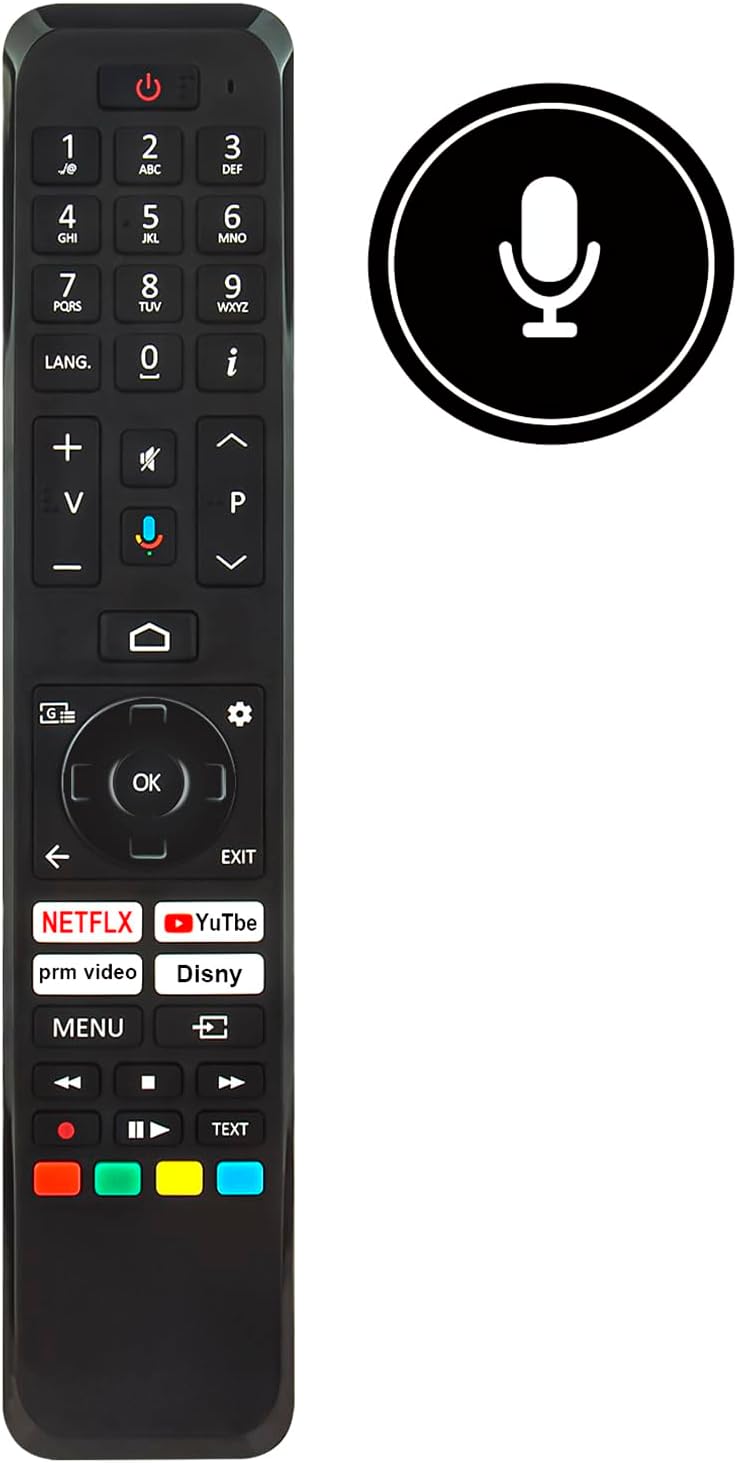
ภาพ: ด้านหน้า view of the ALLIMITY RC45162 remote control, displaying the full button layout.
3.1 ฟังก์ชั่นพื้นฐาน
- ปุ่มเพาเวอร์ (U): เปิดหรือปิดทีวี
- ปุ่มตัวเลข (0-9): เลือกช่องรายการได้โดยตรง
- เพิ่ม/ลดระดับเสียง (+/-): ปรับระดับเสียงทีวี
- Channel Up/Down (P^/P<): เปลี่ยนช่องทีวี
- ปุ่มปิดเสียง: ปิดเสียงหรือเปิดเสียงทีวี
- แผงนำทาง (ขึ้น, ลง, ซ้าย, ขวา, ตกลง): ใช้สำหรับนำทางเมนูและยืนยันการเลือก
- Back Button (<): กลับไปยังเมนูหรือหน้าจอก่อนหน้า
- ปุ่มออก: ออกจากเมนูหรือแอพพลิเคชันปัจจุบัน
- ปุ่มโฮม: เข้าสู่หน้าจอหลักของทีวีหรืออินเทอร์เฟซสมาร์ททีวี
3.2 คุณสมบัติพิเศษ
- Voice Control Button (Microphone icon): Activates the voice control feature. Press and hold this button, then speak your command clearly into the remote. Release the button when finished.
- ปุ่มเข้าถึงด่วน: Dedicated buttons for popular streaming services such as Netflix, YouTube, Prime Video, and Disney+ for direct access.
- LANG. Button: For language selection or audio track changes.
- ปุ่มข้อมูล (i): แสดงข้อมูลเกี่ยวกับโปรแกรมหรืออินพุตปัจจุบัน
- ปุ่มเมนู: เข้าสู่เมนูการตั้งค่าหลักของทีวี
- ปุ่มสี (แดง, เขียว, เหลือง, น้ำเงิน): These buttons often correspond to specific functions within TV menus or applications, as indicated on the screen.
4. การบำรุงรักษา
4.1 การทำความสะอาด
เพื่อรักษารูปลักษณ์และฟังก์ชันการทำงานของรีโมทคอนโทรล:
- เช็ดรีโมทด้วยผ้าแห้งและนุ่ม
- สำหรับสิ่งสกปรกฝังแน่น ให้เช็ดออกเล็กน้อยampชุบน้ำหรือน้ำยาทำความสะอาดสูตรอ่อนโยนที่ไม่มีฤทธิ์กัดกร่อนบนผ้า
- หลีกเลี่ยงการใช้สารเคมีรุนแรง ตัวทำละลาย หรือวัสดุที่มีฤทธิ์กัดกร่อน เนื่องจากอาจทำให้พื้นผิวหรือชิ้นส่วนภายในของรีโมทเสียหายได้
4.2 การเปลี่ยนแบตเตอรี่
Replace batteries when the remote control's response becomes sluggish or stops working. Always replace all batteries at the same time with new ones of the same type. Do not mix old and new batteries or different types of batteries.
4.3 พื้นที่จัดเก็บ
หากไม่ได้ใช้งานรีโมทคอนโทรลเป็นเวลานาน ควรถอดแบตเตอรี่ออกเพื่อป้องกันการรั่วไหลและอาจทำให้ตัวเครื่องเสียหายได้
5 การแก้ไขปัญหา
If you encounter issues with your ALLIMITY RC45162 remote control, please refer to the following common solutions:
- รีโมตไม่ตอบสนอง:
- ตรวจสอบว่าใส่แบตเตอรี่อย่างถูกต้องและมีประจุเพียงพอหรือไม่ เปลี่ยนแบตเตอรี่หากจำเป็น
- ตรวจสอบให้แน่ใจว่าไม่มีสิ่งกีดขวางระหว่างรีโมทคอนโทรลและเซ็นเซอร์อินฟราเรดของทีวี
- ชี้รีโมตไปที่ทีวีโดยตรง
- การควบคุมด้วยเสียงไม่ทำงาน:
- Ensure you are pressing and holding the voice control button while speaking.
- พูดให้ชัดเจนและระดับเสียงปกติ
- Check your TV's settings to ensure voice control is enabled and configured correctly.
- การตอบสนองที่จำกัดหรือเป็นระยะๆ:
- Replace the batteries. Low battery power can affect signal strength.
- Ensure the remote is within the maximum operating range (up to 10 meters).
- Minimize sources of infrared interference, such as direct sunlight or strong artificial light.
6. ข้อมูลจำเพาะ

ภาพ: ด้านหน้าและด้านข้าง view of the remote control, illustrating its dimensions for reference.
| ยี่ห้อ | ความเสมอภาค |
| ชื่อรุ่น / หมายเลข | MME-RC45162-NP |
| คุณสมบัติพิเศษ | การยศาสตร์ |
| สี | สีดำ/สีขาว |
| จำนวนอุปกรณ์ที่รองรับสูงสุด | 10 |
| อุปกรณ์ที่รองรับ | TX-65MX700E, TX-65MX710E, TX-43MX700E, TX-55MX710E, TX-50MX710E, TX-55MX700E |
| เทคโนโลยีการเชื่อมต่อ | อินฟราเรด |
| ประเภทตัวควบคุม | การควบคุมด้วยแสงอินฟราเรด |
| ระยะสูงสุด | 10 เมตร |
| ประเภทแบตเตอรี่ | ลิเธียม |
| น้ำหนักสินค้า | 59 กรัม |
7. ข้อมูลการรับประกัน
This product is typically covered by a standard manufacturer's warranty. For specific details regarding warranty duration, coverage, and claims, please refer to the documentation provided at the time of purchase or contact your retailer. Extended warranty options may be available from third-party providers.
8. การสนับสนุน
For further assistance or if you have questions not covered in this manual, please contact the seller or the manufacturer directly. You may find contact information on the product packaging or the retailer's webเว็บไซต์.
Ask a question about this manual
Ask about setup, troubleshooting, compatibility, parts, safety, or missing instructions. Manuals+ will review the question and use this page’s manual context to help answer it.