
การแนะนำ
This user manual provides comprehensive instructions for the installation, operation, and maintenance of your Hodozzy 10.1-inch Double Din Android Car Stereo. Please read this manual thoroughly before using the product to ensure proper functionality and to prevent damage.
เนื้อหาแพ็คเกจ
ตรวจสอบว่าสินค้าทั้งหมดที่ระบุไว้ด้านล่างนี้รวมอยู่ในแพ็คเกจของคุณแล้ว หากมีสินค้าใดสูญหายหรือเสียหาย โปรดติดต่อฝ่ายสนับสนุนลูกค้า
- Hodozzy 10.1-inch Android Car Stereo Unit
- สายไฟ
- อาร์ซีเอเคเบิ้ล
- สาย USB
- เสาอากาศ GPS
- สายเคเบิลอินพุตกล้องด้านหลัง
- ตัวยึด
- ไมโครโฟน (ไมค์)
- กล้องหลัง
- คู่มือการใช้งาน (เอกสารนี้)

Image: All components included in the Hodozzy car stereo package, laid out clearly.
ข้อมูลจำเพาะ
| คุณสมบัติ | ข้อมูลจำเพาะ |
|---|---|
| ระบบปฏิบัติการ | แอนดรอยด์ 13 |
| แรม | 4GB |
| รอม | 64GB |
| ขนาดจอแสดงผล | 10.1 นิ้ว |
| ปณิธาน | 1024 x 600 |
| การเชื่อมต่อ | บลูทูธ 5.0, Wi-Fi, USB |
| คุณสมบัติพิเศษ | Wireless CarPlay, Android Auto, Mirror Link, GPS Navigation, FM/RDS Radio, DSP (32-band EQ), Steering Wheel Control, Backup Camera Support |
| น้ำหนักสินค้า | 3.08 ปอนด์ |
| ขนาดแพ็คเกจ | 11.93 x 9.49 x 3.27 นิ้ว |
การติดตั้งและการตั้งค่า
แผนผังการเดินสายไฟ
Refer to the detailed wiring diagram below for correct connection of the power, audio, and accessory cables. Incorrect wiring can damage the unit or your vehicle's electrical system.
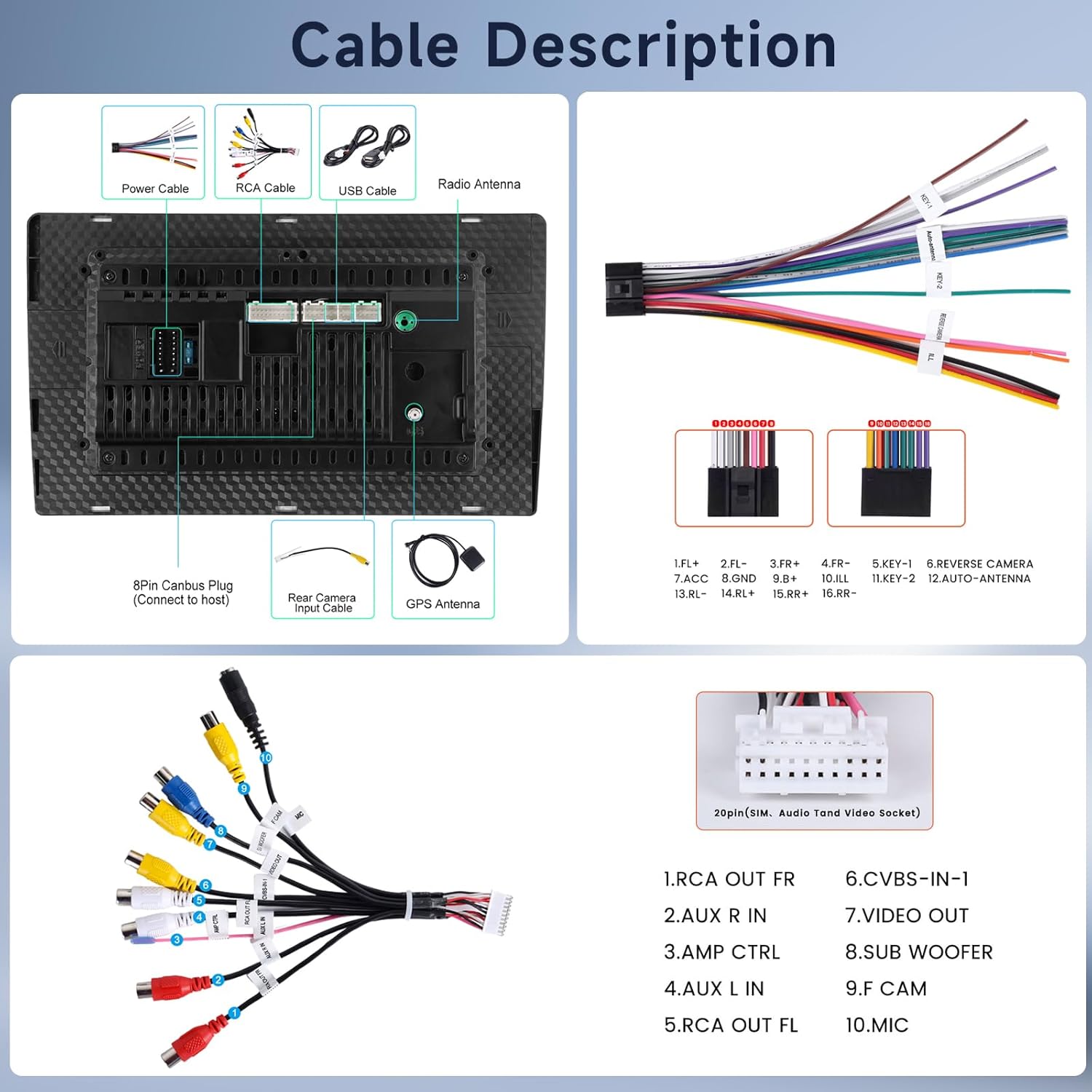
Image: Comprehensive wiring diagram illustrating all necessary cable connections for the car stereo.
ขั้นตอนการติดตั้งทั่วไป
- การตระเตรียม: ถอดแบตเตอรี่รถยนต์ออกก่อนเริ่มงานไฟฟ้าใดๆ
- ถอดหน่วยเก่าออก: ถอดเครื่องเสียงรถยนต์ที่มีอยู่ของคุณออกจากแผงหน้าปัดอย่างระมัดระวัง
- การติดตั้ง: Use the provided mounting brackets to secure the Hodozzy unit into the double din slot. Ensure it is firmly in place.
- เชื่อมต่อสายเคเบิล:
- Connect the main power harness (yellow to constant 12V, red to accessory 12V, black to ground).
- Connect speaker wires (ensure correct polarity).
- เชื่อมต่อเสาอากาศ GPS และวางตำแหน่งให้รับสัญญาณได้ดีที่สุด
- Connect the rear camera input cable and the camera itself, if installing.
- เชื่อมต่อไมโครโฟนภายนอก
- Connect any additional RCA or USB cables as needed.
- ทดสอบฟังก์ชันการทำงาน: Before fully reassembling the dashboard, reconnect the battery and test all functions of the stereo (power, audio, touch screen, radio, GPS, etc.).
- การประกอบขั้นสุดท้าย: เมื่อตรวจสอบการทำงานทั้งหมดแล้ว ให้ประกอบแผงควบคุมกลับเข้าที่อย่างระมัดระวัง
คำแนะนำการใช้งาน
การทำงานพื้นฐาน
- เปิด/ปิดเครื่อง: Press and hold the power button on the front panel.
- การควบคุมระดับเสียง: Use the volume buttons or on-screen controls.
- หน้าจอหลัก: แตะไอคอนบ้านเพื่อกลับไปยังหน้าจอหลัก
- การจัดการแอพ: Swipe up or down to access the app drawer.

Image: The 10.1-inch HD screen displaying its full-color capabilities, along with examples of split-screen functionality and customizable home screen applications.
CarPlay ไร้สายและ Android Auto
Connect your iPhone or Android smartphone wirelessly to access navigation, music, calls, and messages directly on the stereo's display.
- โปรดตรวจสอบให้แน่ใจว่าได้เปิดใช้งาน Bluetooth และ Wi-Fi บนโทรศัพท์และเครื่องเสียงรถยนต์แล้ว
- บนเครื่องเสียง ไปที่แอปพลิเคชัน CarPlay/Android Auto
- Select your phone from the list of available devices.
- ทำตามคำแนะนำบนหน้าจอเพื่อทำการเชื่อมต่อให้เสร็จสมบูรณ์

Image: The car stereo screen showcasing the Apple CarPlay and Android Auto interfaces, highlighting seamless smartphone integration.
ฟังก์ชั่นการเชื่อมโยงกระจก
Mirror your phone's screen onto the car stereo display via Wi-Fi or USB connection.
- การเชื่อมต่อ Wi-Fi: Connect both the stereo and your phone to the same Wi-Fi network. Open the Mirror Link app on the stereo and follow the instructions.
- การเชื่อมต่อ USB: Connect your phone to the stereo via a USB cable. Enable USB debugging (for Android) or trust the device (for iOS) as prompted.
ระบบนำทาง GPS
The unit supports both online and offline navigation. For online navigation, ensure the stereo is connected to Wi-Fi or your phone's hotspot.
- การนำทางออนไลน์: Download your preferred navigation apps (e.g., Google Maps, Waze) from the app store.
- การนำทางแบบออฟไลน์: Download offline map data within your navigation app settings for use without an internet connection.

Image: The car stereo displaying GPS navigation, illustrating both online and offline map capabilities, alongside a visual representation of Wi-Fi connectivity.
บลูทูธ 5.0
เชื่อมต่อโทรศัพท์ของคุณเพื่อการโทรแบบแฮนด์ฟรีและการสตรีมเสียง
- เข้าไปที่การตั้งค่าบลูทูธในเครื่องเสียงรถยนต์
- เปิดใช้งานบลูทูธบนโทรศัพท์ของคุณและค้นหาอุปกรณ์ที่มีอยู่
- Select "Hodozzy" or a similar device name from the list and confirm pairing.
วิทยุ FM/RDS
Access local radio stations and receive RDS information (if available).
- เปิดแอปพลิเคชันวิทยุ
- ใช้ฟังก์ชันสแกนเพื่อค้นหาสถานีที่มีอยู่หรือปรับจูนความถี่ด้วยตนเอง
- RDS (Radio Data System) will display station information, song titles, etc., where supported.

Image: The car stereo's display featuring the 32-band equalizer, Bluetooth 5.0 connection screen, and the FM/RDS radio interface.
DSP (Digital Sound Processor) & EQ Adjustment
Customize your audio experience with the built-in 32-band equalizer.
- Navigate to the EQ or DSP settings in the audio menu.
- Adjust individual frequency bands to tailor the sound output to your preference.
- Utilize preset equalizer modes or create your own custom profile.
ระบบควบคุมพวงมาลัย (SWC)
ตั้งโปรแกรมปุ่มต่างๆ บนพวงมาลัยรถของคุณเพื่อควบคุมฟังก์ชันต่างๆ ของเครื่องเสียง
- ไปที่การตั้งค่าการควบคุมพวงมาลัยในเมนูระบบ
- Follow the on-screen instructions to assign functions (e.g., volume up/down, track skip, mode change) to your steering wheel buttons.

Image: The car stereo display showing the backup camera feed and the interface for programming steering wheel controls.
จอแสดงผลกล้องมองหลัง
When properly connected, the rear camera view will automatically display on the screen when the vehicle is put into reverse gear.
- Ensure the backup camera is correctly wired to the reverse trigger and video input.
- The display will show a clear, wide-angle view of the area behind your vehicle, often with parking guidelines.
การซ่อมบำรุง
- การทำความสะอาดหน้าจอ: ใช้ผ้านุ่มไม่เป็นขุยเช็ดหน้าจอสัมผัสเบาๆ สำหรับรอยเปื้อนฝังแน่น ให้เช็ดเบาๆampชุบผ้าด้วยน้ำหรือน้ำยาทำความสะอาดที่ปลอดภัยต่อหน้าจอ หลีกเลี่ยงวัสดุที่มีฤทธิ์กัดกร่อนหรือสารเคมีรุนแรง
- การอัปเดตซอฟต์แวร์: ตรวจสอบการอัปเดตซอฟต์แวร์เป็นระยะผ่านการตั้งค่าระบบหรือของผู้ผลิต webไซต์เพื่อให้มั่นใจถึงประสิทธิภาพที่เหมาะสมที่สุดและการเข้าถึงฟีเจอร์ใหม่ ๆ
- การดูแลทั่วไป: เก็บอุปกรณ์ให้สะอาดปราศจากฝุ่นและเศษขยะ หลีกเลี่ยงการสัมผัสกับอุณหภูมิที่สูงหรือแสงแดดโดยตรงเป็นเวลานาน
การแก้ไขปัญหา
| ปัญหา | สาเหตุที่เป็นไปได้ | สารละลาย |
|---|---|---|
| เครื่องไม่เปิด | สายไฟไม่ถูกต้อง ฟิวส์ขาด การต่อไฟฟ้าหลวม | Check power cable connections (yellow, red, black). Verify vehicle fuses and the unit's fuse. Ensure secure connections. |
| ไม่มีเสียงออกจากลำโพง | Speaker wires disconnected; Incorrect speaker polarity; Volume too low; Mute enabled. | Check all speaker wire connections. Ensure correct positive/negative polarity. Increase volume. Disable mute function. |
| สัญญาณ GPS อ่อน หรือไม่พบสัญญาณ | เสาอากาศ GPS ติดตั้งไม่ถูกต้องหรือมีสิ่งกีดขวาง | Ensure GPS antenna is placed in an unobstructed location (e.g., dashboard, under windshield). Check antenna connection. |
| ปัญหาการเชื่อมต่อบลูทูธ | ไม่ได้เปิดใช้งานบลูทูธ ไม่สามารถค้นพบอุปกรณ์ได้ มีสัญญาณรบกวน | Ensure Bluetooth is on for both devices. Make the stereo discoverable. Try pairing again. Move away from other wireless devices. |
| หน้าจอสัมผัสไม่ตอบสนอง | ซอฟต์แวร์มีปัญหาชั่วคราว จำเป็นต้องปรับเทียบหน้าจอ | Restart the unit. If issue persists, perform a factory reset (refer to system settings, note this will erase data). |
| กล้องสำรองไม่แสดงผล | กล้องไม่ได้เชื่อมต่อ; สายทริกเกอร์ถอยหลังไม่ได้เชื่อมต่อ; กล้องมีปัญหา | Check camera video input and reverse trigger wire connection. Test camera with another display if possible. |
การรับประกันและการสนับสนุน
Your Hodozzy 10.1-inch Double Din Android Car Stereo comes with a รับประกัน 2 ปี from the date of purchase, covering manufacturing defects. For warranty claims or technical assistance, please contact Hodozzy customer support.
อีเมลสนับสนุนลูกค้า: hodozzyofficial@163.com
Please provide your product model number (B0DB7KK193) and a detailed description of the issue when contacting support for faster service.

Image: The official Hodozzy brand logo.