
1. บทนำ
The Bluesound Node Nano is a compact, high-resolution multi-room music streamer designed to integrate seamlessly with your existing audio system. It allows you to access and stream music from various sources, including online streaming services, network-attached storage, and local libraries, all controlled via the intuitive BluOS app. Experience pristine audio quality with support for up to 24-bit/192 kHz resolution.

ด้านหน้า view of the Bluesound Node Nano, showcasinด้วยดีไซน์ที่ทันสมัยและระบบควบคุมแบบสัมผัส
2. อะไรอยู่ในกล่อง
Carefully unpack your Bluesound Node Nano. The package should contain the following items:
- Bluesound Node Nano Unit
- อะแดปเตอร์ USB Power
- 4x International Plug Adapters
- สายไฟ USB-C
- สายสเตอริโอ RCA เป็น RCA
- สายเคเบิลอีเทอร์เน็ต
3. ทางกายภาพมากกว่าview
3.1 แผงควบคุมด้านหน้า
The top surface of the Node Nano features touch-sensitive controls for basic playback and volume adjustments:
- ปุ่มเล่น/หยุดชั่วคราว: เริ่มหรือหยุดการเล่นชั่วคราว
- ปุ่มแทร็กก่อนหน้า/ถัดไป: ข้ามไปยังเพลงก่อนหน้าหรือเพลงถัดไป
- ปุ่มปรับระดับเสียงขึ้น / ลง: ปรับระดับเสียงเอาท์พุต
- ไฟ LED แสดงสถานะ: Displays the current operational status of the device.

สูงสุด view of the Node Nano, showing the touch-sensitive controls and status LED.
3.2 การเชื่อมต่อแผงด้านหลัง
The rear panel provides all necessary input and output ports for connecting the Node Nano to your audio system and network.
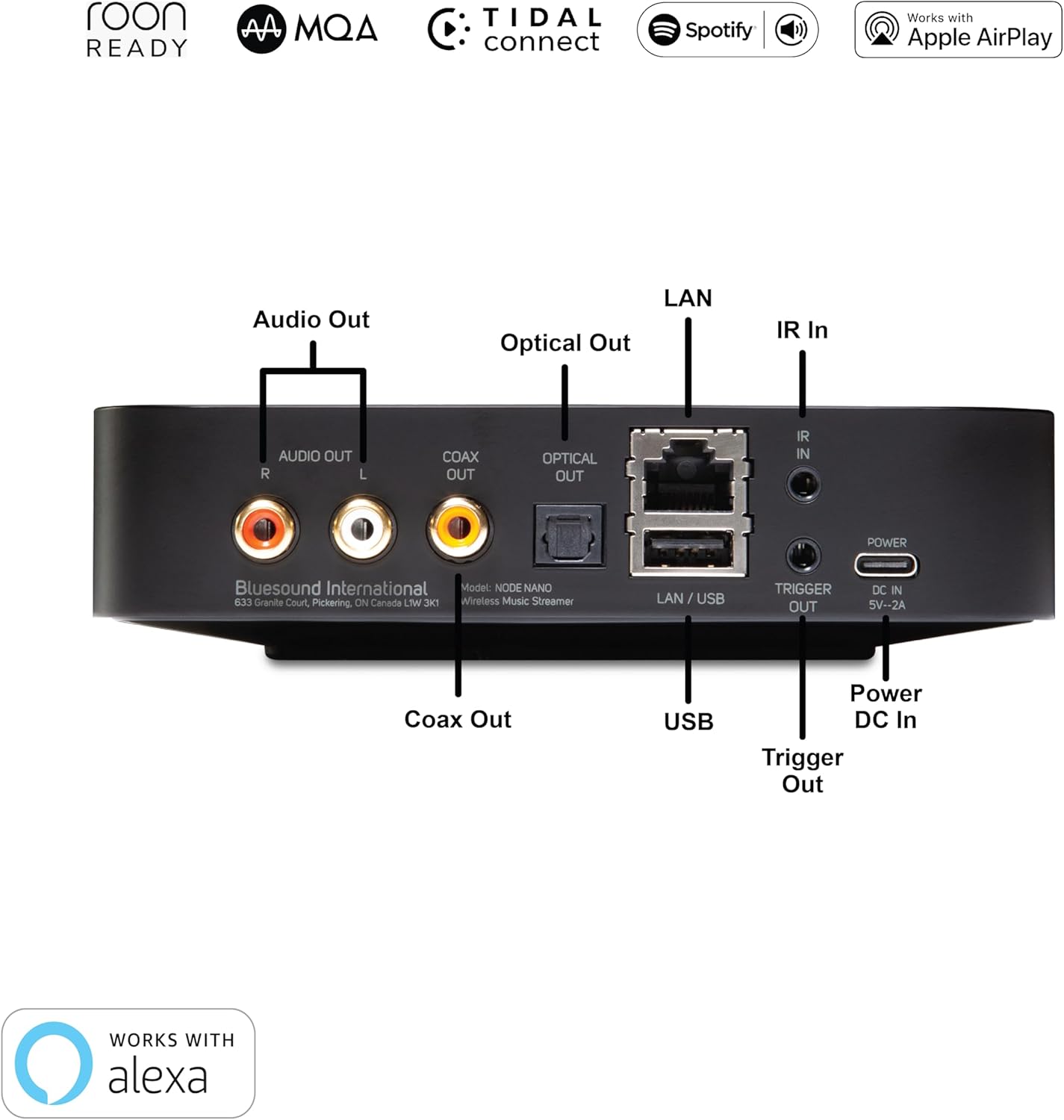
รายละเอียด view of the Node Nano's rear panel, illustrating all available connection ports.
- เสียงออก (RCA): Stereo analog output for connecting to an ampเครื่องขยายเสียงหรือลำโพงที่มีกำลังขยาย
- ออปติคัลเอาท์: เอาต์พุตเสียงดิจิตอลแบบออปติคอล
- เกลี้ยกล่อม: เอาต์พุตเสียงดิจิตอลแบบโคแอกเซียล
- LAN / USB: Ethernet port for wired network connection and USB port for external storage.
- IR ใน: Infrared input for external IR receivers.
- ทริกเกอร์ออก: 12V trigger output for controlling other audio components.
- Power DC In: Power input for the included USB-C power adapter.
4. การตั้งค่าเริ่มต้น
Follow these steps to set up your Bluesound Node Nano for the first time:
- การจัดวาง: Place the Node Nano on a stable, flat surface near your audio system and a power outlet. Ensure adequate ventilation.
- เชื่อมต่อกับระบบเสียง:
- For analog connection, use the supplied Stereo RCA to RCA cable to connect the ช่องสัญญาณเสียงออก (RCA) ports on the Node Nano to an available analog input (e.g., AUX, CD) on your ampเครื่องขยายเสียงหรือลำโพงที่มีกำลังขยาย
- For digital connection, use an optical or coaxial cable (not supplied) to connect the เอาท์พุตออปติคอล or โคแอกซ์เอาท์ port on the Node Nano to a corresponding digital input on your DAC or ampชีวิต.
- เชื่อมต่อกับเครือข่าย:
- การเชื่อมต่อแบบมีสาย: เชื่อมต่อปลายด้านหนึ่งของสายอีเธอร์เน็ตที่ให้มาเข้ากับ... LAN / USB port on the Node Nano and the other end to an available LAN port on your router or network switch.
- การเชื่อมต่อแบบไร้สาย: The Node Nano supports dual-band Wi-Fi. For initial setup, a wired connection is recommended, but you can configure Wi-Fi later via the BluOS app.
- เปิดเครื่อง: เชื่อมต่อสายไฟ USB-C เข้ากับ Power DC In port on the Node Nano and plug the USB power adapter into a wall outlet. The status indicator LED will illuminate.
- Download BluOS App: Download the BluOS Controller app from the Apple App Store (for iOS devices) or Google Play Store (for Android devices). The app is essential for controlling your Node Nano.
- ตั้งค่าให้เสร็จสมบูรณ์ในแอป: Open the BluOS app and follow the on-screen instructions to discover and configure your Node Nano. This includes naming your player and connecting to your Wi-Fi network if you chose a wireless setup.

The Node Nano connected to an amplifier, ready for audio playback.
5. คู่มือการใช้งาน
5.1 Using the BluOS App
The BluOS app is your primary interface for controlling the Node Nano. It allows you to browse music, manage playlists, select inputs, and control multi-room audio.
- บริการเพลง: Access integrated streaming services like Spotify Connect, Tidal Connect, and more.
- Local Library: Browse and play music from your local network shares or USB-connected storage.
- การเลือกผู้เล่น: Select the Node Nano or other Bluesound players in your system.
- การควบคุมระดับเสียง: Adjust volume directly from the app.
- ค่าที่ตั้งล่วงหน้า: Utilize the two programmable quick-touch presets for instant access to favorite stations or playlists.

Screenshots illustrating the user interface of the BluOS app for music control.
5.2 Direct Control
For quick adjustments, use the touch controls on the top panel of the Node Nano:
- แตะที่ เล่น/หยุดชั่วคราว icon to toggle playback.
- แตะที่ ก่อนหน้า/ถัดไป icons to change tracks.
- แตะที่ เพิ่ม/ลดระดับเสียง icons to adjust volume.
5.3 ระบบเสียงหลายห้อง
The Node Nano is part of the BluOS multi-room ecosystem. You can group it with other Bluesound players (e.g., PULSE speakers, POWERNODE amplifiers) to play the same music synchronously across multiple rooms or play different music in each zone. This is managed entirely within the BluOS app.

The Node Nano integrated into a multi-room audio setup, providing high-resolution streaming to connected speakers.
6. การเชื่อมต่อและคุณสมบัติ
The Node Nano offers a wide array of connectivity options and advanced features:
- เสียงความละเอียดสูง: Supports up to 24-bit/192 kHz audio playback, including MQA (Master Quality Authenticated) and DSD (via future update).
- การเชื่อมต่อไร้สาย: Dual-band Wi-Fi (802.11ac) for robust wireless streaming.
- การเชื่อมต่อแบบมีสาย: Gigabit Ethernet for stable network connection.
- บลูทูธ: Two-way aptX Adaptive Bluetooth for high-quality wireless audio transmission and reception.
- บริการสตรีมมิ่ง: Native support for popular services like Spotify Connect, Tidal Connect, and Apple AirPlay 2.
- Local Server Mode: Access and stream music from local network storage.
- ช่องต่อ USB: Connect external USB drives for music playback.
- IR Remote Learning: Configure the Node Nano to respond to commands from your existing IR remote control.
7. การดูแลรักษา
To ensure the longevity and optimal performance of your Bluesound Node Nano, follow these care guidelines:
- การทำความสะอาด: Use a soft, dry cloth to clean the exterior. Avoid abrasive cleaners, solvents, or strong detergents.
- การจัดวาง: Keep the device away from direct sunlight, heat sources, and excessive moisture. Ensure proper ventilation around the unit.
- พลัง: Always use the supplied power adapter. Disconnect power during electrical storms or when unused for extended periods.
- การจัดการ: โปรดใช้งานด้วยความระมัดระวัง หลีกเลี่ยงการทำตกหรือการกระแทกอย่างแรง
8 การแก้ไขปัญหา
If you encounter issues with your Node Nano, refer to the following common problems and solutions:
| ปัญหา | วิธีแก้ปัญหาที่เป็นไปได้ |
|---|---|
| No Power / Status LED Off | Ensure the power adapter is securely connected to the Node Nano and a working power outlet. Try a different outlet. |
| Cannot Find Player in BluOS App | Ensure your mobile device and the Node Nano are connected to the same Wi-Fi network. Restart both the Node Nano and your mobile device. If using a wired connection, verify the Ethernet cable is properly connected. |
| ไม่มีเสียงออก | Check all audio cable connections (RCA, Optical, Coaxial) between the Node Nano and your amplifier/speakers. Ensure the correct input is selected on your amplifier. Verify the volume level on both the Node Nano and your audio system is not muted or too low. |
| Intermittent Playback / Dropouts | Check your network connection. For Wi-Fi, ensure the Node Nano is within range of your router and there is no interference. Consider a wired Ethernet connection for optimal stability. Ensure your internet speed is sufficient for streaming high-resolution audio. |
| App is Slow or Unresponsive | Close and reopen the BluOS app. Ensure your app is updated to the latest version. Restart your mobile device. Check your network stability. |
For more detailed troubleshooting or persistent issues, please visit the Bluesound support webเว็บไซต์หรือติดต่อฝ่ายบริการลูกค้าของพวกเขา
9. ข้อมูลจำเพาะทางเทคนิค
| คุณสมบัติ | ข้อมูลจำเพาะ |
|---|---|
| ชื่อรุ่น | Node Nano |
| หมายเลขรุ่นสินค้า | NODE-N030BLKUNV |
| โปรเซสเซอร์ | QUAD-CORE 1.8GHz ARM Cortex A53 |
| แดช | ESS ES9039Q2M SABRE DAC |
| ปณิธาน | สูงสุด 24 บิต/192 kHz |
| เทคโนโลยีการเชื่อมต่อ | RCA, Ethernet, Wi-Fi (Dual-band), Bluetooth (aptX Adaptive) |
| ประเภทของขั้วต่อ | RCA, Optical, Coaxial, USB |
| บริการอินเทอร์เน็ตที่รองรับ | Spotify Connect, AirPlay 2, Tidal Connect, MQA, DSD playback (via future update), Local server mode |
| ประเภทตัวควบคุม | App Control (BluOS) |
| สี | สีดำ |
| น้ำหนักสินค้า | 1.26 ปอนด์ |
| ขนาดสินค้า | 5.6 x 5.6 x 1.38 นิ้ว |
10. การรับประกันและการสนับสนุน
For warranty information, product registration, and technical support, please refer to the official Bluesound webหรือติดต่อฝ่ายบริการลูกค้า โปรดเก็บหลักฐานการซื้อไว้เพื่อใช้ในการเคลมประกัน
บลูซาวด์ ออร์ลอจี Webเว็บไซต์: www.bluesound.com