
การแนะนำ
This manual provides essential information for the safe and effective operation of the Instek LCR-1010 Handheld LCR Meter. It covers product overview, setup, operating instructions, maintenance, troubleshooting, and technical specifications. Please read this manual thoroughly before using the device to ensure proper functionality and to prevent damage or injury.
ข้อมูลด้านความปลอดภัย
Always observe the following safety precautions to prevent electric shock, injury, or damage to the meter or the device under test.
- อย่าใช้งานมิเตอร์หากพบว่าชำรุดเสียหาย หรือหาก...asing เปิดอยู่
- Ensure the device under test is de-energized and discharged before connecting the LCR meter, especially for capacitors.
- ใช้เฉพาะสายทดสอบและอุปกรณ์เสริมที่ระบุไว้เท่านั้น
- Do not exceed the maximum input ratings specified in the technical specifications.
- Keep the meter dry and away from extreme temperatures.
- ควรขอรับบริการจากบุคลากรที่มีคุณสมบัติเท่านั้น
สินค้าเกินview
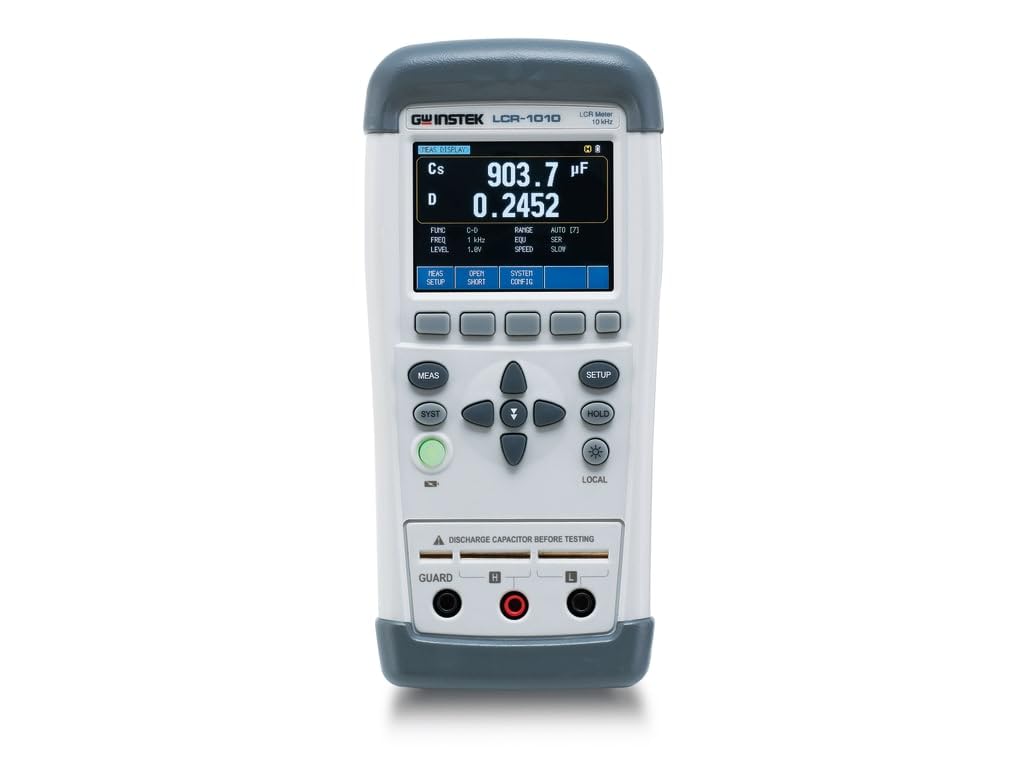
The Instek LCR-1010 is a handheld LCR meter designed for precise measurement of capacitance, inductance, and resistance, along with various related parameters. It features an automatic real-time test function and a high-resolution display.
การตั้งค่า
- เปิดเครื่อง: Press the green power button to turn on the device. Ensure batteries are installed or an AC adapter is connected if applicable.
- การทดสอบตัวเองเบื้องต้น: The meter will perform a brief self-test upon startup. Wait for the main display to appear.
- เชื่อมต่อสายทดสอบ: Insert the test leads into the 'GUARD', 'H', and 'L' terminals as required for your measurement setup.
- Open/Short Calibration: For accurate measurements, especially at different frequencies, perform an Open/Short calibration. Press the 'OPEN SHORT' button and follow the on-screen prompts.
คำแนะนำการใช้งาน
The LCR-1010 offers various measurement modes and settings to suit different component testing needs.
การวัดขั้นพื้นฐาน
- Select Measurement Function: Use the 'FUNC' button (accessed via 'MEAS SETUP') to cycle through primary measurement parameters like C-D, L-Q, R-X, etc.
- Set Test Frequency: Use the 'FREQ' button (accessed via 'MEAS SETUP') to select the desired test frequency (50Hz, 100Hz, 120Hz, 1kHz, 2kHz, 10kHz).
- Set Test Level: Adjust the AC test voltage (0.3V, 0.7V, 1Vrms) or DC test voltage (+/- 1V) using the 'LEVEL' button (accessed via 'MEAS SETUP').
- ส่วนประกอบการเชื่อมต่อ: Carefully connect the component to be measured to the test terminals. Ensure proper polarity if applicable.
- อ่านการวัด: The primary and secondary measurement results will be displayed on the screen.
Auto LCZ Mode
The Auto LCZ mode automatically identifies the component type (Inductor, Capacitor, or Resistor) and performs the appropriate measurement. This simplifies testing for unknown components.
- To activate, navigate to the 'FUNC' settings and select 'Auto LCZ'.
- Connect the component, and the meter will automatically display the relevant L, C, or R value.
ฟังก์ชันเก็บข้อมูล
Press the 'HOLD' button to freeze the current measurement on the display. Press it again to release the hold and resume real-time measurements.
การแสดงผลและการควบคุม
The LCR-1010 features a clear display and intuitive button layout:
- แสดง: Shows primary and secondary measurement parameters (e.g., Cs, D), test frequency, test level, range, equivalent circuit, and speed.
- ปุ่มซอฟต์คีย์ (ด้านล่างจอแสดงผล): 'MEAS SETUP', 'OPEN SHORT', 'SYSTEM CONFIG' for accessing menus and functions.
- ปุ่มนำทาง: Up, Down, Left, Right arrows for menu navigation and value adjustment.
- ปุ่ม MEAS: Initiates or confirms a measurement.
- SYST Button: Accesses system settings and utilities.
- ปุ่มตั้งค่า: Enters setup menus for various parameters.
- ปุ่มถือ: หยุดการแสดงค่าปัจจุบันบนหน้าจอ
- LOCAL Button (with backlight icon): Toggles display backlight and may have other local functions.
- ปุ่มเปิด/ปิด (สีเขียว): เปิดและปิดอุปกรณ์
พารามิเตอร์การวัด
The LCR-1010 can automatically measure a wide range of parameters:
- Capacitance (C): C-D (Dissipation Factor), C-Q (Quality Factor), C-R (Equivalent Series Resistance)
- Inductance (L): L-D (Dissipation Factor), L-Q (Quality Factor), L-R (Equivalent Series Resistance), L-Rdc (DC Resistance)
- Resistance (R): R-Q (Quality Factor), R-X (Reactance), R-Rdc (DC Resistance), Rdc (DC Resistance)
- อิมพีแดนซ์ (Z): Z-D (Dissipation Factor), Z-Q (Quality Factor), Z-θr (Phase Angle in Radians), Z-θd (Phase Angle in Degrees)
การซ่อมบำรุง
Proper maintenance ensures the longevity and accuracy of your LCR meter.
- การทำความสะอาด: ใช้ผ้าแห้งเนื้อนุ่มเช็ดทำความสะอาดภายนอกมิเตอร์ ห้ามใช้สารทำความสะอาดที่มีฤทธิ์กัดกร่อนหรือตัวทำละลาย
- การเปลี่ยนแบตเตอรี่: If the low battery indicator appears, replace the batteries promptly. Refer to the battery compartment for correct battery type and polarity.
- พื้นที่จัดเก็บ: เก็บเครื่องวัดไว้ในที่แห้งและเย็น หลีกเลี่ยงแสงแดดโดยตรงและอุณหภูมิที่สูงหรือต่ำเกินไป หากเก็บรักษาเป็นเวลานาน ควรถอดแบตเตอรี่ออก
- การสอบเทียบ: แนะนำให้ทำการสอบเทียบเป็นระยะโดยศูนย์บริการที่ได้รับอนุญาต เพื่อรักษาความแม่นยำในการวัด
การแก้ไขปัญหา
If you encounter issues with your LCR-1010, try the following:
- ไม่มีไฟฟ้า: Check battery installation or AC adapter connection. Ensure the power button is fully pressed.
- การอ่านค่าที่ไม่ถูกต้อง: Perform an Open/Short calibration. Check test lead connections for looseness or damage. Ensure the component is properly connected and discharged. Verify correct test frequency and level settings.
- ข้อผิดพลาดในการแสดงผล: If the display shows unusual characters or freezes, try restarting the meter. If the problem persists, contact support.
- ไม่มีการตอบสนองจากปุ่ม: Ensure the meter is not in a 'Hold' state. Restart the device.
ข้อมูลจำเพาะ
| คุณสมบัติ | ข้อมูลจำเพาะ |
|---|---|
| หมายเลขรุ่น | แอลซีอาร์-1010 |
| ความแม่นยำขั้นพื้นฐาน | 0.20% |
| ความถี่ในการทดสอบ | 50Hz, 100Hz, 120Hz, 1kHz, 2kHz, 10kHz |
| ระดับการทดสอบ | AC 0.3V/0.7V/1Vrms, DC +/- 1V |
| จำนวนการแสดงผล | Primary/Secondary 50,000 counts |
| พารามิเตอร์การวัด | C-D, C-Q, C-R, L-D, L-Q, L-R, L-Rdc, R-Q, R-X, R-Rdc, Rdc, Z-D, Z-Q, Z-θr, Z-θd |
| ความเร็วในการวัด | Slow: 2.5 times/s, Fast: 10 times/s |
| การเชื่อมต่อ | USB-HID, USB-VCOM |
| แหล่งพลังงาน | AC (adapter) / Battery (not included) |
| น้ำหนักสินค้า | 1 ปอนด์ |
| ขนาดสินค้า | 1 x 1 x 1 นิ้ว |
การรับประกันและการสนับสนุน
Instek products are designed for reliability and performance. For warranty information, technical support, or service inquiries, please refer to the official Instek webหรือติดต่อตัวแทนจำหน่ายที่ได้รับอนุญาต เก็บใบเสร็จรับเงินไว้เป็นหลักฐานการซื้อสำหรับการเรียกร้องการรับประกัน