
1. บทนำ
Thank you for choosing the YESIDO YSP13 Bluetooth Ear Hook Earphones. This manual provides essential information for the proper setup, operation, and maintenance of your device. Please read it carefully before use to ensure optimal performance and longevity.
The YSP13 features an air conduction design, eliminating the need to insert earbuds directly into the ear canal, which can enhance comfort and ear health. It utilizes Bluetooth 5.3 for stable connectivity and delivers HiFi sound quality, making it suitable for music and sports activities.
2. เนื้อหาบรรจุภัณฑ์
กรุณาตรวจสอบแพ็คเกจสำหรับรายการต่อไปนี้:
- YESIDO YSP13 Bluetooth Ear Hook Earphones (Left and Right)
- เคสชาร์จไฟ
- สายชาร์จ
- คู่มือการใช้งาน
- กระเป๋าเก็บของ

Image: Contents of the YESIDO YSP13 package, including the earphones, charging case, charging cable, and a small storage pouch.
3. สินค้าหมดview
The YESIDO YSP13 earphones feature a rotatable ear hook design for a secure and comfortable fit during various activities. The charging case includes a digital display to indicate battery levels.
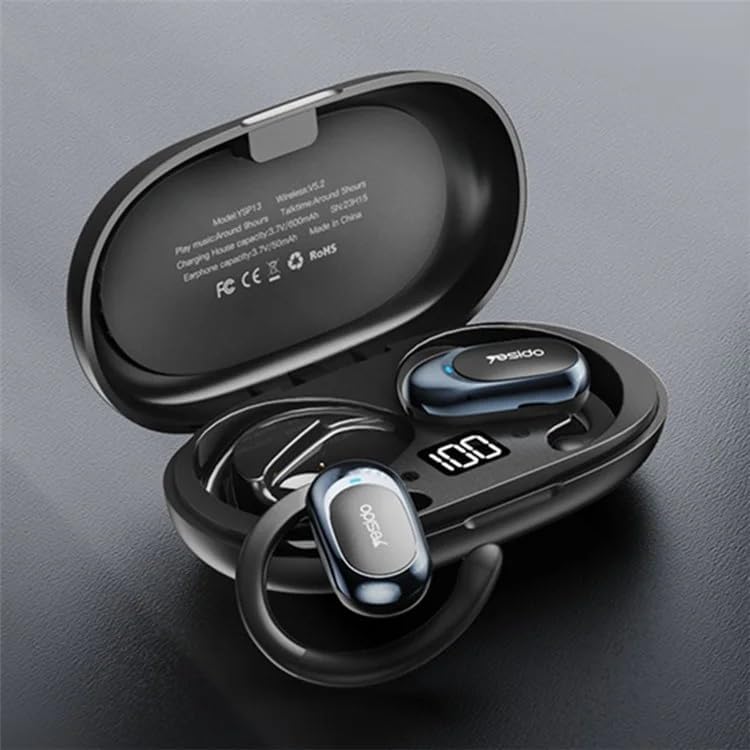
Image: The YESIDO YSP13 earphones resting in their charging case, which features a digital battery level indicator.

Image: A user wearing the YESIDO YSP13 earphone, illustrating how the ear hook design fits securely around the ear.

Image: An exploded diagram of the YESIDO YSP13 earphone, showcasing its internal structure and components responsible for HiFi sound reproduction.
4. การตั้งค่า
4.1 การชาร์จหูฟังและเคส
- ใส่หูฟังลงในกล่องชาร์จ ตรวจสอบให้แน่ใจว่าใส่หูฟังเข้าที่อย่างถูกต้อง
- เสียบสายชาร์จเข้ากับพอร์ตชาร์จบนเคสและแหล่งจ่ายไฟ USB
- The digital display on the charging case will show the charging status.
- Charging time for earphones is approximately 1 hour. Charging time for the case is approximately 2.5 hours.
- เมื่อชาร์จเต็มแล้ว ให้ถอดสายชาร์จออก
4.2 การจับคู่บลูทูธ
- ตรวจสอบให้แน่ใจว่าหูฟังมีการชาร์จแล้ว
- เปิดกล่องชาร์จ หูฟังจะเข้าสู่โหมดจับคู่โดยอัตโนมัติ
- เปิดใช้งาน Bluetooth บนอุปกรณ์ของคุณ (สมาร์ทโฟน แท็บเล็ต ฯลฯ)
- ค้นหา available Bluetooth devices and select "YESIDO YSP13" from the list.
- เมื่อเชื่อมต่อแล้ว คุณจะได้ยินเสียงยืนยัน และหูฟังก็จะพร้อมใช้งาน
- เมื่อนำหูฟังออกจากเคส หูฟังจะเชื่อมต่อกับอุปกรณ์ที่จับคู่ไว้ครั้งล่าสุดโดยอัตโนมัติ หากเปิดใช้งาน Bluetooth บนอุปกรณ์
5. คู่มือการใช้งาน
5.1 การสวมหูฟัง
Gently place the ear hook over your ear, positioning the earphone speaker near your ear canal. Adjust the rotatable ear hook for a comfortable and secure fit.
5.2 ฟังก์ชั่นพื้นฐาน
- เปิดเครื่อง: Open the charging case, earphones power on automatically.
- หมดแรง: Place earphones back into the charging case and close the lid, earphones power off automatically.
- เล่น/หยุดชั่วคราว: Single tap on either earphone's touch control area.
- เพลงถัดไป: Double tap on the right earphone's touch control area.
- แทร็กก่อนหน้า: Double tap on the left earphone's touch control area.
- รับ/วางสาย: Single tap on either earphone's touch control area during an incoming call.
- ปฏิเสธสาย: Press and hold either earphone's touch control area for 2 seconds during an incoming call.
- เปิดใช้งาน Voice Assistant: Triple tap on either earphone's touch control area.
Note: Specific touch control functions may vary slightly. Refer to the quick start guide included in your package for detailed diagrams if available.
6. การบำรุงรักษา
- การทำความสะอาด: ใช้ผ้านุ่ม แห้ง และไม่เป็นขุยทำความสะอาดหูฟังและกล่องชาร์จ ห้ามใช้สารเคมีรุนแรงหรือวัสดุที่มีฤทธิ์กัดกร่อน
- ความต้านทานน้ำ: The earphones are designed to be resistant to splashes. However, they are not waterproof. Do not submerge them in water.
- พื้นที่จัดเก็บ: เมื่อไม่ได้ใช้งาน ให้เก็บหูฟังไว้ในกล่องชาร์จเพื่อปกป้องหูฟังและชาร์จไฟอยู่เสมอ
- อุณหภูมิ: ควรหลีกเลี่ยงการวางอุปกรณ์ไว้ในที่ที่มีอุณหภูมิสูงหรือต่ำเกินไป หรือมีความชื้นสูง

Image: The YESIDO YSP13 earphones shown with water splashes, illustrating their resistance to sweat and light rain.
7 การแก้ไขปัญหา
| ปัญหา | วิธีแก้ปัญหาที่เป็นไปได้ |
|---|---|
| หูฟังไม่จับคู่ |
|
| ไม่มีเสียง |
|
| เคสชาร์จไม่ชาร์จ |
|
| การเชื่อมต่อเป็นระยะ |
|
8. ข้อมูลจำเพาะ
| คุณสมบัติ | รายละเอียด |
|---|---|
| หมายเลขรุ่น | YSP13 |
| เวอร์ชันบลูทูธ | BT8926B2 V5.3 |
| หูฟังความจุของแบตเตอรี่ | 50mAhx2 |
| ความจุแบตเตอรี่ของเคสชาร์จ | 600mAh |
| เพลง/เวลาโทร | ประมาณ 6 ชั่วโมง |
| เวลาในการชาร์จหูฟัง | ประมาณ 1 ชั่วโมง |
| เวลาในการชาร์จเคสชาร์จ | ประมาณ 2.5 ชั่วโมง |
| วัสดุ | PC+ABS+Electroplating UV |
| การเชื่อมต่อ | ไร้สาย (Bluetooth) |
| คุณสมบัติเพิ่มเติม | Microphone Included, Air Conduction Design, Rotatable Ear Hook |
9. การรับประกันและการสนับสนุน
9.1 ข้อมูลการรับประกัน
ผลิตภัณฑ์นี้มาพร้อมกับ รับประกัน 6 เดือน from the date of purchase. The warranty covers manufacturing defects and malfunctions under normal use. It does not cover damage caused by misuse, accidents, unauthorized modifications, or normal wear and tear.
โปรดเก็บหลักฐานการซื้อของคุณไว้เพื่อเรียกร้องการรับประกัน
9.2 การสนับสนุนลูกค้า
For technical assistance, warranty claims, or any questions regarding your YESIDO YSP13 earphones, please contact your retailer or the manufacturer's customer support. Refer to the packaging or the retailer's webเว็บไซต์สำหรับรายละเอียดการติดต่อ