
1. บทนำ
This manual provides instructions for the proper installation, operation, and maintenance of your ProCase Privacy Screen Protector for the Microsoft Surface Pro 11 13 Inch 2024. Please read this manual thoroughly before installation to ensure optimal performance and longevity of the product.
ความเข้ากันได้ของผลิตภัณฑ์
This privacy screen protector is specifically designed for the 13.0 inch Microsoft Surface Pro 11 2024 model. It is not compatible with other Surface Pro models such as Surface Pro 10 (2024), Surface Pro 9 (2022), Surface Pro 8, or Surface Pro X.

Image: Product compatibility for the ProCase Privacy Screen Protector. It clearly indicates that the protector is designed exclusively for the Surface Pro 11 2024 model, showing a green checkmark for this device and a red 'X' for other Surface Pro models like the 10, 9, 8, and X.
2. ข้อมูลด้านความปลอดภัย
- Handle the screen protector with care to avoid bending or cracking, especially during installation.
- เก็บให้พ้นจากมือเด็ก
- Avoid contact with sharp objects that could scratch or damage the protector.
- Do not attempt to reapply the protector multiple times as this may compromise the adhesive and introduce dust.
3. การตั้งค่าและการติดตั้ง
Follow these steps for a clean and bubble-free installation:
- เตรียมพื้นที่ทำงานของคุณ: Choose a clean, dust-free environment. Wash your hands thoroughly to remove oils and dirt.
- ทำความสะอาดหน้าจอ: Use the provided alcohol wipe to clean your Surface Pro 11 screen. Ensure all smudges, fingerprints, and dust are removed.
- การทำให้หน้าจอแห้ง: Use the microfiber cloth to dry the screen completely. Ensure no lint or dust particles remain. Use the dust-absorber sticker to pick up any remaining dust.
- จัดตำแหน่งตัวป้องกัน: Carefully peel off the protective film labeled "1 BACK" from the adhesive side of the screen protector. Align the protector with the edges of your Surface Pro 11 screen, paying close attention to the camera and sensor cutouts.
- ใช้ตัวป้องกัน: Once aligned, gently lower the protector onto the screen. The advanced silicon adhesive will begin to adhere.
- ลบฟองอากาศ: Use a squeegee card (not included, a credit card can be used) wrapped in the microfiber cloth to gently push out any air bubbles towards the edges of the screen. Small bubbles may dissipate over 24-48 hours.
- ขั้นตอนสุดท้าย: Peel off the top protective film (if present).

Image: Features of the privacy tempered glass screen protector, highlighting its 2.5D rounded edges, anti-spy functionality, high responsiveness, and 9H hardness for strength.

Image: A visual comparison showing a tablet screen before and after the privacy screen protector installation. Before, the screen content is clearly visible from the side. After, the screen appears dark and unreadable from the side, demonstrating the privacy feature.
4. คู่มือการใช้งาน
Privacy Functionality
The ProCase Privacy Screen Protector is designed to limit the viewing angle of your screen. When viewed from directly in front, the screen content is clear. However, from side angles (typically beyond 30 degrees from the center), the screen will appear dark or obscured, preventing unauthorized viewing by bystanders.
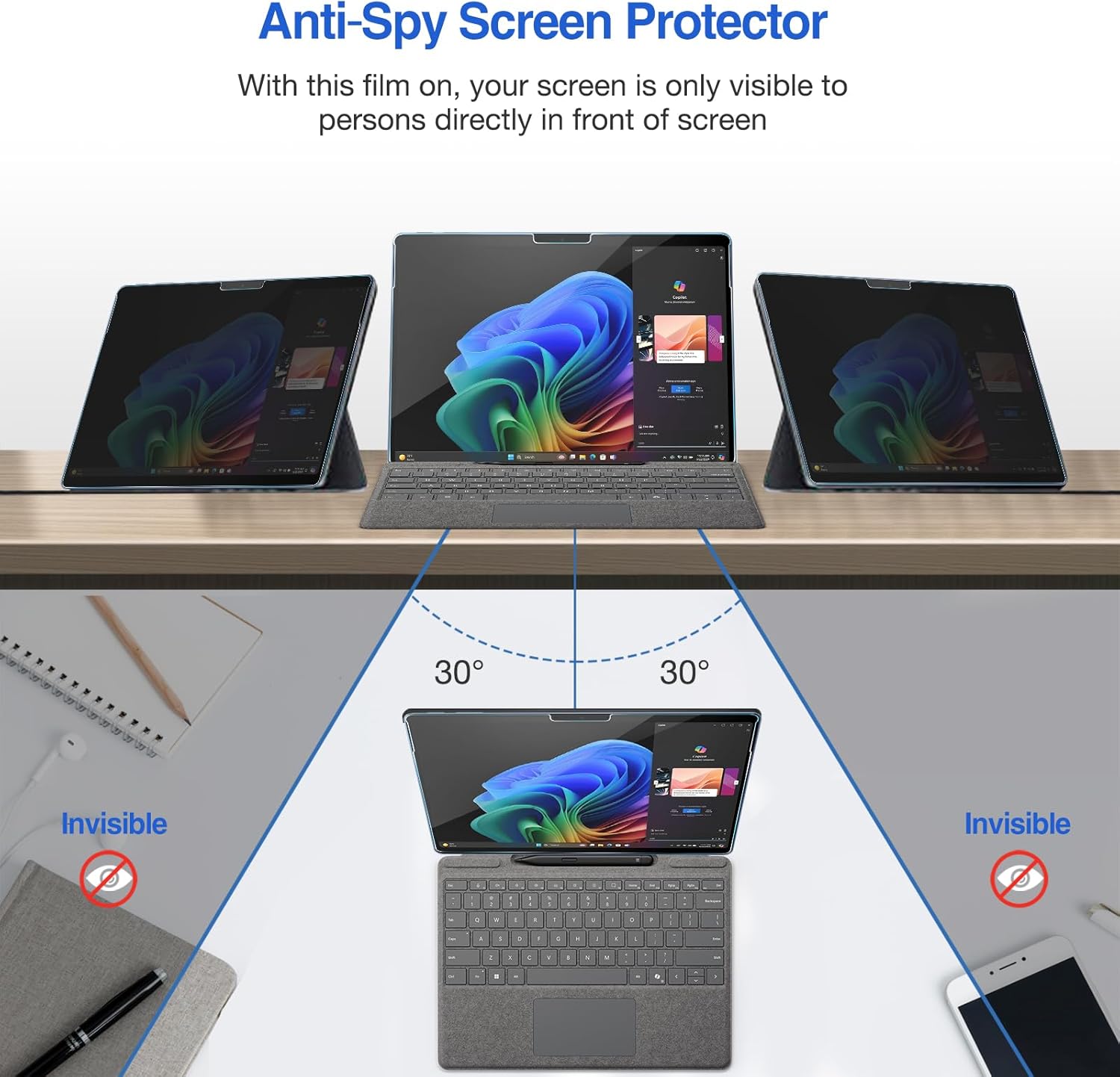
Image: An illustration demonstrating the anti-spy screen protector feature. It shows a tablet screen visible to the user directly in front, but appearing "invisible" to individuals viewing from angles greater than 30 degrees to either side.

ภาพ: เหนือศีรษะ view illustrating the anti-spy screen protector in an office setting. The screen content is visible to the user, but appears obscured to those viewing from side angles, indicating effective privacy protection.

Image: A collage showing individuals using their tablets with the privacy screen protector in diverse environments such as a cafe, park, office, and metro, emphasizing the ability to protect privacy anytime and anywhere.

Image: A person using a tablet with the privacy screen protector while traveling on an airplane, illustrating privacy protection in transit.

Image: A person working on a tablet with the privacy screen protector in a coffee shop, demonstrating secure viewing in public spaces.

Image: A tablet with the privacy screen protector placed on a desk in an open-style office, showcasing its utility in maintaining screen privacy in shared workspaces.

Image: Two individuals on a couch, one using a tablet with a privacy screen protector, and the other using a tablet without one, illustrating the difference in screen visibility for daily life privacy.
Touch Sensitivity and Pen Compatibility
The ultra-thin tempered glass (0.33mm thickness) ensures that the original touch sensitivity of your Surface Pro 11 is maintained. It is also fully compatible with the Surface Pen, allowing for smooth writing and drawing without interference.

Image: A hand using a Surface Pen to interact with a tablet screen that has the privacy screen protector installed, demonstrating full compatibility and responsive touch functionality.

Image: A close-up shot of a hand drawing on a tablet screen with a stylus, emphasizing the highly responsive touch sensitivity maintained by the ultra-thin tempered glass screen protector.
5. การบำรุงรักษาและการดูแล
- การทำความสะอาด: To clean the screen protector, gently wipe it with a soft, lint-free microfiber cloth. For stubborn smudges, slightly dampชุบผ้าด้วยน้ำหรือน้ำยาทำความสะอาดหน้าจอที่ออกแบบมาสำหรับอุปกรณ์อิเล็กทรอนิกส์โดยเฉพาะ หลีกเลี่ยงสารเคมีรุนแรงหรือวัสดุที่มีฤทธิ์กัดกร่อน
- การป้องกัน: While the protector offers 9H hardness and is shock, liquid, and scratch-resistant, it is not indestructible. Avoid dropping your device or exposing it to extreme impacts.
- พื้นที่จัดเก็บ: If removing the protector for any reason, store it flat and protect the adhesive side from dust and debris. Note that reapplication may not be as effective as the initial installation.

Image: A composite image illustrating the durability of the screen protector. It shows a tablet screen with a metal ball bouncing off it (shock-resistant), water droplets on the screen (liquid-resistant), and a blade attempting to scratch the surface (scratch-resistant), highlighting its protective qualities.
6 การแก้ไขปัญหา
| ปัญหา | สาเหตุที่เป็นไปได้ | สารละลาย |
|---|---|---|
| ฟองอากาศหลังการติดตั้ง | Dust particles trapped underneath, or improper application. | Gently lift the nearest edge of the protector and use a dust-absorber sticker to remove dust. Reapply carefully. For small bubbles, they may disappear within 24-48 hours. |
| ความไวต่อการสัมผัสลดลง | Improper installation, or a faulty protector. | Ensure the protector is fully adhered without gaps. If the issue persists, contact customer support. |
| Privacy effect not strong enough | Viewing angle expectations, or incorrect product. | The privacy effect is designed for specific angles (e.g., 30 degrees from center). Ensure you have the correct privacy screen protector for your model. |
| รอยแตกหรือความเสียหาย | การกระแทกหรือการใช้แรงมากเกินไป | The protector is designed to absorb impact to protect your screen. Replace the damaged protector. |
7. ข้อมูลจำเพาะ
- ยี่ห้อ: โปรเคส
- ชื่อรุ่น : ProCase Privacy Screen Protector for Surface Pro 11 13 Inch 2024
- อุปกรณ์ที่รองรับ: Microsoft Surface Pro 11 2024 (13.0 inch)
- วัสดุ: กระจกนิรภัย
- ความแข็งของสินค้า: 9H
- Product Dimensions (L x W): 11.3" x 8.19"
- ความหนา: 0.33มม.
- คุณสมบัติพิเศษ: Anti-Spy, Touch Sensitive, Scratch Resistant, Shock Resistant, Liquid Resistant
- เสร็จสิ้นประเภท: มันเงา
- ความชัดเจน: 9
8. การรับประกันและการสนับสนุน
For warranty information, product support, or to contact customer service, please visit the official ProCase website or refer to the packaging for contact details. Keep your purchase receipt for warranty claims.