
1. บทนำ
This manual provides essential instructions for the safe and efficient operation, installation, and maintenance of your AFYEEV 11 kW EV Charging Station. Please read this manual thoroughly before using the product and retain it for future reference.
2. ข้อมูลด้านความปลอดภัย
Always observe the following safety precautions to prevent injury or damage to the charging station and your vehicle:
- Ensure the charging station is connected to a properly grounded CEE 3-phase socket.
- ห้ามพยายามเปิด ถอดประกอบ หรือปรับเปลี่ยนสถานีชาร์จ
- Keep the charging station away from flammable materials, liquids, and gases.
- Do not use the charging station if the cable or connector is damaged.
- In case of emergency, use the emergency stop switch immediately.
- The charger includes multiple protection functions: overcurrent protection, earth protection, lightning protection, overvoltage protection, under-frequency protection, overheating protection, and earthing warning.
- The unit is IP65 rated for dust and water resistance, suitable for outdoor use in various weather conditions (-30°C to 50°C).
3. เนื้อหาบรรจุภัณฑ์
ตรวจสอบว่ามีรายการทั้งหมดอยู่ในแพ็คเกจ:
- 1 x EV Charging Station
- 1 x Cable Holder
- การ์ด RFID 2 ใบ
- 1 x Dishcloth (for cleaning)
4. การตั้งค่า
4.1 การติดตั้งทางกายภาพ
The AFYEEV 11 kW EV Charging Station is designed for simple plug-and-play operation, requiring no complex wiring. It connects directly to an existing CEE 3-phase socket.
- Select a suitable location for the charging station, ensuring it is within reach of your vehicle and a CEE 3-phase socket. The unit is IP65 rated, making it suitable for both indoor and outdoor environments.
- Mount the charging station securely to a wall or suitable support structure using appropriate fasteners (not included).
- Plug the charging station's CEE 3-phase plug into the existing CEE 3-phase socket.
- Install the provided cable holder to manage the charging cable when not in use.

ภาพ: The AFYEEV EV Charging Station is designed for safe outdoor use, featuring an IP65 rating for dust and water resistance, and operating effectively in temperatures from -30°C to +50°C.
4.2 การติดตั้งและการเชื่อมต่อแอป
The charging station can be controlled via a smart application. The recommended application is the Tuya Smart App.
- Download the Tuya Smart App from your device's app store (iOS or Android) or scan the QR code provided on the product packaging or in the image below. ดาวน์โหลดแอป Tuya Smart
- ลงทะเบียนหรือเข้าสู่ระบบบัญชีของคุณ
- ตรวจสอบให้แน่ใจว่าได้เปิดใช้งาน Bluetooth และ Wi-Fi ของสมาร์ทโฟนของคุณแล้ว
- Follow the in-app instructions to add your EV charging station. The app will guide you through connecting via Bluetooth or Wi-Fi.
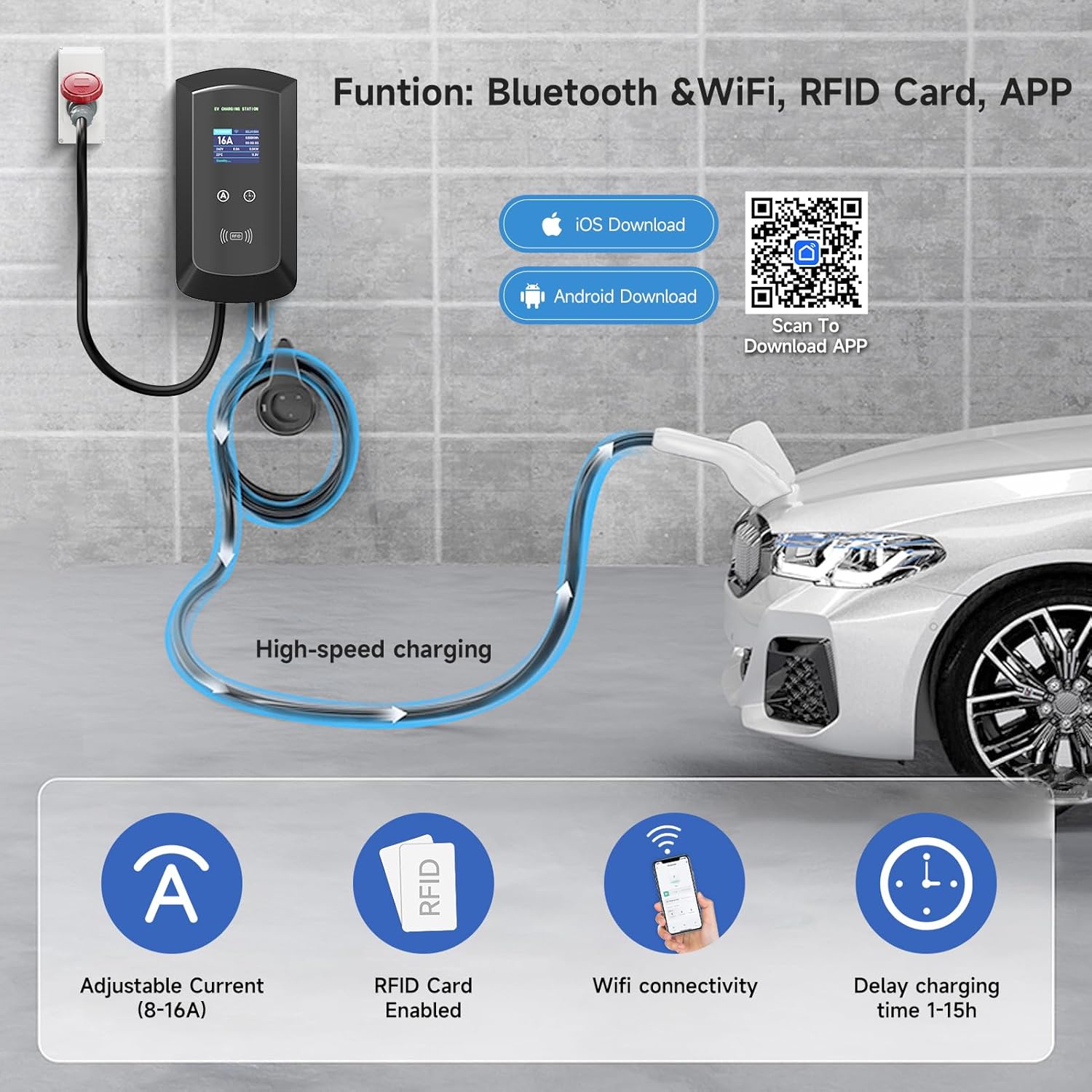
ภาพ: The charging station offers smart control via Bluetooth and Wi-Fi using the Tuya Smart App, allowing for adjustable current, RFID card enablement, and delayed charging time settings.
4.3 การตั้งค่าการ์ด RFID
The included RFID cards provide an alternative method to start and stop charging, enhancing security and convenience.
- The RFID cards are pre-configured for use with your charging station.
- To initiate charging, simply swipe an authorized RFID card over the designated RFID reader area on the charging station.
- To stop charging, swipe the card again.
5. คู่มือการใช้งาน
5.1 Starting and Stopping a Charge
You can start and stop charging using either the RFID card or the smart application.
- Connect the Vehicle: Plug the charging cable into your electric vehicle's charging port.
- Start Charging (RFID): Swipe an authorized RFID card over the RFID reader on the charging station. The display will indicate that charging has begun.
- Start Charging (App): Open the Tuya Smart App, select your charging station, and initiate charging through the app interface.
- Stop Charging (RFID): Swipe the authorized RFID card over the reader again.
- Stop Charging (App): Use the app interface to stop the charging session.
- Disconnect the Vehicle: Once charging is complete or stopped, safely disconnect the charging cable from your vehicle.
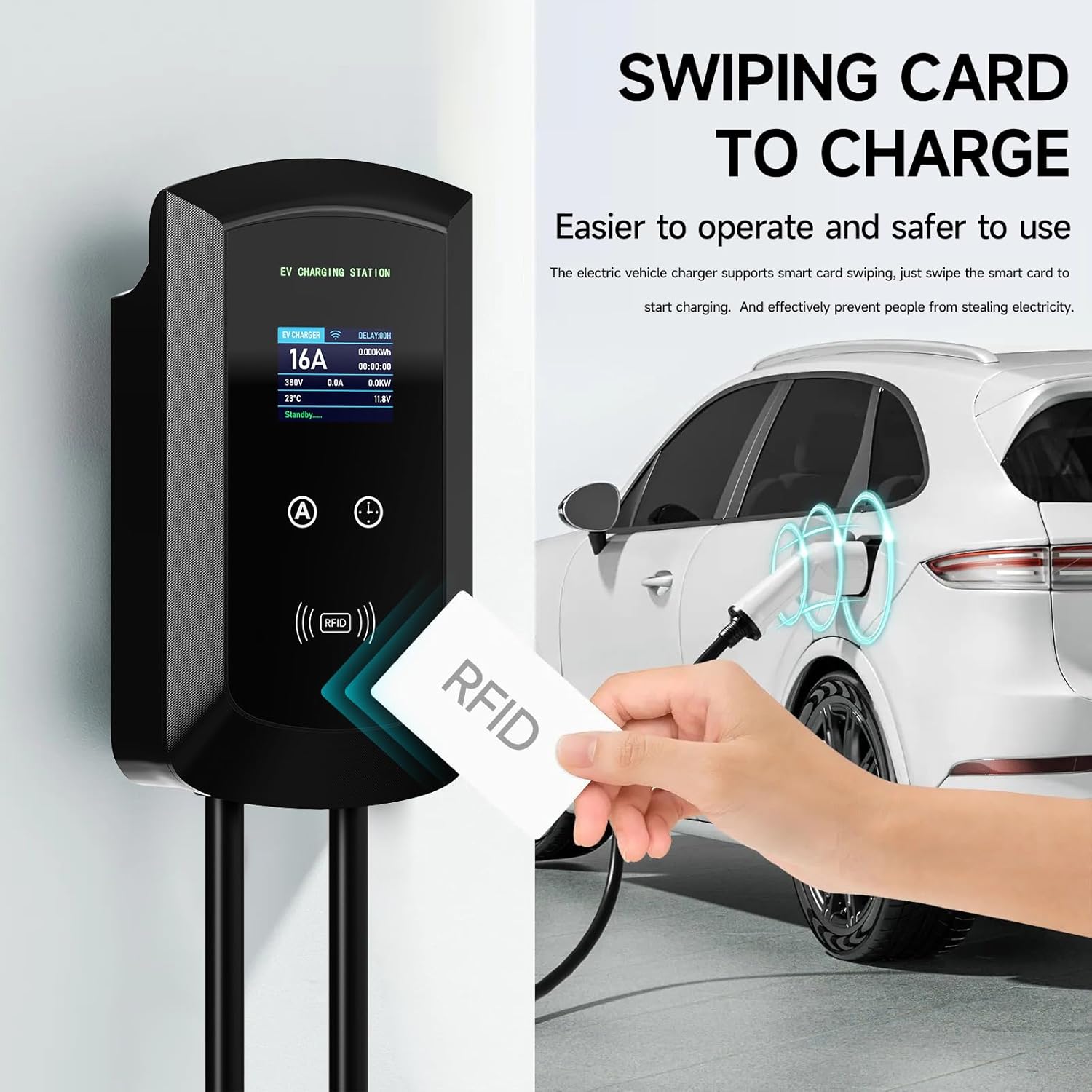
ภาพ: Charging can be easily initiated by swiping an RFID card over the designated area on the EV charging station, providing a secure and straightforward method to start and stop charging.
5.2 การปรับกระแสไฟชาร์จ
The charging current can be adjusted between 8A and 16A to suit your vehicle's requirements or available power supply. This can be done manually or via the app.
- การปรับด้วยตนเอง: Use the physical buttons on the charging station to cycle through available current settings (8A, 10A, 13A, 16A). The station has a memory function for the last selected current.
- การปรับแต่งแอป: Within the Tuya Smart App, navigate to the charging settings to select your desired current (8A-16A).
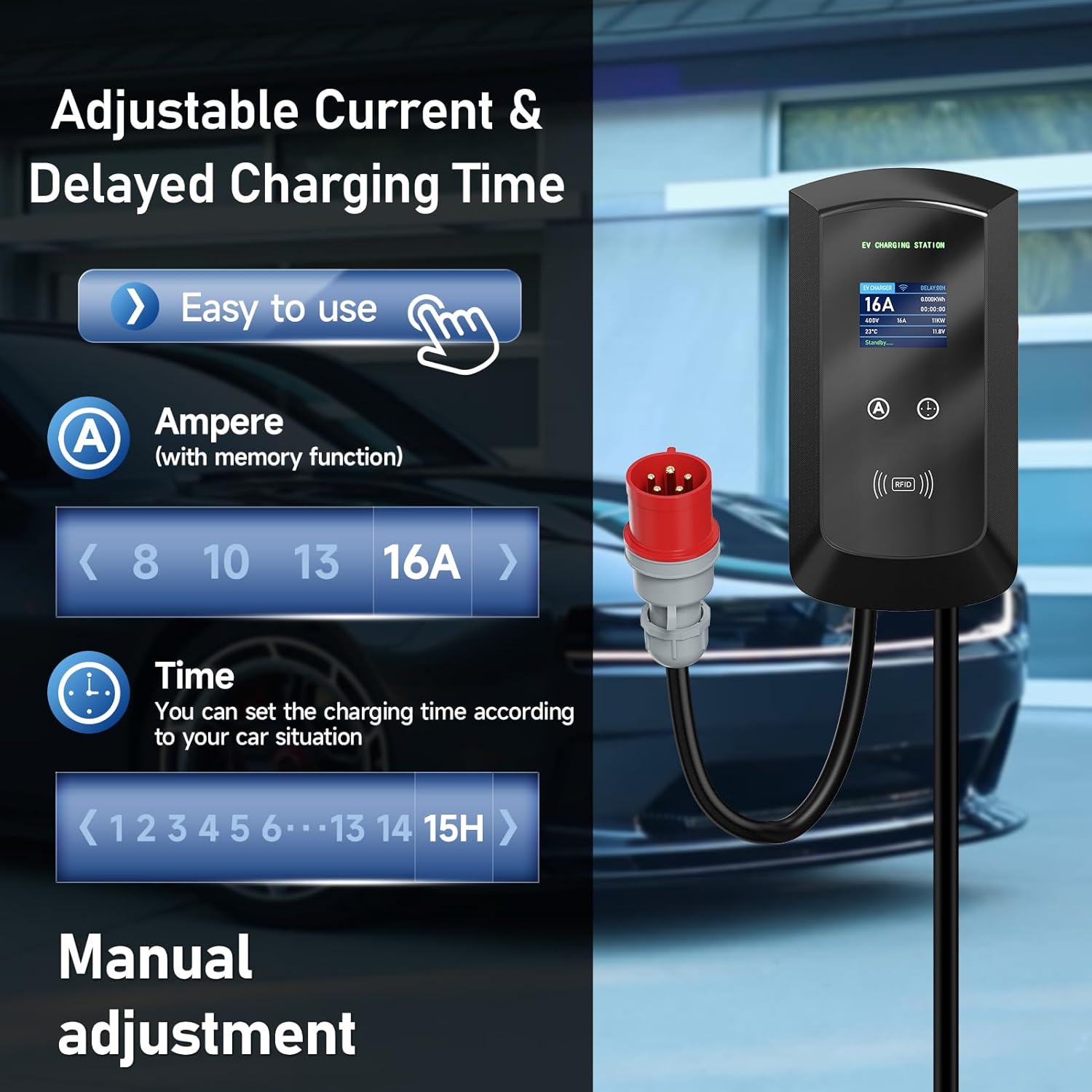
ภาพ: The charging station allows for easy manual adjustment of the charging current (8A-16A) and setting delayed charging times (1-15 hours) directly from the unit.
5.3 การชาร์จตามกำหนดเวลา
Utilize the smart app to schedule charging sessions during off-peak hours to save on electricity costs.
- Open the Tuya Smart App and select your charging station.
- Access the "Scheduled Charging" or "Time Setting" feature.
- Set your desired start and end times for the charging session.
- Confirm the schedule. The charging station will automatically begin and end charging according to your settings.

ภาพ: The smart app enables scheduled charging, allowing users to set specific times for charging, such as during off-peak hours, to optimize electricity costs.
5.4 การตรวจสอบสถานะการชาร์จ
The large screen display on the charging station provides real-time information about the charging process.
- ปัจจุบัน (A): Displays the active charging current.
- เล่มที่tagอี (วี): แสดงปริมาณแบบเรียลไทม์tage.
- กำลังไฟฟ้า (kW): Indicates the current charging power.
- พลังงาน (กิโลวัตต์ชั่วโมง): Tracks the total energy delivered during the session.
- อุณหภูมิ (°C): Displays the internal temperature of the unit.
- สถานะ: Shows the current operational status (e.g., "Standby", "Charging").
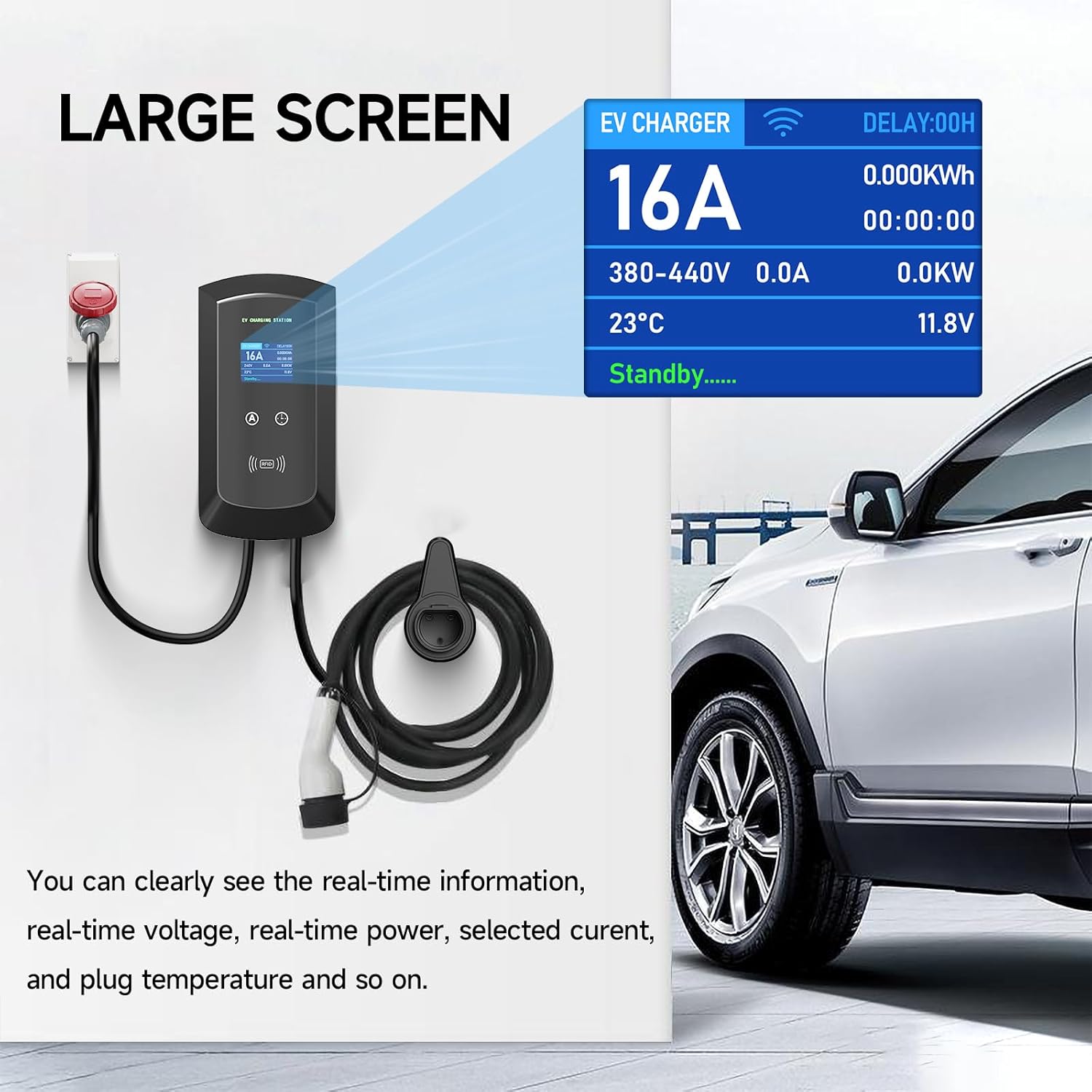
ภาพ: The large screen on the EV charger provides clear, real-time information including current, voltage, power, temperature, and charging status, ensuring users can easily monitor the charging process.
6. การบำรุงรักษา
การบำรุงรักษาอย่างสม่ำเสมอจะช่วยให้สถานีชาร์จของคุณมีอายุการใช้งานยาวนานและใช้งานได้อย่างปลอดภัย
- การทำความสะอาด: ใช้แบบนุ่มๆamp cloth (like the provided dishcloth) to clean the exterior of the charging station. Do not use abrasive cleaners or solvents. Ensure the unit is powered off before cleaning.
- การตรวจสอบสายเคเบิล: Periodically inspect the charging cable and connector for any signs of wear, damage, or fraying. If any damage is found, discontinue use immediately and contact support.
- สภาพแวดล้อม : While the unit is IP65 rated, avoid prolonged exposure to extreme weather conditions if possible. Ensure proper ventilation around the unit.
7 การแก้ไขปัญหา
If you encounter issues with your charging station, refer to the following common troubleshooting steps:
- ไม่มีไฟฟ้า:
- Check if the CEE 3-phase socket has power.
- Ensure the charging station's plug is fully inserted.
- Check your circuit breaker for tripped circuits.
- การชาร์จไม่เริ่ม:
- Ensure the charging cable is securely connected to both the station and the vehicle.
- Verify that the RFID card is authorized and swiped correctly.
- Check the app for any error messages or scheduled charging conflicts.
- ตรวจสอบให้แน่ใจว่ารถของคุณพร้อมรับการชาร์จไฟแล้ว
- ปัญหาการเชื่อมต่อแอพ:
- Ensure your phone's Bluetooth and Wi-Fi are on.
- Check if the charging station is within Wi-Fi or Bluetooth range.
- Restart the app and/or your phone.
- If Wi-Fi connection fails, try reconnecting through the app's device management section.
- ข้อความแสดงข้อผิดพลาดบนหน้าจอ:
- Note down the error code or message.
- Refer to the app for more detailed explanations or contact customer support with the error information.
หากปัญหายังคงมีอยู่หลังจากพยายามทำตามขั้นตอนเหล่านี้แล้ว โปรดติดต่อฝ่ายสนับสนุนลูกค้า
8. ข้อมูลจำเพาะ
| คุณสมบัติ | รายละเอียด |
|---|---|
| ยี่ห้อ | AFYEEV |
| หมายเลขรุ่น | 11kW-8-16A-CEEBIGUA-001 |
| กำลังขับสูงสุด | 11 กิโลวัตต์ |
| แม็กซ์ปัจจุบัน | 16 ก |
| ปรับกระแสไฟได้ | 8A, 10A, 13A, 16A |
| ประเภทขั้วต่อ | CEE 3-phase plug (input), Type 2 (output) |
| ความยาวสายเคเบิล | 5m |
| ระดับการป้องกันน้ำเข้า (IP) | IP65 (กันฝุ่นและกันน้ำ) |
| อุณหภูมิในการทำงาน | -30°C ถึง 50°C |
| การเชื่อมต่อ | Wi-Fi, Bluetooth, RFID Card |
| คุณสมบัติด้านความปลอดภัย | Overcurrent, Earth, Lightning, Overvoltage, Under-frequency, Overheating Protection, Emergency Stop Switch |
| การปฏิบัติตามมาตรฐาน | IEC 62196-2 (European Standard) |
9. การรับประกันและการสนับสนุน
For warranty information, technical support, or service inquiries, please contact AFYEEV customer service through the retailer where you purchased the product or visit the official AFYEEV webเว็บไซต์.
Please have your model number (11kW-8-16A-CEEBIGUA-001) and purchase date available when contacting support.