
1. สินค้าหมดview
The Pxton S1 Walkie Talkie is a versatile two-way radio designed for reliable communication across various environments. It features 16 communication channels, 155 privacy codes, and a range of functions including VOX, TOT, emergency alarm, and an LED flashlight, making it suitable for both personal and professional use.
คุณสมบัติหลัก:
- 16 ช่องทางการติดต่อสื่อสาร
- 155 รหัสความเป็นส่วนตัว (CTCSS/DCS)
- 5-level VOX Sensitivity Adjustment for hands-free operation
- TOT (Time-Out Timer) to prevent accidental prolonged transmissions
- ฟังก์ชั่นปลุกฉุกเฉิน
- Auto Squelch for clear audio
- การแจ้งเตือนแบตเตอรี่เหลือน้อยและโหมดประหยัดพลังงาน
- Channel Scan and Monitoring functions
- ไฟฉาย LED ในตัว
- Custom Programming Support (programming cable sold separately)
- Durable 1500mAh Li-ion Battery

Image 1.1: Pxton S1 Walkie Talkies in use, highlighting key features.
2. เนื้อหาบรรจุภัณฑ์
ตรวจสอบว่ารายการทั้งหมดที่ระบุไว้ด้านล่างนี้รวมอยู่ในแพ็คเกจของคุณ:
- 2 x Pxton S1 Walkie Talkies
- แท่นชาร์จ 2 ชิ้น
- 2 x 1500mAh Lithium Batteries
- 2 x เข็มขัดคลิป
- 2 x หูฟัง
- 1 x คู่มือผู้ใช้

Image 2.1: Included components in the Pxton S1 Walkie Talkie package.
3. แผนภาพสินค้า
Familiarize yourself with the various parts and controls of your Pxton S1 Walkie Talkie:

Image 3.1: Labeled diagram of the Pxton S1 Walkie Talkie components.
- เสาอากาศแบบไวต่อสัญญาณในตัว: สำหรับการส่งและรับสัญญาณ
- ไฟฉาย: มีไฟ LED ในตัวเพื่อการส่องสว่าง
- ไฟแสดงสถานะ LED: แสดงสถานะ (เช่น กำลังส่ง กำลังรับ แบตเตอรี่เหลือน้อย)
- ปุ่ม PTT (กดเพื่อพูด): กดค้างเพื่อส่ง ปล่อยเพื่อรับ
- ลำโพงใส: สำหรับเอาต์พุตเสียง
- ไมโครโฟนในตัว: สำหรับการป้อนข้อมูลด้วยเสียง
- แจ็ค SP/MIC: For connecting earpieces or external microphones.
- ปุ่ม MONI (มอนิเตอร์): Temporarily disables squelch to listen to weak signals.
- ปุ่มไฟฉาย: เปิดใช้งานไฟฉาย LED
- สวิตช์ช่อง: ปุ่มหมุนสำหรับเลือกช่องทางการสื่อสาร
- สวิตช์ไฟ/การควบคุมระดับเสียง: ปุ่มหมุนสำหรับเปิด/ปิดวิทยุและปรับระดับเสียง
4. การตั้งค่า
4.1 การติดตั้งและการชาร์จแบตเตอรี่
ก่อนใช้งานครั้งแรก โปรดชาร์จแบตเตอรี่ให้เต็ม
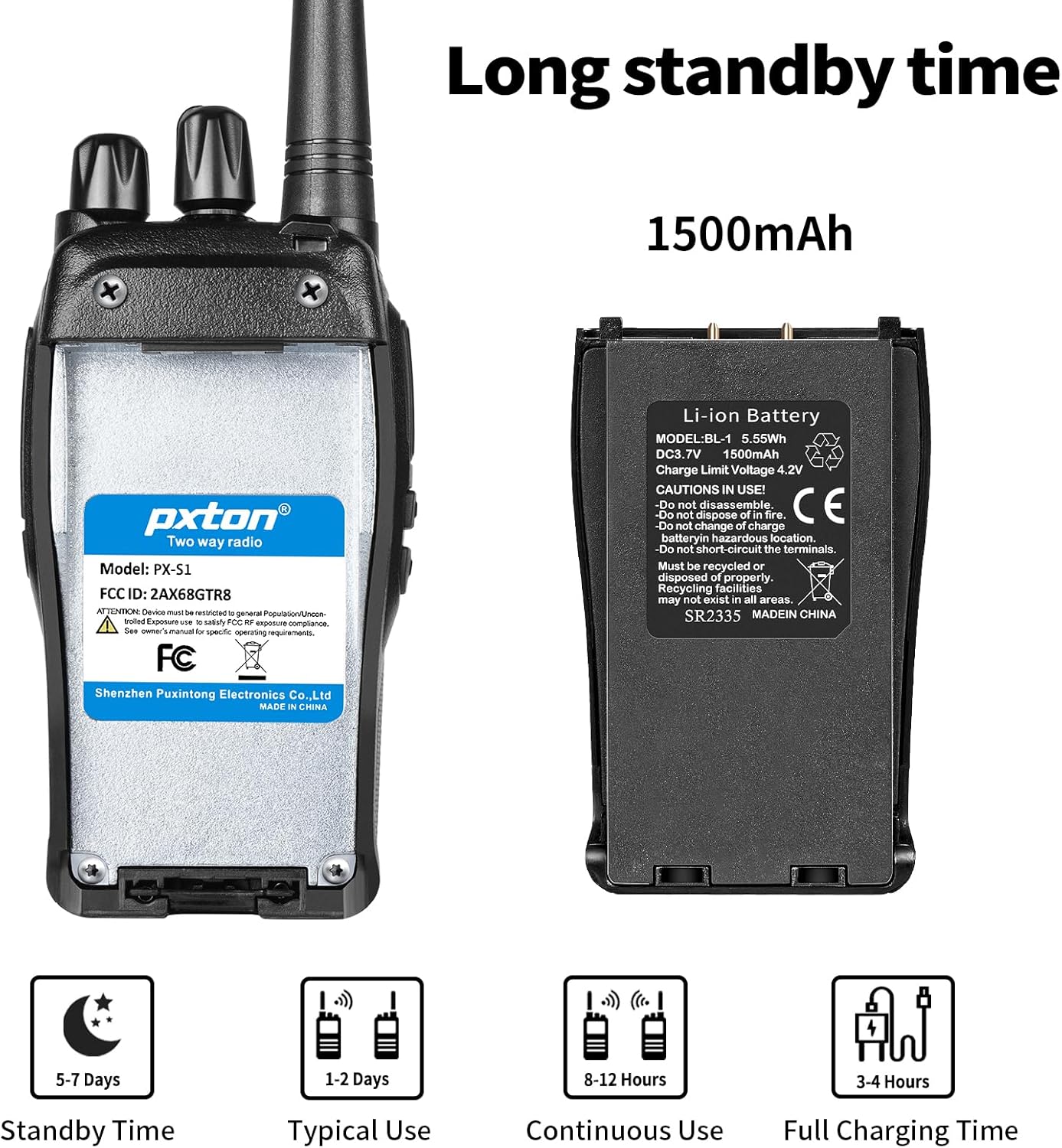
Image 4.1: Battery details and charging information.
- ติดตั้งแบตเตอรี่: Align the 1500mAh Li-ion battery with the battery compartment on the back of the walkie talkie and slide it into place until it clicks securely.
- Place in Charging Base: Insert the walkie talkie (with battery installed) into the charging base. Ensure the charging contacts on the radio align with those on the base.
- เชื่อมต่อพลังงาน: Plug the charging base's adapter into a standard wall outlet. The LED indicator on the charging base will typically show red while charging and turn green when fully charged.
- เวลาในการชาร์จ: การชาร์จเต็มโดยทั่วไปจะใช้เวลา 3-4 ชั่วโมง
4.2 Attaching the Belt Clip and Earpiece
- คลิปหนีบเข็มขัด: Secure the belt clip to the designated slot on the back of the walkie talkie using the provided screws.
- หูฟัง: Insert the earpiece plug into the SP/MIC jacks on the side of the walkie talkie. Ensure it is fully inserted for proper connection.
5. คู่มือการใช้งาน
5.1 การเปิด/ปิดเครื่องและการควบคุมระดับเสียง
- เปิดเครื่อง: Rotate the Power Switch/Volume Control knob clockwise until you hear a click. The radio will emit a tone, and the LED indicator may flash.
- ปรับระดับเสียง: Continue rotating the Power Switch/Volume Control knob clockwise to increase volume, or counter-clockwise to decrease volume.
- หมดแรง: Rotate the Power Switch/Volume Control knob counter-clockwise until you hear a click.
5.2 การเลือกช่องสัญญาณ
The Pxton S1 has 16 channels. To select a channel:
- Rotate the Channel Switch knob to select your desired channel (1-16).
- Ensure all radios you wish to communicate with are set to the same channel and privacy code.
5.3 การส่งและรับ
- การส่ง: Press and hold the PTT (Push-to-Talk) button on the side of the radio. Speak clearly into the microphone. The LED indicator will typically glow red.
- เพื่อรับ: ปล่อยปุ่ม PTT วิทยุจะเปลี่ยนเป็นโหมดรับสัญญาณโดยอัตโนมัติ โดยปกติไฟ LED จะสว่างเป็นสีเขียวเมื่อได้รับสัญญาณ
5.4 ฟังก์ชัน VOX (ระบบโทรศัพท์อัตโนมัติ)
VOX allows for hands-free transmission. When VOX is enabled, the radio will automatically transmit when it detects your voice, without needing to press the PTT button.

Image 5.1: Illustration of VOX/Hands-free function.
- VOX sensitivity can be adjusted (5 levels) to suit your environment and voice volume. This feature typically requires programming software to enable and adjust.
5.5 TOT (ตัวจับเวลาหมดเวลา)
The TOT function limits the duration of a single transmission to prevent accidental prolonged transmissions and conserve battery life. If the PTT button is held down for longer than the preset time, the radio will stop transmitting and emit a warning tone.
5.6 การแจ้งเตือนฉุกเฉิน
The emergency alarm function can be activated to send out an alert signal. The method of activation may vary depending on programming, but it is typically assigned to a programmable side button.
5.7 ฟังก์ชั่นการสแกน
The scan function allows the radio to automatically scan through all programmed channels to detect active conversations. When an active channel is found, the radio will stop on that channel until the transmission ends.
5.8 ไฟฉาย
ไฟฉาย LED ในตัวช่วยให้มองเห็นได้ชัดเจนขึ้น

Image 5.2: Walkie Talkie flashlight in use.
- Press the dedicated Flashlight Button (refer to Product Diagram) to turn the flashlight on or off.
6. ระยะการสื่อสาร
The actual communication range of the Pxton S1 Walkie Talkie can vary significantly based on terrain, obstacles, and electromagnetic interference. General estimates are:
- Flat or Unobstructed Areas: Up to 3 miles (approximately 4.8 km)
- พื้นที่ชานเมืองหรือชนบท: Approximately 1.2 miles (approximately 1.9 km)
- Urban Settings: Approximately 0.6 miles (approximately 1 km)

Image 6.1: Communication range in various environments.
7. การบำรุงรักษา
7.1 การดูแลแบตเตอรี่
- หลีกเลี่ยงการปล่อยแบตเตอรี่จนหมดบ่อยครั้งเพื่อยืดอายุการใช้งาน
- ควรชาร์จแบตเตอรี่ในที่แห้งและเย็น
- If storing the radio for an extended period, charge the battery to about 50% and remove it from the radio. Recharge every 3-6 months.
- ทิ้งแบตเตอรี่เก่าด้วยความรับผิดชอบตามข้อบังคับท้องถิ่น
7.2 การทำความสะอาด
- เช็ดภายนอกวิทยุด้วยผ้านุ่มๆamp ผ้า. อย่าใช้สารเคมีที่รุนแรงหรือน้ำยาทำความสะอาดที่มีฤทธิ์กัดกร่อน
- Ensure the radio is powered off and the charging port cover is securely closed before cleaning.
8 การแก้ไขปัญหา
| ปัญหา | สาเหตุที่เป็นไปได้ | สารละลาย |
|---|---|---|
| วิทยุไม่เปิด | แบตเตอรี่หมดหรือติดตั้งไม่ถูกต้อง | Charge the battery. Reinstall the battery ensuring proper contact. |
| ไม่สามารถส่งหรือรับได้ | Incorrect channel or privacy code. Volume too low. Battery low. | Verify channel and privacy code settings. Increase volume. Charge battery. |
| คุณภาพเสียงไม่ดี / สัญญาณรบกวน | Out of range. Interference. Squelch level too low. | Move closer to other radios. Avoid sources of interference. Adjust squelch level. |
| แบตเตอรี่หมดเร็ว | Frequent transmissions. VOX sensitivity too high. Battery nearing end of life. | Reduce transmission time. Adjust VOX sensitivity. Consider replacing battery if old. |
9. ข้อมูลจำเพาะ
| คุณสมบัติ | รายละเอียด |
|---|---|
| หมายเลขรุ่น | PX-S1-0001 |
| ยี่ห้อ | พิกเซลตัน |
| สี | สีดำ |
| จำนวนช่องสัญญาณ | 16 |
| ช่วงความถี่ | ยูเอชเอฟ |
| ระยะการสนทนาสูงสุด | 3 Miles (unobstructed) |
| ประเภทแบตเตอรี่ | ลิเธียมไออน 1500mAh (รวมอยู่ด้วย) |
| เล่มที่tage | 3.7 โวลต์ (กระแสตรง) |
| อายุการใช้งานแบตเตอรี่โดยเฉลี่ย | 7 days (standby) / 12 hours (continuous use) |
| เวลาในการชาร์จ | 3-4 ชั่วโมง |
| ระดับความต้านทานต่อน้ำ | ทนน้ำ |
| ขนาดสินค้า (ลึก x กว้าง x สูง) | 9.9" x 2.2" x 6.9" (including antenna) |
| น้ำหนักสินค้า | 1.4 ปอนด์ |
| ช่วงอุณหภูมิในการทำงาน | -10°C ถึง 40°C |
| รหัส FCC | 2AX68GTR8 |

Image 9.1: Pxton S1 Walkie Talkie dimensions.
10. ความเข้ากันได้
The Pxton S1 walkie talkie is compatible with the following models:
- พีเอ็กซ์-888เอส
- พีเอ็กซ์-777เอส
- พีเอ็กซ์-666เอส
- PX-888S Pro
These models can work together and utilize the same programming tools and cables. Note that the programming cable must be purchased separately and is not included with the PX-S1.
11. การรับประกันและการสนับสนุน
11.1 ข้อมูลการรับประกัน
Pxton offers a 30-day unconditional exchange and refund policy from the date of purchase. Additionally, the product comes with lifetime after-sales service.
11.2 การสนับสนุนลูกค้า
If you encounter any issues or have questions regarding your Pxton S1 Walkie Talkie, please contact Pxton customer support. You can reach us via Amazon messages for assistance.