
1. บทนำ
The ELEKTROBOCK SN130 humidity sensor is designed for automatic control of ventilation systems, particularly in environments prone to high humidity. It effectively detects excessive moisture and activates a connected fan to maintain optimal air quality, preventing condensation and mold growth.
This manual provides essential information for the safe and efficient installation, operation, and maintenance of your SN130 humidity sensor. Please read it thoroughly before use and retain it for future reference.
2. ข้อมูลด้านความปลอดภัย
WARNING: Risk of electric shock. Installation must be performed by a qualified electrician in accordance with local wiring regulations.
- ควรตัดการเชื่อมต่อไฟฟ้าทุกครั้งก่อนการติดตั้ง การบำรุงรักษา หรือการแก้ไขปัญหา
- Do not expose the device to water splashes or extreme temperatures outside its operating range.
- ตรวจสอบให้แน่ใจว่าการเชื่อมต่อทั้งหมดมีความปลอดภัยและมีฉนวนป้องกันอย่างเหมาะสม
- อุปกรณ์นี้ได้รับการออกแบบสำหรับใช้ภายในอาคารเท่านั้น
- อย่าพยายามซ่อมแซมหรือดัดแปลงอุปกรณ์ด้วยตนเอง โปรดติดต่อช่างผู้ชำนาญการเพื่อขอรับบริการ
3. สินค้าหมดview
The ELEKTROBOCK SN130 is an intelligent humidity sensor that automatically manages ventilation based on ambient humidity levels. It is ideal for bathrooms, laundry rooms, cellars, and other areas where excess moisture is a concern.
คุณสมบัติหลัก:
- Automatic humidity detection and fan activation.
- Adjustable humidity threshold (20% to 95% RH).
- Manual override button for 10-minute fan operation.
- Prevents mold and condensation damage.
- Compatible with devices up to 10 A.

Image 3.1: The ELEKTROBOCK SN130 Humidity Sensor in a bathroom setting, illustrating its function to detect excessive humidity and automatically activate a fan.
4. การตั้งค่าและการติดตั้ง
The SN130 humidity sensor is designed for wall mounting. Ensure the installation location is free from direct water spray and within the operating temperature and humidity ranges.
ส่วนประกอบที่รวมอยู่:
- SN130 Humidity Sensor unit
- แผ่นยึดผนัง
- สกรูสำหรับติดตั้ง
ขั้นตอนการติดตั้ง:
- การตัดการเชื่อมต่อไฟฟ้า: ก่อนเริ่มดำเนินการ โปรดตรวจสอบให้แน่ใจว่าได้ปิดสวิตช์ไฟหลักของพื้นที่ติดตั้งแล้วที่เบรกเกอร์วงจร
- การติดตั้ง:
- Select a suitable wall location, away from direct heat sources or drafts that could affect humidity readings.
- Use the provided mounting plate as a template to mark drilling points on the wall.
- Drill holes and secure the mounting plate to the wall using the supplied screws.
- การเดินสายไฟ:
Refer to the connection diagram below for proper wiring. The SN130 requires a 230V power supply and provides a potential-free contact output to control the fan.

Image 4.1: Detailed wiring diagram for the SN130 sensor. Connect the 230V power supply (Live and Neutral) to the 'LN' terminals and the 230V fan to the 'OUT' terminals using appropriate connectors.
- Connect the 230V power supply (Live and Neutral) to the terminals marked LN.
- Connect the 230V fan to the output terminals marked ออก. Ensure correct polarity if specified by the fan manufacturer.
- ตรวจสอบให้แน่ใจว่าการเชื่อมต่อทั้งหมดแน่นหนาและปลอดภัย
- Attach Sensor Unit: Carefully attach the SN130 sensor unit to the mounted plate, ensuring it clicks securely into place.
- คืนค่าพลัง: เมื่อการติดตั้งเสร็จสมบูรณ์และตรวจสอบการเชื่อมต่อทั้งหมดแล้ว ให้เปิดไฟที่เบรกเกอร์อีกครั้ง
5. คู่มือการใช้งาน
The SN130 operates automatically once installed and configured. It features an adjustable humidity setting and a manual override function.

ภาพที่ 5.1: ด้านหน้า view of the SN130 showing the humidity setting dial, LED status indicator, and manual ON button.
การตั้งค่าความชื้น:
- The large central dial allows you to set the desired humidity threshold (RH%).
- Turn the dial to adjust the humidity level between 20% and 95% RH.
- When the ambient humidity exceeds this set value, the sensor will activate the connected fan.
- The fan will turn off automatically when the humidity drops below the set value, accounting for the 5% hysteresis.
ไฟ LED แสดงสถานะ:
- A small LED indicator (usually red) is located on the top left of the unit.
- This LED illuminates when the fan is active, indicating that the humidity threshold has been exceeded or the manual override is engaged.
Manual Override (ON Button):
- Press the "ON" button (located on the bottom right) to manually activate the fan.
- This will run the fan for a fixed duration of 10 minutes, regardless of the current humidity level.
- This feature is useful for immediate ventilation needs, such as after a shower.
6. การบำรุงรักษา
The ELEKTROBOCK SN130 humidity sensor requires minimal maintenance to ensure optimal performance.
- การทำความสะอาด: Periodically wipe the sensor's exterior with a soft, dry cloth. Do not use abrasive cleaners, solvents, or excessive moisture.
- พื้นที่เซ็นเซอร์: Ensure the sensor's ventilation openings are not obstructed by dust or debris. Gently clean if necessary.
- ไม่มีชิ้นส่วนที่ผู้ใช้สามารถซ่อมบำรุงได้: The internal components are not user-serviceable. Do not open the casing.
7 การแก้ไขปัญหา
If you experience issues with your SN130 humidity sensor, refer to the following common problems and solutions:
| ปัญหา | สาเหตุที่เป็นไปได้ | สารละลาย |
|---|---|---|
| Fan does not turn on automatically. |
|
|
| พัดลมทำงานอย่างต่อเนื่อง |
|
|
| Manual ON button does not work. |
|
|
8. ข้อมูลจำเพาะทางเทคนิค
Below are the detailed technical specifications for the ELEKTROBOCK SN130 Humidity Sensor:
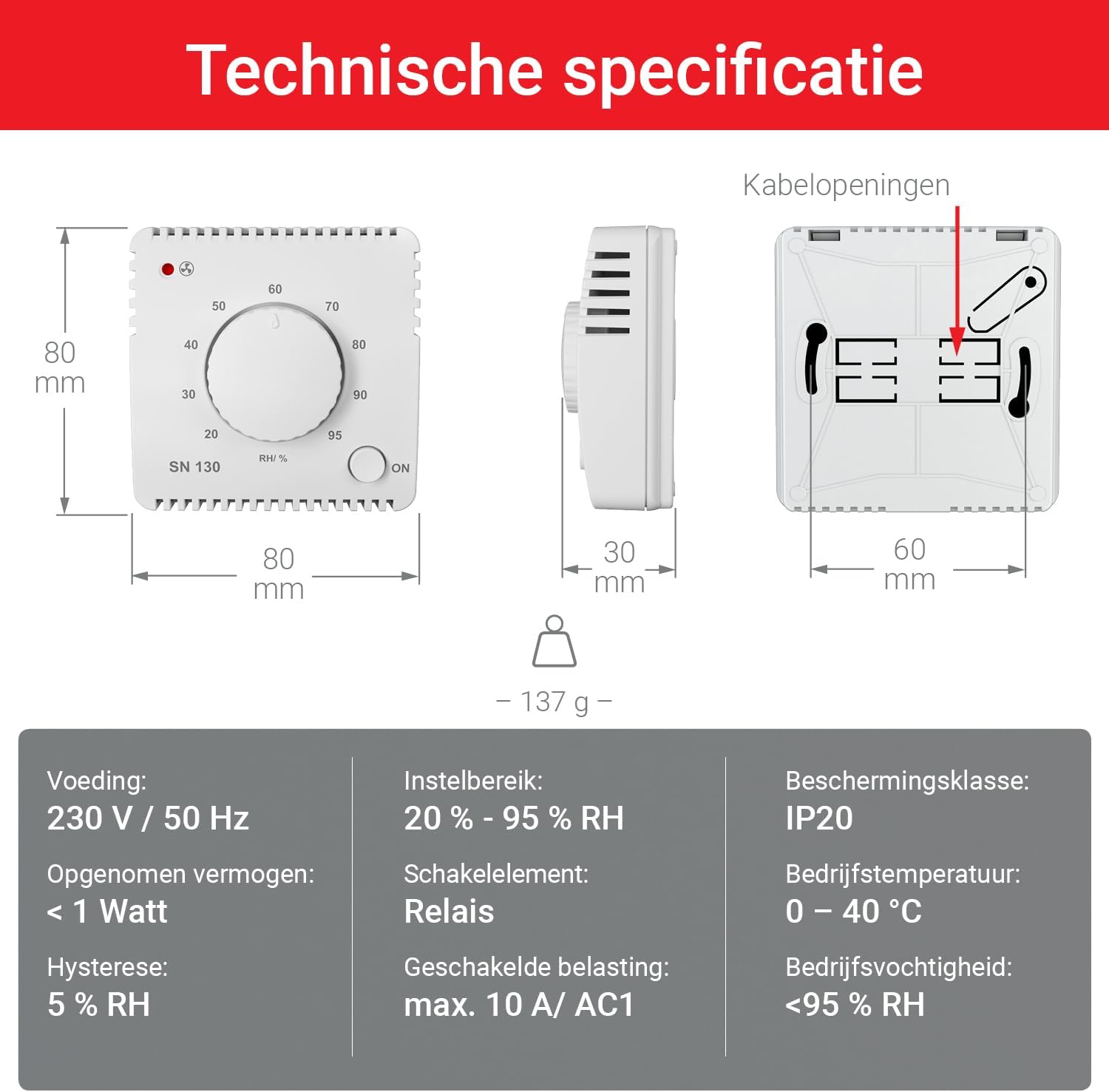
Image 8.1: Diagram illustrating the physical dimensions and key technical specifications of the SN130 sensor.
| พารามิเตอร์ | ค่า |
|---|---|
| หมายเลขรุ่น | สเอ็น130 |
| ผู้ผลิต | Elektrobock |
| แหล่งจ่ายไฟ | 230 V / 50 Hz (AC) |
| การใช้พลังงาน | < 1 วัตต์ |
| ช่วงการตั้งค่าความชื้น | ความชื้นสัมพัทธ์ 20% - 95% |
| ฮิสเทอรีซิส | ความชื้นสัมพัทธ์ 5% |
| องค์ประกอบการสลับ | รีเลย์ |
| Max Switched Load | 10 เอ / AC1 |
| ระดับการป้องกัน | IP20 |
| อุณหภูมิในการทำงาน | 0 - 40 องศาเซลเซียส |
| ความชื้นในการทำงาน | < 95% RH (ไม่กลั่นตัว) |
| ขนาด (กว้าง x ยาว x สูง) | 80 x 30 x 80 มม. (ประมาณ 8 x 3 x 8 ซม.) |
| น้ำหนัก | 137 กรัม |
| วัสดุ | พลาสติก |
| สี | สีขาว |
| ประเทศต้นกำเนิด | สาธารณรัฐเช็ก |
9. การรับประกันและการสนับสนุน
Elektrobock products are manufactured to high-quality standards. For warranty information, please refer to the terms and conditions provided at the point of purchase or visit the official Elektrobock webเว็บไซต์.
If you encounter any issues not covered in the troubleshooting section or require further assistance, please contact Elektrobock customer support or your local distributor. Have your product model (SN130) and purchase details ready when contacting support.
แหล่งข้อมูลออนไลน์: For additional information, FAQs, or updated manuals, please visit the official Elektrobock webเว็บไซต์.
