
การแนะนำ
This manual provides detailed instructions for the installation, operation, and maintenance of your AKAMATE Wireless CarPlay Portable Motorcycle Dash Cam. Please read this manual thoroughly before using the product to ensure proper function and safety. Keep this manual for future reference.
ข้อมูลด้านความปลอดภัย
- Ensure all components are securely mounted to prevent detachment during operation.
- Route all cables away from moving parts, heat sources, and sharp edges to prevent damage and interference.
- ห้ามถอดประกอบหรือดัดแปลงอุปกรณ์ การดัดแปลงโดยไม่ได้รับอนุญาตอาจทำให้การรับประกันเป็นโมฆะและก่อให้เกิดความเสี่ยงด้านความปลอดภัย
- The device is waterproof (IP67 rated); however, avoid prolonged submersion or high-pressure water jets.
- Operating the device while riding should be done with caution to avoid distraction. Utilize voice control features for safer interaction.
- Connect the power supply correctly to avoid electrical shorts or damage to your motorcycle's electrical system.
เนื้อหาแพ็คเกจ
ตรวจสอบว่ารายการทั้งหมดที่ระบุไว้ด้านล่างนี้รวมอยู่ในแพ็คเกจของคุณ:
- Motorcycle Dash Cam Unit (Main Display)
- กล้องหน้า
- กล้องหลัง
- เครื่องมือติดตั้ง
- เครื่องมือติดตั้ง
- ชุดสายไฟ
- ชุดฮาร์ดไวร์
- คู่มือการใช้งาน
สินค้าเกินview
The AKAMATE Wireless CarPlay Portable Motorcycle Dash Cam is designed to enhance your riding experience with smart connectivity and recording capabilities. It features a 5.5-inch waterproof touch screen, dual 1080P HD cameras for front and rear recording, and supports wireless CarPlay and Android Auto. Integrated Bluetooth 5.3 allows for seamless connection to your smartphone and headset, enabling voice control and hands-free communication.
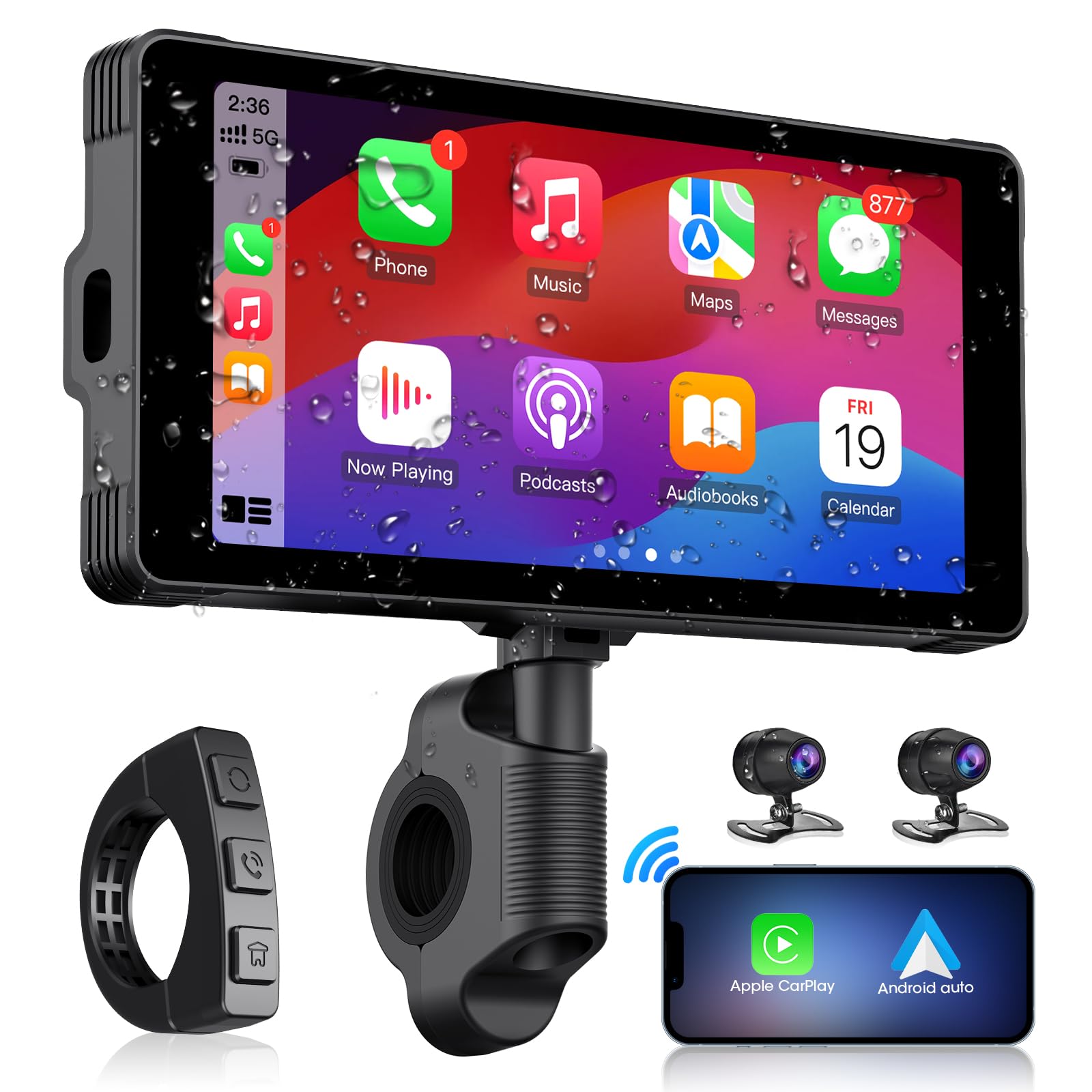
Image: The main AKAMATE dash cam unit, showing its compact design and display.
การตั้งค่า
1. การติดตั้ง
Proper installation is crucial for the device's performance and your safety. Follow these general steps:
- การติดตั้งยูนิตหลัก: Use the provided mounting tools to securely attach the main display unit to your motorcycle's handlebar. Ensure it is positioned for clear visibility without obstructing your view of the road or controls.
- ตำแหน่งกล้อง: Install the front and rear cameras in locations that provide a clear, unobstructed view. Typically, the front camera is mounted near the headlight or on the fairing, and the rear camera near the license plate or tail light.
- การเดินสายไฟ: Connect the wiring kit. The hardwire kit typically connects directly to your motorcycle's battery (for constant power) and an accessory wire (for ignition-switched power). Ensure all connections are secure and insulated. Route cables carefully, avoiding hot engine parts, sharp edges, and areas where they might be pinched or snagged. Use zip ties or cable clips to secure wiring.
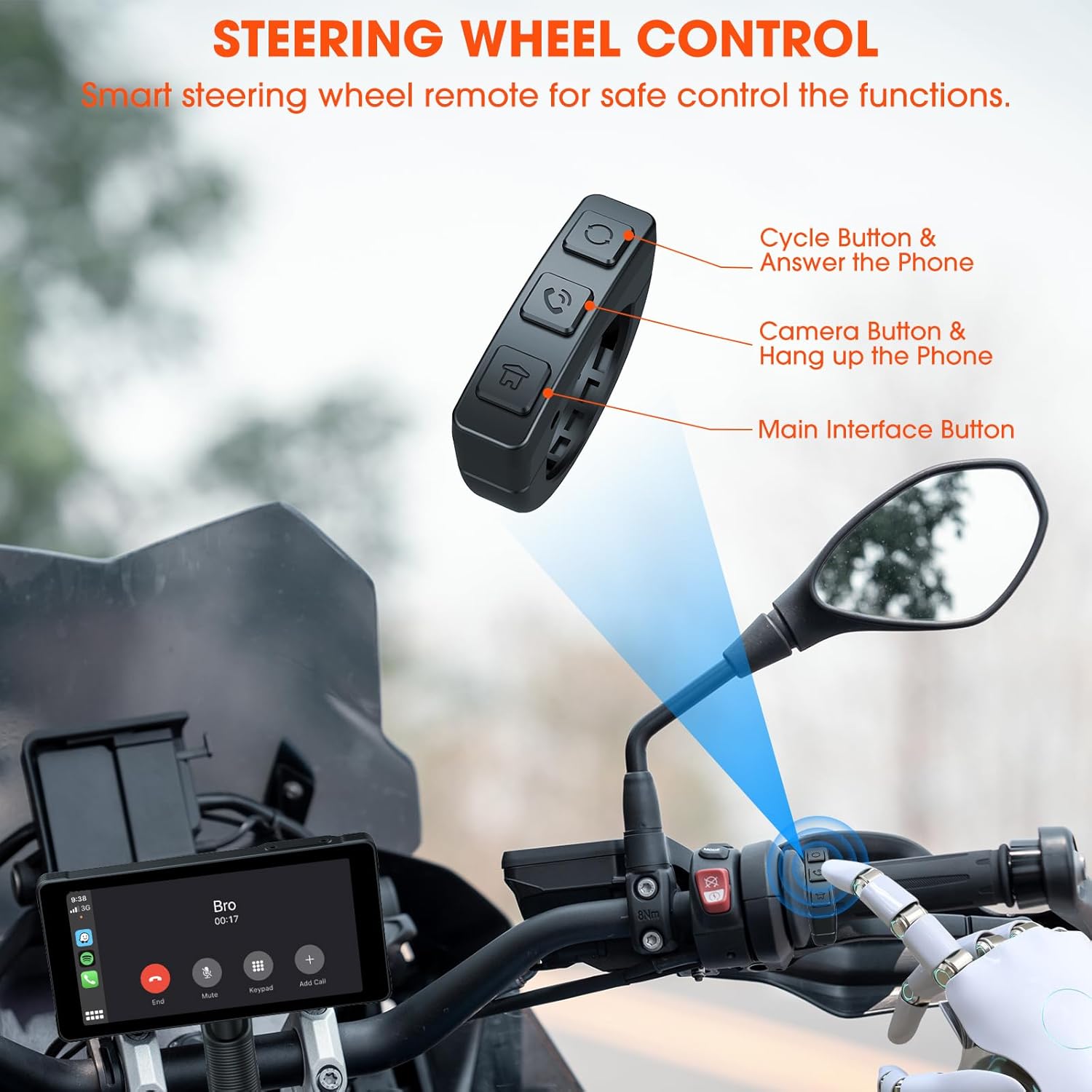
Image: Comparison showing a motorcycle handlebar before and after the installation of the AKAMATE dash cam, highlighting the integrated look and IP67 waterproof rating.
2. การเปิดเครื่องครั้งแรก
Once installed and wired, turn on your motorcycle's ignition. The dash cam should power on automatically. Follow the on-screen prompts for initial setup, including language selection and time zone settings.
คำแนะนำการใช้งาน
1. Wireless Connection (CarPlay/Android Auto)
The device supports wireless Apple CarPlay and Android Auto for seamless smartphone integration.
- ตรวจสอบให้แน่ใจว่าเปิดใช้งาน Bluetooth และ Wi-Fi บนสมาร์ทโฟนของคุณแล้ว
- On the dash cam, navigate to the 'Wireless Connection' or 'CarPlay/Android Auto' settings.
- ค้นหา available devices on your phone and select the dash cam's Bluetooth name.
- Confirm the pairing code on both devices. Once paired via Bluetooth, the device will automatically establish a Wi-Fi connection for CarPlay or Android Auto.
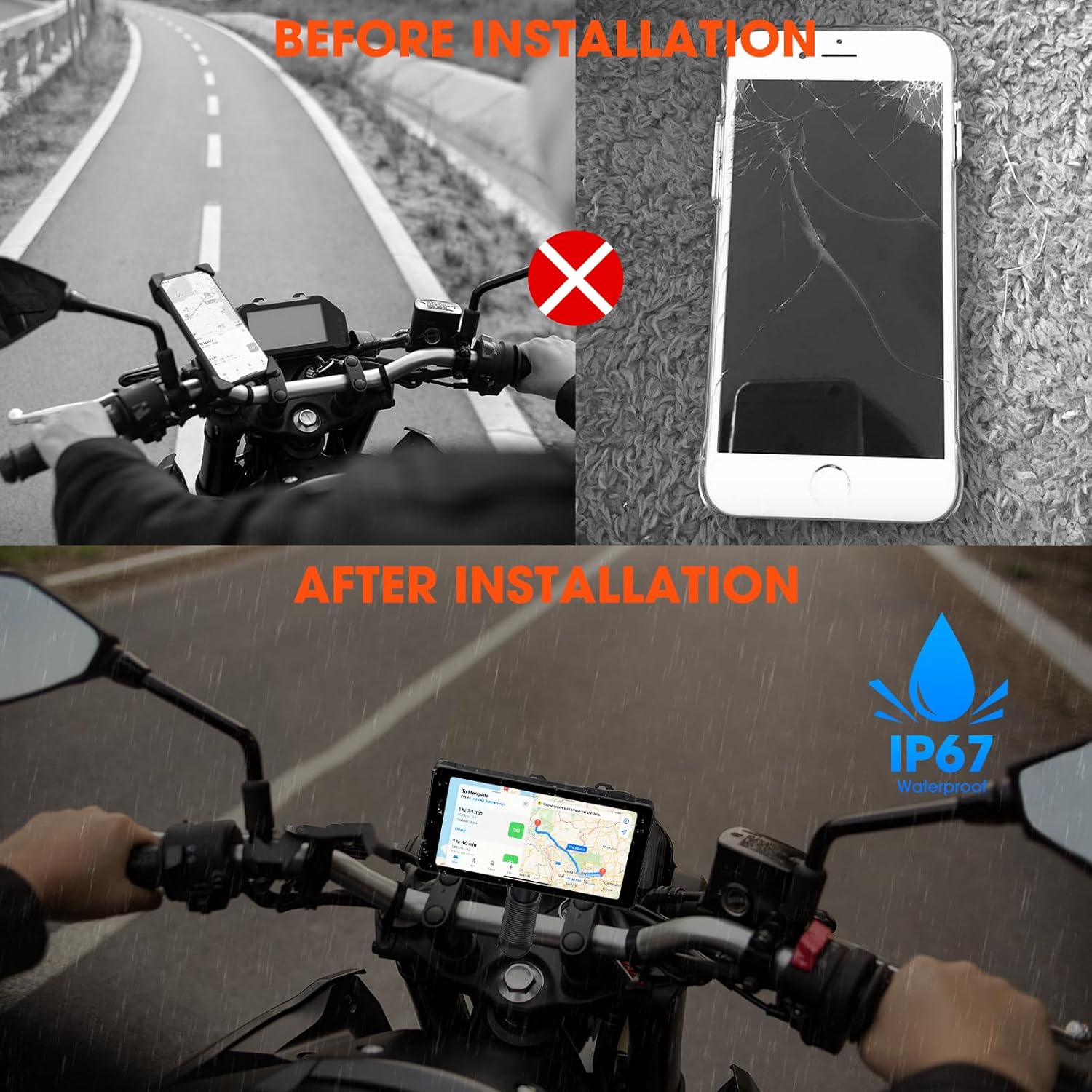
Image: Illustrates the wireless connection feature, showing the dash cam displaying navigation and music, with voice commands for Siri and Google Assistant.
2. Dash Cam Operation (Video Recording)
The device automatically begins recording upon power-on. It features 1080P HD front and rear cameras.
- การบันทึกแบบวนซ้ำ: The system records video in continuous loops, overwriting the oldest footagเช่นเมื่อการ์ดหน่วยความจำเต็ม
- การบันทึกเหตุการณ์ฉุกเฉิน: In the event of a sudden impact or collision, the G-sensor will trigger emergency recording, locking the current footage เพื่อป้องกันไม่ให้ถูกเขียนทับ
- Viewไออิงฟูtage: วีดีโอที่บันทึกไว้ก็ได้ viewed directly on the dash cam's screen or by removing the memory card and inserting it into a computer.

Image: Demonstrates the 1080P HD front and rear camera views, highlighting the 170-degree wide-angle recording and loop recording function.
3. การเชื่อมต่อบลูทูธ
The device utilizes Bluetooth 5.3 for stable connections.
- การจับคู่โทรศัพท์: Pair your smartphone via Bluetooth for CarPlay/Android Auto functionality and hands-free calls.
- การจับคู่ชุดหูฟัง: Connect your Bluetooth helmet or earphones to the dash cam to receive audio (navigation prompts, music, calls) directly.

Image: Illustrates the dual Bluetooth connection capability, allowing simultaneous pairing with a smartphone and a Bluetooth helmet or earphones.
4. การควบคุมด้วยเสียง
With CarPlay or Android Auto connected, you can use voice commands (Siri or Google Assistant) for navigation, music playback, calls, and messages, minimizing manual interaction while riding.
5. Steering Wheel Control (Remote)
A smart remote control is included for convenient operation of key functions without reaching for the main unit.
- Cycle Button & Answer Phone: Used to cycle through modes or answer incoming calls.
- Camera Button & Hang up Phone: Activates camera functions (e.g., take a snapshot) or ends calls.
- Main Interface Button: Navigates to the main menu or home screen.
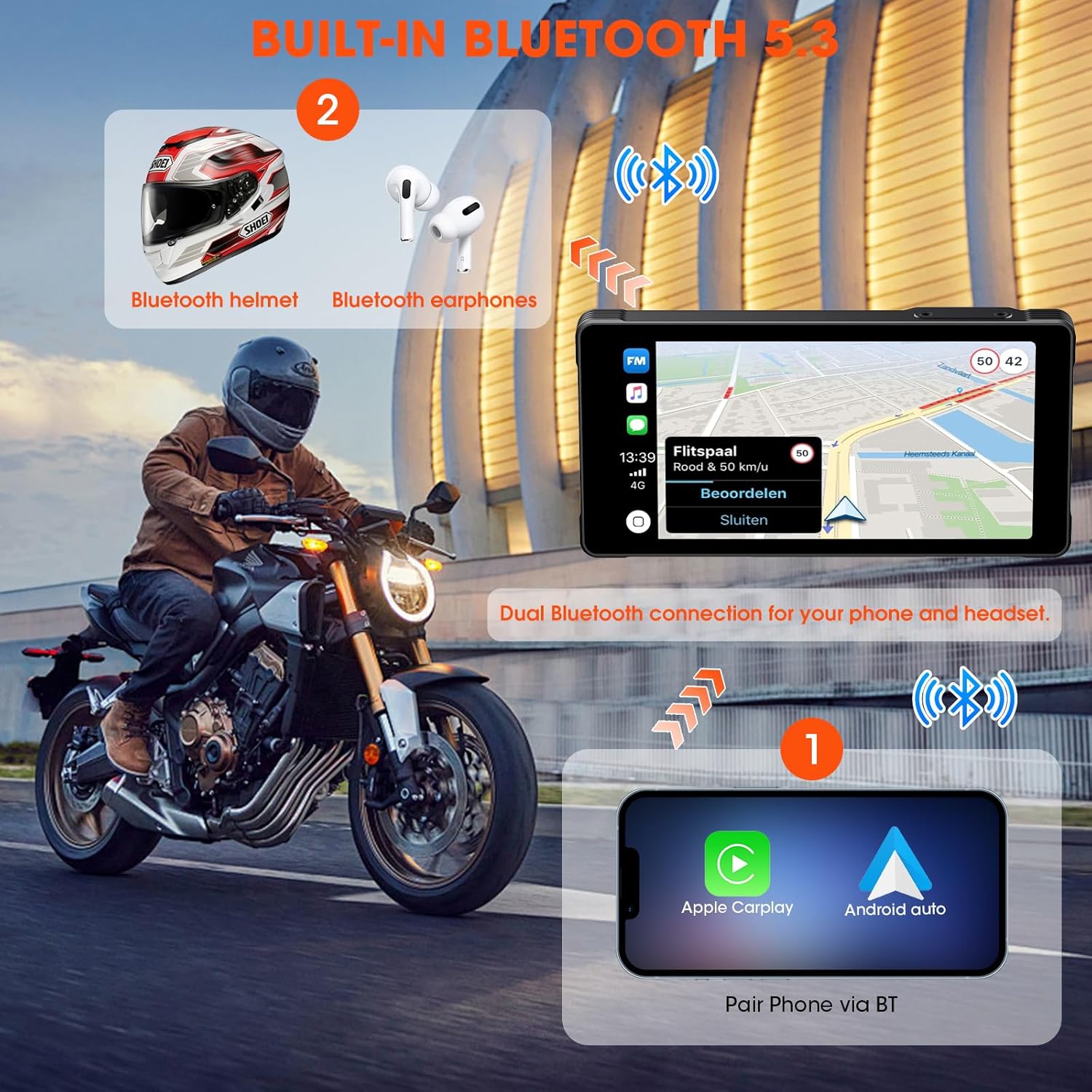
Image: Shows the smart steering wheel remote control and its functions, designed for safe operation while riding.
6. ระบบนำทาง GPS
GPS navigation is provided through your smartphone's CarPlay or Android Auto application. The dash cam acts as a display for your phone's navigation system, offering real-time directions on its screen.
การซ่อมบำรุง
- การทำความสะอาด: ใช้แบบนุ่มๆamp ใช้ผ้าเช็ดทำความสะอาดหน้าจอและตัวเครื่อง หลีกเลี่ยงการใช้สารทำความสะอาดที่มีฤทธิ์กัดกร่อนหรือตัวทำละลาย
- อัพเดตเฟิร์มแวร์: ตรวจสอบผู้ผลิตเป็นระยะ webเว็บไซต์สำหรับอัพเดตเฟิร์มแวร์เพื่อให้มั่นใจถึงประสิทธิภาพการทำงานที่เหมาะสมที่สุดและการเข้าถึงฟีเจอร์ใหม่ๆ
- การ์ดหน่วยความจำ: Format the memory card regularly (e.g., monthly) to maintain optimal recording performance and prevent data corruption. Back up important footage ก่อนการจัดรูปแบบ
- การตรวจสอบสายเคเบิล: Regularly inspect all cables and connections for wear, damage, or loose fittings.
การแก้ไขปัญหา
| ปัญหา | สาเหตุที่เป็นไปได้ | สารละลาย |
|---|---|---|
| อุปกรณ์ไม่เปิดเครื่อง | Incorrect wiring; Blown fuse; Low battery voltage. | Check power connections; Inspect fuse; Ensure motorcycle battery has sufficient charge. |
| CarPlay/Android Auto ไม่สามารถเชื่อมต่อได้ | Bluetooth/Wi-Fi off on phone; Incorrect pairing; Interference. | Ensure phone's Bluetooth/Wi-Fi is on; Re-pair devices; Move away from sources of interference. |
| Cameras not recording or footage เสียหายแล้ว | Memory card full/faulty; Incorrect card format; Loose camera connection. | Format memory card; Replace card if faulty; Check camera cable connections. |
| ไม่มีเสียงจากหูฟัง | Headset not paired; Volume too low; Incorrect audio output selected. | Ensure headset is paired and connected; Adjust volume; Check audio settings on device. |
ข้อมูลจำเพาะ
| คุณสมบัติ | รายละเอียด |
|---|---|
| ผู้ผลิต | อะกามาเต |
| ขนาดสินค้า | 0.99 x 14.99 x 7.49 ซม. (ประมาณ 1 x 15 x 7.5 ซม.) |
| น้ำหนักสินค้า | 907.18 grams (approx. 2 pounds) |
| ASIN | B0D9B3T8SL |
| ยี่ห้อ | อะกามาเต |
| ประเภทบริการยานพาหนะ | Motorcycle, Bicycle |
| เทคโนโลยีการเชื่อมต่อ | บลูทู ธ Wi-Fi |
| คุณสมบัติพิเศษ | Voice Control, Wireless Android Auto, Portable Wireless CarPlay, Waterproof (IP67) |
| ความละเอียดในการจับภาพวิดีโอ | 1080p |
| ส่วนประกอบที่รวมอยู่ | Motorcycle Dash Cam Unit, Front Camera, Rear Camera, Mounting Tools, Installation Tools, Wiring Kit, Hardwire Kit, User Manual |
| ประเภทการติดตั้ง | ที่ยึดแฮนด์บาร์ |
| วิธีการควบคุม | ระยะไกล |
การรับประกันและการสนับสนุน
For warranty information and technical support, please refer to the documentation included with your product or visit the official AKAMATE webไซต์ โปรดเก็บใบเสร็จรับเงินไว้เป็นหลักฐานการซื้อสำหรับการเรียกร้องการรับประกัน