
1. บทนำ
The Parsonver Smartwatch Z139 is designed to enhance your daily life with a variety of intelligent functions. This manual provides detailed instructions for setting up, operating, and maintaining your smartwatch to ensure optimal performance and user experience.
Key features include Bluetooth calling, comprehensive health monitoring (heart rate, blood oxygen, sleep), over 100 sports modes, and smart notifications.
2. การเริ่มต้น: การตั้งค่า
2.1 เนื้อหาบรรจุภัณฑ์
- Parsonver Smartwatch Z139
- สายชาร์จ
- คู่มือการใช้งาน
2.2 การชาร์จสมาร์ทวอทช์
ก่อนใช้งานครั้งแรก โปรดชาร์จสมาร์ทวอทช์ให้เต็มก่อน เชื่อมต่อสายชาร์จแม่เหล็กเข้ากับขั้วชาร์จด้านหลังของนาฬิกา และเสียบปลาย USB เข้ากับอะแดปเตอร์แปลงไฟ (ไม่ได้รวมอยู่ในชุด) หรือพอร์ต USB ของคอมพิวเตอร์
2.3 การติดตั้งและการจับคู่แอป
To unlock the full potential of your Parsonver Smartwatch, download the companion app on your smartphone. The app is compatible with iOS 9.0/Android 6.0 or above.
- Scan the QR code in the manual or search for "Parsonver" in your phone's app store (Google Play Store for Android, Apple App Store for iOS).
- ติดตั้งและเปิดแอป
- Follow the on-screen instructions in the app to create an account and pair your smartwatch via Bluetooth. Ensure Bluetooth is enabled on your smartphone.
- During pairing, grant necessary permissions for notifications, location, and health data synchronization.

Image: The Parsonver Smartwatch Z139, showcasing its main display with time, date, and step count.
3. คู่มือการใช้งาน
3.1 การโทรผ่านบลูทูธและการแจ้งเตือนอัจฉริยะ
Once connected via Bluetooth, you can manage calls directly from your smartwatch.
- การรับ/โทรออก: Use the watch's interface to answer incoming calls or dial numbers. The watch features high-quality speakers and a high-definition microphone for clear communication.
- การแจ้งเตือน: Receive alerts for SMS, WhatsApp, Facebook, emails, and other app notifications directly on your watch. The watch will vibrate to inform you of new messages.
- ผู้ช่วยเสียง: Utilize the integrated voice assistant for hands-free control and information access.
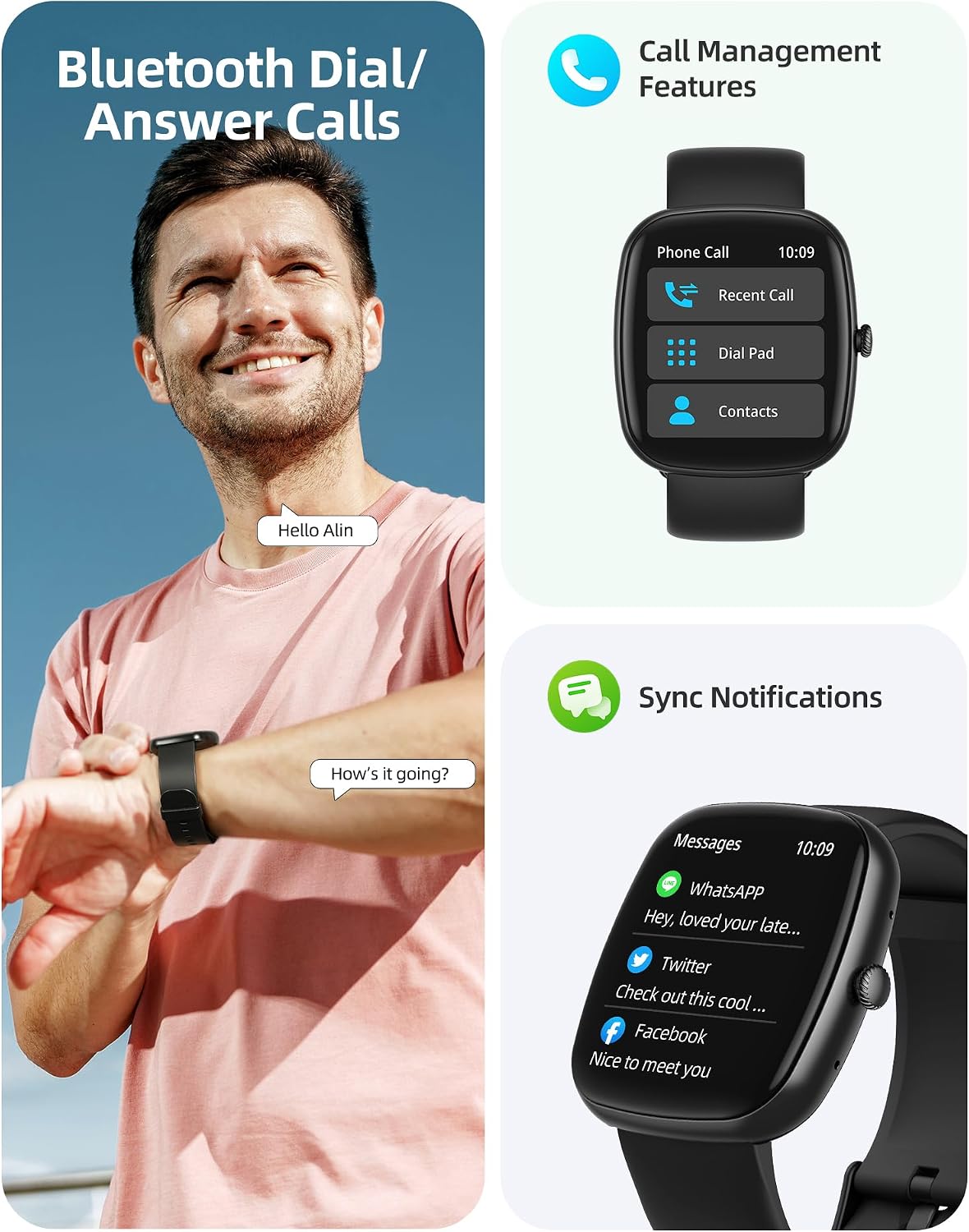
Image: A user interacting with the smartwatch for Bluetooth calls, demonstrating the call management interface.
3.2 การตรวจติดตามสุขภาพ
The smartwatch features advanced sensors for continuous health tracking.
- การตรวจสอบอัตราการเต้นของหัวใจ: Measures and records your heart rate throughout the day. The app displays trends and alerts for abnormal readings.
- การตรวจวัดออกซิเจนในเลือด (SpO2): ตรวจสอบระดับความอิ่มตัวของออกซิเจนในเลือดของคุณ
- การติดตามการนอนหลับ: Analyzes your sleep patterns, including deep sleep, light sleep, and awake times, to help optimize your sleep habits.
- การติดตามความเครียด: ให้ข้อมูลเชิงลึกเกี่ยวกับระดับความเครียดของคุณ
- การติดตามสุขภาพสตรี: Records menstrual cycles and ovulation periods.

Image: Visual representation of the smartwatch's health monitoring capabilities, including heart rate, blood oxygen, and pressure readings.
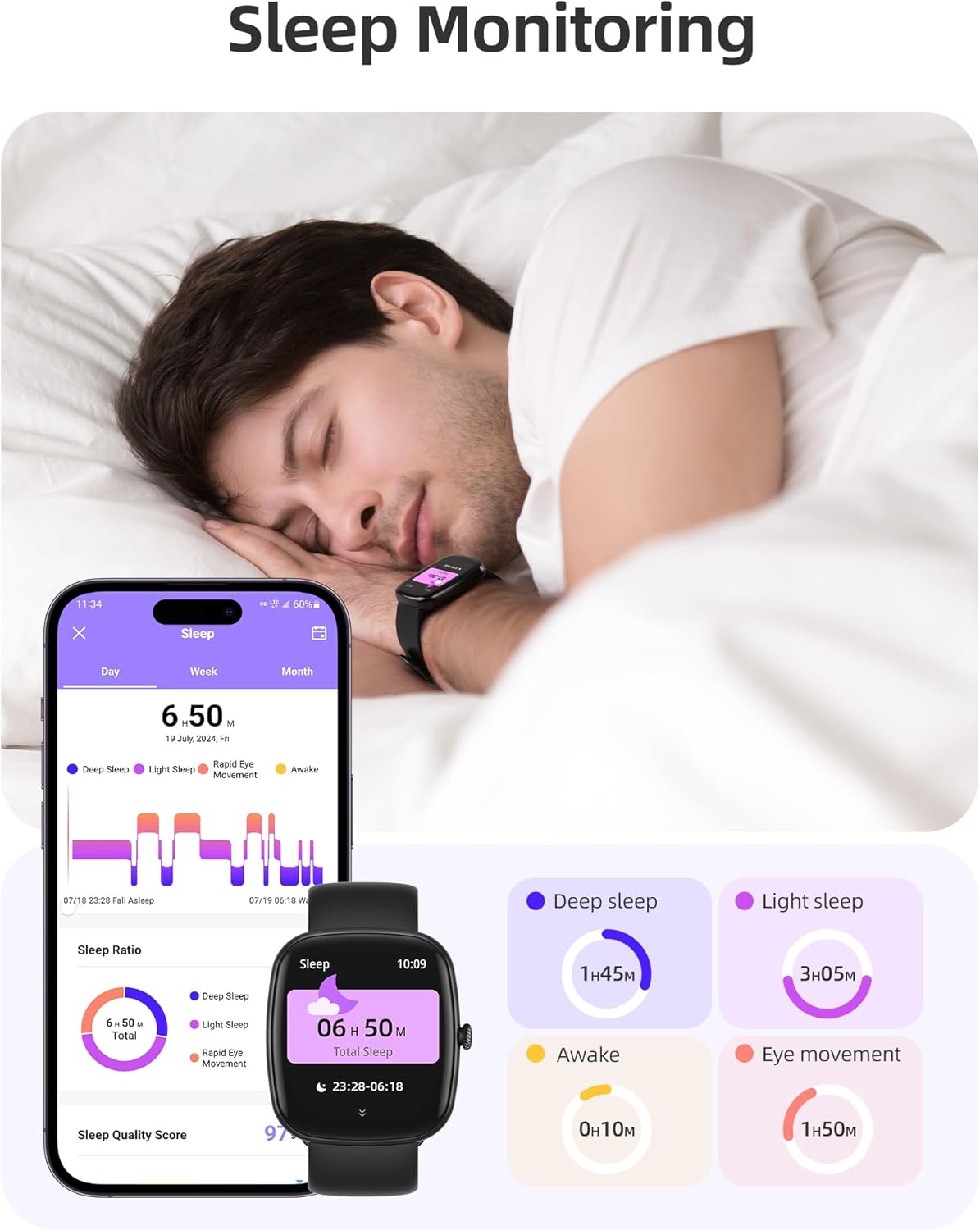
Image: The smartwatch monitoring sleep, with a detailed breakdown of sleep stages displayed on the companion app.
3.3 โหมดกีฬาและการติดตามกิจกรรม
The activity tracker supports over 100 sports modes to monitor your workouts effectively.
- โหมดที่มีจำหน่าย: Includes yoga, running, jumping, cycling, badminton, football, rowing, and many more.
- การติดตามข้อมูล: Records steps, distance, calories burned, and real-time heart rate during exercise.
- คะแนนความพร้อมรายวัน: Provides a summary of your daily activity and recovery.

Image: The smartwatch tracking a user's activity during a run, displaying key metrics like calories, steps, heart rate, and distance.
3.4 App Experience and BMI Tracking
The companion app offers additional features for health management.
- Weight and BMI Tracking: Manually input your weight in the app to track changes and automatically calculate your Body Mass Index (BMI). View daily, weekly, monthly, and yearly weight trends.
- หลักสูตรฝึกอบรม: Access integrated training courses from beginner to advanced levels.
- Relaxation Features: Includes white noise, meditation exercises, and relaxation training.

Image: The companion app displaying weight and BMI tracking features, helping users monitor their body composition.
หน้าปัดนาฬิกาที่ปรับแต่งได้ 3.5 แบบ
Personalize your smartwatch with over 200 different watch face designs available through the app.

Image: A selection of customizable watch faces, demonstrating the variety of styles and information layouts available.
3.6 ฟังก์ชันการใช้งานอื่นๆ
The smartwatch includes several other useful features:
- พยากรณ์อากาศ: View 7-day weather forecasts.
- การควบคุมเพลง: Control music playback directly from your wrist.
- การควบคุมกล้อง: ควบคุมกล้องสมาร์ทโฟนของคุณจากระยะไกล
- นาฬิกาปลุก: ตั้งนาฬิกาปลุกหลายตัว
- นาฬิกาจับเวลา: กำหนดเวลาที่แม่นยำสำหรับกิจกรรมต่างๆ
- เตือนการนั่งเฉยๆ: แจ้งเตือนให้คุณเคลื่อนไหวหลังจากช่วงเวลาที่ไม่ได้ใช้งาน
- การออกกำลังกายการหายใจ: Guided exercises to reduce stress.
- ค้นหาหมายเลขโทรศัพท์: Locate your paired smartphone with a tap on your watch.
- การปรับความสว่าง: Continuously adjustable screen brightness for optimal visibility in any lighting condition.

ภาพ: โอเวอร์view of the various practical functions available on the Parsonver Smartwatch Z139.
4. การบำรุงรักษา
Proper care ensures the longevity and performance of your smartwatch.
- การทำความสะอาด: ควรทำความสะอาดนาฬิกาและสายนาฬิกาเป็นประจำด้วยผ้าแห้งเนื้อนุ่ม หลีกเลี่ยงสารเคมีรุนแรง
- ความต้านทานน้ำ: The smartwatch has an IP68 water resistance rating, meaning it can withstand hand washing, rain, and splashes. Do not use it for swimming, diving, or in saunas.
- การชาร์จ: Use only the provided charging cable. Avoid exposing charging contacts to moisture.
- พื้นที่จัดเก็บ: ควรเก็บนาฬิกาไว้ในที่แห้งและเย็นเมื่อไม่ได้ใช้งาน
5 การแก้ไขปัญหา
หากคุณประสบปัญหาเกี่ยวกับสมาร์ทวอทช์ของคุณ ให้ลองทำตามขั้นตอนต่อไปนี้:
- นาฬิกาไม่เปิด: ตรวจสอบให้แน่ใจว่านาฬิกาชาร์จเต็มแล้ว
- ไม่สามารถจับคู่กับโทรศัพท์ได้:
- ตรวจสอบให้แน่ใจว่าได้เปิดใช้งานบลูทูธบนโทรศัพท์และนาฬิกาของคุณแล้ว
- ตรวจสอบให้แน่ใจว่านาฬิกาอยู่ในระยะของโทรศัพท์ของคุณ
- รีสตาร์ททั้งนาฬิกาและโทรศัพท์ของคุณ
- ลองยกเลิกการจับคู่แล้วจับคู่ใหม่อีกครั้งผ่านแอป
- ไม่ได้รับการแจ้งเตือน:
- Check app permissions on your phone to ensure notifications are allowed for the Parsonver app.
- Verify that notifications are enabled within the Parsonver app settings.
- ตรวจสอบให้แน่ใจว่านาฬิกาเชื่อมต่อผ่านบลูทูธอย่างถูกต้องแล้ว
- ข้อมูลสุขภาพที่ไม่ถูกต้อง:
- ตรวจสอบให้แน่ใจว่าสวมนาฬิกาให้พอดีกับข้อมือ ไม่แน่นหรือหลวมเกินไป
- ทำความสะอาดเซ็นเซอร์ที่ด้านหลังของนาฬิกา
- หลีกเลี่ยงการเคลื่อนไหวมากเกินไปในระหว่างการวัด
- หน้าจอไม่ตอบสนอง: Try restarting the watch. If the issue persists, contact customer support.
6. ข้อมูลจำเพาะ
| คุณสมบัติ | ข้อมูลจำเพาะ |
|---|---|
| ยี่ห้อ | พาร์สันเวอร์ |
| หมายเลขรุ่น | Z139 |
| ขนาดหน้าจอ | 1.83 นิ้ว |
| ความเข้ากันได้ของระบบปฏิบัติการ | iOS 9.0/Android 6.0 or above Smartphones |
| เทคโนโลยีการเชื่อมต่อ | บลูทูธ |
| คุณสมบัติพิเศษ | Bluetooth Calls, 100+ Sports Modes, Heart Rate Monitoring, SpO2 Monitoring, Sleep Monitoring, IP68 Water Resistance, Music Control, Camera Control, Weather, Alarm, Timer, Stopwatch, Sedentary Reminder, Breathing Exercises, Find Phone, Brightness Adjustment, Women's Health Tracking |
| องค์ประกอบของแบตเตอรี่ | ลิเธียมโพลิเมอร์ |
| ความจุของแบตเตอรี่ | 230 มิลลิแอมป์ |
| ระดับการต้านทานน้ำ | IP68 (Not for swimming/diving/sauna) |
| ความจุของหน่วยความจำ | 512MB |
| จีพีเอส | ผ่านทางสมาร์ทโฟน |
7. การรับประกันและการสนับสนุน
For warranty information and customer support, please refer to the documentation included with your purchase or visit the official Parsonver website. Typically, products are covered by a manufacturer's warranty against defects in materials and workmanship for a specified period from the date of purchase. Please retain your proof of purchase.
If you experience any issues not covered in this manual, or require further assistance, please contact Parsonver customer service.