
ARROWMAX 230313
AM ARROWMAX SGS MAX Smart Engraving Pen User Manual
รุ่น : 230313
ยี่ห้อ: ARROWMAX
1. บทนำ
Thank you for choosing the AM ARROWMAX SGS MAX Smart Engraving Pen. This versatile tool is designed for precision engraving and polishing on a wide range of materials, including metal, wood, glass, and plastic. Featuring a hollow cup motor, OLED display, and magnetic charging, the SGS MAX offers an intuitive and powerful experience for all your crafting needs. Please read this manual thoroughly before use to ensure proper operation and maintenance.
2. ข้อมูลด้านความปลอดภัย
- Always wear appropriate personal protective equipment, such as safety glasses, to protect your eyes from debris.
- Ensure your workspace is well-lit and clear of obstructions.
- Keep the engraving pen and its accessories out of reach of children and pets.
- Do not operate the tool near flammable liquids or gases.
- Avoid touching the bit during or immediately after operation, as it may be hot.
- Do not immerse the engraving pen in water or any other liquid.
- Use only approved accessories and bits with the SGS MAX.
- If the tool shows signs of damage or malfunction, discontinue use immediately and contact customer support.
3. เนื้อหาบรรจุภัณฑ์
ตรวจสอบว่ารายการทั้งหมดที่ระบุไว้ด้านล่างนี้รวมอยู่ในแพ็คเกจของคุณ:

Image: All items included in the SGS MAX package, neatly arranged.
- AM ARROWMAX SGS MAX Smart Engraving Pen
- Aluminum Storage Case
- Magnetic USB-C Charging Cable
- 30 Engraving Bits
- 12 Polishing Bits
- Quick Start Guide (Physical or Digital)
4. สินค้าหมดview
Familiarize yourself with the components of your SGS MAX engraving pen:

Image: Labeled diagram of the SGS MAX engraving pen highlighting its key parts.
- เชย: Holds the engraving/polishing bits securely.
- ตัวเรือนอลูมิเนียมอัลลอยด์: Durable and ergonomic design for comfortable grip.
- ปุ่มเปิด/ปิด: เปิด/ปิดอุปกรณ์
- ปุ่มปรับเกียร์: Cycles through speed modes and adjusts direction.
- Status Display (OLED): Shows battery status, selected mode, and rotation direction.
- พอร์ตชาร์จแม่เหล็ก: For convenient and quick charging.
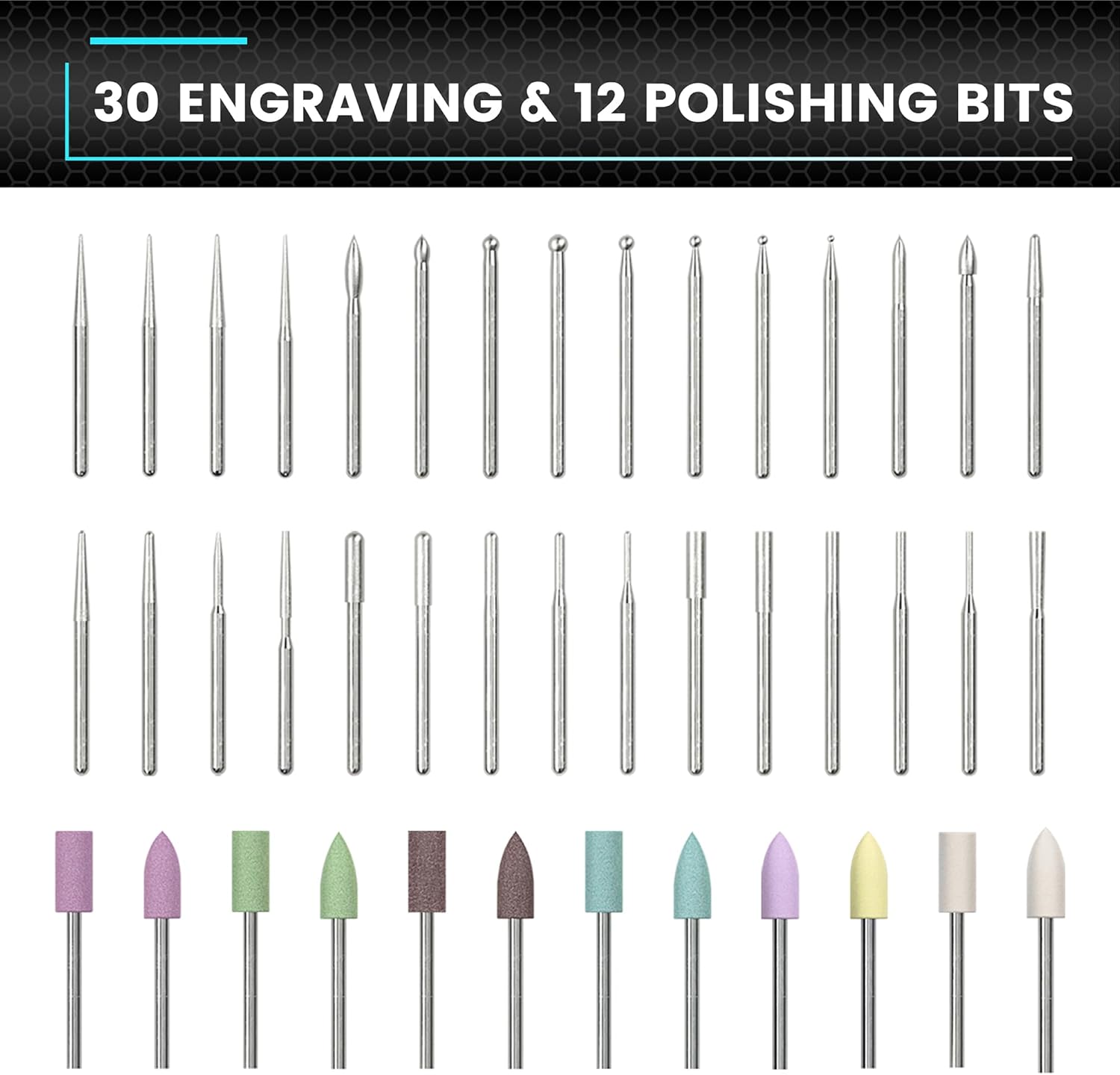
ภาพ: ครอบคลุม view of the 30 engraving bits and 12 polishing bits.
5. การตั้งค่า
5.1. การชาร์จครั้งแรก
Before first use, fully charge the SGS MAX engraving pen. Connect the magnetic charging cable to the charging port on the pen and plug the other end into a USB power source (e.g., computer, wall adapter). The OLED display will indicate charging status. A full charge typically takes approximately 60 minutes.
5.2 การติดตั้ง/เปลี่ยนดอกสว่าน
- Ensure the engraving pen is turned off.
- Gently unscrew the chuck counter-clockwise to loosen it.
- Insert the desired engraving or polishing bit into the chuck. Ensure it is seated firmly.
- Tighten the chuck clockwise until the bit is securely held. Do not overtighten.
6. คู่มือการใช้งาน
6.1. เปิด/ปิดเครื่อง
Press and hold the Power Button for 2 seconds to turn the engraving pen on or off. The OLED display will illuminate upon power-on.
6.2 การปรับโหมดความเร็ว
The SGS MAX offers 5 RPM modes for various applications:

Image: Visual representation of the five speed modes and their corresponding RPMs.
- Mode A (Auto Sensing): 10,000-30,000 RPM. The Smart Motion System dynamically adjusts speed based on your twist angle.
- โหมด 1 (ต่ำ): 15,000 รอบต่อนาที
- โหมด 2 (ปานกลาง): 20,000 รอบต่อนาที
- Mode 3 (High): 25,000 รอบต่อนาที
- Mode 4 (Maximum): 30,000 รอบต่อนาที
To cycle through the speed modes, short press the Gear Adjustment Button. The current mode will be displayed on the OLED screen.

Image: OLED display showing battery, dynamic display, and current gear.
6.3. การเปลี่ยนทิศทางการหมุน
Within each speed mode, you can toggle between forward (clockwise) and reverse (anti-clockwise) directions. Double-press the Gear Adjustment Button to switch directions. The OLED display will indicate the current rotation direction.
6.4. Using the ARROWMAX App
For enhanced control and customization, download the official ARROWMAX app from your device's app store. The app allows you to fine-tune speed settings beyond the factory presets and provides additional features.

Image: ARROWMAX app interface for controlling the engraving pen.
6.5. ความเข้ากันได้ของวัสดุ
The SGS MAX is suitable for engraving and polishing various materials:

ภาพ: อดีตamples of engraving on crystal, wood, gold, and glass.

Image: Diverse materials compatible with the engraving pen, such as plastic, PCB, shell, wood, glass, leather, and stone.
Always test on a scrap piece of material first to determine the optimal speed and bit for your project.
7. การบำรุงรักษา
7.1. การทำความสะอาด
- After each use, gently wipe the body of the engraving pen with a soft, dry cloth.
- Remove any dust or debris from the chuck area using a small brush or compressed air.
- อย่าใช้สารเคมีรุนแรงหรือน้ำยาทำความสะอาดที่มีฤทธิ์กัดกร่อน
7.2. Bit Care and Storage
- Clean bits after use to remove any material residue.
- Store bits in their designated slots within the aluminum case to prevent damage and loss.
- Replace worn or damaged bits to ensure optimal performance and safety.
7.3. การดูแลแบตเตอรี่
- หลีกเลี่ยงการปล่อยแบตเตอรี่จนหมดบ่อยครั้ง
- เก็บอุปกรณ์ไว้ในที่แห้งและเย็นเมื่อไม่ได้ใช้งานเป็นเวลานาน
- Charge the battery at least once every three months to maintain its health.
8 การแก้ไขปัญหา
| ปัญหา | สาเหตุที่เป็นไปได้ | สารละลาย |
|---|---|---|
| ปากกาไม่เปิด | แบตเตอรี่อ่อน; กดปุ่มเปิด/ปิดไม่ถูกต้อง | Charge the pen fully; Press and hold the Power Button for 2 seconds |
| Bit is loose or wobbles | Chuck not tightened; Bit not inserted correctly | Ensure bit is fully inserted and chuck is tightened securely |
| Reduced performance/engraving quality | Worn bit; Incorrect speed setting; Material too hard | Replace bit; Adjust speed mode; Ensure material is suitable for engraving |
| Pen stops unexpectedly | Overload protection activated; Low battery | Reduce pressure; Charge the pen |
9. ข้อมูลจำเพาะ
- แบบอย่าง: SGS MAX
- หมายเลขรุ่นสินค้า: 230313
- ยี่ห้อ: แอร์โรว์แม็กซ์
- ประเภทมอเตอร์: HollowCup Motor
- โหมดความเร็ว: 5 (10,000-30,000 RPM, including Auto Sensing)
- แบตเตอรี่: แบตเตอรี่ลิเธียมโพลิเมอร์ 1 ก้อน (รวมอยู่ด้วย)
- การชาร์จ: Magnetic, 5V rechargeable
- ชิ้นส่วนที่รวมอยู่: 30 Engraving Bits, 12 Polishing Bits (Total 42)
- วัสดุตัวเครื่อง: โลหะผสมอลูมิเนียม
- แสดง: โอแอลอีดี
- น้ำหนักสินค้า: 13.7 ออนซ์
- ขนาดแพ็คเกจ: 8.74 x 3.07 x 1.22 นิ้ว
10. การรับประกันและการสนับสนุน
The AM ARROWMAX SGS MAX Smart Engraving Pen comes with a standard manufacturer's warranty. For detailed warranty information, please refer to the warranty card included in your package or visit the official ARROWMAX website. If you encounter any issues or require technical assistance, please contact ARROWMAX customer support through their official channels or the retailer from whom you purchased the product.
หากต้องการความช่วยเหลือเพิ่มเติม คุณสามารถไปที่ ARROWMAX Store on Amazon.
Ask a question about this manual
Ask about setup, troubleshooting, compatibility, parts, safety, or missing instructions. Manuals+ will review the question and use this page’s manual context to help answer it.