
1. บทนำ
Thank you for choosing the Hama DR2002BT Digital Radio. This device offers a comprehensive audio experience with FM, DAB/DAB+ digital radio reception, and Bluetooth connectivity. Its user-friendly design, featuring large buttons and a clear 4.3-inch TFT color display, makes it suitable for all users. This manual will guide you through the setup, operation, and maintenance of your new digital radio.
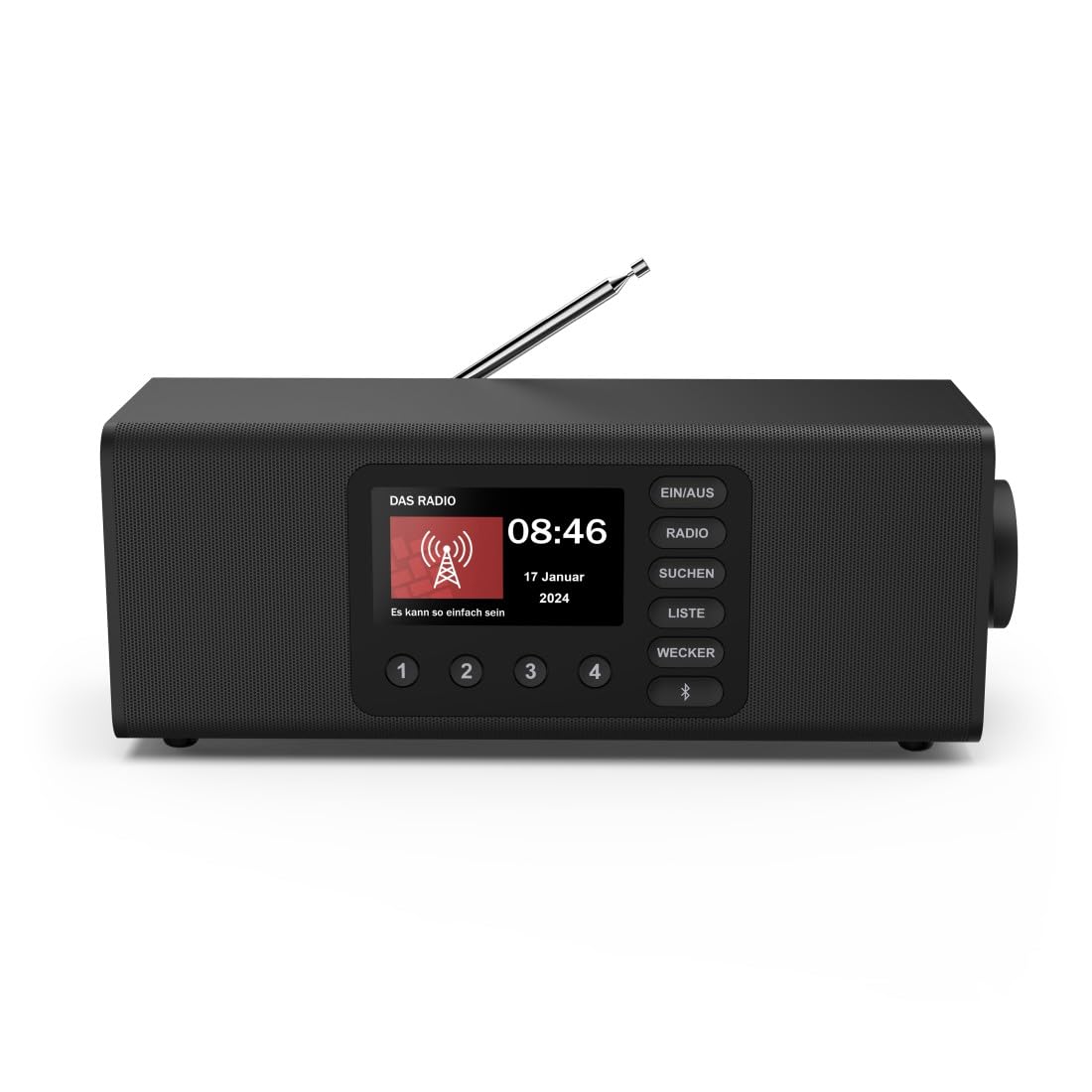
ภาพ: ด้านหน้า view of the Hama DR2002BT Digital Radio, showcasing หน้าจอแสดงผลและปุ่มควบคุม
2. ข้อมูลด้านความปลอดภัย
โปรดอ่านคำแนะนำด้านความปลอดภัยเหล่านี้อย่างละเอียดก่อนใช้งานอุปกรณ์ เก็บคู่มือนี้ไว้เพื่อใช้อ้างอิงในอนาคต
- อย่าให้เครื่องอยู่ในที่ชื้น ฝน หรืออุณหภูมิที่สูงหรือต่ำเกินไป
- หลีกเลี่ยงการวางอุปกรณ์ใกล้แหล่งความร้อนหรือแสงแดดโดยตรง
- อย่าเปิดอุปกรณ์casing. การซ่อมแซมควรดำเนินการโดยบุคลากรที่มีคุณสมบัติเหมาะสมเท่านั้น
- ใช้เฉพาะอะแดปเตอร์ที่ให้มาเท่านั้น
- ตรวจสอบให้แน่ใจว่ามีการระบายอากาศที่เหมาะสมรอบๆ อุปกรณ์
3. เนื้อหาบรรจุภัณฑ์
ตรวจสอบว่ามีสิ่งของทั้งหมดอยู่ครบเมื่อแกะกล่อง:
- Hama DR2002BT Digital Radio
- อะแดปเตอร์แปลงไฟ
- คู่มือการใช้งาน
4. สินค้าหมดview
4.1 ส่วนควบคุมและการแสดงผลที่แผงด้านหน้า

Image: Front panel of the radio highlighting the display and control buttons, with icons for Bluetooth, DAB+, and Alarm functions.
The front panel features a 4.3-inch TFT color display, large control buttons, and a rotary knob for easy navigation and selection. Key buttons include:
- EIN/AUS (ON/OFF): เปิดหรือปิดอุปกรณ์
- วิทยุ: Switches between FM and DAB/DAB+ modes.
- SUCHEN (SEARCH): Initiates station scanning.
- LISTE (LIST): Accesses the list of available stations.
- WECKER (ALARM): กำหนดค่าการตั้งค่าสัญญาณเตือน
- ปุ่มบลูทูธ: เปิดใช้งานโหมดจับคู่บลูทูธ
- ปุ่มตั้งค่าล่วงหน้า (1-4): เข้าถึงสถานีโปรดที่บันทึกไว้ได้อย่างรวดเร็ว
- Rotary Knob (LAUTSTÄRKE/NAVIGIEREN): Controls volume and navigates menus.
4.2 การเชื่อมต่อแผงด้านหลัง
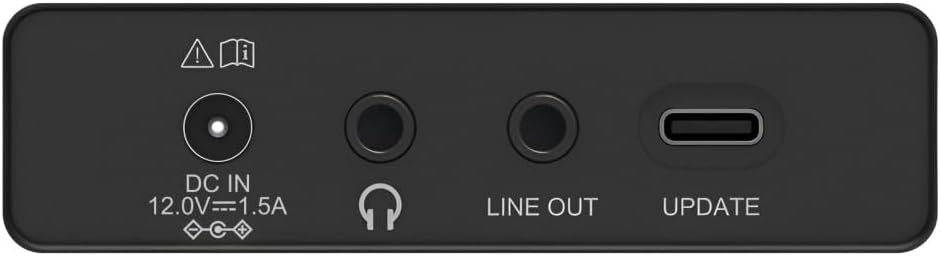
Image: Close-up of the rear panel showing the DC IN, Headphone, Line Out, and UPDATE (USB-C) ports.
The rear panel provides essential connectivity options:
- DC IN 12.0V --- 1.5A: Power input for the external adapter.
- แจ็คหูฟัง (3.5 มม.): สำหรับการฟังส่วนตัว
- สายออก: เอาต์พุตเสียงสำหรับเชื่อมต่อกับอุปกรณ์ภายนอก ampเครื่องขยายเสียง หรือ ลำโพง
- UPDATE (USB-C): สำหรับการอัพเดตเฟิร์มแวร์
- เสาอากาศยืดไสลด์: For FM and DAB/DAB+ reception.

ภาพ: ด้านหลัง view of the Hama DR2002BT Digital Radio with its telescopic antenna extended for optimal signal reception.
5. การตั้งค่า
5.1 การเชื่อมต่อสายไฟ
- เชื่อมต่ออะแดปเตอร์ไฟฟ้าที่ให้มาเข้ากับ ดีซี ใน พอร์ตที่ด้านหลังของวิทยุ
- เสียบอะแดปเตอร์แปลงไฟเข้ากับเต้ารับที่เหมาะสม
- วิทยุจะเปิดเองโดยอัตโนมัติหรือเข้าสู่โหมดสแตนด์บาย
5.2 การจัดวางตำแหน่งเสาอากาศ
For optimal FM and DAB/DAB+ reception, fully extend the telescopic antenna. Position the radio near a window if reception is poor.
5.3 การตั้งค่าเริ่มต้น (การใช้งานครั้งแรก)
Upon first power-on, the radio may guide you through an initial setup process, including language selection and an automatic DAB station scan. Follow the on-screen prompts.
6. คู่มือการใช้งาน
6.1 เปิด/ปิดเครื่อง
กดปุ่ม EIN/ออสเตรเลีย ปุ่มสำหรับเปิดหรือปิดวิทยุ
6.2 โหมดวิทยุ DAB/DAB+
- กดปุ่ม วิทยุ ปุ่มเพื่อเลือกโหมด DAB
- If this is the first time in DAB mode or if you want to rescan, press SUCHEN to perform a full scan for available stations.
- Use the rotary knob to navigate through the station list. Press the knob to select a station.
- ถึง view the station list, press the รายการ ปุ่ม.
โหมดวิทยุ FM 6.3
- กดปุ่ม วิทยุ ปุ่มเพื่อเลือกโหมด FM
- กด SUCHEN เพื่อทำการค้นหาสถานีวิทยุ FM ที่ว่างอยู่ถัดไปโดยอัตโนมัติ
- Alternatively, use the rotary knob to manually tune to a frequency.
6.4 การบันทึกและการเรียกใช้ค่าที่ตั้งไว้ล่วงหน้า
The radio allows you to store up to 4 favorite stations using the dedicated preset buttons (1-4).
- Tune to the desired station (DAB or FM).
- Press and hold one of the preset buttons (1-4) until the display confirms the station has been saved.
- To recall a preset station, simply press the corresponding preset button (1-4).
6.5 การทำงานของบลูทูธ

ภาพ: ด้านหน้า view of the radio with Bluetooth and stereo speaker icons, indicating its wireless audio streaming capability.
The Hama DR2002BT can stream audio from your smartphone, tablet, or laptop via Bluetooth 5.0.
- Press the Bluetooth button on the front panel to enter Bluetooth pairing mode. The display will show a pairing indicator.
- On your external device (smartphone, tablet), enable Bluetooth and search for available devices.
- Select "Hama DR2002BT" from the list of devices to pair.
- Once paired, you can play audio from your device, and it will be output through the radio's speakers.
6.6 ฟังก์ชันนาฬิกาปลุก

Image: A person waking up with the Hama DR2002BT Digital Radio placed on a bedside table, illustrating its alarm clock functionality.
The radio features two independent alarm settings.
- กดปุ่ม เวคเกอร์ ปุ่มสำหรับเข้าถึงการตั้งค่าการเตือนภัย
- Use the rotary knob to select Alarm 1 or Alarm 2.
- Configure the alarm time, source (buzzer or radio station), and repetition (once, daily, weekdays, weekends, or specific days).
- Press the rotary knob to confirm each setting.
- To quickly activate/deactivate an alarm, press the เวคเกอร์ button and use the rotary knob to toggle the alarm status.

Image: A person interacting with the Hama DR2002BT Digital Radio, demonstrating its ease of use for setting functions like alarms or tuning stations.
7. การบำรุงรักษา
To ensure the longevity and optimal performance of your Hama DR2002BT Digital Radio, follow these maintenance guidelines:
- การทำความสะอาด: Use a soft, dry, lint-free cloth to clean the exterior of the radio. Do not use abrasive cleaners, waxes, or solvents.
- ฝุ่น: Regularly dust the device to prevent accumulation in vents and ports.
- พื้นที่จัดเก็บ: หากต้องเก็บรักษาวิทยุไว้เป็นเวลานาน ควรตัดการเชื่อมต่อจากแหล่งจ่ายไฟและเก็บไว้ในที่แห้งและเย็น
- เสาอากาศ: Handle the telescopic antenna carefully to avoid bending or breaking.
8 การแก้ไขปัญหา
หากคุณพบปัญหาเกี่ยวกับวิทยุ โปรดดูปัญหาและวิธีแก้ไขที่พบบ่อยต่อไปนี้:
| ปัญหา | สาเหตุที่เป็นไปได้ | สารละลาย |
|---|---|---|
| ไม่มีไฟฟ้า | Power adapter not connected; Power outlet faulty | ตรวจสอบการเชื่อมต่ออะแดปเตอร์แปลงไฟ ลองใช้ปลั๊กไฟอื่นดู |
| การรับสัญญาณวิทยุไม่ดี (DAB/FM) | เสาอากาศไม่ได้ยืดออก; บริเวณที่มีสัญญาณอ่อน; มีสัญญาณรบกวน | Fully extend the telescopic antenna; Reposition the radio (e.g., near a window); Perform a new station scan. |
| การจับคู่บลูทูธล้มเหลว | Bluetooth not enabled on external device; Radio not in pairing mode; Device too far | Ensure Bluetooth is on and visible on your device; Press the Bluetooth button on the radio; Move devices closer (within 10m). |
| ไม่มีเสียง | ระดับเสียงต่ำเกินไป; เปิดใช้งานโหมดปิดเสียง; เลือกแหล่งสัญญาณไม่ถูกต้อง | Increase volume using the rotary knob; Check if mute is active; Ensure the correct mode (DAB, FM, Bluetooth) is selected. |
| นาฬิกาปลุกไม่ส่งเสียง | Alarm not activated; Incorrect alarm time/day set | Verify alarm is enabled in settings; Check alarm time and repetition settings. |
9. ข้อมูลจำเพาะ

Image: Diagram showing the dimensions of the Hama DR2002BT Digital Radio: 35 cm (width), 12.5 cm (depth), and 13 cm (height).
| คุณสมบัติ | รายละเอียด |
|---|---|
| หมายเลขรุ่น | DR2002BT (00054298) |
| แผนกต้อนรับ | แดบ, แดบ+, เอฟเอ็ม |
| เวอร์ชันบลูทูธ | 5.0 |
| กำลังขับ (RMS) | 10 W (Stereo) |
| แสดง | จอแสดงผลสี TFT ขนาด 4.3 นิ้ว |
| การเชื่อมต่อ | 3.5mm Jack (Headphone), USB-C (Update), Line Out, DC IN |
| แหล่งจ่ายไฟ | อะแดปเตอร์ไฟภายนอก |
| ขนาด (กว้าง x ลึก x สูง) | 35 x 12.5 x 13 ซม. |
| น้ำหนัก | 1788 กรัม |
| วัสดุ | พลาสติก |
| สี | สีดำ |
| คุณสมบัติเพิ่มเติม | Alarm Function (2 alarms), Direct Selection Keys |
10. การรับประกันและการสนับสนุน
Hama GmbH & Co KG provides a warranty for this product. Please refer to the warranty card included in your package or visit the official Hama webเว็บไซต์สำหรับข้อกำหนดและเงื่อนไขการรับประกันโดยละเอียด
For technical support, troubleshooting assistance, or spare parts, please contact Hama customer service or visit their website. The availability of spare parts in the EU is guaranteed for 7 years.
- ผู้ผลิต: บริษัท ฮามา จีเอ็มบีเอช แอนด์ โค เคจี
- ประเทศต้นกำเนิด: ประเทศเยอรมนี
- EU Spare Parts Availability: 7 ปี