
1. ข้อมูลด้านความปลอดภัยที่สำคัญ
- อ่านคำแนะนำทั้งหมดก่อนใช้อุปกรณ์
- เก็บอุปกรณ์ให้ห่างจากน้ำและความชื้น
- อย่าให้อุณหภูมิสูงหรือถูกแสงแดดโดยตรง
- Use only the provided power adapter and charging cables.
- อย่าพยายามถอดประกอบหรือซ่อมแซมอุปกรณ์ด้วยตนเอง โปรดติดต่อเจ้าหน้าที่บริการที่มีคุณสมบัติเหมาะสม
- ตรวจสอบให้แน่ใจว่ามีการระบายอากาศที่เหมาะสมเพื่อป้องกันภาวะความร้อนมากเกินไป
2. เนื้อหาบรรจุภัณฑ์
ตรวจสอบว่ามีรายการทั้งหมดอยู่ในแพ็คเกจ:
- Ikarao Break X2 Karaoke Machine
- ไมโครโฟนไร้สาย 2 ตัว
- สายชาร์จ
- สายรัด
- คู่มือการใช้งาน
3. สินค้าหมดview
The Ikarao Break X2 is an all-in-one portable karaoke system designed for an immersive entertainment experience. It features a 10.1-inch touch screen, a powerful 600W Bluetooth speaker, and two self-charging wireless microphones.
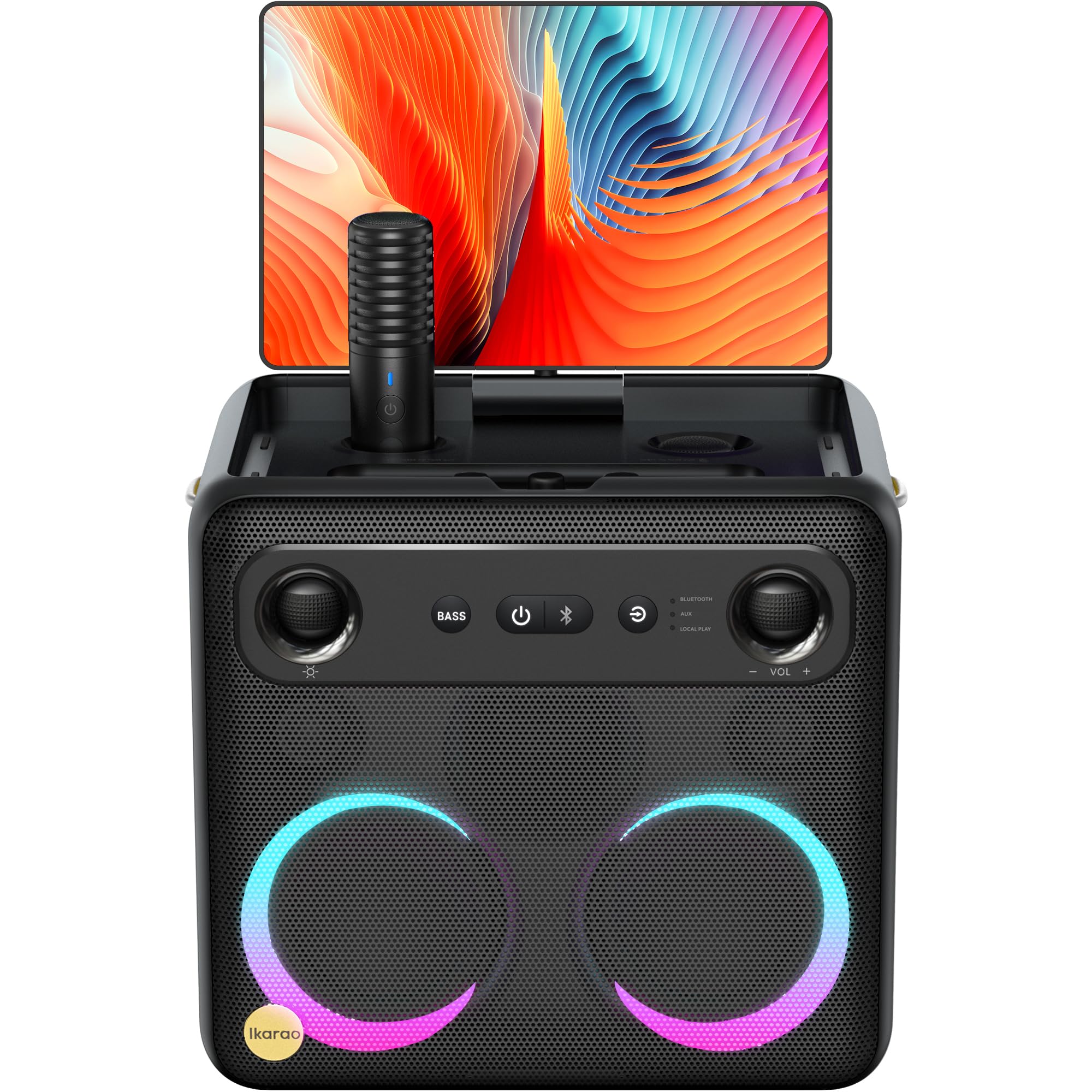
Image: Ikarao Break X2 Karaoke Machine. This image shows the main unit with its integrated 10.1-inch touch screen, the speaker grille, and the two wireless microphones stored in their charging slots.
คุณสมบัติหลัก:
- หน้าจอสัมผัสขนาด 10.1 นิ้วในตัว: 2K HD resolution for clear lyric display. The screen can rotate 180 degrees for optimal viewมุมการเอียง
- 600W Bluetooth Speaker: Delivers powerful and clear audio for an engaging karaoke experience.
- Two Self-Charging Wireless Microphones: Conveniently store and charge microphones within the unit. No manual pairing required.
- การเชื่อมต่อในตัว: Access YouTube and Spotify via Wi-Fi for an unlimited song library.
- โหมดการเล่นหลายโหมด: Supports HDMI, USB, AUX IN, AUX OUT, TF, SD, and wired microphone connections.
- การออกแบบพกพา: Compact and equipped with a strap for easy transport, offering up to 8 hours of battery life.
4. การตั้งค่า
4.1 การชาร์จเริ่มต้น
- Connect the provided charging cable to the charging port on the Ikarao Break X2.
- เสียบปลายอีกด้านหนึ่งเข้ากับเต้ารับไฟฟ้าที่เหมาะสม
- โปรดปล่อยให้เครื่องชาร์จจนเต็มก่อนใช้งานครั้งแรก ไฟแสดงสถานะการชาร์จจะแสดงสถานะแบตเตอรี่
4.2 การเปิด/ปิดเครื่อง
- To power on, press and hold the Power button located on the control panel until the screen illuminates.
- To power off, press and hold the Power button until the shutdown options appear on the screen, then select 'Power Off'.
4.3 การเชื่อมต่อ Wi-Fi
- Once powered on, navigate to the 'Settings' menu on the touch screen.
- เลือก 'Wi-Fi' แล้วเปิดใช้งาน
- เลือกเครือข่าย Wi-Fi ที่ต้องการจากรายการ และป้อนรหัสผ่านหากระบบถาม
- Once connected, you can access online features like YouTube and Spotify.
4.4 การใช้งานไมโครโฟน
- The two wireless microphones are pre-paired with the unit. Simply remove them from their charging slots to activate.
- To charge, place the microphones back into their designated slots on the main unit.
5. คู่มือการใช้งาน
5.1 การใช้หน้าจอสัมผัส
- The 10.1-inch touch screen functions like a tablet. Tap to select, swipe to scroll.
- The screen can be rotated 180 degrees to adjust the viewing angle. Gently pivot the screen to the desired position.
5.2 Karaoke Mode (YouTube/Spotify)
- ตรวจสอบให้แน่ใจว่าอุปกรณ์เชื่อมต่อกับ Wi-Fi
- From the home screen, tap on the YouTube or Spotify application icon.
- ค้นหา your desired karaoke songs or playlists.
- Adjust the main volume using the controls on the unit or the on-screen interface.
- Adjust microphone volume and echo effects using the dedicated controls.
5.3 โหมดลำโพงบลูทูธ
- เปิดใช้งานบลูทูธบนอุปกรณ์ภายนอกของคุณ (เช่น สมาร์ทโฟน แท็บเล็ต)
- On the Ikarao Break X2, navigate to the Bluetooth settings or select the Bluetooth input mode.
- ค้นหา 'Ikarao Break X2' on your external device and pair.
- Once connected, you can play audio from your external device through the Ikarao Break X2 speaker.
5.4 การเชื่อมต่ออุปกรณ์ภายนอก
- ช่องต่อ HDMI: Connect to a TV or external display for a larger viewการสร้างประสบการณ์
- USB/TF/SD: Insert USB drives or memory cards to play local audio or video files.
- ช่องรับสัญญาณเสียงเข้า: เชื่อมต่อแหล่งสัญญาณเสียงภายนอกโดยใช้สายสัญญาณเสียงขนาด 3.5 มม.
- AUX ออก: Connect to external speakers or sound systems.
- ไมโครโฟนแบบมีสาย: An additional port is available for a wired microphone if desired.
6. การบำรุงรักษา
6.1 การทำความสะอาด
- เช็ดหน้าจอและพื้นผิวด้านนอกด้วยผ้าแห้งนุ่มๆ ที่ไม่มีขน
- ห้ามใช้สารทำความสะอาดที่มีฤทธิ์กัดกร่อน ตัวทำละลาย หรือสเปรย์แอโรซอล
- สำหรับรอยฝังแน่น ให้เช็ดเบาๆampชุบผ้าด้วยน้ำแล้วเช็ดให้แห้งทันที
6.2 พื้นที่จัดเก็บ
- เก็บอุปกรณ์ไว้ในที่แห้งและเย็น หลีกเลี่ยงแสงแดดโดยตรงและอุณหภูมิที่สูงหรือต่ำเกินไป
- Ensure microphones are securely placed in their charging slots when not in use.
6.3 การดูแลแบตเตอรี่
- เพื่อยืดอายุการใช้งานแบตเตอรี่ ควรหลีกเลี่ยงการปล่อยแบตเตอรี่จนหมดบ่อยครั้ง
- หากจัดเก็บเป็นเวลานาน ควรชาร์จแบตเตอรี่ให้เหลือประมาณ 50% ทุกๆ สองสามเดือน
7 การแก้ไขปัญหา
7.1 ไม่มีเสียงออกจากลำโพง
- Check the main volume level on the unit and any connected external devices.
- Ensure the correct input source is selected (e.g., Bluetooth, AUX, YouTube).
- Verify that cables are securely connected if using wired inputs.
7.2 ไมโครโฟนใช้งานไม่ได้
- Ensure microphones are fully charged. Place them in their slots for a few minutes.
- Check microphone volume levels on the unit.
- Confirm that the microphones are removed from their charging slots to activate.
7.3 ปัญหาการเชื่อมต่อ Wi-Fi
- Restart the Ikarao Break X2 and your Wi-Fi router.
- ตรวจสอบให้แน่ใจว่าคุณอยู่ในระยะสัญญาณของเครือข่าย Wi-Fi
- ตรวจสอบรหัสผ่าน Wi-Fi อีกครั้ง
7.4 หน้าจอไม่ตอบสนอง
- Try restarting the device by holding the Power button.
- If the screen is frozen, a hard reset might be necessary (refer to specific instructions if available, or hold power button for 10-15 seconds).
8. ข้อมูลจำเพาะ
| คุณสมบัติ | ข้อมูลจำเพาะ |
|---|---|
| ยี่ห้อ | อิคาราโอะ |
| ชื่อรุ่น | เบรก X2 |
| ขนาดสินค้า | 21 x 27 x 29 ซม. |
| น้ำหนัก | 6 กิโลกรัม |
| ประเภทแบตเตอรี่ | ลิเธียมไอออน (ต้องใช้ 1 อัน รวมอยู่ด้วย) |
| แหล่งพลังงาน | ใช้พลังงานจากแบตเตอรี่ |
| อุปกรณ์ต่อพ่วงที่ใช้งานร่วมกันได้ | HDMI, Guitar, USB, AUX IN, AUX OUT, TF, SD, Wired Microphone |
| คุณสมบัติพิเศษ | Integrated YouTube and Spotify connection |
| เทคโนโลยีการเชื่อมต่อ | Aux, Bluetooth, HDMI, USB, Wi-Fi |
| ประเภทสื่อ | ยูเอสบี, บลูทูธ |
| การใช้ที่แนะนำ | TV connection, Indoor, Outdoor, Parties, Commercial, Home use |
9. การรับประกันและการสนับสนุน
The Ikarao Break X2 Karaoke Machine comes with a standard manufacturer's warranty. Please refer to the warranty card included in your package for specific terms and conditions.
For technical support, troubleshooting assistance, or warranty claims, please contact Ikarao customer service through their official webไซต์หรือข้อมูลการติดต่อที่ระบุไว้ในเอกสารการซื้อของคุณ
โปรดเก็บหลักฐานการซื้อไว้เพื่อวัตถุประสงค์การรับประกัน