
1. บทนำ
Thank you for choosing the pecron E2000LFP Portable Power Station with 2x200W Solar Panels. This manual provides essential information for the safe and efficient operation of your solar generator. Please read it thoroughly before use and retain it for future reference.
The pecron E2000LFP is a high-capacity portable power station designed to provide reliable power for various applications, including home backup, camping, RV travel, and emergency situations. Featuring a 1920Wh LiFePO4 battery, 2000W rated AC output, and multiple charging options, it offers a versatile energy solution.
2. ข้อมูลด้านความปลอดภัย
ปฏิบัติตามคำแนะนำด้านความปลอดภัยต่อไปนี้เสมอเพื่อป้องกันการบาดเจ็บหรือความเสียหายต่ออุปกรณ์:
- ห้ามถอดประกอบ ซ่อมแซม หรือดัดแปลงตัวเครื่อง การประกอบใหม่ที่ไม่ถูกต้องอาจทำให้เกิดไฟไหม้หรือไฟฟ้าช็อตได้
- ห้ามนำอุปกรณ์ไปวางใกล้ไฟหรือบริเวณที่มีอุณหภูมิสูง
- Do not use or store the unit in direct sunlight, near heat sources, or in high-humidity environments.
- เก็บเครื่องให้ห่างจากน้ำและของเหลวอื่นๆ
- ตรวจสอบให้แน่ใจว่ามีการระบายอากาศที่เหมาะสมระหว่างการใช้งานเพื่อป้องกันความร้อนสูงเกินไป
- ใช้เฉพาะอุปกรณ์เสริมและสายชาร์จที่เป็นของแท้หรือผ่านการรับรองเท่านั้น
- เก็บให้พ้นจากมือเด็ก
- The built-in Battery Management System (BMS) provides protection against short circuit, overload, and overheating.
- The 120V Pure-sine wave inverter ensures safe operation for sensitive electronic devices.

ภาพ: ภายใน view highlighting the LiFePO4 battery cells for enhanced safety and durability.

Image: Close-up of the integrated Battery Management System (BMS) chip, ensuring safe and reliable power delivery.
3. เนื้อหาบรรจุภัณฑ์
ตรวจสอบว่ามีรายการทั้งหมดรวมอยู่ในแพ็คเกจของคุณ:
- สถานีพลังงานแบบพกพา Pecron E2000LFP
- แผงโซลาร์เซลล์ 2 แผง ขนาด 200 วัตต์
- แพ็คอุปกรณ์เสริม
- อะแดปเตอร์ AC
- 2 x Solar Charging Cables
- 2 sets of Parallel Solar Panel Cables
- สายชาร์จรถยนต์
- คู่มือการใช้งาน
4. คุณสมบัติและส่วนประกอบของผลิตภัณฑ์
The pecron E2000LFP is equipped with various ports and features for versatile power delivery.

ภาพ: ด้านหน้า view of the E2000LFP power station with all 15 output ports and controls clearly labeled.
- แบตเตอรี่ LiFePO4 1920 วัตต์ชั่วโมง: Provides long-lasting and safe power.
- 2000W AC Output (4000W Surge): Capable of powering demanding appliances.
- พอร์ตเอาท์พุต 15 พอร์ต: Includes 6x AC outlets, 6x USB ports (up to PD 100W), 1x Cigar port, 2x DC ports.
- ความจุที่ขยายได้: Can be expanded up to 8064Wh with additional battery packs (sold separately).
- จอแสดงผล HD จอแอลซีดี: Shows real-time power input/output, battery level, and status.
- ที่ชาร์จแบบไร้สาย: Integrated wireless charging pad for compatible devices.
- Dual MPPT Solar Charging: Optimized for efficient solar power input.

Image: Dimensions of the pecron E2000LFP power station, measuring 16.1"L x 10"W x 11.6"H.
5. การตั้งค่า
การชาร์จเบื้องต้น
Before first use, fully charge the E2000LFP power station. This can be done via a wall outlet, solar panels, or a car charger.
การเชื่อมต่อแผงโซล่าเซลล์
- Unfold the 200W solar panels and position them in direct sunlight.
- Connect the solar charging cables to the solar panels.
- Connect the other end of the solar charging cables to the DC 32V~95V charging ports on the E2000LFP. For optimal charging, use the provided parallel solar panel cables to connect multiple panels.
- The LCD display will indicate incoming solar power.

Image: The E2000LFP power station connected to solar panels for charging in an open field.
6. คู่มือการใช้งาน
การเปิด/ปิด
- To turn on the unit, press and hold the main power button until the LCD screen illuminates.
- To turn off the unit, press and hold the main power button until the LCD screen turns off.
การใช้เต้ารับไฟฟ้ากระแสสลับ
- Press the AC Output Switch button to activate the AC outlets. The AC indicator on the LCD will light up.
- Plug your devices into the 120V AC outlets.
- ตรวจสอบให้แน่ใจว่าวัตต์รวมtagกำลังไฟรวมของอุปกรณ์ที่เชื่อมต่อต้องไม่เกิน 2000 วัตต์
- After use, press the AC Output Switch button again to turn off the AC outlets.
Using DC and USB Ports
- Press the DC 12V/USB Wireless Switch button to activate the DC and USB ports. The corresponding indicators on the LCD will light up.
- Connect your devices to the appropriate USB-A, USB-C, DC, or Cigar port.
- For wireless charging, place your compatible device on the wireless charging pad.
- After use, press the DC 12V/USB Wireless Switch button again to turn off these outputs.
Recharging the E2000LFP
The E2000LFP offers multiple recharging methods:
- เต้ารับไฟผนัง: Connect the AC power adapter to the unit and a standard wall outlet. Charging time: 3.5-4 hours.
- Dual Wall Outlet: Using a second adapter (sold separately), connect to two wall outlets for faster charging. Charging time: 1.5-2 hours.
- แผงโซล่าเซลล์: Connect solar panels as described in the Setup section. Charging time (with 4x200W panels): 3-4 hours.
- เครื่องกำเนิดไฟฟ้า: Connect to a compatible generator using the AC power adapter. Charging time: 1.5-2 hours (with 2 adapters) or 3.5-4 hours (with 1 adapter).
- ซ็อกเก็ตรถ: Use the car charger cable to charge from your vehicle's 12V socket. Charging time: Approximately 20 hours.
- Wall + Solar: Combine wall charging with solar input for the fastest recharge. Charging time: 1.5-2 hours (with 1 adapter + 3x200W solar panels).

Image: The E2000LFP power station connected to a single wall outlet for charging.

Image: The E2000LFP power station connected to dual wall outlets for accelerated charging.
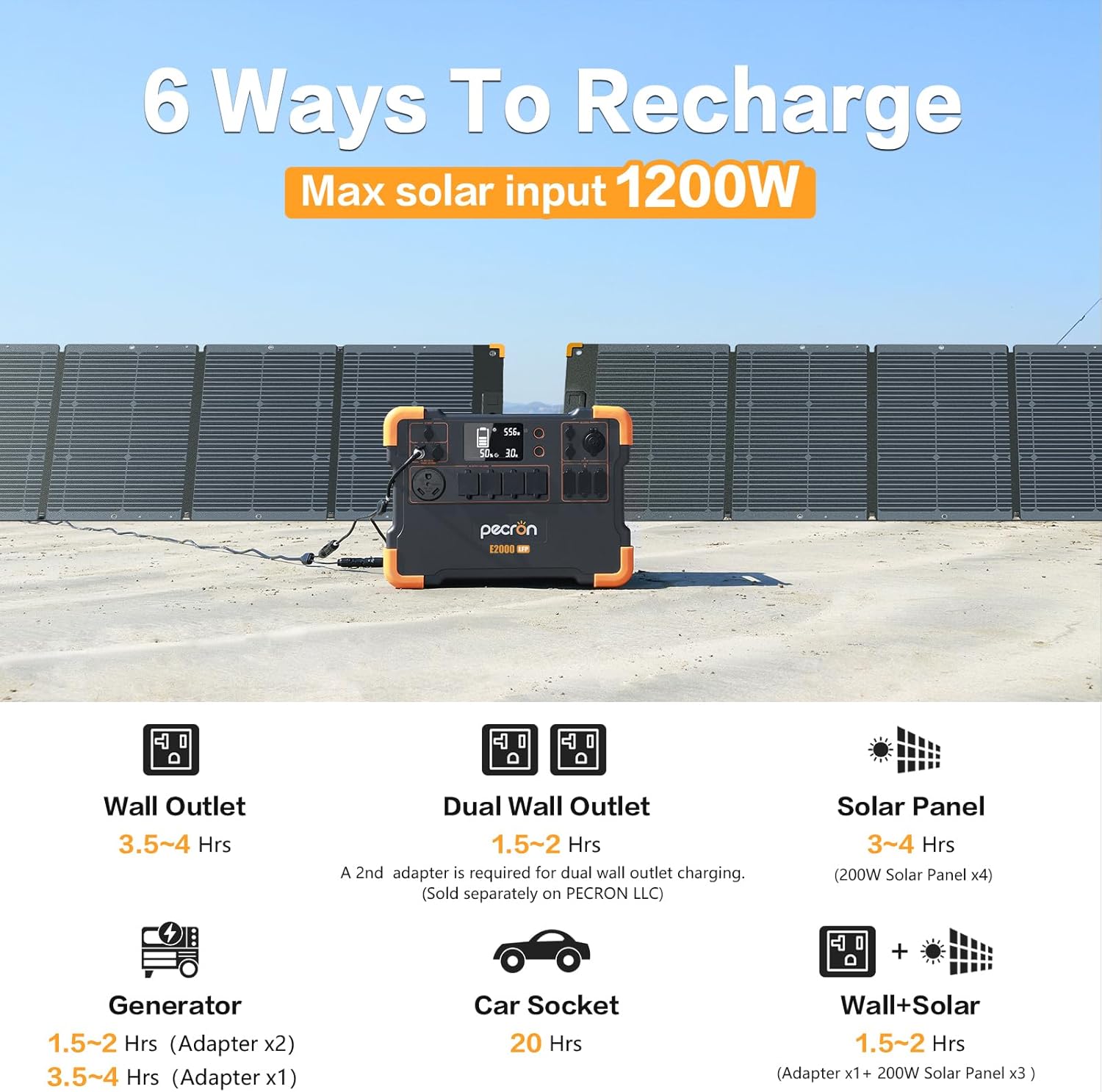
ภาพ: เหนือview of the six available recharging methods for the E2000LFP, including wall, dual wall, solar, generator, car, and combined wall+solar.
ความจุที่ขยายได้
The E2000LFP's capacity can be expanded by connecting additional EB3000 battery packs (sold separately). This allows for increased power storage for longer durations.
- E2000LFP (1920Wh) + 1x EB3000 (3072Wh) = 4992Wh total capacity.
- E2000LFP (1920Wh) + 2x EB3000 (6144Wh) = 8064Wh total capacity.

Image: The E2000LFP power station connected to an EB3000 expansion battery, demonstrating increased capacity.

Image: Visual representation of the E2000LFP's modular power supply, showing how capacity can be expanded with EB3000 units to reach up to 8064Wh.
Typical Device Run Times
The E2000LFP can power a wide range of devices. Below are approximate run times for common appliances:
Outdoor/Portable Devices
- แล็ปท็อป (50 วัตต์): 30-34 ชั่วโมง
- กล้อง (60W): 43 times recharge
- Fridge (60W): 28 ชั่วโมง
- เครื่องช่วยหายใจ (40W): 40 ชั่วโมง
- Coffee Machine (800W): 2 ชั่วโมง
- Projector (150W): 10-12 ชั่วโมง

Image: E2000LFP powering various devices in an outdoor setting, illustrating typical run times.
เครื่องใช้ในบ้าน
- Coffee Machine (800W): 2 ชั่วโมง
- Microwave (600W): 2-2.5 ชั่วโมง
- Fridge (200W): 8 ชั่วโมง
- ทีวี (120W): 13-13.5 ชั่วโมง
- Washing Machine (500W): 3-4 ชั่วโมง
- A/C (800W): 2-3 ชั่วโมง

Image: E2000LFP powering various home appliances, indicating their respective run times.
เครื่องมือไฟฟ้า
- Electric Chainsaw (1200W): 1.36 ชั่วโมง
- Electric Hammer Drill (1500W): 1 ชั่วโมง
- Cutting Machine (1400W): 1.1 ชั่วโมง
- Corded String Trimmer (1200W): 1.3 ชั่วโมง

Image: E2000LFP powering various power tools, showing their approximate usage durations.
7. การบำรุงรักษา
- พื้นที่จัดเก็บ: Store the E2000LFP in a cool, dry place, away from direct sunlight and extreme temperatures.
- ความถี่ในการชาร์จ: For optimal battery health, fully charge the unit every 3-6 months if not in regular use.
- การทำความสะอาด: Use a dry, soft cloth to clean the exterior of the unit. Do not use harsh chemicals or abrasives.
- การระบายอากาศ : ตรวจสอบให้แน่ใจว่าช่องระบายอากาศไม่มีฝุ่นและเศษขยะเพื่อป้องกันความร้อนสูงเกินไป
8 การแก้ไขปัญหา
หน่วยไม่เปิด
- Check if the battery is completely depleted. Connect the unit to a power source (wall outlet or solar) and attempt to turn it on after a few minutes.
- โปรดตรวจสอบให้แน่ใจว่าได้กดปุ่มเปิด/ปิดค้างไว้ตามระยะเวลาที่กำหนด
ไม่มีสัญญาณส่งออกจากพอร์ต
- Verify that the specific output (AC, DC, USB) is activated by pressing its respective switch.
- Check the LCD display for any error codes or overload indicators.
- Ensure the connected device's power consumption does not exceed the port's or the unit's maximum output.
- Try a different port or device to isolate the issue.
ชาร์จช้า
- การชาร์จพลังงานแสงอาทิตย์: Ensure solar panels are in direct sunlight, free from obstructions, and angled correctly. Check all cable connections.
- การชาร์จผนัง: Verify the AC adapter is properly connected and the wall outlet is functioning.
เปิดใช้งานการป้องกันไฟเกิน
- If an overload occurs, the unit will automatically shut down the affected output.
- Disconnect the device causing the overload.
- Restart the unit and try connecting devices with lower power consumption.
9. ข้อมูลจำเพาะ
| คุณสมบัติ | ข้อมูลจำเพาะ |
|---|---|
| ชื่อรุ่น | E2000-KIT400W (E2000LFP + 2x200W Solar Panels) |
| ประเภทแบตเตอรี่ | ลิเธียมไอออนฟอสเฟต |
| ความจุ | 1920Wh (Expandable up to 8064Wh) |
| เอาท์พุตไฟฟ้ากระแสสลับ | 2000W (Rated), 4000W (Surge), 120V Pure Sine Wave |
| พอร์ต USB | 6 ports (including PD 100W USB-C) |
| พอร์ต DC | 2 ports + 1 Cigar Port |
| ป้อนพลังงานแสงอาทิตย์ | Max 1200W (Dual MPPT) |
| Charging Time (Wall) | 3.5-4 hours (single adapter), 1.5-2 hours (dual adapter) |
| ระยะเวลาในการชาร์จ (พลังงานแสงอาทิตย์) | 3-4 hours (with 4x200W solar panels) |
| ขนาด | ยาว 16.1 นิ้ว x กว้าง 10 นิ้ว x สูง 11.6 นิ้ว |
| น้ำหนัก | 48.5 ปอนด์ |
| วัสดุ | Steel/Aluminum (Frame & Housing), Plastic/Rubber (Electrical Components), LiFePO4 (Battery) |
10. การรับประกันและการสนับสนุน
การรับประกัน
The pecron E2000LFP Solar Generator comes with a รับประกัน 24 เดือนโดยไม่ต้องกังวล นับจากวันที่ซื้อสินค้า การรับประกันนี้ครอบคลุมข้อบกพร่องจากการผลิตและรับประกันประสิทธิภาพการทำงานที่เชื่อถือได้ภายใต้การใช้งานปกติ โปรดเก็บหลักฐานการซื้อไว้เพื่อใช้ในการเรียกร้องการรับประกัน
การสนับสนุนลูกค้า
For any questions, technical assistance, or warranty inquiries, please contact pecron customer service. Our team is available 24 hours a day, 7 days a week to provide friendly and efficient support.
ข้อมูลติดต่อ:
- Webเว็บไซต์: Visit the pecron Store on Amazon
- Refer to the contact details provided in your accessory pack or on the official pecron webเว็บไซต์.