
1. สินค้าหมดview

Image: The LEVN Wireless Headset HS019, a black on-ear headset with a microphone boom, designed for professional communication.
The LEVN Wireless Headset HS019 is designed for clear communication and productivity in professional and personal environments. It features advanced AI Noise Cancelling technology, Bluetooth 5.2 connectivity, and a versatile charging base with integrated USB ports. Enjoy extended usage with its long-lasting battery and flexible connection options.
2. อะไรอยู่ในกล่อง
กรุณาตรวจสอบเนื้อหาในแพ็คเกจเพื่อให้แน่ใจว่ามีสินค้าครบทั้งหมด:
- LEVN Wireless Headset
- ฐานชาร์จ
- ดองเกิล USB
- คู่มือการใช้งาน
- สาย USB-C
3. การตั้งค่า
3.1 การชาร์จชุดหูฟัง
Before first use, fully charge your LEVN Wireless Headset. You can charge it using the included USB-C cable or by placing it on the multifunction charging base.
- การใช้สาย USB-C: Connect the USB-C cable to the headset's charging port and to a USB power source (e.g., computer, wall adapter).
- Using Charging Base: Place the headset onto the charging base. Ensure the charging contacts align. The base also provides storage for the USB dongle.

Image: LEVN Wireless Headset placed on its multifunction charging base, which also features four USB ports for additional device connectivity. The base provides a convenient charging and storage solution.
The charging base includes four USB ports for flexible data transfer and connecting peripheral devices like mobile hard drives or USB flash drives, helping to keep your workspace organized.
3.2 การเชื่อมต่อแบบไร้สาย
The headset offers two wireless connection methods: via the 2.4G USB dongle or Bluetooth 5.2.

Image: Illustration showing the two wireless connection methods for the LEVN Wireless Headset: a USB dongle for a stable 2.4G connection and Bluetooth 5.2 for broader compatibility.
3.2.1 Using the 2.4G USB Dongle
- Insert the USB dongle into an available USB port on your computer or device.
- เปิดใช้งานชุดหูฟัง ระบบจะเชื่อมต่อกับตัวรับสัญญาณโดยอัตโนมัติ
- Once connected, the indicator light on the dongle will show a steady blue, and the headset will confirm connection.
- Ensure the LEVN Headset is selected as the audio input and output device in your computer's sound settings.
The USB dongle provides a secure, stable connection with low latency and an impressive wireless range of up to 15 meters (49 feet).
3.2.2 Using Bluetooth 5.2
- เปิดชุดหูฟัง
- Put the headset into pairing mode (refer to the headset's specific button combination for pairing, usually holding the power button for a few seconds until the indicator light flashes).
- On your device (smartphone, tablet, computer), go to Bluetooth settings and search for new devices.
- Select "LEVN HS019" (or similar name) from the list of available devices to pair.
- Once connected, the headset's indicator light will show a steady blue, and you will hear a confirmation tone.
4. คู่มือการใช้งาน
4.1 เปิด/ปิดเครื่อง
- เปิดเครื่อง: กดปุ่มเปิด/ปิดค้างไว้ประมาณ 3 วินาที จนกว่าไฟแสดงสถานะจะสว่างขึ้น
- หมดแรง: กดปุ่มเปิด/ปิดค้างไว้ประมาณ 3 วินาที จนกระทั่งไฟแสดงสถานะดับ
4.2 การควบคุมการโทร
- รับ/วางสาย: กดปุ่มมัลติฟังก์ชั่นหนึ่งครั้ง
- ปฏิเสธสาย: กดปุ่มมัลติฟังก์ชั่นค้างไว้ 2 วินาที
- เพิ่ม/ลดระดับเสียง: Use the physical volume rocker buttons located on the headset.
- ปิดเสียง/เปิดเสียงไมโครโฟน: Press the dedicated Mute button on the microphone boom or earcup. This provides instant call privacy.
4.3 ระบบตัดเสียงรบกวน AI
The LEVN HS019 features AI Noise Cancellation, which eliminates up to 99.9% of background noise, ensuring your voice remains clear during calls and online meetings. This feature is automatically active to optimize your audio experience.
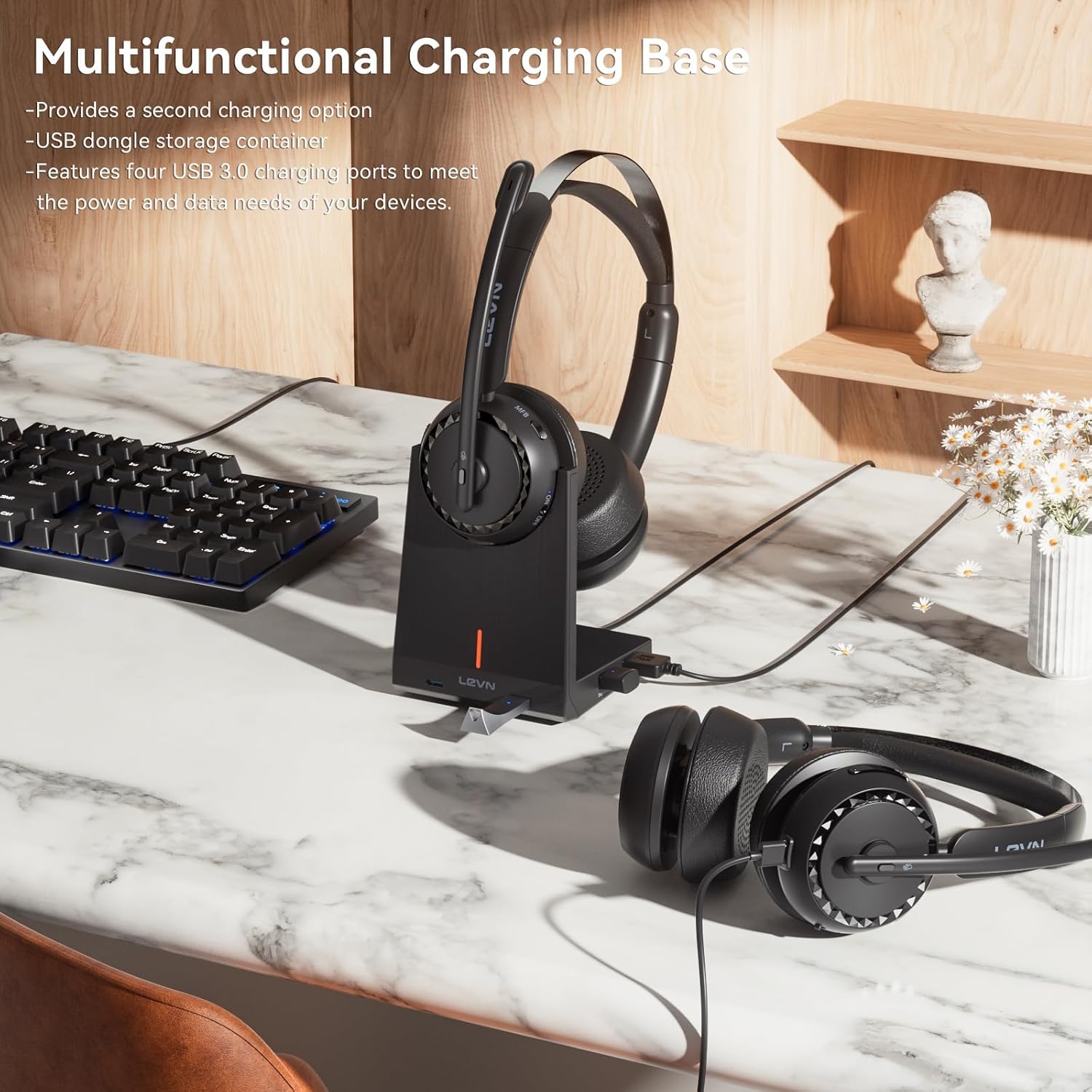
Image: A person wearing the LEVN Wireless Headset in an office environment, demonstrating the AI Noise Cancellation feature. Visual representation shows background noise being filtered out, resulting in clear voice transmission.
4.4 อายุการใช้งานแบตเตอรี่
The headset is equipped with a high-capacity battery, providing up to 65 hours of continuous playback on a single charge. This ensures extended use for long work sessions or entertainment without frequent recharging.

Image: A LEVN Wireless Headset positioned above a clock face indicating "65h", surrounded by batteries, symbolizing its ultra-long battery life of 65 hours.
5. การบำรุงรักษา
- การทำความสะอาด: ใช้ผ้าแห้งนุ่มเช็ดทำความสะอาดหูฟังและแท่นชาร์จ หลีกเลี่ยงการใช้สารเคมีรุนแรงหรือวัสดุที่มีฤทธิ์กัดกร่อน
- พื้นที่จัดเก็บ: When not in use, store the headset in a cool, dry place, preferably on its charging base to keep it charged and protected.
- การดูแลแบตเตอรี่ เพื่อยืดอายุการใช้งานแบตเตอรี่ ควรหลีกเลี่ยงการปล่อยให้หูฟังแบตหมดจนเกลี้ยงบ่อยๆ ควรชาร์จแบตเตอรี่เป็นประจำ
- ปลอบโยน: The headset is designed for comfort with plush materials. Adjust the headband and earcups for a secure yet comfortable fit during extended use.

Image: The LEVN Wireless Headset resting on a soft, cloud-like surface, illustrating its comfortable design and feather-light feel for all-day wear.
6 การแก้ไขปัญหา
If you encounter issues with your LEVN Wireless Headset, please refer to the following common solutions:
- ไม่มีเสียง/ไมโครโฟนไม่ทำงาน:
- ตรวจสอบให้แน่ใจว่าชุดหูฟังเปิดอยู่และชาร์จจนเต็มแล้ว
- Verify the headset is correctly paired via Bluetooth or the USB dongle.
- Check your computer's sound settings to ensure the LEVN Headset is selected as the default input and output device.
- If using the USB dongle, try unplugging and re-inserting it. Restarting your computer may also resolve the issue.
- Ensure the microphone is not muted using the physical mute button.
- Connection Drops/Unstable Connection:
- โปรดตรวจสอบให้แน่ใจว่าคุณอยู่ในระยะสัญญาณไร้สาย 15 เมตร
- ลดการรบกวนจากอุปกรณ์ไร้สายอื่นๆ (เช่น เราเตอร์ Wi-Fi, อุปกรณ์ Bluetooth อื่นๆ)
- ลองเชื่อมต่อชุดหูฟังกับอุปกรณ์ของคุณอีกครั้ง หรือเสียบตัวรับสัญญาณ USB กลับเข้าไปใหม่
- หูฟังไม่ชาร์จ:
- Ensure the USB-C cable is securely connected to both the headset/charging base and the power source.
- If using the charging base, ensure the headset is correctly seated and the charging contacts are clean.
- ลองใช้สาย USB-C หรืออะแดปเตอร์ไฟอื่น
7. ข้อมูลจำเพาะ
| คุณสมบัติ | รายละเอียด |
|---|---|
| ยี่ห้อ | เลฟเน่ |
| หมายเลขรุ่น | HS019 |
| ชื่อรุ่น | LE-HS016 V3 |
| เทคโนโลยีการเชื่อมต่อ | ไร้สาย (บลูทูธ 5.2, ดองเกิล USB 2.4G) |
| ช่วงบลูทูธ | สูงถึง 15 เมตร (49 ฟุต) |
| การควบคุมเสียงรบกวน | ระบบตัดเสียงรบกวน AI |
| การวางตำแหน่งหู | บนหู |
| อายุการใช้งานแบตเตอรี่ | เล่นได้นานสูงสุด 65 ชั่วโมง |
| Charging Ports on Base | พอร์ต USB 4 พอร์ต |
| ประเภทการควบคุม | Call Control (Buttons) |
| ช่วงความถี่ | 20 เฮิรตซ์ ถึง 20,000 เฮิรตซ์ |
| วัสดุ | Plastic, Stainless Steel, Leather |
| น้ำหนัก | 120 กรัม |
8. การรับประกันและการสนับสนุน
LEVN products are designed for reliability and performance. For warranty information, technical support, or customer service inquiries, please refer to the official LEVN website or contact their customer support directly. The contact details are typically provided in the packaging or on the manufacturer's webเว็บไซต์.
โปรดเก็บหลักฐานการซื้อของคุณไว้เพื่อเรียกร้องการรับประกัน