
Next YE-65GFSG8-QLED
Next YE-65GFSG8-QLED 65-inch UHD 4K QLED Google TV User Manual
Model: YE-65GFSG8-QLED
1. บทนำ
ขอบคุณสำหรับการซื้อasing the Next YE-65GFSG8-QLED 65-inch UHD 4K QLED Google TV. This manual provides essential information for setting up, operating, and maintaining your new television. Please read it thoroughly before use and keep it for future reference.

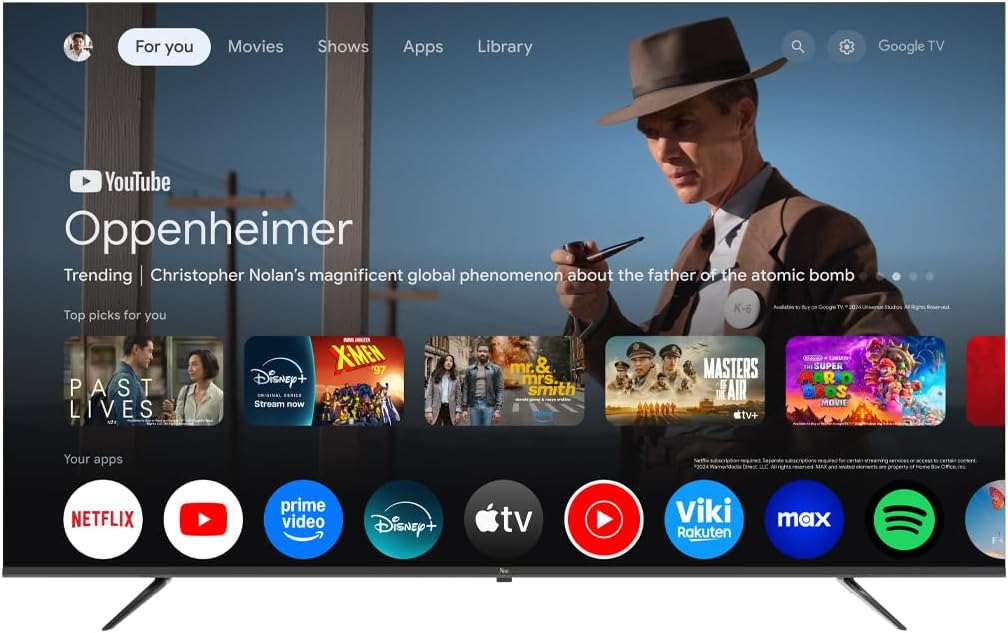
ภาพที่ 1.1: ด้านหน้า view of the Next YE-65GFSG8-QLED 65-inch QLED Google TV.
2. ข้อมูลด้านความปลอดภัย
Please observe the following safety precautions to prevent damage and ensure safe operation:
- อย่าให้ทีวีโดนฝนหรือความชื้น
- อย่าปิดกั้นช่องระบายอากาศ
- ตรวจสอบให้แน่ใจว่าได้ต่อสายดินอย่างถูกต้องสำหรับจุดเชื่อมต่อทางไฟฟ้า
- ควรวางทีวีให้ห่างจากแสงแดดโดยตรง แหล่งความร้อน และเปลวไฟ
- ใช้เฉพาะสายไฟที่ให้มาพร้อมกับทีวีเท่านั้น
- อย่าพยายามซ่อมทีวีด้วยตนเอง ควรส่งซ่อมโดยช่างผู้ชำนาญการเท่านั้น
- วางทีวีบนพื้นผิวที่มั่นคงและระดับ หรือยึดเข้ากับผนังอย่างแน่นหนา
3. เนื้อหาบรรจุภัณฑ์
ตรวจสอบว่ามีรายการทั้งหมดอยู่ในแพ็คเกจ:
- Next YE-65GFSG8-QLED 65-inch UHD 4K QLED Google TV
- รีโมทคอนโทรล
- สายไฟ
- คู่มือการใช้งาน (เอกสารนี้)
- ส่วนประกอบขาตั้งทีวี (ถ้ามี)
- Screws for Stand Assembly (if applicable)
4. การตั้งค่า
4.1. การประกอบขาตั้ง (ไม่บังคับ)
If you are not wall-mounting the TV, attach the stand as follows:
- วางทีวีคว่ำหน้าลงบนพื้นผิวที่นุ่มและสะอาดอย่างระมัดระวังเพื่อป้องกันไม่ให้หน้าจอเสียหาย
- จัดตำแหน่งส่วนประกอบขาตั้งให้ตรงกับรูสำหรับติดตั้งที่ด้านล่างของทีวี
- ยึดขาตั้งด้วยสกรูที่ให้มา อย่าขันแน่นเกินไป
- ยกทีวีขึ้นอย่างระมัดระวังให้ตั้งตรงบนพื้นผิวที่มั่นคง
4.2. อุปกรณ์เชื่อมต่อ
เชื่อมต่ออุปกรณ์ภายนอกของคุณเข้ากับพอร์ตที่เหมาะสมด้านหลังทีวี
ภาพที่ 4.1: ด้านหลัง view of the TV with connection ports labeled.
- HDMI (3 ports, one with ARC): Connect Blu-ray players, game consoles, set-top boxes, etc. Use the HDMI (ARC) port for audio return channel functionality with compatible sound systems.
- USB (2 พอร์ต): เชื่อมต่ออุปกรณ์จัดเก็บข้อมูล USB สำหรับการเล่นสื่อหรืออัปเดตซอฟต์แวร์
- DVB-S / DVB-T (TV 1, TV 2): Connect satellite (DVB-S) or terrestrial (DVB-T) antenna cables for broadcast TV reception.
- CI Module: Insert a Conditional Access Module (CAM) for encrypted digital TV services.
- มินิ AV-IN: Connect older devices using an AV adapter cable (not always included).
- ออปติคัลเอาท์: เชื่อมต่อกับซาวด์บาร์หรือเครื่องรับสัญญาณเสียงเพื่อเอาต์พุตเสียงดิจิทัล
- อีเธอร์เน็ต: เชื่อมต่อสายเคเบิลอีเทอร์เน็ตสำหรับการเชื่อมต่ออินเทอร์เน็ตแบบใช้สาย
4.3. การเชื่อมต่อไฟฟ้า
เสียบสายไฟเข้ากับช่องจ่ายไฟของทีวี จากนั้นเสียบเข้ากับเต้ารับไฟฟ้าที่ผนัง ทีวีจะเข้าสู่โหมดสแตนด์บาย
5. คู่มือการใช้งาน
5.1. การตั้งค่าครั้งแรก
When you power on the TV for the first time, follow the on-screen instructions to:
- เลือกภาษาและภูมิภาคของคุณ
- Connect to a Wi-Fi network or use the wired Ethernet connection.
- ลงชื่อเข้าใช้ด้วยบัญชี Google ของคุณเพื่อเข้าถึงฟีเจอร์ต่างๆ ของ Google TV
- Scan for available TV channels (if using antenna/satellite).

Image 5.1: Google TV interface on the Next QLED TV.
5.2. คุณสมบัติของ Google TV
Your TV runs on Google TV, providing access to a wide range of content and smart features:
- คำแนะนำส่วนบุคคล: Get suggestions based on your viewประวัติความเป็นมา
- การควบคุมด้วยเสียง: Use the built-in Google Assistant via the remote control to search for content, control smart home devices, and more.
- การเข้าถึงแอป: Download and stream from popular services like YouTube, Netflix, Disney+, and more via the Google Play Store.
- Chromecast ในตัว: ส่งเนื้อหาจากอุปกรณ์มือถือที่รองรับไปยังทีวีได้โดยตรง
5.3. เทคโนโลยีจอแสดงผล QLED
The QLED display technology in your TV offers enhanced picture quality:
- สีสันสดใส: Quantum Dot technology produces a wider color gamut and higher color saturation.
- ความสว่างสูง: Experience brighter images with improved contrast.
- รองรับ HDR: High Dynamic Range (HDR) content delivers greater detail in both bright and dark scenes.

Image 5.2: Visual representation of QLED technology's enhanced color saturation.

Image 5.3: Visual representation of HDR technology's improved dynamic range.
5.4. รีโมทคอนโทรล
The included remote control allows you to navigate the TV's interface, adjust settings, and access smart features. Refer to the remote control diagram (if available in the physical manual) for specific button functions.
5.5. สินค้าหมดview วีดีโอ
รับชมวิดีโอนี้เพื่อรับข้อมูลโดยย่อview of the Next QLED Google TV's key features, including QLED technology, Ultra HD quality, Google TV integration, and frameless design.
วิดีโอ 5.1: จบview of Next QLED Google TV features.
6. การบำรุงรักษา
เพื่อให้ทีวีของคุณมีอายุการใช้งานยาวนานและมีประสิทธิภาพเหมาะสมที่สุด ให้ทำดังนี้:
- การทำความสะอาดหน้าจอ: เช็ดหน้าจอเบาๆ ด้วยผ้านุ่มๆ ที่ไม่เป็นขุย สำหรับคราบฝังแน่น ให้ใช้น้ำยาทำความสะอาดเฉพาะสำหรับหน้าจอ เช็ดลงบนผ้า อย่าเช็ดลงบนหน้าจอโดยตรง
- ทำความสะอาดตู้: ใช้ผ้าแห้งนุ่มเช็ดทำความสะอาดตู้ทีวี ห้ามใช้สารทำความสะอาดที่มีฤทธิ์กัดกร่อนหรือตัวทำละลาย
- การระบายอากาศ : ตรวจสอบให้แน่ใจว่าช่องระบายอากาศปราศจากฝุ่นละอองและสิ่งกีดขวางเพื่อป้องกันความร้อนสูงเกินไป
- หมดแรง: Disconnect the TV from the power outlet during electrical storms or when it will be unused for extended periods.
7 การแก้ไขปัญหา
หากคุณประสบปัญหาเกี่ยวกับทีวี โปรดดูวิธีแก้ไขทั่วไปต่อไปนี้:
| ปัญหา | วิธีแก้ปัญหาที่เป็นไปได้ |
|---|---|
| ไม่มีไฟฟ้า | ตรวจสอบว่าสายไฟเชื่อมต่อกับทีวีและเต้ารับที่ผนังอย่างแน่นหนาหรือไม่ ตรวจสอบให้แน่ใจว่าเต้ารับใช้งานได้ |
| ไม่มีภาพแต่มีเสียง | ตรวจสอบว่าเลือกแหล่งสัญญาณเข้าที่ถูกต้อง ตรวจสอบการเชื่อมต่อสายเคเบิลกับอุปกรณ์ภายนอก |
| ไม่มีเสียงแต่มีภาพ | ตรวจสอบระดับเสียงและสถานะปิดเสียง ตรวจสอบให้แน่ใจว่าสายสัญญาณเสียงเชื่อมต่อถูกต้อง ตรวจสอบการตั้งค่าเอาต์พุตเสียงของทีวี |
| รีโมตคอนโทรลไม่ทำงาน | เปลี่ยนแบตเตอรี่ ตรวจสอบให้แน่ใจว่าไม่มีสิ่งกีดขวางระหว่างรีโมทและเซ็นเซอร์อินฟราเรดของทีวี |
| คุณภาพของภาพไม่ดี | ตรวจสอบการเชื่อมต่อเสาอากาศ/สายเคเบิล ปรับการตั้งค่าภาพ (ความสว่าง คอนทราสต์ ความคมชัด) ตรวจสอบให้แน่ใจว่าเนื้อหาต้นฉบับมีคุณภาพสูง |
| ไม่สามารถเชื่อมต่อ Wi-Fi ได้ | Restart your router. Ensure the Wi-Fi password is correct. Move the TV closer to the router or use a wired Ethernet connection. |
หากปัญหายังคงมีอยู่หลังจากลองวิธีแก้ไขเหล่านี้แล้ว โปรดติดต่อฝ่ายสนับสนุนลูกค้า
8. ข้อมูลจำเพาะ
Key technical specifications for the Next YE-65GFSG8-QLED 65-inch UHD 4K QLED Google TV:
| คุณสมบัติ | รายละเอียด |
|---|---|
| แบบอย่าง | YE-65GFSG8-QLED |
| ขนาดหน้าจอ | 65 นิ้ว (165 ซม.) |
| เทคโนโลยีการแสดงผล | คิวแอลอีดี |
| ปณิธาน | 4K UHD (Ultra High Definition) |
| อัตราการรีเฟรช | 60 เฮิรตซ์ |
| ระบบปฏิบัติการ | กูเกิลทีวี |
| การเชื่อมต่อ | บลูทูธ, อีเทอร์เน็ต, HDMI (3 พอร์ต), USB (2 พอร์ต), Wi-Fi |
| อัตราส่วนภาพ | 16:9 น. |
| ขนาดสินค้า (ลึก x กว้าง x สูง) | 27.8D x 144.6W x 88.9H ซม. |
| น้ำหนักผลิตภัณฑ์ | 16.3 กิโลกรัม |
| ส่วนประกอบที่รวมอยู่ | รีโมทคอนโทรล |
| คุณสมบัติพิเศษ | การออกแบบ Frameless |
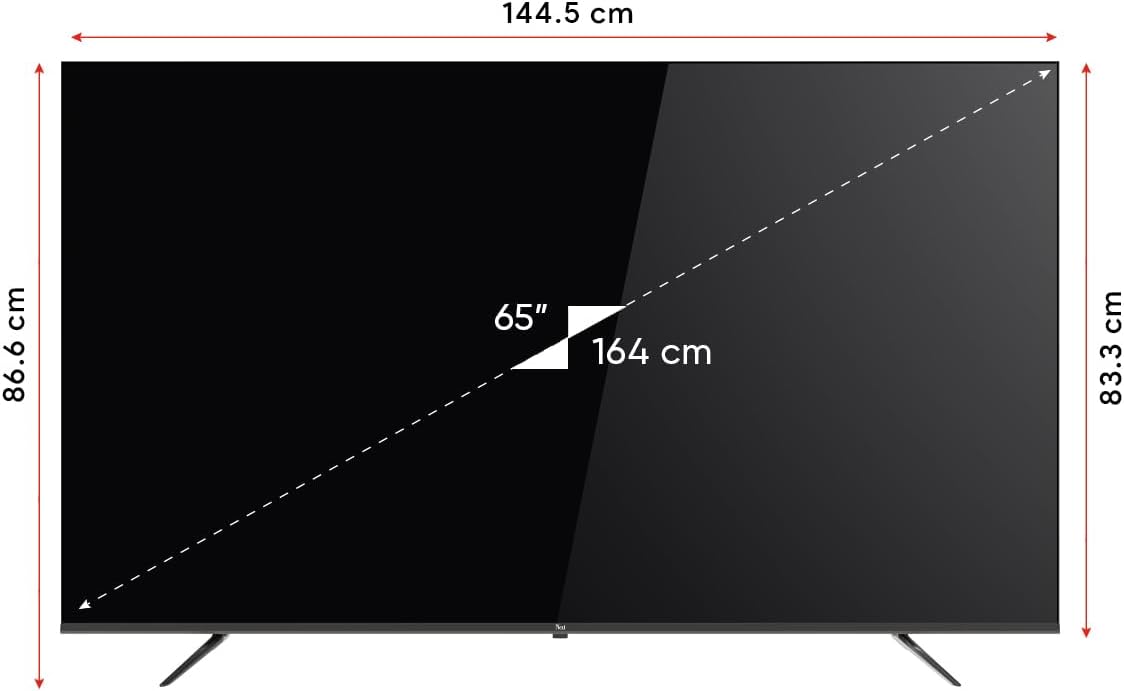
Image 8.1: TV dimensions (144.5 cm width, 86.6 cm height, 65" / 164 cm diagonal).
9. การรับประกันและการสนับสนุน
Your Next YE-65GFSG8-QLED TV comes with a manufacturer's warranty:
- ระยะเวลารับประกัน: 2 Years Manufacturer Warranty.
- สนับสนุน: For technical assistance, warranty claims, or further inquiries, please refer to the contact information provided in your warranty card or visit the official Next webเว็บไซต์.
Ask a question about this manual
Ask about setup, troubleshooting, compatibility, parts, safety, or missing instructions. Manuals+ will review the question and use this page’s manual context to help answer it.