
1. บทนำ
This manual provides detailed instructions for the safe and effective operation of your VAR TECH V92S Smart Digital Multimeter. The V92S is a True RMS, fully auto-ranging digital multimeter designed for precise measurements across various electrical parameters. Please read this manual thoroughly before use and retain it for future reference.
2. ข้อมูลด้านความปลอดภัย
Always adhere to basic safety precautions when using this multimeter to prevent personal injury or damage to the instrument. Improper use can result in electric shock or fire.
- ห้ามป้อนค่าเกินค่าสูงสุดที่กำหนดไว้สำหรับแต่ละฟังก์ชัน
- ตรวจสอบให้แน่ใจว่าสายวัดเชื่อมต่ออย่างถูกต้องและอยู่ในสภาพดีก่อนทำการวัด
- อย่าใช้มัลติมิเตอร์หากพบว่าชำรุด หรือหากฝาปิดแบตเตอรี่ปิดไม่สนิท
- ใช้ความระมัดระวังอย่างยิ่งเมื่อทำงานกับ voltagสูงกว่า 60V DC หรือ 30V AC RMS เนื่องจากอาจเกิดอันตรายจากไฟฟ้าช็อตได้
- ควรตัดกระแสไฟออกจากวงจรที่กำลังทดสอบทุกครั้งก่อนทำการวัดค่าความต้านทาน ความจุ หรือความต่อเนื่อง
- เปลี่ยนแบตเตอรี่ทันทีเมื่อไฟแสดงสถานะแบตเตอรี่อ่อนปรากฏขึ้นเพื่อให้แน่ใจว่าการอ่านค่าแม่นยำ
- Do not operate the multimeter in explosive atmospheres or near flammable materials.
3. คุณสมบัติหลัก
The VAR TECH V92S Smart Digital Multimeter offers a range of advanced features for comprehensive electrical testing:
- Smart Digital Multimeter with Auto Detection TRMS (True Root Mean Square)
- 600 V AC/DC & 10 A AC/DC measurement capabilities
- 6000 Counts HD Display with Primary & Secondary display and Analog bar graph
- Capacitance Test: 6 nF to 60 mF
- Frequency Test: 6 Hz to 10 MHz
- Temperature Test: -40 ºC to 1000 ºC
- Diode & Continuity Test
- NCV (Non-Contact Vol .)tage) test for live wire detection
- Integrated Torch for illumination in dark environments
- Auto Power Off function to conserve battery life
- Data Hold function to freeze readings on the display
- ไฟแสดงสถานะแบตเตอรี่ต่ำ
- Jack Prompt for correct test lead insertion
- Burnt Fuse Prompt for safety and easy maintenance
- Resistance measurement: 600 Ω to 60 MΩ

รูปที่ 3.1 : ด้านหน้า view of the VAR TECH V92S Smart Digital Multimeter, showcasing หน้าจอแสดงผลและปุ่มควบคุม

Figure 3.2: The VAR TECH V92S Multimeter held in hand, illustrating its compact and ergonomic design.
4. ส่วนประกอบผลิตภัณฑ์
The VAR TECH V92S Smart Digital Multimeter package includes the following items:
- VAR TECH V92S Digital Multimeter
- สายทดสอบ (สีแดงและสีดำ)
- คู่มือการใช้งาน (เอกสารนี้)
- กระเป๋าใส่อุปกรณ์
- แบตเตอรี่ AAA 4 ก้อน (มีมาให้แล้วหรือต้องซื้อแยกต่างหาก)

Figure 4.1: Contents of the VAR TECH V92S package, including the multimeter, test leads, manual, and carrying pouch.
5. การตั้งค่า
5.1. การติดตั้งแบตเตอรี่
The VAR TECH V92S requires 4 AAA batteries for operation. If batteries are not pre-installed, or if replacement is needed:
- ตรวจสอบให้แน่ใจว่ามัลติมิเตอร์ปิดอยู่
- ค้นหาช่องใส่แบตเตอรี่ที่ด้านหลังของอุปกรณ์
- ใช้ไขควงเปิดฝาช่องใส่แบตเตอรี่
- ใส่แบตเตอรี่ AAA 4 ก้อน โดยสังเกตขั้วให้ถูกต้อง (+/-) ตามที่ระบุไว้ภายในช่องใส่แบตเตอรี่
- ปิดฝาช่องใส่แบตเตอรี่ให้แน่น
5.2. การเชื่อมต่อสายทดสอบ
การเชื่อมต่อสายวัดอย่างถูกต้องเป็นสิ่งสำคัญอย่างยิ่งต่อการวัดที่แม่นยำและปลอดภัย
- Insert the black test lead into the “COM” (Common) jack.
- สำหรับปริมาตรส่วนใหญ่tage, resistance, continuity, capacitance, frequency, and temperature measurements, insert the red test lead into the “INPUT” jack.
- For current measurements (mA/A), insert the red test lead into the “mA/A” jack.

Figure 5.1: The input jack prompt light feature. When turning on or changing ranges, the corresponding input socket light flashes to indicate where to insert the probe.
6. คู่มือการใช้งาน
6.1. เปิด/ปิดเครื่อง
กดปุ่ม พลัง button (red circle with line) to turn the multimeter on or off.
6.2. การเลือกฟังก์ชั่น
The V92S features an auto-ranging function, automatically detecting the measurement type in “SMART” mode. For specific functions, use the เอสอีแอล และ ฟังค์ชั่น ปุ่ม:
- ปุ่ม SEL (เลือก): Used to switch between different measurement types within a primary mode (e.g., AC Voltage และ DC Voltage, or Diode and Continuity).
- FUNC (Function) Buttons: Used to directly select specific measurement functions like Capacitance, Frequency, or Temperature.
6.3. โหมดการวัด
Ensure test leads are correctly inserted for the desired measurement.
6.3.1. ฉบับtagการวัด (AC/DC)
- Insert the red lead into the “INPUT” jack and the black lead into the “COM” jack.
- เปิดมัลติมิเตอร์ โดยปกติแล้วจะตั้งค่าเริ่มต้นเป็นโหมดวัดระดับเสียงอัตโนมัติtagอีการวัด
- หากจำเป็น ให้กด เอสอีแอล เพื่อสลับระหว่างแรงดันไฟฟ้ากระแสสลับและกระแสตรงtage.
- เชื่อมต่อโพรบวัดทดสอบแบบขนานเข้ากับวงจรหรือชิ้นส่วนที่ต้องการวัด
6.3.2. การวัดกระแสไฟฟ้า (AC/DC)
- Insert the red lead into the “mA/A” jack and the black lead into the “COM” jack.
- Turn on the multimeter. The device automatically enters the current measurement function when the probe is inserted into the mA/A socket.
- หากจำเป็น ให้กด เอสอีแอล to switch between AC and DC current.
- เชื่อมต่อโพรบวัดทดสอบแบบอนุกรมเข้ากับวงจรที่ต้องการวัด
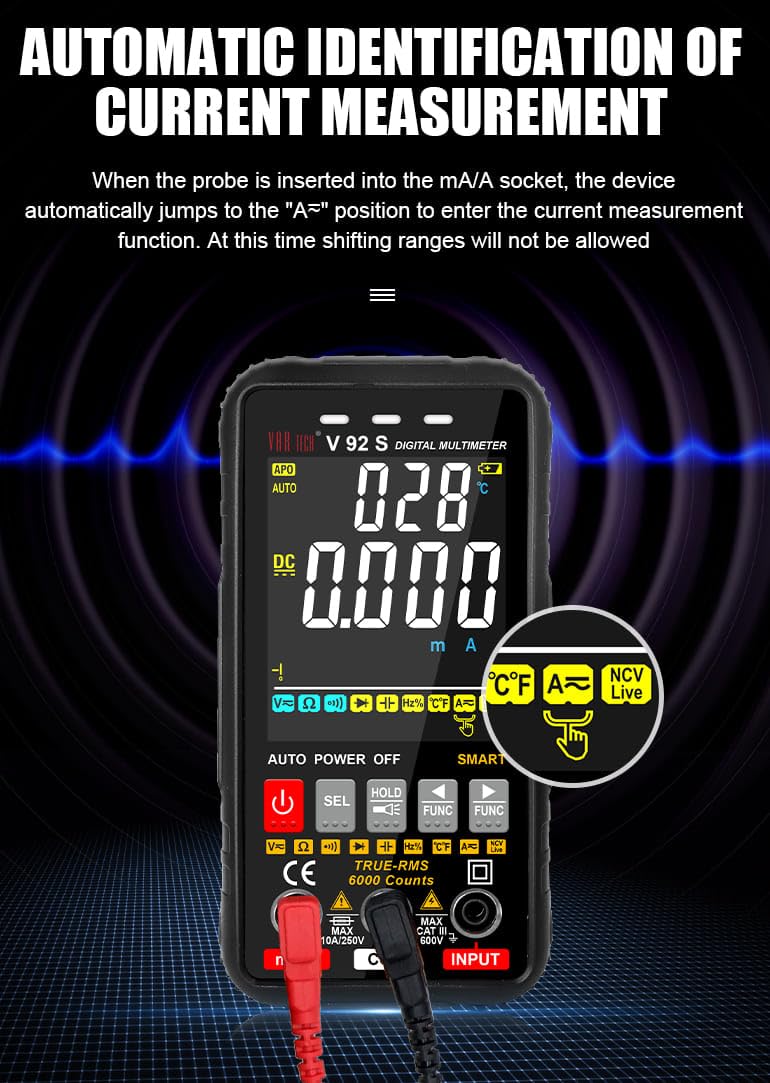
Figure 6.1: Automatic identification of current measurement. The multimeter automatically adjusts to the current measurement function when the probe is inserted into the mA/A socket.
6.3.3. Resistance, Capacitance, Frequency, Temperature, Diode, Continuity
For these measurements, ensure the red lead is in the “INPUT” jack and the black lead in the “COM” jack. Use the เอสอีแอล or ฟังค์ชั่น buttons to select the desired mode. Connect probes to the component or circuit as appropriate for each measurement type.
6.3.4. NCV (เครื่องวัดปริมาณสารแบบไม่สัมผัส)tagจ) ทดสอบ
ฟังก์ชัน NCV ช่วยให้สามารถตรวจจับแรงดันไฟฟ้ากระแสสลับได้tagโดยไม่สัมผัสกับตัวนำโดยตรง
- Select the NCV function using the appropriate button.
- Bring the top of the multimeter near the conductor or outlet.
- The instrument will emit an audible beep and the alarm indicator light will illuminate when AC signals are detected. A “-H” display indicates a strong signal, while “-L” indicates a weak signal.

Figure 6.2: Auditory and visual alarm during NCV (Non-Contact Voltage) testing, indicating the presence of AC voltage.
6.4. ฟังก์ชันการเก็บข้อมูล
กดปุ่ม ถือ ปุ่มนี้ใช้สำหรับหยุดการแสดงค่าปัจจุบันบนหน้าจอ กดอีกครั้งเพื่อยกเลิกการหยุดแสดงค่า
6.5. ฟังก์ชั่นไฟฉาย
The multimeter includes a built-in flashlight for illuminating work areas. Activate the flashlight using the designated button (often integrated with the HOLD button or a separate light icon). Press again to turn it off.

Figure 6.3: The integrated flashlight function, useful for working in dimly lit environments.
7. การบำรุงรักษา
7.1. การทำความสะอาด
เช็ดเคสด้วยโฆษณาamp cloth and mild detergent. Do not use abrasives or solvents. Ensure the multimeter is powered off and disconnected from all circuits before cleaning.
7.2. การเปลี่ยนแบตเตอรี่
เมื่อไฟแสดงสถานะแบตเตอรี่เหลือน้อยปรากฏขึ้นบนหน้าจอ ให้เปลี่ยนแบตเตอรี่ตามที่อธิบายไว้ในหัวข้อ 5.1
7.3. การเปลี่ยนฟิวส์
The V92S features an intelligent anti-burn function with a built-in safety fuse to protect the circuit. If the safety fuse burns out, the display screen will show a “FUSE” symbol to prompt replacement.
- ตรวจสอบให้แน่ใจว่ามัลติมิเตอร์ปิดอยู่และถอดสายวัดทั้งหมดออกแล้ว
- เปิดฝาปิดช่องใส่แบตเตอรี่ที่ด้านหลังของอุปกรณ์
- Carefully locate and remove the blown fuse.
- Replace it with a fuse of the same type and rating (refer to specifications for fuse type).
- ปิดฝาช่องใส่แบตเตอรี่ให้แน่น

Figure 7.1: The intelligent anti-burn function prompt, indicating the location of the fuse for replacement.
8 การแก้ไขปัญหา
If you encounter issues with your VAR TECH V92S, refer to the following common problems and solutions:
- ไม่มีจอแสดงผล: ตรวจสอบการติดตั้งแบตเตอรี่และให้แน่ใจว่าแบตเตอรี่ไม่หมด เปลี่ยนแบตเตอรี่หากจำเป็น
- การอ่านไม่ถูกต้อง: Verify test lead connections. Ensure the correct measurement function is selected. Check if the fuse is intact for current measurements.
- “OL” or Overload Indication: The measured value exceeds the range of the selected function. Select a higher range if available, or ensure the input is within the multimeter’s capabilities.
- “FUSE” Display: The fuse has blown. Refer to Section 7.3 for fuse replacement.
If the problem persists, contact VAR TECH customer support for assistance.
9. ข้อมูลจำเพาะทางเทคนิค
| พารามิเตอร์ | ข้อมูลจำเพาะ |
|---|---|
| แบบอย่าง | วี92เอส |
| แสดง | 6000 Counts HD Display |
| ค่า RMS ที่แท้จริง | ใช่ |
| DC ฉบับที่tage | สูงถึง 600 โวลต์ |
| ฉบับ ACtage | สูงถึง 600 โวลต์ |
| กระแสไฟฟ้าตรง | สูงถึง 10 แอมป์ |
| กระแสไฟ AC | สูงถึง 10 แอมป์ |
| ความต้านทาน | 600 โอห์ม ถึง 60 เมกะโอห์ม |
| ความจุ | 6 nF ถึง 60 mF |
| ความถี่ | 6 Hz ถึง 10 MHz |
| อุณหภูมิ | -40ºC ถึง 1000ºC |
| การทดสอบความต่อเนื่อง | ใช่ |
| การทดสอบ Diode | ใช่ |
| NCV (Non-Contact Vol .)tage) | ใช่ |
| แหล่งพลังงาน | แบตเตอรี่ AAA จำนวน 4 ก้อน (รวมอยู่ด้วย) |
| น้ำหนักสินค้า | 300 กรัม |
| ขนาดสินค้า (กว้าง x ยาว x สูง) | 14 x 7 x 5 ซม. |
| ระดับความปลอดภัย | กสท.600 XNUMXV |
| การรับรอง | ซีอี,ไอเอสโอ 9001 |

Figure 9.1: A comparison table illustrating the features of various VAR TECH multimeter models, including the V92S.
10. การรับประกันและการสนับสนุน
The VAR TECH V92S Smart Digital Multimeter comes with a 1-year warranty against manufacturing defects. For warranty claims or technical support, please contact VAR TECH directly.
Manufacturer: V A R TECH, www.var-tech.com