
1. บทนำ
This manual provides detailed instructions for the installation, operation, and maintenance of your COOLLEO BL360 Digital Display White ARGB 360mm All-in-One (AIO) CPU Liquid Cooler. Please read this manual thoroughly before installation to ensure proper setup and optimal performance.
2. สินค้าหมดview และส่วนประกอบ
The COOLLEO BL360 is a high-performance liquid CPU cooler designed for efficient heat dissipation. It features a digital display, ARGB lighting, and a robust pump and fan system.
2.1. อะไรอยู่ในกล่อง
- COOLLEO BL360 Digital Display White ARGB 360mm AIO CPU Cooler Kit
- Mounting plates and fasteners for AMD and Intel platforms
- วางความร้อน
- คู่มือการใช้งาน (เอกสารนี้)

3. คุณสมบัติหลัก
3.1. Digital Display and Temperature Monitoring
The integrated smart digital display provides real-time visualization of CPU temperature and usage data. This information can be displayed via software or set to alternate at fixed intervals. The system includes a temperature alarm design:
- Yellow Warning: Activates when CPU temperature reaches or exceeds 60°C.
- Red Warning: Activates when CPU temperature reaches or exceeds 80°C.

3.2. Advanced Pump Technology
The cooler features a three-phase, nine-stage motor pump designed for efficient and stable operation. This design contributes to lower noise, reduced vibration, and extended lifespan. The pump operates at 3000 RPM ± 10%.

3.3. High-Performance Fans
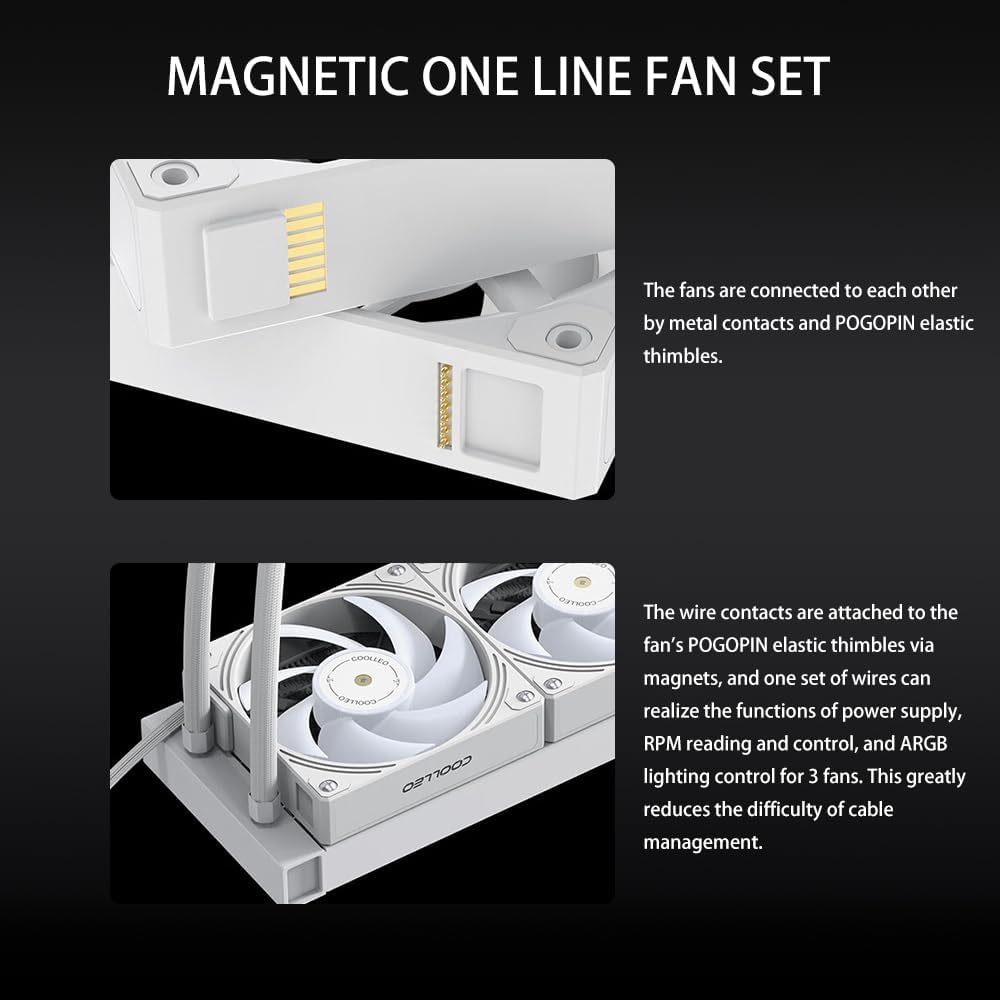
Equipped with three Hurricane T28 magnetic 28mm thick PWM fans, constructed from industrial-strength PA66 nylon and PC material. These fans feature double ball bearings for durability and are designed for high airflow (80 CFM ± 5%) and high air pressure (2.9 mm/H2O ± 5%). The fans connect via a magnetic one-line fan set, simplifying cable management.

3.4. การก่อสร้างที่ทนทาน
The pump head features an ARGB magic halo with a 2.5D hardened curved glass cover, enhancing both aesthetics and durability.

4. คู่มือการติดตั้ง
The COOLLEO BL360 AIO liquid CPU cooler is designed for convenient installation across multiple platforms. Refer to the included installation kits for specific fasteners and plates.
4.1. ความเข้ากันได้
This cooler supports the following CPU socket platforms:
- เอเอ็มดี: เอเอ็ม4,เอเอ็ม5
- อินเทล: LGA 115X, LGA 1200, LGA 1700
4.2. ก่อนการติดตั้ง
- ตรวจสอบให้แน่ใจว่าระบบของคุณปิดและถอดปลั๊กแล้ว
- Remove your existing CPU cooler. Clean any residual thermal paste from the CPU surface.
- Identify the correct mounting hardware for your CPU socket from the installation kit.
4.3. Mounting the Water Block
- Attach the appropriate backplate (if required for your socket) to the motherboard.
- Secure the standoffs onto the backplate or directly into the motherboard's CPU cooler mounting holes.
- ทาซิลิโคนระบายความร้อนปริมาณเล็กน้อยลงตรงกลางแผ่นกระจายความร้อนแบบรวม (IHS) ของซีพียู
- Carefully place the water block onto the CPU, aligning the mounting holes.
- Secure the water block with the provided screws, tightening them in a diagonal pattern until snug. Avoid over-tightening.
4.4 การติดตั้งหม้อน้ำและพัดลม
- Determine the optimal mounting location for the 360mm radiator within your PC case (e.g., top, front).
- Mount the radiator to your chosen location using the provided screws. Ensure proper airflow direction (intake or exhaust) for your system.
- Connect the fans to the radiator. The magnetic one-line fan set simplifies this process; connect the fans to each other, then connect the main fan cable to the motherboard's PWM fan header.
- Connect the pump's power cable to an appropriate header on your motherboard (e.g., AIO_PUMP or CPU_FAN).
- Connect the ARGB cable from the pump head and fans to a compatible 5V ARGB header on your motherboard.

4.5. การติดตั้งซอฟต์แวร์
To utilize the intelligent digital display and monitor CPU data, install the latest English version of the software. The software package can be downloaded from the following link: ดาวน์โหลดซอฟต์แวร์.
5. คู่มือการใช้งาน
5.1. Digital Display Operation
Once the cooler is installed and the software is running, the digital display on the pump head will show real-time CPU temperature and usage. You can configure the display settings within the software to show specific data or cycle through information at set intervals.
5.2. Temperature Alerts
The digital display provides visual temperature warnings:
- The display will show a yellow warning when the CPU temperature reaches or exceeds 60°C.
- The display will show a คำเตือนสีแดง when the CPU temperature reaches or exceeds 80°C.
These warnings are designed to help you monitor your CPU's thermal status and ensure stable operation.
6. การบำรุงรักษา
Regular maintenance helps ensure the longevity and optimal performance of your COOLLEO BL360 AIO CPU Cooler.
- การทำความสะอาดฝุ่น: ทำความสะอาดฝุ่นออกจากครีบหม้อน้ำและใบพัดลมเป็นระยะโดยใช้ลมอัด ตรวจสอบให้แน่ใจว่าพัดลมไม่หมุนระหว่างการทำความสะอาด
- การตรวจสอบพัดลม: ตรวจสอบใบพัดพัดลมว่ามีสิ่งกีดขวางหรือความเสียหายหรือไม่ และตรวจสอบให้แน่ใจว่าพัดลมติดตั้งแน่นหนาดีแล้ว
- การตรวจสอบท่อ: Inspect the water tubes for any kinks, leaks, or damage.
- น้ำยาระบายความร้อน: While not frequently required, if you ever remove the water block, reapply fresh thermal paste before reinstallation.
7 การแก้ไขปัญหา
If you encounter issues with your COOLLEO BL360 cooler, refer to the following common troubleshooting steps:
- ไม่มีไฟฟ้า/ไฟ: Ensure all power cables (pump, fans, ARGB) are securely connected to the motherboard and power supply. Check motherboard headers for proper configuration in BIOS/UEFI.
- อุณหภูมิ CPU สูง:
- Verify that the water block is properly seated on the CPU and tightened evenly.
- Confirm that thermal paste was applied correctly.
- Check fan orientation for proper airflow (e.g., pushing air through the radiator).
- Ensure pump is running (listen for a faint hum or check software monitoring).
- ทำความสะอาดฝุ่นละอองที่เกาะอยู่บนครีบหม้อน้ำ
- พัดลมไม่หมุน/ไฟ ARGB ไม่ทำงาน:
- Check fan and ARGB cable connections.
- Ensure the 5V ARGB header on your motherboard is enabled and configured correctly via motherboard software.
- Verify that the COOLLEO software is installed and running.
- จอแสดงผลดิจิตอลไม่ทำงาน: Ensure the cooler's software is installed and running. Check the display's connection to the motherboard.
8. ข้อมูลจำเพาะทางเทคนิค
| คุณสมบัติ | ข้อมูลจำเพาะ |
|---|---|
| แบบอย่าง | BL360 |
| สี | สีขาว |
| วิธีการทำความเย็น | ของเหลว (น้ำ) |
| ขนาดของหม้อน้ำ (ยาว x กว้าง x สูง) | 397มม. x 120มม. x 27มม. |
| ขนาดปั๊ม (ยาว x กว้าง x สูง) | 75มม. x 75มม. x 58มม. |
| ความยาวท่อน้ำ | 380มม. |
| วัสดุท่อน้ำ | EPDM + IIR |
| ขนาดพัดลม (ยาว x กว้าง x สูง) | 120มม. x 120มม. x 28มม. |
| ประเภทพัดลม | Hurricane T28Mag PWM Fan |
| ความเร็วพัดลม | 2050 รอบต่อนาที |
| พัดลมระบายอากาศ | 80 ซีเอฟเอ็ม ± 5% |
| แรงดันลมพัดลม | 2.9 mm/H2O ± 5% |
| ระดับเสียงพัดลม | ≤25.4 dBA ± 2dBA |
| ความเร็วของปั๊ม | 3000 รอบต่อนาที ± 10% |
| ระดับเสียงของปั๊ม | ≤28 dBA ± 2dBA |
| Pump Life Expectancy | 40,000 ชั่วโมง |
| อินพุต Voltage | 12โวลต์ |
| Input Current (Pump) | 0.28A ± 10% |
| Input Current (Fan) | 0.18A ± 10% |
| ประเภทตัวเชื่อมต่อกระแสไฟ | 4 พิน |
| อุปกรณ์ที่รองรับ | เดสก์ท็อป |
| ซ็อกเก็ตที่รองรับ | AMD AM4/AM5, Intel LGA 115X/1200/1700 |
| การสนับสนุน TDP | สูงสุดถึง 300W |

9. การรับประกันและการสนับสนุน
The COOLLEO BL360 Digital Display White ARGB 360mm AIO CPU Cooler comes with a reliable การรับประกันจากผู้ผลิต 5 ปี. For technical support, warranty claims, or further assistance, please refer to the contact information provided with your product packaging or visit the official COOLLEO webเว็บไซต์.


