
YX27
User Manual: Noise Cancellation Bluetooth 4.0 Wireless Earbuds
Model: YX27 | Brand: Generic
1. บทนำ
These Noise Cancellation Bluetooth 4.0 Wireless Earbuds provide a seamless audio experience with integrated noise cancellation and a built-in microphone for clear communication. Designed for comfort and portability, they feature a sleek gold finish and offer up to 6 hours of playtime on a single charge. The compact design makes them ideal for on-the-go use.
The charging case features an intuitive LCD touchable screen for easy control and monitoring of settings.

Figure 1.1: Gold Wireless Earbuds and Charging Case.
2. ข้อมูลด้านความปลอดภัย
- ห้ามให้หูฟังหรือกล่องชาร์จสัมผัสกับอุณหภูมิที่สูงหรือต่ำเกินไป แสงแดดโดยตรง หรือความชื้นสูง
- หลีกเลี่ยงการทำอุปกรณ์หล่นหรือกระแทกอย่างรุนแรง
- เก็บให้พ้นจากมือเด็กและสัตว์เลี้ยง
- อย่าพยายามถอดประกอบหรือดัดแปลงอุปกรณ์ การกระทำเช่นนี้จะทำให้การรับประกันเป็นโมฆะและอาจทำให้เกิดความเสียหายได้
- ใช้เฉพาะสายชาร์จที่ให้มาหรือที่เทียบเท่าที่ได้รับการรับรองเท่านั้น
- การฟังเสียงดังเป็นเวลานานอาจก่อให้เกิดความเสียหายต่อการได้ยิน ปรับระดับเสียงให้อยู่ในระดับที่ปลอดภัย
- Exercise caution when using earbuds in situations requiring awareness of surroundings, such as driving or walking in traffic.
3. อะไรอยู่ในกล่อง
กรุณาตรวจสอบเนื้อหาในแพ็คเกจของคุณ:
- หูฟังไร้สาย (ซ้ายและขวา)
- เคสชาร์จแบบไร้สาย
- สายชาร์จ USB (Type-C)
- คู่มือผู้ใช้ (เอกสารนี้)
- จุกหูฟังหลายขนาด
4. การตั้งค่า
4.1 การชาร์จหูฟังและเคส
Before first use, fully charge the earbuds and the charging case. Place the earbuds into the charging case. Connect the USB charging cable to the Type-C port on the back of the charging case and plug the other end into a USB power adapter (not included) or a computer's USB port. The LCD screen on the case will indicate the charging status and battery levels.
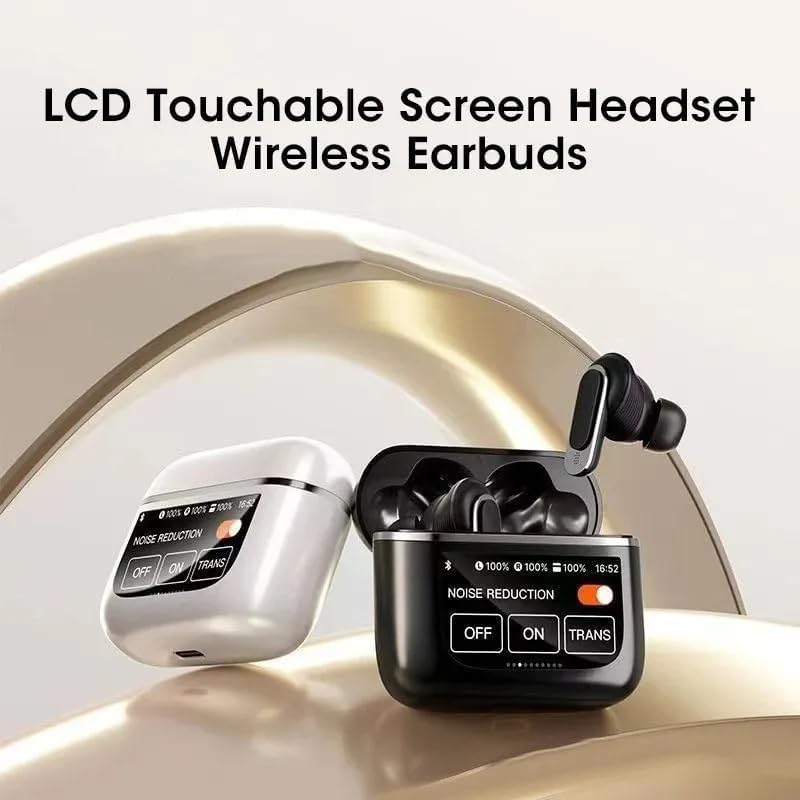
Figure 4.1: Earbud placement for charging within the case.
4.2 การจับคู่บลูทูธ
- Ensure the earbuds are charged. Open the charging case. The earbuds will automatically enter pairing mode, indicated by a flashing light on the earbuds (specific light pattern not provided, general instruction).
- เปิดใช้งาน Bluetooth บนอุปกรณ์ของคุณ (สมาร์ทโฟน แท็บเล็ต ฯลฯ)
- ค้นหา available Bluetooth devices. You should see "YX27 Pro Tour" or a similar name appear in the list.
- Select "YX27 Pro Tour" to connect. Once connected, the earbuds will indicate successful pairing (e.g., a voice prompt or solid light).
- เมื่อนำเอียร์บัดออกจากเคส เอียร์บัดจะเชื่อมต่อกับอุปกรณ์ที่จับคู่ไว้ครั้งล่าสุดโดยอัตโนมัติ หากเปิดใช้งาน Bluetooth บนอุปกรณ์
4.3 การสวมหูฟัง
Select the ear tips that provide the most comfortable and secure fit for optimal sound quality and noise cancellation. Gently insert each earbud into your ear canal and twist slightly to secure them in place. The ergonomic design ensures a comfortable fit for extended wear.
5. คู่มือการใช้งาน
5.1 เปิด/ปิดเครื่อง
- เปิดเครื่อง: เปิดกล่องชาร์จ หูฟังจะเปิดโดยอัตโนมัติ
- หมดแรง: ใส่หูฟังกลับเข้าไปในกล่องชาร์จและปิดฝา หูฟังจะปิดโดยอัตโนมัติและเริ่มชาร์จ
5.2 การควบคุมสื่อ
The earbuds feature touch controls for media playback. Specific touch gestures are typically managed via the LCD screen or predefined taps:
- เล่น/หยุดชั่วคราว: แตะที่หูฟังข้างใดข้างหนึ่งเพียงครั้งเดียว
- เพลงถัดไป: แตะสองครั้งที่หูฟังด้านขวา
- แทร็กก่อนหน้า: แตะสองครั้งที่หูฟังด้านซ้าย
- ปรับระดับเสียงขึ้น: แตะสามครั้งที่หูฟังด้านขวา
- ลดเสียงลง: แตะสามครั้งที่หูฟังด้านซ้าย
5.3 การจัดการการโทร
- รับ/วางสาย: แตะที่หูฟังข้างใดข้างหนึ่งเพียงครั้งเดียว
- ปฏิเสธสาย: กดเอียร์บัดข้างใดข้างหนึ่งค้างไว้ 2 วินาที
- เปิดใช้งาน Voice Assistant: กดหูฟังข้างใดข้างหนึ่งค้างไว้ 3 วินาที (เช่น ใช้กับ Siri หรือ Google Assistant)
5.4 Noise Control (ANC/Transparency) via LCD Screen
The charging case features an LCD touchable screen that allows you to manage noise control settings, battery levels, and potentially other functions. Based on the visual information, you can switch between different modes:

Figure 5.1: LCD Touchable Screen Interface for Noise Control.
- Noise Reduction ON: Activates Active Noise Cancellation (ANC) to minimize ambient sounds.
- Noise Reduction OFF: ปิดการใช้งานระบบตัดเสียงรบกวน
- TRANS (โหมดโปร่งใส): ช่วยให้คุณได้ยินเสียงรอบข้างขณะยังเพลิดเพลินกับเสียงได้ ซึ่งมีประโยชน์ต่อการรับรู้
Tap the corresponding option on the LCD screen to switch between these modes. The screen also displays the battery percentage for both the left and right earbuds, and the charging case.
6. การบำรุงรักษา
6.1 การทำความสะอาด
- เช็ดหูฟังและกล่องชาร์จเบาๆ ด้วยผ้าแห้งนุ่มที่ไม่เป็นขุย
- ห้ามใช้สารเคมีรุนแรง น้ำยาทำความสะอาด หรือสารซักฟอกชนิดเข้มข้น
- ถอดปลายหูออกและทำความสะอาดแยกต่างหากโดยใช้สบู่ชนิดอ่อนและน้ำหากจำเป็น และตรวจสอบให้แน่ใจว่าแห้งสนิทก่อนจะใส่กลับเข้าไป
- Keep charging contacts on both earbuds and case clean and free of debris.
6.2 พื้นที่จัดเก็บ
เมื่อไม่ใช้งาน ควรเก็บหูฟังไว้ในกล่องชาร์จเพื่อป้องกันและรักษาระดับประจุไฟ เก็บกล่องชาร์จไว้ในที่แห้งและเย็น หลีกเลี่ยงแสงแดดโดยตรงและอุณหภูมิที่สูงหรือต่ำเกินไป
7 การแก้ไขปัญหา
| ปัญหา | วิธีแก้ปัญหาที่เป็นไปได้ |
|---|---|
| หูฟังเอียร์บัดไม่จับคู่ |
|
| ไม่มีเสียงหรือเสียงเบา |
|
| หูฟังไม่ชาร์จ |
|
| Noise cancellation not working effectively. |
|
8. ข้อมูลจำเพาะ
| คุณสมบัติ | รายละเอียด |
|---|---|
| ชื่อรุ่น | YX27 Pro Tour |
| เทคโนโลยีการเชื่อมต่อ | ไร้สาย (บลูทูธ 4.0) |
| การควบคุมเสียงรบกวน | ระบบตัดเสียงรบกวนแบบแอคทีฟ |
| อายุการใช้งานแบตเตอรี่ (หูฟัง) | นานถึง 6 ชั่วโมง |
| ช่วงบลูทูธ | 10 เมตร (ประมาณ 33 ฟุต) |
| ช่วงความถี่ | 20 เฮิรตซ์ - 20,000 เฮิรตซ์ |
| วัสดุ | ซิลิโคน, พลาสติก |
| สี | ทอง |
| ระดับความต้านทานต่อน้ำ | กันน้ำ |
| ประเภทการควบคุม | การควบคุมสื่อ (สัมผัส) |
| ส่วนประกอบที่รวมอยู่ | เคสชาร์จแบบไร้สาย |
| น้ำหนักสินค้า | 4 ออนซ์ |
| ผู้ผลิต | YX27 |
หมายเหตุ: ข้อมูลจำเพาะอาจเปลี่ยนแปลงได้โดยไม่ต้องแจ้งให้ทราบล่วงหน้า
9. การรับประกันและการสนับสนุน
Specific warranty information and customer support contact details are not provided in the available product data. Please refer to the product packaging or the retailer's website for warranty terms and support options.
Ask a question about this manual
Ask about setup, troubleshooting, compatibility, parts, safety, or missing instructions. Manuals+ will review the question and use this page’s manual context to help answer it.