
1. บทนำ
ขอบคุณสำหรับการซื้อasing the DEERC 9003E 1:14 High-Speed RC Off-Road Truck. This manual provides essential information for the safe operation, maintenance, and troubleshooting of your new RC vehicle. Please read it thoroughly before use to ensure optimal performance and longevity of the product.
คุณสมบัติหลัก:
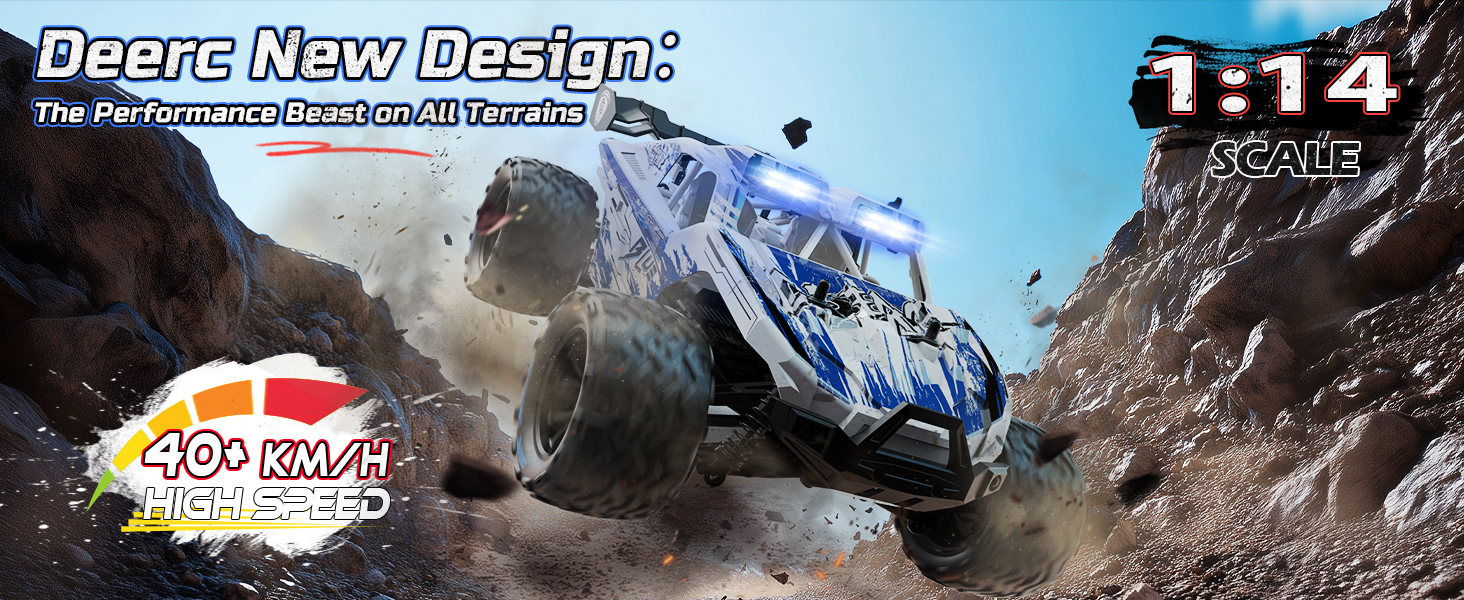
- ประสิทธิภาพที่ไม่มีใครเทียบได้: Constructed from premium alloy materials, the differential ensures exceptional strength and durability, allowing the RC car to reach speeds over 40 km/h. Designed to withstand extreme impacts, this high-performance component, coupled with a 30A ESC, ensures stable operation even during intense off-road adventures.
- กำลังไฟขยาย: Equipped with two rechargeable 2S 7.4V 1500mAh Li-ion batteries, this RC car is designed for prolonged play and peak performance. Enjoy up to 40 minutes of continuous action, with an integrated power indicator to keep you informed of battery levels.
- การควบคุมความแม่นยำ: The advanced three-channel 2.4 GHz remote control offers a range of up to 262 feet with zero signal interference. Enhanced fully proportional controls allow precise speed and steering adjustments for smooth acceleration and accurate maneuvers.
- สร้างมาเพื่อพิชิต: Featuring a robust metal transmission with upgraded components like enhanced dog bones, a metal differential, and reinforced gears, this RC car is built for extreme durability and lasting performance. Aggressive anti-slip rubber tires are ready for any challenge.
- All-Terrain Adaptability: Whether navigating muddy trails, sandy beaches, or rocky paths, the powerful grip and agile suspension system allow this RC car to conquer any surface with ease.
2. เนื้อหาบรรจุภัณฑ์
ตรวจสอบว่ารายการทั้งหมดที่ระบุไว้ด้านล่างนี้รวมอยู่ในแพ็คเกจของคุณ:
- DEERC 9003E RC Truck
- รีโมทคอนโทรล 2.4GHz
- แบตเตอรี่ลิเธียมไอออน 2 ก้อน ขนาด 7.4 โวลต์ 1500 mAh
- สายชาร์จ USB
- ไขควง
- คู่มือการใช้งาน
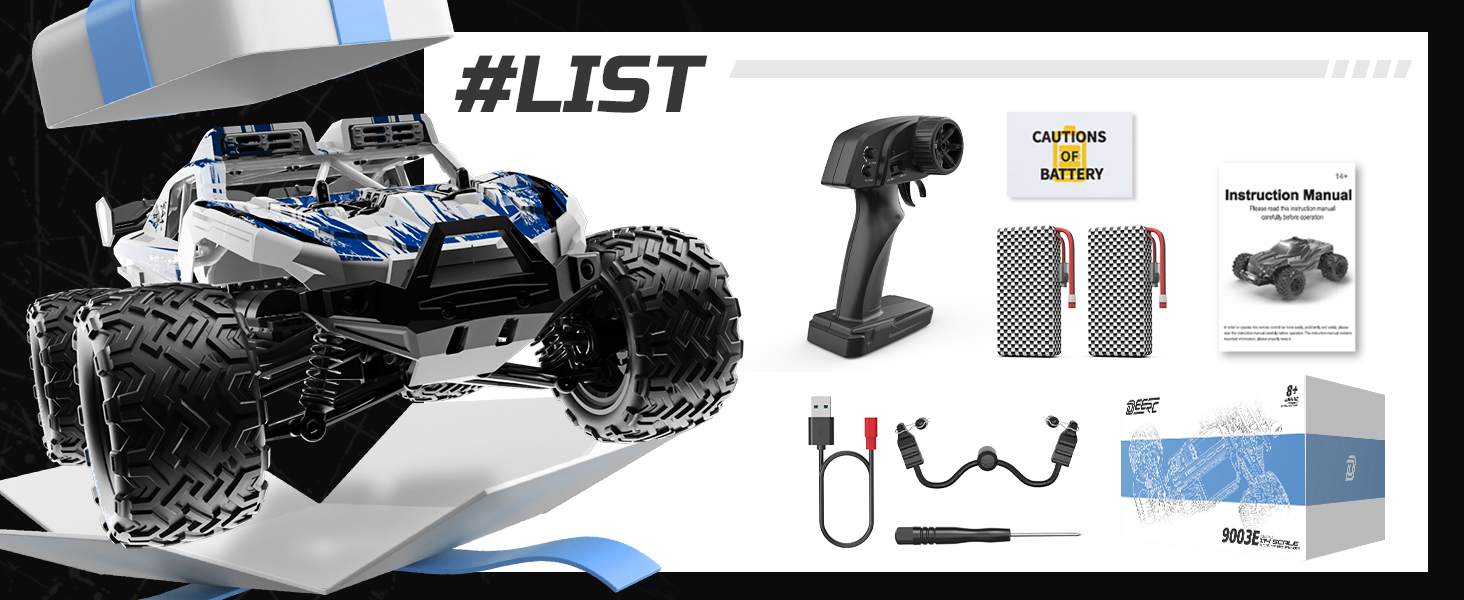
Image: The complete package contents of the DEERC 9003E RC Truck, showing the vehicle, remote control, two batteries, USB charging cable, and a screwdriver.
3. การตั้งค่า
3.1 Charging the Vehicle Batteries
- Connect the 7.4V 1500mAh Li-ion battery to the USB charging cable.
- Plug the USB charging cable into a USB power adapter (e.g., phone charger, computer USB port).
- The indicator light on the USB charger will show the charging status. Refer to the charger's specific instructions for light indications (usually red for charging, green for fully charged).
- Charging typically takes 3-4 hours. Do not overcharge the batteries.
Image: Two 2S 7.4V 1500mAh Li-ion batteries, which provide extended power for the RC truck.
3.2 Installing Vehicle Batteries
- Ensure the RC truck is powered off.
- ค้นหาช่องใส่แบตเตอรี่ที่บริเวณใต้ท้องรถ
- เปิดฝาช่องใส่แบตเตอรี่
- Insert the charged Li-ion battery into the compartment, ensuring correct polarity.
- เชื่อมต่อขั้วแบตเตอรี่เข้ากับพอร์ตจ่ายไฟของรถยนต์
- ปิดฝาช่องใส่แบตเตอรี่ให้แน่น
3.3 การติดตั้งแบตเตอรี่รีโมทคอนโทรล
- หาช่องใส่แบตเตอรี่ที่ด้านหลังของรีโมทคอนโทรล
- เปิดฝาช่องใส่แบตเตอรี่
- Insert 2 x AAA batteries (not included) into the compartment, observing the correct polarity (+/-).
- ปิดฝาช่องใส่แบตเตอรี่
3.4 การจับคู่รีโมทคอนโทรลกับรถยนต์
- Turn on the RC truck by sliding the power switch to the 'ON' position.
- Turn on the remote controller. The indicator light on the remote will flash.
- Wait for a few seconds. The indicator light on the remote will become solid, indicating successful pairing.
- If pairing fails, turn off both the vehicle and the remote, then repeat the steps.
Image: The 2.4GHz remote control, designed for stable connection and interference-free operation.
4. คู่มือการใช้งาน
4.1 การควบคุมขั้นพื้นฐาน
- คันเร่งทริกเกอร์: ดึงไกเพื่อเคลื่อนที่ไปข้างหน้า กดไกเพื่อเบรกหรือถอยหลัง
- พวงมาลัย: Turn the wheel left to steer the vehicle left. Turn the wheel right to steer the vehicle right.
- ตัดแต่งพวงมาลัย: Adjust the steering trim dial on the remote to ensure the vehicle drives straight when the steering wheel is centered.
- สวิตช์ความเร็ว: Use the speed switch (if available) to toggle between different speed modes (e.g., low, medium, high) for varied driving experiences.
4.2 เคล็ดลับการขับขี่
- ควรขับขี่ยานพาหนะในพื้นที่โล่งเสมอ ห่างจากผู้คน สัตว์เลี้ยง และสิ่งกีดขวาง
- Avoid driving in wet conditions or through deep puddles to prevent damage to electronic components.
- Practice gentle throttle and steering inputs to maintain control, especially at high speeds.
- The DEERC 9003E is designed for various terrains, including dirt, sand, and grass. Adjust your driving style to suit the surface.

Image: The DEERC 9003E RC Truck demonstrating its all-terrain capabilities on various surfaces.

Image: The RC truck performing in diverse environments, highlighting its robust design for adventure.
5. การบำรุงรักษา
5.1 การทำความสะอาด
- After each use, especially in dirty or dusty conditions, clean the vehicle with a soft brush or compressed air to remove debris.
- เช็ดตัวด้วยโฆษณาamp ผ้า. อย่าใช้สารเคมีหรือตัวทำละลายที่รุนแรง
- Regularly check for dirt or small stones lodged in the suspension, gears, or wheels.
5.2 การดูแลและจัดเก็บแบตเตอรี่
- Always disconnect batteries from the vehicle and remote when not in use.
- เก็บแบตเตอรี่ไว้ในที่แห้งและเย็น หลีกเลี่ยงแสงแดดโดยตรงและอุณหภูมิที่สูงหรือต่ำเกินไป
- For long-term storage, charge Li-ion batteries to approximately 50% capacity.
- อย่าปล่อยให้แบตเตอรี่ชาร์จอยู่โดยไม่มีใครดูแล
5.3 การตรวจสอบส่วนประกอบ
- Periodically inspect the driveshafts, differential, and gears for wear or damage.
- ตรวจสอบให้แน่ใจว่าสกรูและตัวยึดทั้งหมดขันแน่น
- Check the tires for cuts or excessive wear and replace if necessary.
- Lubricate moving parts (e.g., universal joints, bearings) with appropriate RC lubricant as needed.
ภาพ: ภายใน view of the RC truck's chassis, illustrating the durable metal drive system components.
6 การแก้ไขปัญหา
| ปัญหา | สาเหตุที่เป็นไปได้ | สารละลาย |
|---|---|---|
| รถไม่ตอบสนองต่อรีโมท | 1. Vehicle or remote is off. 2. แบตเตอรี่เหลือน้อยหรือหมด 3. จับคู่ไม่ถูกต้อง 4. Out of range. | 1. เปิดอุปกรณ์ทั้งสองเครื่อง 2. เปลี่ยน/ชาร์จแบตเตอรี่ 3. Re-pair the remote and vehicle. 4. Bring vehicle closer to remote. |
| Vehicle runs slowly or has weak power. | 1. Vehicle battery is low. 2. Motor or gears are obstructed. | 1. Recharge vehicle battery. 2. Check for debris and clean components. |
| รถเบี่ยงไปด้านใดด้านหนึ่ง | 1. Steering trim is off. 2. Steering mechanism is damaged. | 1. Adjust steering trim on the remote. 2. Inspect steering components for damage. |
| ระยะเวลาการทำงานสั้น | 1. แบตเตอรี่ชาร์จไม่เต็ม 2. Battery is old or damaged. | 1. ตรวจสอบให้แน่ใจว่าแบตเตอรี่ชาร์จเต็มแล้ว 2. เปลี่ยนแบตเตอรี่ใหม่ |
7. ข้อมูลจำเพาะ
| คุณสมบัติ | รายละเอียด |
|---|---|
| ยี่ห้อ | เดียร์ค |
| หมายเลขรุ่น | 9003อี |
| มาตราส่วน | 1:14 น. |
| ขนาดสินค้า (กว้าง x ยาว x สูง) | 33 x 24 x 14 ซม. (13 x 9.4 x 5.5 นิ้ว) |
| น้ำหนักสินค้า | 1.98 กิโลกรัม (4.37 ปอนด์) |
| วัสดุ | พลาสติก, โลหะ |
| สี | สีฟ้าและสีขาว |
| แหล่งพลังงาน | ใช้พลังงานจากแบตเตอรี่ |
| ประเภทแบตเตอรี่รถยนต์ | 2S 7.4V 1500mAh Lithium-ion Polymer (Included) |
| ประเภทแบตเตอรี่ระยะไกล | 2 x AAA (ไม่รวม) |
| ความเร็วสูงสุด | 40 กม/ชม. |
| ช่วงการควบคุม | สูงถึง 262 ฟุต (80 เมตร) |
| คุณสมบัติพิเศษ | Anti-slip tires, Remote Controlled, Metal Differential, Reinforced Gears, 30A ESC, 1.5KG Servo |
| อายุที่แนะนำโดยผู้ผลิต | 0 - 12 years (Note: Age range description is 'Youth') |
8. การรับประกันและการสนับสนุน
DEERC products are manufactured to high-quality standards. For warranty information, please refer to the documentation included with your purchase or contact DEERC customer support directly. Keep your proof of purchase for any warranty claims.
For technical assistance, spare parts, or further inquiries, please visit the official DEERC website or contact their customer service team. Contact details are typically found on the product packaging or the official brand webเว็บไซต์.