
1. บทนำและเรื่องอื่นๆview
The Maxpro Fagor Connect+ FG2804 is a versatile multifunction food processor designed to simplify your cooking experience. It features a 5-liter stainless steel bowl, an intuitive 10-inch LED touchscreen, and integrated Wi-Fi connectivity for guided recipes and automatic updates. With its powerful 1500W motor, it can perform various tasks including cooking, simmering, steaming, browning, mixing, kneading, and chopping.
คุณสมบัติที่สำคัญ ได้แก่:
- 5-liter stainless steel bowl with handle for easy handling.
- Integrated Wi-Fi for step-by-step guided recipes and automatic updates.
- Intuitive 10-inch (25.4cm) LED touchscreen display.
- Reverse function for delicate tasks like kneading dough for bread and pastries, or preparing risottos, soups, and stews.
- Integrated scale for precise ingredient measurements.
- Pre-loaded with 400 recipes, with monthly updates.
- "Do It Yourself" page for manual program settings and saving custom recipes.
- Google Assistant Voice Control activation.
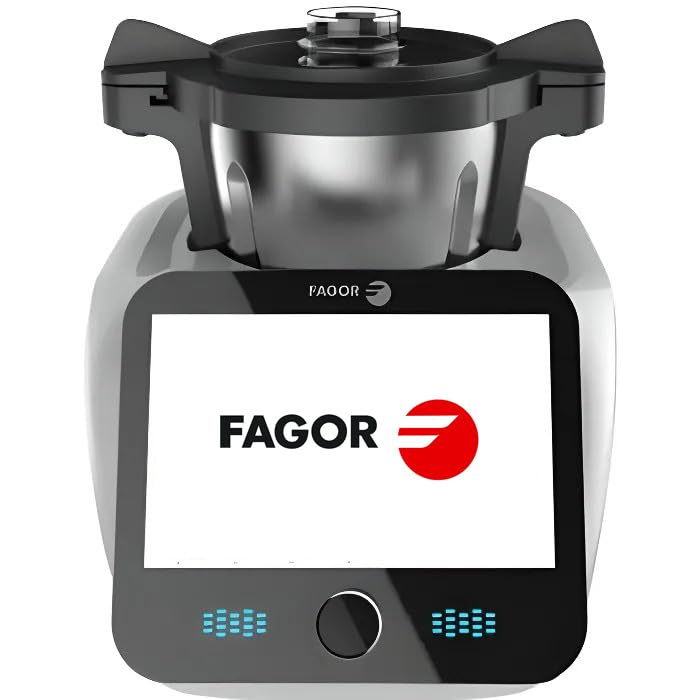
Image 1: The Maxpro Fagor Connect+ FG2804 food processor, showcasing its large touchscreen display with a recipe.
2. การตั้งค่า
Before first use, ensure all packaging materials are removed. Place the food processor on a stable, flat, and dry surface. Ensure adequate ventilation around the appliance.
- แกะส่วนประกอบ: Carefully remove the main unit, stainless steel bowl, lid, and all accessories from the packaging.
- ทำความสะอาดส่วนประกอบ: Wash the stainless steel bowl, lid, and all accessories (spatula, chopping blade, blade protection, measuring cap, steam bowl, butterfly whisk, steam basket) with warm soapy water. Rinse thoroughly and dry completely before assembly. The main unit should be wiped with a damp ผ้า.
- ประกอบชาม: Place the clean stainless steel bowl onto the main unit. Ensure it is securely seated.
- อุปกรณ์เสริมที่ใส่: Depending on your recipe, insert the appropriate accessory (e.g., chopping blade, butterfly whisk) into the bowl. The system allows for easy accessory changes without removing the bowl.
- ยึดฝาให้แน่น: Place the lid onto the bowl and turn it clockwise until it locks securely into place. The appliance will not operate if the lid is not properly secured.
- เชื่อมต่อกับพลังงาน: เสียบสายไฟเข้ากับเต้ารับไฟฟ้าที่เหมาะสม
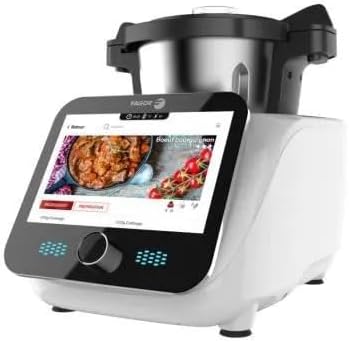
Image 2: The Fagor Connect+ food processor with its various accessories, including the stainless steel bowl, lid, and different blades/attachments.
3. คู่มือการใช้งาน
The Fagor Connect+ offers both automated guided recipes and manual control for maximum flexibility.
3.1. Using Guided Recipes (Wi-Fi Connected)
- เปิดเครื่อง: Turn on the appliance. The 10-inch LED touchscreen will display the main menu.
- เชื่อมต่อกับ Wi-Fi: Ensure your appliance is connected to your home Wi-Fi network to access the full recipe library and receive automatic updates. Follow the on-screen prompts for initial Wi-Fi setup.
- Browse Recipes: Use the touchscreen to browse recipes by theme (e.g., Cocktails, Baby Food, Italian, Exotic) or use the search bar to find recipes by ingredients.
- เลือกสูตรอาหาร: Tap on your desired recipe. The screen will display step-by-step instructions, including ingredient lists and preparation steps.
- ปฏิบัติตามคำแนะนำ: The appliance will guide you through each step, indicating when to add ingredients, which accessory to use, and automatically setting the correct time, temperature, and speed.
- คำแนะนำอัจฉริยะ: The new interface may offer intelligent suggestions for complementary recipes (e.g., an appetizer, sauce, or dessert) based on your preferences or previously prepared dishes.
- การควบคุมด้วยเสียง: Activate Google Assistant Voice Control in the settings to operate the appliance hands-free.
3.2. Manual Operation ("Do It Yourself" Page)
- Access Manual Mode: Navigate to the "Do It Yourself" page on the touchscreen.
- ตั้งค่าพารามิเตอร์: Manually adjust the speed (11 speeds available), temperature, and time according to your recipe.
- Use Integrated Scale: The integrated scale allows for precise weighing of ingredients directly in the bowl.
- เลือกฟังก์ชัน: Choose from various functions such as chopping, mixing, kneading (using the reverse function for delicate doughs), cooking, simmering, steaming, browning, liquefying, or emulsifying.
- Save Custom Recipes: You can save your customized manual settings as new recipes for future use.
4. การบำรุงรักษา
Proper maintenance ensures the longevity and optimal performance of your Fagor Connect+ food processor.
- การทำความสะอาดตัวเครื่องหลัก: Always unplug the appliance before cleaning. Wipe the main unit with a soft, damp ผ้า ห้ามจุ่มตัวเครื่องหลักลงในน้ำหรือของเหลวอื่นใด
- การทำความสะอาดชามและอุปกรณ์เสริม: The stainless steel bowl and most accessories (spatula, chopping blade, blade protection, measuring cap, steam bowl, butterfly whisk, steam basket) are dishwasher safe. For best results, rinse immediately after use to prevent food from drying on.
- การล้างมือ: If hand washing, use warm soapy water and a non-abrasive sponge. Rinse thoroughly and dry completely.
- พื้นที่จัดเก็บ: เก็บเครื่องใช้ไฟฟ้าและอุปกรณ์เสริมไว้ในที่สะอาดและแห้ง
Important: The main appliance unit is NOT dishwasher safe and should only be cleaned by hand wiping.
5 การแก้ไขปัญหา
If you encounter issues with your Fagor Connect+ food processor, refer to the following common troubleshooting steps:
- อุปกรณ์ไม่เปิด:
- ตรวจสอบให้แน่ใจว่าสายไฟเสียบเข้ากับเต้ารับไฟฟ้าที่ใช้งานได้แน่นดี
- Check if the lid is properly closed and locked. The appliance has a safety mechanism that prevents operation if the lid is not secured.
- มอเตอร์ไม่ทำงาน:
- Verify that the bowl and accessories are correctly assembled.
- Check for any error messages on the touchscreen display and consult the digital manual for specific codes.
- ปัญหาการเชื่อมต่อ Wi-Fi:
- ตรวจสอบให้แน่ใจว่าเราเตอร์ Wi-Fi ของคุณเปิดอยู่และทำงานได้อย่างถูกต้อง
- Check the Wi-Fi settings on the appliance's touchscreen and re-enter network credentials if necessary.
- Move the appliance closer to your Wi-Fi router if signal strength is weak.
- Inaccurate Scale Readings:
- Ensure the appliance is on a flat, stable surface and not vibrating during weighing.
- Remove any items from the main unit's base before using the scale.
- Tare the scale before adding ingredients.
หากปัญหายังคงอยู่หลังจากลองทำตามขั้นตอนเหล่านี้แล้ว โปรดติดต่อฝ่ายบริการลูกค้าเพื่อขอความช่วยเหลือเพิ่มเติม
6. ข้อมูลจำเพาะ
| คุณสมบัติ | รายละเอียด |
|---|---|
| ยี่ห้อ | Maxpro |
| ชื่อรุ่น | Fagor Connect+ |
| หมายเลขรุ่น | เอฟจี 2804 |
| พลัง | 1500 Watts (800W motor + 1000W heating) |
| ความจุชาม | 5 Litres (3.5L usable) |
| วัสดุ | Stainless Steel (bowl and blade) |
| จำนวนความเร็ว | 11 |
| คุณสมบัติพิเศษ | Adjustable Speed Control, Programmable, Integrated Scale, Wi-Fi Connectivity, 10-inch LED Touchscreen, Voice Control (Google Assistant) |
| ขนาด (กว้าง x ยาว x สูง) | 40 ซม. x 30 ซม. x 30 ซม. |
| น้ำหนัก | 10 กิโลกรัม |
| การใช้ที่แนะนำ | Grinding, Chopping, Liquefying, Emulsifying, Cooking, Simmering, Steaming, Browning, Mixing, Kneading |
| ส่วนประกอบที่รวมอยู่ | 5L Stainless Steel Bowl, Spatula, Chopping Blade, Blade Protection for Mixing, Lid with 90ml Measuring Cap, Steam Bowl, Butterfly Whisk, Steam Basket |
| คำแนะนำในการดูแล | Main unit: Hand wash only. Bowl and accessories: Dishwasher safe. |
7. การรับประกันและการสนับสนุน
Your Maxpro Fagor Connect+ FG2804 food processor comes with a standard manufacturer's warranty. Please refer to the warranty card included in your product packaging for specific terms and conditions, including warranty period and coverage details.
For technical support, service, or warranty claims, please contact Maxpro customer service. Contact information can typically be found on the product packaging, the official Maxpro webเว็บไซต์หรือบัตรรับประกัน
When contacting support, please have your model number (FG2804) and proof of purchase readily available.